Google-api-javascript-client: No response/callback when calling gapi.auth2.authorize
When my page first loads I call:
    gapi.load('client:auth2:picker:signin2', {
      callback: () => {
        gapi.client.init({
          apiKey: API_KEY,
        }).then(() => {
          console.log('GAPI Loaded')
          this._gapiLoadedResolve(true)
        })
      }
    })
Then I have the user login:
  renderSigninButton = (id) => {
    gapi.signin2.render(id, {
      'scope': SIGNIN_SCOPES,
      'width': 240,
      'height': 50,
      'longtitle': true,
      'theme': 'dark',
      client_id: CLIENT_ID,
      ux_mode: 'redirect',
      response_type: 'code token id_token',
      redirect_uri: 'http://localhost:3000/login-callback',
    })
  }
It successfully redirects to my specified redirect URI and then I try and authorize the user by calling:
    gapi.auth2.authorize({
      client_id: CLIENT_ID,
      scope: SIGNIN_SCOPES,
      response_type: 'code',
      prompt: 'none',
    }, (response) => {
      if (response.error) {
        // An error happened!
        return
      }
    }, (err) => {
      console.log(err)
    })
However, neither one of my callbacks passed to authorize is ever called and no errors are shown in the console. Shouldn't I be getting a response object with an error property?
 mgenti
All 23 comments
Have you whitelisted your origin (localhost:3000) with the given CLIENT_ID? Also, why not using the onsuccess callback of the signin2 library instead of calling gapi.auth2.authorize?
 TMSCH
on 20 Jan 2018
TMSCH
on 20 Jan 2018
Yes, the origin is whitelisted for that client ID and is working fine for the signin component.
My callback isn't being called for the onsuccess of the signin component either.
mgenti
on 20 Jan 2018
Could you do this:
gapi.auth2.authorize({
      client_id: CLIENT_ID,
      scope: SIGNIN_SCOPES,
      response_type: 'code',
      prompt: 'none',
}, (response) => {
      console.log(response);
}); // There is no "error" callback.
Removing the other function as you suggested when calling gapi.auth2.authorize did not appear to change anything. I'm still not getting a callback from gapi.auth2.authorize.
mgenti
on 22 Jan 2018
@mgenti and nothing logged in the console? Could you check the network logs for requests to https://accounts.google.com/o/oauth2/iframerpc and copy paste their responses here.
TMSCH
on 22 Jan 2018
Nothing is logged to the console and no network requests to the URI you mentioned are shown in the chrome network logs.
Since I never called gapi.auth2.init will the iframe be setup? It's my understanding you don't need to call init if you are calling authorize.
mgenti
on 23 Jan 2018
I am able to get the authorize callback to fire when 3rd party cookies are enabled. When they are disabled, which they are in my testing environment since they are disabled in most of my user base, the callback does NOT fire.
mgenti
on 23 Jan 2018
@mgenti with 3rd party cookies disabled, the library currently cannot work. We use cookies in the IFrame (gapi.auth2.authorize also uses an IFrame) to make sure that the user is still signed in to Google.
TMSCH
on 24 Jan 2018
It appears that the sigin component works using redirect when the 3rd cookies are disabled. Is there any other way to get the acess tokens needed to make API calls with the cookies disabled?
mgenti
on 24 Jan 2018
Unfortunately not with gapi.auth2 library. You'd have to implement server-side OAuth 2.0 in your use case.
TMSCH
on 24 Jan 2018
Duplicate of #260, closing this one. Working on the issue.
TMSCH
on 23 Feb 2018
@TMSCH I am having the same problem - with third-party cookies disabled gapi.auth2.authorize with prompt:'none' doesn't invoke the callback the first time it's called. Interestingly, if it's executed for the second time it throws {error: "Cookies are not enabled in current environment."} instead of invoking the callback.
The older gapi.auth.authorize has the same problem of not responding on the first execution with immediate:true. On the second execution it properly invokes the callback with the same error object instead of throwing which seems more consistent with the API documentation
callback - A function called with a gapi.auth2.AuthorizeResponse object after the request has been completed (either successfully or with a failure).
I understand that the API doesn't support having third-party cookies disabled (#260) but it should report the failure.
Here's a short replication page (requires setting a client id)
 vladimir-i
on 7 Mar 2018
vladimir-i
on 7 Mar 2018
@vladimir-i thanks for the report. This indeed seems inconsistent. We are working on fixing such issue.
TMSCH
on 7 Mar 2018
Just hit the same problem with gapi.auth2.authorize not calling back with an error. In my case, the source problem was different: I hadn't whitelisted my origin for the clientId I was using. It took us a while to realize this was failing since the callback wasn't invoked, and even once we'd found it to be failing I ultimately had to just guess the causative issue.
Unless it's already been fixed at HEAD, could this ticket be reopened to track the bug of not invoking the callback on errors? Seems to be a more general bug with the library (not specific to 3p storage #260).
 calbach
on 22 Mar 2018
calbach
on 22 Mar 2018
@calbach Reopening to track the issue with error not being surfaced.
TMSCH
on 28 Mar 2018
I am the same problem.The Callback not working.
I have a serious impact on my customers. Please deal with urgent measures.
 hima213
on 20 Apr 2018
hima213
on 20 Apr 2018
I have the same problem. (Win 10 & IE 11)
I use gapi.auth.authorize, but similar events occur even if I change to gapi.auth2.authorize.
I think that the setting of the Internet option also affects it because it will not occur when IE is initialized.
 nahtemf
on 20 Apr 2018
nahtemf
on 20 Apr 2018
Any updates on this? Facing the same issues
 christian-fei
on 2 May 2018
christian-fei
on 2 May 2018
Although it is an article in Japan, it solved by the following measures.
https://qiita.com/hida/items/5570e390781b6f118a4f
nahtemf
on 21 May 2018
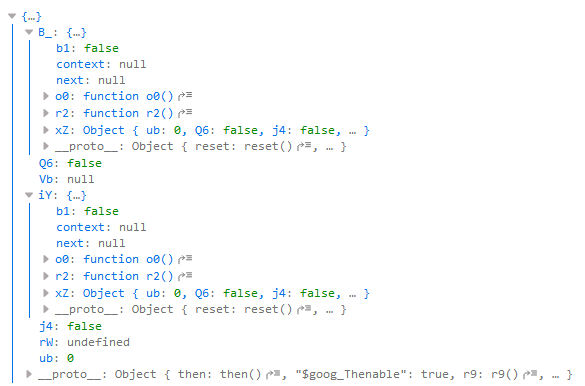
I see the same error in Firefox, Windows 10, with no callback called the first time. It works just fine with Edge on the same PC. Running it a second time, I get an authResult.error message of "localStorage is not available in the current environment." Logging the output of .authorize I see the following:
 kd7uiy
on 1 Jul 2018
kd7uiy
on 1 Jul 2018
Where is your onsuccess function?
function renderGoogleSignInButton() {
    gapi.signin2.render('gSignIn', {
    onsuccess: function(user) {
      googleUser = user
      console.log('Logged in as: ' + googleUser.getBasicProfile().getName())
    },
        onerror: function(err) {
            // console.log('Google signIn2.render button err: ' + err)
            setTimeout(function() {
                renderGoogleSignInButton()
            }, 1000)
        }
    })
}
 knoxcard
on 8 Sep 2018
knoxcard
on 8 Sep 2018
2019, the bug is happily popping.
 danmo
on 10 Feb 2019
danmo
on 10 Feb 2019
hah, mid 2020 and this is still an issue...
 ZoltanTompa-ResDiary
on 5 Aug 2020
ZoltanTompa-ResDiary
on 5 Aug 2020
Related issues
 wonderfly
·
8Comments
wonderfly
·
8Comments
 phyllisstein
·
3Comments
phyllisstein
·
3Comments
 wzup
·
4Comments
wonderfly
·
3Comments
wzup
·
4Comments
wonderfly
·
3Comments
 nmquaan-bigbom
·
7Comments
nmquaan-bigbom
·
7Comments
Most helpful comment
@calbach Reopening to track the issue with error not being surfaced.