Google-api-javascript-client: not work
"Not a valid origin for the client: http://xxxx.beget.tech has not been whitelisted for client ID 9999-qweerty.apps.googleusercontent.com. Please go to https://console.developers.google.com/ and whitelist this origin for your project's client ID."
how i can that?
 des1roer
All 14 comments
Please go to https://console.developers.google.com/apis/credentials, click on the 'edit' button of your Client ID, and add your site to the origin whitelist.
 bochunz
on 30 May 2017
bochunz
on 30 May 2017
If you are on staging delete the account key and recreated it again.
 josephluvanda
on 15 Jan 2018
josephluvanda
on 15 Jan 2018
I have created origins and call back right but still not working ??
 mateegojra
on 9 Feb 2018
mateegojra
on 9 Feb 2018
@mateegojra Please provide more information (snippet of code, origin tested, etc.)
 TMSCH
on 9 Feb 2018
TMSCH
on 9 Feb 2018
Facing the same problem.
I was testing it using this piece of code.
<html><head><title>Google APIs - Sample JS Page</title></head>
<body>

<script>

  /***** START BOILERPLATE CODE: Load client library, authorize user. *****/

  // Global variables for GoogleAuth object, auth status.
  var GoogleAuth;

  /**
   * Load the API's client and auth2 modules.
   * Call the initClient function after the modules load.
   */
  function handleClientLoad() {
    gapi.load('client:auth2', initClient);
  }

  function initClient() {
    // Initialize the gapi.client object, which app uses to make API requests.
    // Get API key and client ID from API Console.
    // 'scope' field specifies space-delimited list of access scopes

    gapi.client.init({
        'clientId': 'REPLACE_ME',
        'discoveryDocs': ['https://www.googleapis.com/discovery/v1/apis/youtube/v3/rest'],
        'scope': 'https://www.googleapis.com/auth/youtube.force-ssl https://www.googleapis.com/auth/youtubepartner'
    }).then(function () {
      GoogleAuth = gapi.auth2.getAuthInstance();

      // Listen for sign-in state changes.
      GoogleAuth.isSignedIn.listen(updateSigninStatus);

      // Handle initial sign-in state. (Determine if user is already signed in.)
      setSigninStatus();

      // Call handleAuthClick function when user clicks on "Authorize" button.
      $('#execute-request-button').click(function() {
        handleAuthClick(event);
      });
    });
  }

  function handleAuthClick(event) {
    // Sign user in after click on auth button.
    GoogleAuth.signIn();
  }

  function setSigninStatus() {
    var user = GoogleAuth.currentUser.get();
    isAuthorized = user.hasGrantedScopes('https://www.googleapis.com/auth/youtube.force-ssl https://www.googleapis.com/auth/youtubepartner');
    // Toggle button text and displayed statement based on current auth status.
    if (isAuthorized) {
      defineRequest();
    }
  }

  function updateSigninStatus(isSignedIn) {
    setSigninStatus();
  }

  function createResource(properties) {
    var resource = {};
    var normalizedProps = properties;
    for (var p in properties) {
      var value = properties[p];
      if (p && p.substr(-2, 2) == '[]') {
        var adjustedName = p.replace('[]', '');
        if (value) {
          normalizedProps[adjustedName] = value.split(',');
        }
        delete normalizedProps[p];
      }
    }
    for (var p in normalizedProps) {
      // Leave properties that don't have values out of inserted resource.
      if (normalizedProps.hasOwnProperty(p) && normalizedProps[p]) {
        var propArray = p.split('.');
        var ref = resource;
        for (var pa = 0; pa < propArray.length; pa++) {
          var key = propArray[pa];
          if (pa == propArray.length - 1) {
            ref[key] = normalizedProps[p];
          } else {
            ref = ref[key] = ref[key] || {};
          }
        }
      };
    }
    return resource;
  }

  function removeEmptyParams(params) {
    for (var p in params) {
      if (!params[p] || params[p] == 'undefined') {
        delete params[p];
      }
    }
    return params;
  }

  function executeRequest(request) {
    request.execute(function(response) {
      console.log(response);
    });
  }

  function buildApiRequest(requestMethod, path, params, properties) {
    params = removeEmptyParams(params);
    var request;
    if (properties) {
      var resource = createResource(properties);
      request = gapi.client.request({
          'body': resource,
          'method': requestMethod,
          'path': path,
          'params': params
      });
    } else {
      request = gapi.client.request({
          'method': requestMethod,
          'path': path,
          'params': params
      });
    }
    executeRequest(request);
  }

  /***** END BOILERPLATE CODE *****/


  function defineRequest() {
    // See full sample for buildApiRequest() code, which is not
// specific to a particular API or API method.

buildApiRequest('GET',
                '/youtube/v3/playlistItems',
                {'maxResults': '25',
                 'part': 'snippet,contentDetails',
                 'playlistId': 'PLBCF2DAC6FFB574DE'});

  }
</script>

<button id="execute-request-button">Authorize</button>

<script src="https://ajax.googleapis.com/ajax/libs/jquery/1.11.3/jquery.min.js"></script>
<script async defer src="https://apis.google.com/js/api.js"
        onload="this.onload=function(){};handleClientLoad()"
        onreadystatechange="if (this.readyState === 'complete') this.onload()">
</script>
</body></html>
 mittalyashu
on 17 Feb 2018
mittalyashu
on 17 Feb 2018
Thanks
On Sun, Feb 18, 2018 at 12:07 AM, Yashu Mittal notifications@github.com
wrote:
Facing the same problem.
I was testing it using this piece of code.
Google APIs - Sample JS Page
—
You are receiving this because you were mentioned.
Reply to this email directly, view it on GitHub
https://github.com/google/google-api-javascript-client/issues/301#issuecomment-366463980,
or mute the thread
https://github.com/notifications/unsubscribe-auth/Ab637dm08AIj2maqb5N4LPMdLsjBMrYCks5tVyNWgaJpZM4NoS7f
.
--
[image: --]
Matee Gojra
[image: https://]about.me/mateegojra
https://about.me/mateegojra?promo=email_sig&utm_source=email_sig&utm_medium=email_sig&utm_campaign=external_links
mateegojra
on 20 Feb 2018
@mittalyashu @mateegojra could you try again after clearing your cache?
TMSCH
on 21 Feb 2018
Did that, but still facing the same problem.
mittalyashu
on 21 Feb 2018
@mittalyashu did you check that the content of window.location.origin is in the authorized origins in the developers console, for the client ID used?
TMSCH
on 21 Feb 2018
Clearing the cache solved the issue. What did not solve it was pressing "Clear site data" in Chrome which I find confusing.
 sakalys
on 17 May 2018
sakalys
on 17 May 2018
Clearing the cache solved the issue. What did not solve it was pressing "Clear site data" in Chrome which I find confusing.
This actually solved the issue. Thanks sakalys
 sarangkartikey50
on 8 Nov 2018
sarangkartikey50
on 8 Nov 2018
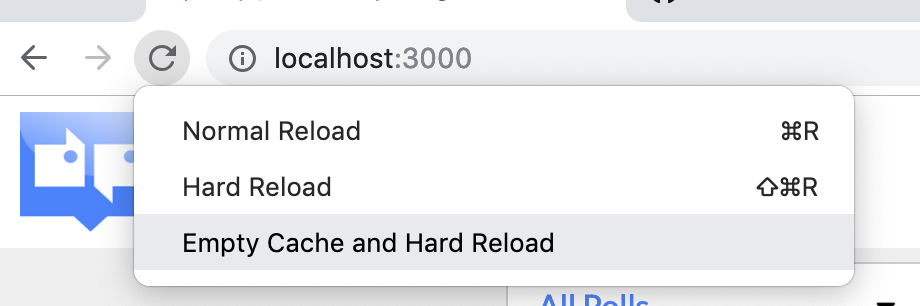
This solve it for me. Long press on reload button
 Kif11
on 1 Mar 2019
Kif11
on 1 Mar 2019
if you are testing locally, use http://localhost:8080 (or whatever port you are using) for both whitlisting at https://console.developers.google.com/apis/credentials and on your browser (not http://127.0.0.1:8080) .this worked for me
 orichcasperkevin
on 3 Apr 2020
orichcasperkevin
on 3 Apr 2020
i have the same problem. and when i open https://console.developers.google.com/apis/credentials, there is nothing in there ! what should i do ?
 lujiajian666
on 14 Jan 2021
lujiajian666
on 14 Jan 2021
Related issues
 lucasriondel
·
3Comments
lucasriondel
·
3Comments
 manian-kumaran
·
6Comments
manian-kumaran
·
6Comments
 mesqueeb
·
5Comments
mesqueeb
·
5Comments
 nmquaan-bigbom
·
7Comments
nmquaan-bigbom
·
7Comments
 Nilesh-P
·
4Comments
Nilesh-P
·
4Comments
Most helpful comment
This solve it for me. Long press on reload button