Google-api-dotnet-client: Installed application: Page not found after successful grant through LocalServerCodeReceiver
There is frequent error when authenticating user through GoogleWebAuthorizationBroker.AuthorizeAsync method. The authentication page is correctly displayed but after confirming application access the browser hangs on "Page Not Found" (localserver:portnumber). But, both tokens are successfully transmitted back to the application. This problem is more frequent when authenticating through proxy.
Hotfix: I did some research and replaced the code with my own copy of LocalServerCodeReceiver. The problem is that HttpListener closes before the response is delivered. I've made quick hotfix by placing Thread.Sleep(10) on the line 99 in the original file (after closing the response stream and before returning instance of AuthorizationCodeResponseUrl). There is probably more elegant way how to fix this but I have no more time to search for correct fix.
 JiriWalter
All 14 comments
Closing as stale, please reopen if still an issue.
 chrisdunelm
on 19 Apr 2017
chrisdunelm
on 19 Apr 2017
Re-opening, looks like this is still as issue: http://stackoverflow.com/questions/43357777/gmail-api-net-googlewebauthorizationbroker-authorizeasync-leaves-browser-waitin
chrisdunelm
on 24 Apr 2017
Closing, as I cannot reproduce this.
Please re-open if this still occurs. It would be very helpful if instructions for a reliable reproduction can be given.
chrisdunelm
on 17 Jul 2017
I can still reproduce this. The source code I'm using is shown here:
I just tested it again now, and it does provide the code okay, but the browser stays spinning, with the URL:
http://localhost:50331/authorize/?code=4/
I tested it using Chrome as my default browser (Version 59.0.3071.115 (Official Build) (64-bit)).
You can also test it with our product that is using this code. It is Remind-Me. If you install the trial and create a new event, and go to the "Email" tab, and press "Configure..." you can choose to use OAuth2.0 and then press "Get Authorization..." to reproduce the issue.
I don't know how to "re-open" this issue? Apparently, just replying doesn't automatically re-open it, and I don't see any link to re-open?
 mbeiley
on 17 Jul 2017
mbeiley
on 17 Jul 2017
Reopening.
What kind of application are you running (console? WinForms? WPF?)? If you could reproduce this in a minimal sample app, that would really help. Do you see any exceptions at all? I'd expect it to spin if it hasn't managed to create the local server properly, for example.
 jskeet
on 17 Jul 2017
jskeet
on 17 Jul 2017
@chrisdunelm @jskeet also reproducible for me.
I temporarily added small workaround with using custom LocalServerCodeReceiver.cs and calling StopListener manually. Task.Delay is required here:
private async void StopListener(HttpListener listener)
{
    await Task.Delay(2000);
    listener.Close();
}
If you could reproduce this in a minimal sample app, that would really help.
I can even reproduce it with this Google OAuthDesktopApp sample:
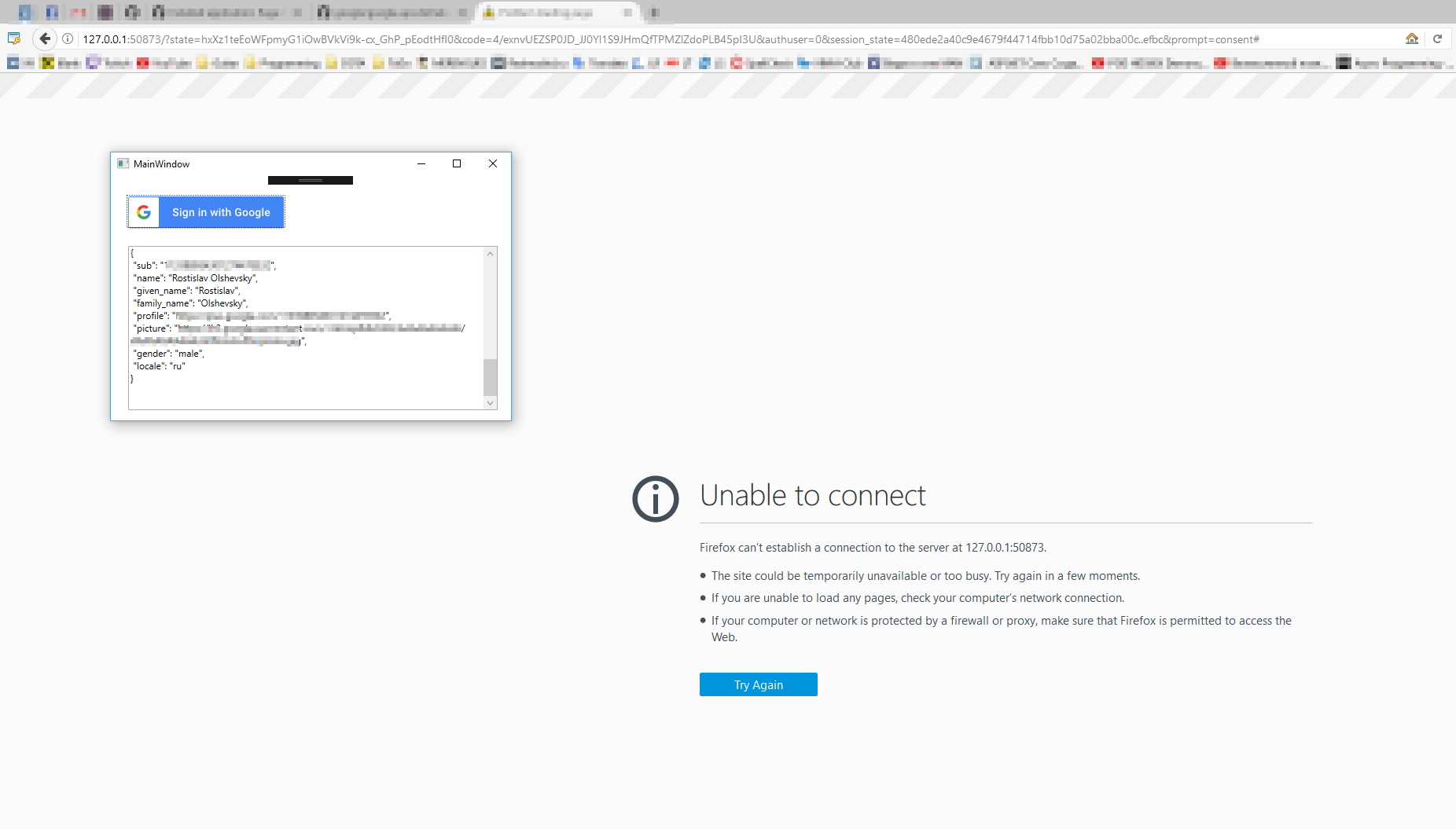
 rolshevsky
on 17 Jul 2017
rolshevsky
on 17 Jul 2017
@rolshevsky: It's not clear why you'd want to call StopListener manually. We'll try to reproduce with the sample though, thanks.
jskeet
on 17 Jul 2017
@jskeet : I can't reproduce it using that Google OAuthDesktopApp sample. The sample works for me. My app is a C++ native windows application. I will try to create a minimal sample app to reproduce it using the same code that is causing the problem. I will post it back here when done.
mbeiley
on 17 Jul 2017
@rolshevsky I cannot reproduce this with the OAuthDesktopApp sample. I suspect the problem is dependent on the machine it's running on.
From where do you call Stoplistener()?
Is your application using the full .NEt framework? Or NET Core?
@mbeiley If your app is a C++ native windows application, why are you using the .NET client library?
I suspect the problem is that the server socket is being shutdown before all/any bytes have been sent to the client. Hence a fixed delay can resolve the problem, so possibly a delay in ReceiveCodeAsync() here after the await, before the return may help.
However, the code is meant to be shutting down the client connection, and the HttpListener cleanly.
chrisdunelm
on 17 Jul 2017
@chrisdunelm : I am using the .NET client library to handle the OAuth communication because there is no C++ library that I'm aware of. I built a small EXE using the .NET and this client library. From within my C++ application I start another thread that calls CreateProcess() and runs the EXE. The main application monitors this process, and waits for it to return. I'm guessing this is somehow causing the problem?
mbeiley
on 17 Jul 2017
@chrisdunelm @jskeet I have created simple project for reproducing this issue with latest Google.Api.OAuth version and .NET 4.7.
Here is the video with usefull showcase how we can reproduce it: video.
As you can see it works for the first time, but if we going to re-login in short period of time - then we catch this error.
In Firefox it works fine only for the first time. In Chrome it's not working at all. And for IE and Egde it WORKS for all the time.
This issue reproducible not only on my home PC, also I can reproduce it on my work machine with .NET 4.5.
rolshevsky
on 17 Jul 2017
@rolshevsky Thank you for the repro. I'm now also seeing the problem.
On my machine:
- Chrome fails about 50% of the time, although the application receives the token OK.
- IE always fails, and the application receives an error.
- Edge always succeeds.
So I hope we'll be able to understand what's going on fairly soon.
chrisdunelm
on 17 Jul 2017
@chrisdunelm : I have attached a complete/minimal sample that reproduces the problem I'm seeing. You need to have a project with the Gmail API enabled, and put that info in Gmail.cs on lines 47 and 48. If you run this you will see it successfully gets the required authorization, but the browser just hangs.
GSMTP.zip
mbeiley
on 17 Jul 2017
@mbeiley Thank you also.
This is interesting. The application from @mbeiley always succeeds on my machine, for IE, Edge and Chrome.
The application from @rolshevsky still fails as described above.
Having both reliably failing and reliably succeeding test cases really should mean we can determine what's going on. I will continue looking tomorrow - it's getting rather late in the UK now ;)
chrisdunelm
on 18 Jul 2017
Related issues
 NKnusperer
·
6Comments
NKnusperer
·
6Comments
 LindaLawton
·
9Comments
LindaLawton
·
9Comments
 iwillspeak
·
7Comments
iwillspeak
·
7Comments
 AlKau
·
6Comments
AlKau
·
6Comments
 jamierytlewski
·
3Comments
jamierytlewski
·
3Comments