Google-api-dotnet-client: Getting 400 Bad Request with Analytics Batch Request
Hi. I'm having a problem with a Batch Request that I am doing. It was previously working fine a couple weeks ago, I left it for a week, came back to it and now it is giving 400 Bad Requests even when only one request is queued. It errors on await request.ExecuteAsync() with the message Response status code does not indicate success: 400 (Bad Request). For authorisation I am using a service account. Here is the code:
```C#
public async Task
{
List
List
        var request = new BatchRequest(_analyticsService);

        foreach (var tableId in tableIDs)
        {
            var req = _analyticsService.Data.Realtime.Get($"ga:{tableId}", "rt:activeUsers");
            req.Dimensions = dimensions;

            request.Queue<RealtimeData>(req, (content, errors, i, message) =>
                {
                    if (content != null) realTimeData.Add(content);
                    if (errors != null) requestErrors.Add(errors);
                });
        }

        await request.ExecuteAsync();

        return realTimeData;
    }
```
I know Google have been updating their Batch Request endpoints, deprecating the global endpoint. Having followed the .NET instructions on this link. I can confirm all my Google Client Libraries are up to date and from debugging the code the BatchURI and BatchURL have values https://www.googleapis.com/batch/analytics/v3.
I'm not really sure what I'm missing or what I may have done to break it. I've had some conversations with the Google Analytics API support team and with their help I was able to make curl requests to https://www.googleapis.com/batch/analytics/v3 fine. Also my code works fine when making single requests and not batching them.
Thanks for any help or guidance available!
 WarrenH97
All 13 comments
Assigning to Amanda as I know she's been looking into batch stuff recently (and also because I'm on vacation until Monday).
 jskeet
on 13 Aug 2020
jskeet
on 13 Aug 2020
I'll take a look first thing tomorrow.
 amanda-tarafa
on 13 Aug 2020
amanda-tarafa
on 13 Aug 2020
@WarrenH97 I'll ask you for a little bit more of info so I can try and reproduce, I haven't been able to so far.
- Can you share the code that initializes
_analyticsService? - On which line of code do you get the exception? Can you show the stack trace?
- Does the callback executes for any requests? Do you see success for some and not others? Could it be failing for some of the requests because say, some of the table IDs are invalid or similar?
- When you say your code works fine when not batching, do you mean you can call Realtime.Get in exactly this way (except for the batch) and it will work? With the same request parametes, service account, etc., for all the table IDs?
amanda-tarafa
on 14 Aug 2020
Thanks for picking this up @amanda-tarafa .
- Can you share the code that initializes
_analyticsService?
```C#
public GoogleAnalytics(string keyPath)
{
string path = HttpContext.Current.Server.MapPath(keyPath);
        _analyticsService = new AnalyticsService(new BaseClientService.Initializer()
        {
            HttpClientInitializer = GoogleServiceAccount.GetServiceAccount(path, _scopes),
            ApplicationName = "Pixel Screens"
        });
    }
And then the static method:
```C#
public static ServiceAccountCredential GetServiceAccount(string keyPath, string[] scopes)
        {
            using (var stream = new FileStream(keyPath, FileMode.Open, FileAccess.Read))
            {
                var credential = GoogleCredential.FromStream(stream)
                                .CreateScoped(scopes)
                                .UnderlyingCredential as ServiceAccountCredential;

                return credential;
            }
        }
    }
- On which line of code do you get the exception? Can you show the stack trace?
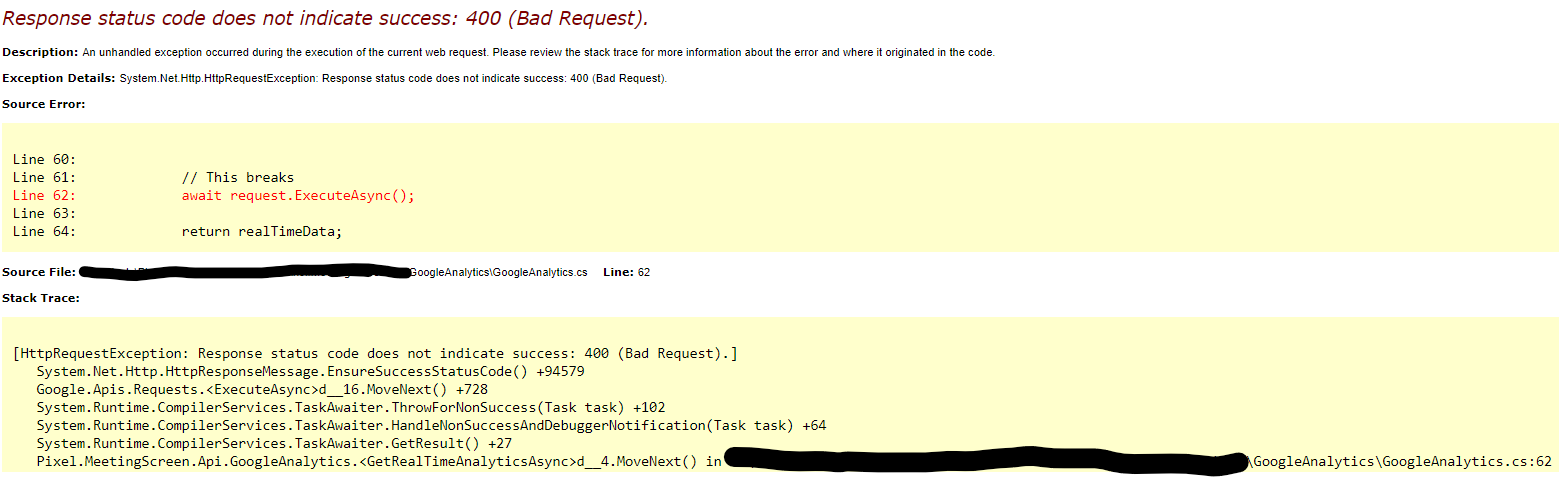
- Does the callback executes for any requests? Do you see success for some and not others? Could it be failing for some of the requests because say, some of the table IDs are invalid or similar?
No the callback is never triggered. I thought the 400 error would've been caught as a RequestError, but it isn't, making me believe that the URL is being generated incorrectly somehow. I initially thought it was a table ID issue, but as you'll see below I don't think it is.
- When you say your code works fine when not batching, do you mean you can call Realtime.Get in exactly this way (except for the batch) and it will work? With the same request parametes, service account, etc., for all the table IDs?
Yeah when I call Realtime.Get it works perfectly fine. See below the adapted code. I'm making the same request, one in a batch and one not and I get the exception shown in the screenshot above.
```C#
public async Task
{
var tempID = tableIDs.First();
        List<RealtimeData> realTimeData = new List<RealtimeData>();
        List<RequestError> requestErrors = new List<RequestError>();

        // This works fine
        var test = _analyticsService.Data.Realtime.Get($"ga:{tempID}", "rt:activeUsers");
        test.Dimensions = dimensions;

        RealtimeData data = test.Execute(); // ExecuteAsync() also works

        var request = new BatchRequest(_analyticsService);

        var req = _analyticsService.Data.Realtime.Get($"ga:{tempID}", "rt:activeUsers");
        req.Dimensions = dimensions;

        request.Queue<RealtimeData>(req, (content, errors, i, message) =>
        {
            if (content != null) realTimeData.Add(content);
            if (errors != null) requestErrors.Add(errors);
        });

        // This breaks
        await request.ExecuteAsync();

        return realTimeData;
    }
```
So yeah I'm a bit lost with this, confused as to how it just stopped working and how I'm not easily able to find out why. It's frustrating because I know it's just going to be something small that I've changed somewhere somehow. Does the service account need additional configuration for batch requests maybe?
Thanks
WarrenH97
on 14 Aug 2020
Thanks for the detailed info! I will try to reproduce again and report back as soon as I know more.
Does the service account need additional configuration for batch requests maybe?
Not really. It might have been a missing scope issue, but if it was that then the single request wouldn't work either and you would usually get an Unauthorized error not a Bad Request error. If the same service account works with a single request, then it shouldn't be a service account problem.
Also, and as a side, which is not related to this issue, but you probably don't need the GetServiceAccount static method. You can use the following which is similar to what you are doing:
HttpClientInitializer = GoogleCredential.FromFile(path).CreateScoped(scopes),
amanda-tarafa
on 14 Aug 2020
I have the same problem. Single request works fine but in a batch i get 400 Bad Request.
 erikosterholm83
on 14 Aug 2020
erikosterholm83
on 14 Aug 2020
@erikosterholm83 Is this with the Analytics API as well or with some other API. If your are seing the error with the Analytics API, what request is failing in batch for you, Realtime.Get or some other?
amanda-tarafa
on 14 Aug 2020
@erikosterholm83 Is this with the Analytics API as well or with some other API. If your are seing the error with the Analytics API, what request is failing in batch for you, Realtime.Get or some other?
Realtime batch with analytics v3.
erikosterholm83
on 14 Aug 2020
I've found the problem and it's an internal issue. There's no workarounf that I can offer you right now except that you can make the individual requests.
I'm chasing internally and I will report here as soon as I know more.
amanda-tarafa
on 14 Aug 2020
This has been fixed internally. The fix is being rolled out and should be live by mid next week. I'll update here to cofirm.
amanda-tarafa
on 20 Aug 2020
@WarrenH97 @erikosterholm83 The fix should now be live. My code that failed before is now working as expected. I'll leave this issue open for a couple of days until you can confirm.
amanda-tarafa
on 25 Aug 2020
@amanda-tarafa Yep appears to be working perfectly fine for me now. Thank you very much! Are you allowed to say what the issue was at all?
Also I know its outside the scope of the original issue, but on a side note now batching is working, do you have any guidance on how to manage the 10 queries per second quota as described here in the docs?
For example if I've got a list of 100 table ID's, how would I go about splitting it up into 10 BatchRequests of size 10 with a second between them? I don't think my initial attempt is the correct way of doing it and it doesn't work flawlessly, sometimes 20% or so of them will return 403's "Quota Error: User Rate Limit Exceeded".
```C#
List
List
List
var request = new BatchRequest(_analyticsService);
foreach (var tableId in tableIDs)
{
var req = _analyticsService.Data.Realtime.Get($"ga:{tableId}", "rt:activeUsers");
req.Dimensions = dimensions;
   request.Queue<RealtimeData>(req, (content, errors, i, message) =>
   {
         if (content != null) realTimeData.Add(content);
         if (errors != null) requestErrors.Add(errors);
   });

   // Analytics API only allows for 10 calls per second
   if (request.Count == MaxCallsPerSecond)
   {
          // Add 1 sec delay between each batch request
          tasks.Add(request.ExecuteAsync());
          //tasks.Add(Task.Delay(1100));
          await Task.Delay(1100);

          // New batch request for next 10
          request = new BatchRequest(_analyticsService);
    }
}
await Task.WhenAll(tasks);
```
Performance isn't much of a concern as they will be cached for a set period of time. Thanks!
WarrenH97
on 25 Aug 2020
Happy that is working for you as well!
Are you allowed to say what the issue was at all?
The problem was related to a change in service config that made Analytics batch requests requiere Content-ID to be set per each individual request. I din't mentioned it before, sorry for that, but if you would have examined the body of the 400 response, you would have found a JSON which ultimately contained an error message saying something like "Content-ID missing for each individual request". For the Analytics API, Content-ID is optional, the config has now been fixed to that purpose. Again, thanks for reporting!
Also I know its outside the scope of the original issue, but on a side note now batching is working, do you have any guidance on how to manage the 10 queries per second quota as described here in the docs?
(Do create a new issue next time :)). But, I think you'd want to wait 1 second after you have received the response from the previous batch, you are now waiting 1 second in between batch starts but that means that batches might be even executing at the same time. Something like this:
       // Analytics API only allows for 10 calls per second
       if (request.Count == MaxCallsPerSecond)
       {
             await request.ExecuteAsync();
              // Add 1 sec delay between each batch request
              await Task.Delay(1000);

              // New batch request for next 10
              request = new BatchRequest(_analyticsService);
        }
I would advise you though to also ask about this on the Analytics API support channels, we are not experts on each individual API, just the client libraries, and they might have better alternatives.
I'll close this issue now, since I believe we have addressed your problem, but don't hesitate to create new ones if you encounter something else.
amanda-tarafa
on 25 Aug 2020
Related issues
 ganySA
·
5Comments
ganySA
·
5Comments
 Misiu
·
7Comments
Misiu
·
7Comments
 bschaeublin
·
9Comments
bschaeublin
·
9Comments
 felinepc
·
4Comments
felinepc
·
4Comments
 forderud
·
6Comments
forderud
·
6Comments