Google-api-dotnet-client: How to exchange the authorization code for an access token - Sample
I want to exchange the authorization code for an access token on a server side.
The web client sends authorization code. Which classes do I have to use.
On this link: https://developers.google.com/identity/sign-in/web/server-side-flow#step_7_exchange_the_authorization_code_for_an_access_token there is only samples for Java and python.
 mspace
All 19 comments
Looking at the GoogleJsonWebSignatureTests.cs file, there was a test that receives the access_token an refresh_token from authorization code.
Is this the correct approach then:
using Google.Apis.Auth.OAuth2;
using Google.Apis.Services;
using System;
using System.Collections.Generic;
using System.Net.Http;
using Google.Apis.Auth;
using Google.Apis.Auth.OAuth2.Responses;
using Google.Apis.Drive.v3;
using System.Threading.Tasks;
using Google.Apis.Auth.OAuth2.Flows;
using System.Threading;
using Google.Apis.Util.Store;

class Program
{
  const string ClientId = "295603823949-ephfqt5xxxxxxxxgo7p.apps.googleusercontent.com";
  const string ClientSecret = "rbWjxxxxxxxxxxxxHARlu-c";

  static void Main(string[] args)
  {
    Test2().Wait();
    Console.ReadKey();
  }

static async Task Test2()
{
    // authorization code is sent by the client (web browser), just for testing purposes here
    string authorizationCode = "4/ugHVxHbdhSc428w1ndk1kHuYO-v250l0n1US3VAkSJ5biJNNm8O2NLPBPNIDMai_HE3Bxkxkn1Wf2IWJZpTFdmk";
    string userId = "userId";
    const string dataStoreFolder = "googleApiStorageFile";

    // create authorization code flow with clientSecrets
    GoogleAuthorizationCodeFlow authorizationCodeFlow = new GoogleAuthorizationCodeFlow(new GoogleAuthorizationCodeFlow.Initializer
    {
        DataStore = new FileDataStore(dataStoreFolder ),
        ClientSecrets = new ClientSecrets()
        {
            ClientId = ClientId,
            ClientSecret = ClientSecret
        }
    });

    FileDataStore fileStore = new FileDataStore(dataStoreFolder );
    TokenResponse tokenResponse = await fileStore .GetAsync<TokenResponse>(userId);

    if (tokenResponse == null)
    {
        // token data does not exist for this user
        tokenResponse = await authorizationCodeFlow.ExchangeCodeForTokenAsync(
          userId, // user for tracking the userId on our backend system
          authorizationCode,
          "http://localhost:4200", // redirect_uri can not be empty. Must be one of the redirects url listed in your project in the api console
          CancellationToken.None);
    }

    UserCredential userCredential = new UserCredential(authorizationCodeFlow, userId, tokenResponse);
    DriveService driveService = new DriveService(new BaseClientService.Initializer()
    {
        HttpClientInitializer = userCredential
    });

    // Define parameters of request.
    FilesResource.ListRequest listRequest = driveService.Files.List();
    IList<Google.Apis.Drive.v3.Data.File> files = listRequest.Execute().Files;

    // If access token expires, the UserCredential automatically makes request with refresh_token
    // and gets new access_token
    //bool complete = await userCredential.RefreshTokenAsync(CancellationToken.None);
}
I didn't run Wireshark to see what requests are made, but I assume that under the hood requests as described in the https://developers.google.com/identity/protocols/OAuth2WebServer#exchange-authorization-code are made.
The code works, but I'm looking for best approach here. Have I missed something?

mspace
on 18 Dec 2019
Assigning to Amanda to consider as part of her current auth and sample work.
 jskeet
on 16 Mar 2020
jskeet
on 16 Mar 2020
MVC this is the only web application sample we have. I am currently working on a sample for asp .net core
I am curious as to why you want to handle this yourself when the library does it all for you.
 LindaLawton
on 15 May 2020
LindaLawton
on 15 May 2020
Hi @LindaLawton, what is the library that you referenced above? I need to do the same as @mspace in order to exchange an authorisation code (received from the client app) with the credential object using the server so that I can make requests from the .Net server (as described here).
After playing with the GoogleAuthorizationCodeFlow which is mentioned in the MVC sample you linked above, it seems that after created a new GoogleAuthorizationCodeFlow, you can call the ExchangeCodeForTokenAsync method to retrieve an access token.
 SirElTomato
on 24 Jun 2020
SirElTomato
on 24 Jun 2020
@SirElTomato Im not 100% sure i understand what you are doing. If you have a client application and you want to use the code service side remember that the client id used to create the tokens are not interchangeable. The client credentials for a client side application are not the same as the client credentials for a server sided application nor is the code the same.
If you have a web application Javascript and you authenticate a user with that. You can not then pass the authorization token to a back end server application and have that refresh it with its client id.
If you have a refresh token then you could create your own implementation of idatastore to access the refresh token and generate a new access token for use server sided.
LindaLawton
on 21 Jul 2020
>
MVC this is the only web application sample we have. I am currently working on a sample for asp .net core
I am curious as to why you want to handle this yourself when the library does it all for you.
@LindaLawton, was a asp.net core sample developed?
I have a .net core 3.1 API endpoint (GET: SyncMyCalendar) calling AuthorizeAsync:
- the consent window opens
- I give consent
- it makes the callback to another API endpoint, which exchanges the authorization code for an access token (using ExchangeCodeForTokenAsync), makes a call to the Calendar API and returns a redirect to the user's calendar in the web app.
That all works, but the original call to SyncMyCalendar never resolves, although the consent form is completed and the redirects work, AuthorizeAsync never returns / resolves. What am I missing?
 pllamena
on 31 Jul 2020
pllamena
on 31 Jul 2020
@mspace , @SirElTomato , @pllamena You can use our integration tests projects as samples for usage of Google.Apis.Auth.AspNetCore* packages which, as far as I can see from all your comments, will simplify your code a lot as in these packages already do most of you want to do. You might want to take a look a #1584 to get more information around these applications.
Those are two very similar apps (one for ASP.NET Core 2 and another for ASP.NET Core 3) that perform end to end authorization using a Google specific implementation of OpenIdConnect.
If those projects don't work for you as samples, then it'll be great if you could share more information around:
- What you want to achieve?
- Why the Google.Apis.Auth.AspNetCore* packages don't help with that.
- Or if they would help but are failing, a minimum application that can reproduce the failure you are seeing would be great. Else, as much information as you can about the failure/incorrect behaviour, like stack traces, environments you are running in, etc.
Also, unless each of you have the exact same need/problem, it would be greatly apprecieated if you created separate issues each, which are always easier to follow for everyone.
 amanda-tarafa
on 31 Jul 2020
amanda-tarafa
on 31 Jul 2020
@mspace , @SirElTomato , @pllamena You can use our integration tests projects as samples for usage of Google.Apis.Auth.AspNetCore* packages which, as far as I can see from all your comments, will simplify your code a lot as in these packages already do most of you want to do. You might want to take a look a #1584 to get more information around these applications.
* [Google.Apis.Auth.AspNetCore.IntegrationTests](https://github.com/googleapis/google-api-dotnet-client/tree/master/Src/Support/Google.Apis.Auth.AspNetCore.IntegrationTests)

* [Google.Apis.Auth.AspNetCore3.IntegrationTests](https://github.com/googleapis/google-api-dotnet-client/tree/master/Src/Support/Google.Apis.Auth.AspNetCore3.IntegrationTests)
Those are two very similar apps (one for ASP.NET Core 2 and another for ASP.NET Core 3) that perform end to end authorization using a Google specific implementation of OpenIdConnect.
If those projects don't work for you as samples, then it'll be great if you could share more information around:
* What you want to achieve?

* Why the Google.Apis.Auth.AspNetCore* packages don't help with that.

* Or if they would help but are failing, a minimum application that can reproduce the failure you are seeing would be great. Else, as much information as you can about the failure/incorrect behaviour, like stack traces, environments you are running in, etc.
Also, unless each of you have the exact same need/problem, it would be greatly apprecieated if you created separate issues each, which are always easier to follow for everyone.
@amanda-tarafa , thank you for the response, the integration tests are helpful, although I am running into https://github.com/googleapis/google-api-dotnet-client/issues/1584 now, which I see you are working on.
Thank you, again!
pllamena
on 31 Jul 2020
@SirElTomato Im not 100% sure i understand what you are doing. If you have a client application and you want to use the code service side remember that the client id used to create the tokens are not interchangeable. The client credentials for a client side application are not the same as the client credentials for a server sided application nor is the code the same.
If you have a web application Javascript and you authenticate a user with that. You can not then pass the authorization token to a back end server application and have that refresh it with its client id.
If you have a refresh token then you could create your own implementation of idatastore to access the refresh token and generate a new access token for use server sided.
@LindaLawton Can I just clarify, that if we have multiple OAuth 2.0 Client IDs within one project, they can share access_tokens between them, but a refresh token gathered from one can not be used by another?
I was under the impression this was a use case as per https://developers.google.com/identity/protocols/oauth2/cross-client-identity, our use case is that a user authorises access through a web front end, and we store in DB using IDataStore, we than have backend services (with their own client ID's/secrets within the same GCP project) that utilise them to do certain things for our users, such as syncing files etc. The access token that we save from the web frontend works across clients, but the refresh token returns a 401 Unauthorized Client error. If this is the intended behaviour, what's the suggested solution for non-interactive services to be able to use long-lived refresh tokens?
 HaydnDias
on 5 Aug 2020
HaydnDias
on 5 Aug 2020
@HaydnDias, yes, your use case is supported. I have a suspiscion of what might be happening though. When we refresh the token from within the auth library we use the Client ID of the current application, and I suspect you need to use the Client ID with which the refresh token was emmitted. If we can confirm that, we can move from there.
I will write an application later in the day or tomorrow to try and confirm it, basically, I'll obtain the access token via the auth libraries, but then I'll try to refresh by making a direct HTTP call as described here to be able to set one Client ID/secret or the other and see what happens. If you could do that on your end as well and describe the results, that'd be great.
amanda-tarafa
on 6 Aug 2020
@HaydnDias, yes, your use case is supported. I have a suspiscion of what might be happening though. When we refresh the token from within the auth library we use the Client ID of the current application, and I suspect you need to use the Client ID with which the refresh token was emmitted. If we can confirm that, we can move from there.
I will write an application later in the day or tomorrow to try and confirm it, basically, I'll obtain the access token via the auth libraries, but then I'll try to refresh by making a direct HTTP call as described here to be able to set one Client ID/secret or the other and see what happens. If you could do that on your end as well and describe the results, that'd be great.
Hi @amanda-tarafa , thanks for getting back to me!
So we have the user-side front end with Client ID/Secret A for example, they authorize through that and I store in database using IDataStore.
The backend server with Client ID/Secret B then wants to refresh the token, the auth library can't do this, but it can use an access_token. So to solve this issue I have to do a manual call to refresh the token and then store that myself so the backend server can use it?
Is there any issues with both services using the same Client ID/Secret? (As we're going to have to use Client ID/Secret A manually in the backend service regardless).
Thank you!
HaydnDias
on 6 Aug 2020
The backend server with Client ID/Secret B then wants to refresh the token, the auth library can't do this, but it can use an access_token. So to solve this issue I have to do a manual call to refresh the token and then store that myself so the backend server can use it?
I really hope that we can find a better solution, i.e. that this works out of the box and you don't have to do anything manual. But for the time being I just want to confirm my suspicions so we can go from there. I will write some code later to test that, but it'd be great if you could test it on your end to confirm that this is the issue you are facing. Can you, for instance, grab one of the refresh_tokens generated from the Front End (Client ID A) and attempt a manual refresh first setting Client ID B (shouldn't work, hasb't been working for you) and then setting Client ID A (if my suspiccion is correct, will work).
Is there any issues with both services using the same Client ID/Secret? (As we're going to have to use Client ID/Secret A manually in the backend service regardless).
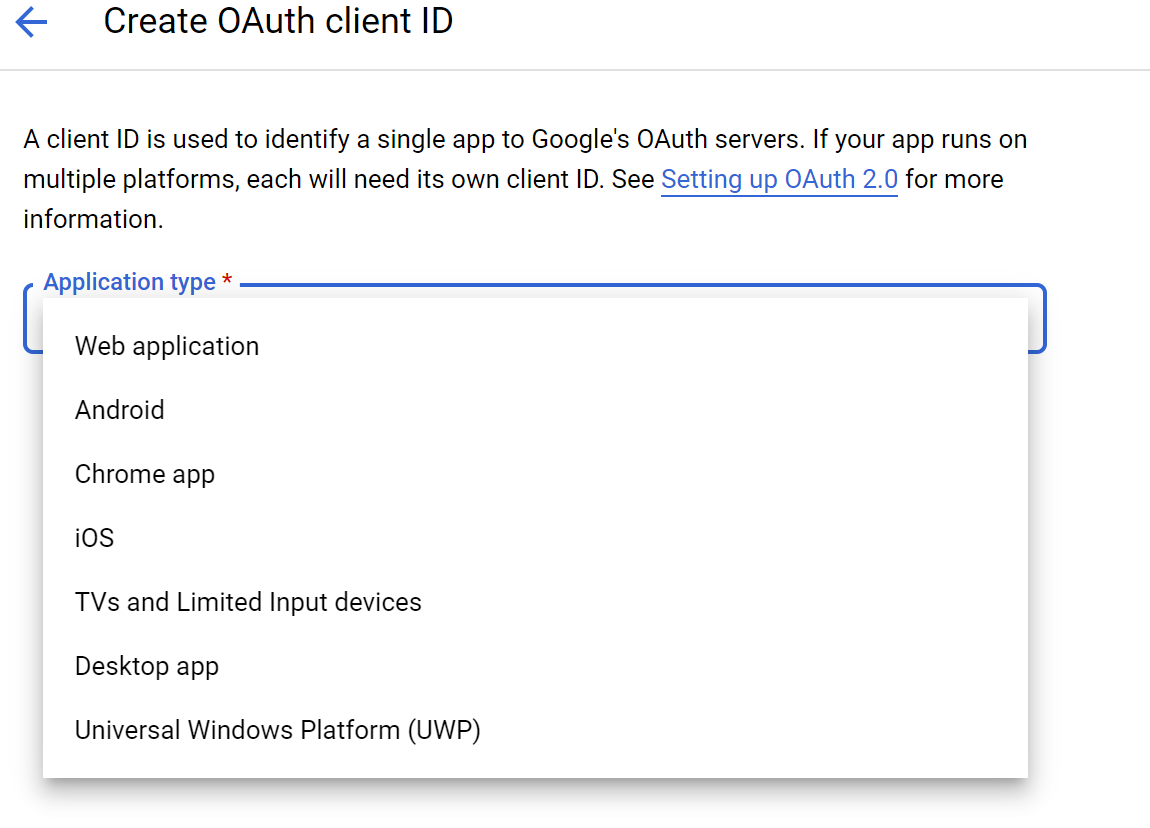
If all your applications are the same type (which doesn't seem to be your case), you can use the same Client ID. But Client IDs have types (see the image attached) and you can't use a web Client ID from an installed application etc. (If my tests fail later, this might also be why, but lets take it one step at a time).
amanda-tarafa
on 6 Aug 2020
@LindaLawton Can I just clarify, that if we have multiple OAuth 2.0 Client IDs within one project, they can share access_tokens between them, but a refresh token gathered from one can not be used by another?
A refresh token is linked to its client id, You must use the client id that created the refresh token in order to request a new access token.
Yes you can have more then once set of credentials with in a project but the tokens created by each credential can only be used by the credentials that created it.
There is one exception that being android / ios apps. There is some magic inside the library or on the auth server itself which does allow for the use of refresh tokens created by other types of credential types within the app. I have seen it but dont know much more about it then that.
LindaLawton
on 6 Aug 2020
@LindaLawton Thank you for clarifying that part, it's as I suspected.
I really hope that we can find a better solution, i.e. that this works out of the box and you don't have to do anything manual. But for the time being I just want to confirm my suspicions so we can go from there. I will write some code later to test that, but it'd be great if you could test it on your end to confirm that this is the issue you are facing. Can you, for instance, grab one of the refresh_tokens generated from the Front End (Client ID A) and attempt a manual refresh first setting Client ID B (shouldn't work, hasb't been working for you) and then setting Client ID A (if my suspiccion is correct, will work).
If all your applications are the same type (which doesn't seem to be your case), you can use the same Client ID. But Client IDs have types (see the image attached) and you can't use a web Client ID from an installed application etc. (If my tests fail later, this might also be why, but lets take it one step at a time).
@amanda-tarafa I was able to swap out the Client ID/Secret B for the A one in the backend project and it did work, the backend services are a mixture of cli apps, hosted services and a web api, all .net core. I did a custom authorization flow which I'll embed below. This code works with credentials of the type "Web Application", even when the application is actually just a console app, so if you don't see any issues with this, we can use this to get around the issue as we can just use the same Client ID/Secret. Sorry for delay in getting back to you, had a power cut and needed to remove proprietary code from examples, thank you for your help.
using System.Threading.Tasks;
using Google.Apis.Auth.OAuth2;
using Google.Apis.Auth.OAuth2.Flows;
using Google.Apis.Auth.OAuth2.Responses;
using Google.Apis.Drive.v3;
using IPM.Application.Common.Interfaces;
using IPM.Domain.ConfigurationModels;
using Microsoft.Extensions.Options;

namespace IPM.Infrastructure.Services.IntegrationProviderHelpers.Google
{
    public class GoogleAuthHelpers : IGoogleAuthHelpers
    {
        private readonly IGoogleAuthDbDataStore _googleAuthDbDataStore;
        private readonly GoogleAuthConfig _googleAuthConfig;

        public GoogleAuthHelpers(IOptions<GoogleAuthConfig> googleAuthConfig, IGoogleAuthDbDataStore googleAuthDbDataStore)
        {
            _googleAuthDbDataStore = googleAuthDbDataStore;
            _googleAuthConfig = googleAuthConfig.Value;
        }

        public async Task<UserCredential> GetGoogleUserCredentials(string key)
        {
            var apiCodeFlow = new GoogleAuthorizationCodeFlow(new GoogleAuthorizationCodeFlow.Initializer
            {
                ClientSecrets = new ClientSecrets()
                {
                    ClientId = "",//_googleAuthConfig.ClientId,
                    ClientSecret = "" //_googleAuthConfig.ClientSecret
                },
                Scopes = new[] { DriveService.Scope.DriveFile },
                DataStore = _googleAuthDbDataStore
            });
            var tokenResponse = await _googleAuthDbDataStore.GetAsync<TokenResponse>(key);
            var credential = new UserCredential(apiCodeFlow, key, tokenResponse);
            return credential;
        }
    }
}
public async Task<UserCloudStorageProviderResult> UploadFileToCloudService(Stream fileStream, string fileName, UserCloudStorageConfig userCloudStorageConfig)
{
    var credentials = await _googleAuthHelpers.GetGoogleUserCredentials("user");
    var driveService = await GetDriveService(credentials);

    var googleFile = new Google.Apis.Drive.v3.Data.File()
    {
        Name = fileName,
        MimeType = "application/pdf"
    };

    var insertRequest = driveService.Files.Create(googleFile, fileStream, "application/pdf");

    var uploadProgress = await insertRequest.UploadAsync();

    // Handling logic here
}
@HaydnDias I don't see any problem with your code and I'm glad you have found a workaround.
I'll still take a deeper look on this later to find out/confirm what's happening. I think we can get to a point where you don't need the workaround and can use the Google.Apis.Auth library as is. I'll leave this issue open until I have more info.
amanda-tarafa
on 7 Aug 2020
@HaydnDias I don't see any problem with your code and I'm glad you have found a workaround.
I'll still take a deeper look on this later to find out/confirm what's happening. I think we can get to a point where you don't need the workaround and can use the Google.Apis.Auth library as is. I'll leave this issue open until I have more info.
Thank you for getting back to me, we'll proceed with this for the time being sharing the same client id/secret between applications, will keep an eye out for any future changes made, really appreciate the help and guidance.
HaydnDias
on 7 Aug 2020
@HaydnDias I've been looking closer at your use case (and looking internally as well) and I believe that what's happening is that your use case it's really not the exact use case described on https://developers.google.com/identity/protocols/oauth2/cross-client-identity.
What's described there, and works well, quoting:
The effect is that if an Android app requests an access token for a particular scope, and the requesting user has already granted approval to a web application in the same project for that same scope, the user will not be asked once again to approve. This works both ways: if access to a scope has been granted in your Android app, it will not be demanded again from another client in the same project such as a web application.
Which means that if a user granted your application Android client authorization to access their Calendar information, then they won't be prompted again for that same authorization when using your application Web client. But the user still needs to authenticate with your Web client, i.e. your Web client still needs to request an access_token for the user, that will come with its own refresh_token etc. The use case described there is automatically supported by the backend service, without clients having to do anything (except having their respective Client IDs defined in the same project), definetely you don't need to share the access_token across clients.
For your use case, I believe you are fine either as you are, having both applications share the same Client ID. Or, if your apps are running on your GSuite domain, then you could consider using impersonation for the backend services.
In the end:
- Sharing the access token across different clients might work (it might depend on the type of Client ID, for instance), but it is not the way to support Cross-client identity as described in the link above, since that's automatically done by the auth service.
- Sharing the refresh token across different clients won't work, the refresh token is indeed tied to the Client ID.
Let me know if there's more info you need around this, or if this has addressed your questions/concerns and we can close it.
amanda-tarafa
on 20 Aug 2020
@amanda-tarafa Thank you for getting back to me.
I appreciate the investigation, I think the sharing of client id's works for us now, I did misunderstand the cross-client-identity system, although it does allow us to share access tokens across clients, what we have works for us now.
Really appreciate the feedback!
HaydnDias
on 21 Aug 2020
Will close this issue now then. Do please create new ones if you encounter any problems.
amanda-tarafa
on 21 Aug 2020
Related issues
 riyadparvez
·
4Comments
jskeet
·
6Comments
riyadparvez
·
4Comments
jskeet
·
6Comments
 AlKau
·
6Comments
AlKau
·
6Comments
 bijington
·
5Comments
bijington
·
5Comments
 nognomar
·
4Comments
nognomar
·
4Comments