Google-api-dotnet-client: FR: Custom Google auth redirect message
Hi Google API team!
I am working on a C# application called Gmail Notifier that works with Gmail API, and I would like to know if it is possible to customize the redirect URI after signing in with Google on the OAuth screen?
For now, the current behavior of the Google API .NET client is to redirect users to something like:
http://127.0.0.1:56252/authorize/?code=
Thanks for your feedback! :wink:
 xavierfoucrier
All 18 comments
@xavierfoucrier This is not currently customizable.
It looks like you're writing an application that is locally installed, so the hostname has to be 127.0.0.1, so it redirects back to your application. The path authorize/ is hard-coded here: https://github.com/googleapis/google-api-dotnet-client/blob/3978ee951c65e2d84cca7544fc74c6514f11ef27/Src/Support/Google.Apis.Auth/OAuth2/LocalServerCodeReceiver.cs#L44
If this hard-coded path is causing a problem that you can't work-around, please let us know here and we'll consider making it configurable.
 chrisdunelm
on 12 Mar 2019
chrisdunelm
on 12 Mar 2019
Hey @chrisdunelm!
Thanks for your feedback first :+1:
My application is a C# software that works locally on Windows machines, but... there is no local server to properly serve http://127.0.0.1, so should I add support for it?
For me, since the user has logged in into Gmail, its better to redirect it to a webpage that display "hey, you have logged in successfully, you can use the app now", instead of "Unable to reach 127.0.0.1"... it's very confusing. :confused:
xavierfoucrier
on 12 Mar 2019
@xavierfoucrier It is required to redirect to localhost, as this is how your application retrieves the authorization code from Google.
The auth library starts up a simple http server to retrieve this code, and serves a very simple page stating that auth is complete and the browser can be closed.
If you are not seeing this, then either there is something blocking serving locally on your machine, or there is something preventing the server from working.
Does the auth success for your application? If so, then the local server is working sufficiently to read the auth code.
Are you able to post a screenshot of the browser after auth is complete?
chrisdunelm
on 12 Mar 2019
Here is a screenshot of localhost after auth is complete:
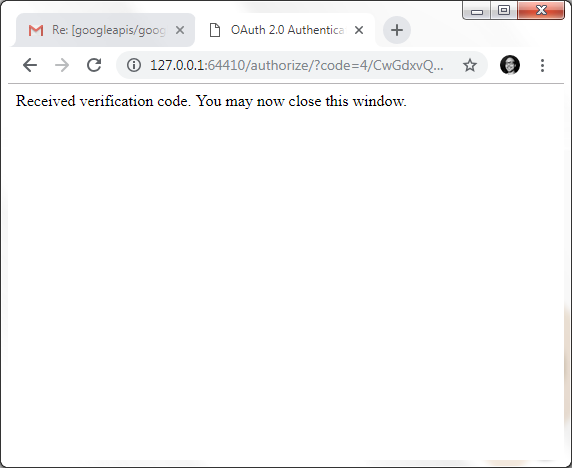
Note that if I manually refresh the webpage, the server is not responding anymore.
xavierfoucrier
on 12 Mar 2019
Right, that's expected - the server shuts down when the verification code has been requested. It looks like it's all working correctly. That's very different from the "Unable to reach 127.0.0.1" message you reported in an earlier comment.
 jskeet
on 12 Mar 2019
jskeet
on 12 Mar 2019
This is working as intended. Closing.
chrisdunelm
on 12 Mar 2019
If it works like intended it's ok, I can understand, but... is there a way to properly modify this webpage to display something else that the default message? That is confusing for end users.
That's what matter for me in this issue: display another message OR use a custom redirect URI to display another web page with a specific message.
Thanks :wink:
xavierfoucrier
on 12 Mar 2019
Ah, OK, that's a different matter.
Yes, we could potentially allow this message to be customized. I'll re-open this issue, and update the title to reflect this.
chrisdunelm
on 12 Mar 2019
Yup,
Sorry to not be enough clear.
Different message is a good start, but... if we could customize the whole page with CSS or app branding it could be a serious gain for app credibility regarding the end users.
May be the API should use some kind of web "template" file and display/use it when the auth is complete.
Thanks for your time.
Best regards :wink: :beers:
xavierfoucrier
on 12 Mar 2019
I happened to dig into this myself and was able to come up with a solution that you're welcome to use @xavierfoucrier or could be used as the solution for this issue.
If you guys like the solution, I'm happy to submit it as a formal PR. In the interim, just copy down the entire class and rename it to something like CustomRedirectLocalServerCodeReceiver. You then would just use it like so:
UserCredential credential = await GoogleWebAuthorizationBroker.AuthorizeAsync( ... , new CustomRedirectLocalServerCodeReceiver("Hello World!"));
 SaviorXTanren
on 11 Apr 2019
SaviorXTanren
on 11 Apr 2019
Hi @SaviorXTanren!
Sounds good, love it! I will test it as soon as possible in my application.
I appreciate your feedback :wink:
xavierfoucrier
on 11 Apr 2019
@SaviorXTanren Please do submit this change as a PR. Thanks :)
chrisdunelm
on 15 Apr 2019
I expect this to be implemented and released within a couple of weeks.
chrisdunelm
on 23 Apr 2019
@chrisdunelm thanks chris :wink:
xavierfoucrier
on 24 Apr 2019
@SaviorXTanren If you'd like to create a PR for this, then please do. Otherwise I'll create a PR myself next week.
chrisdunelm
on 24 Apr 2019
@chrisdunelm Here ya go:
https://github.com/googleapis/google-api-dotnet-client/pull/1380
SaviorXTanren
on 24 Apr 2019
Perfect, I will test this solution in my application soon. Thanks guys! :wink:
xavierfoucrier
on 25 Apr 2019
Hi guys @chrisdunelm @SaviorXTanren,
It is now working as expected in my application.
Big thanks for this feature! :v:
xavierfoucrier
on 29 Jun 2019
Related issues
 LindaLawton
·
9Comments
jskeet
·
6Comments
LindaLawton
·
9Comments
jskeet
·
6Comments
 bijington
·
5Comments
bijington
·
5Comments
 NKnusperer
·
6Comments
NKnusperer
·
6Comments
 AlKau
·
6Comments
AlKau
·
6Comments
Most helpful comment
@chrisdunelm Here ya go:
https://github.com/googleapis/google-api-dotnet-client/pull/1380