Godot: Image thumbnails in FileSystem distorted
Godot version:
v3.2.3.stable.official
OS/device including version:
macOS Catalina 10.15.7
Issue description:
Image assets containing text menu in the official tutorial, when imported to Godot, they look like this:

I believe neat, elegant UI will makes you guys more efficiency.
Minimal reproduction project:
MainMenuDesign.zip
 awkr
awkr
All 5 comments
I can confirm this on 3.2.4beta1 on Linux:
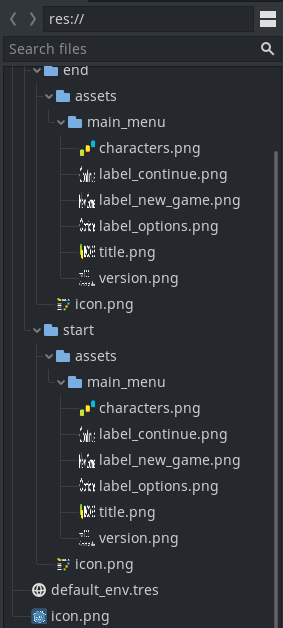
The issue isn't specific to hiDPI displays.
 Calinou
on 1 Nov 2020
Calinou
on 1 Nov 2020
Is this referring to the aspect ratio or the filtering (or both)? (I'm guessing aspect ratio?)
 lawnjelly
on 2 Nov 2020
lawnjelly
on 2 Nov 2020
@lawnjelly Probably the aspect ratio.
Calinou
on 2 Nov 2020
I looked into this a bit and found that the small preview thumbnails are always generated with the same height and width:
https://github.com/godotengine/godot/blob/be14d9d6448a9017c982fd7e30631525aed8f339/editor/editor_resource_preview.cpp#L176-L182
On my system small_thumbnail_size is 16. If i scale the preview thumbnails in a way that they preserve their aspect ratio it looks like this (sadly not really an improvement):
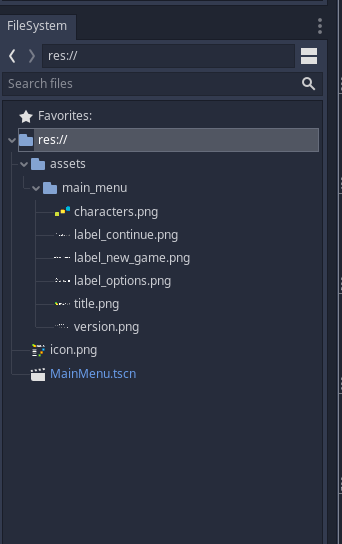
I'm not sure what can be done about this except making the tumbnails bigger, which also sucks.
 mbrlabs
on 2 Nov 2020
mbrlabs
on 2 Nov 2020
It does look marginally better to my eyes with correct aspect ratio, but there is less info conveyed.
What I have done in previous apps with this problem, is use a tooltip. When you hover over the item, it shows a larger thumbnail. This might take a bit of rejigging to achieve, but is an option.
lawnjelly
on 2 Nov 2020
Related issues
 kirilledelman
·
3Comments
kirilledelman
·
3Comments
 SleepProgger
·
3Comments
SleepProgger
·
3Comments
 RayKoopa
·
3Comments
RayKoopa
·
3Comments
 Spooner
·
3Comments
Spooner
·
3Comments
 RebelliousX
·
3Comments
RebelliousX
·
3Comments
Most helpful comment
It does look marginally better to my eyes with correct aspect ratio, but there is less info conveyed.
What I have done in previous apps with this problem, is use a tooltip. When you hover over the item, it shows a larger thumbnail. This might take a bit of rejigging to achieve, but is an option.