Godot: Single window mode is lost after starting a project from the project manager
Godot version:
Master f19c400bedf3f975e2e31cfabaaec9446461c68a
OS/device including version:
Windows 10
Issue description:
When starting the editor with --single-window command line argument and loading a project, single window mode is not applied anymore. It works properly when loading a project directly from the command line.
Steps to reproduce:
- Start godot with
--single-windowwithout loading a project directly - Load any project from the project manager
- Observe the editor is using multi windows mode
Minimal reproduction project:
n/a
 pouleyKetchoupp
All 7 comments
Tip for contributing to fix this issue:
You can check how --debug and --verbose are handled in main.cpp and project_manager.cpp.
pouleyKetchoupp
on 13 Sep 2020
Hello I would like to work on this. I am a bit new to Godot so I'm having some difficulty distinguishing between what Godot should look like in --single-window mode and regular. When I try opening Godot in 3.2 with the --single-window command and selecting a mostly empty project it looks the same as without. Can you post a screenshot of what single-window looks like?
 jak6jak
on 14 Sep 2020
jak6jak
on 14 Sep 2020
@jak6jak Nice to see you want to contribute! The difference is that with --single-window, it works the same way as in 3.x where there's only one window for the whole editor, while by default in 4.0 each popup is created as a separate window.
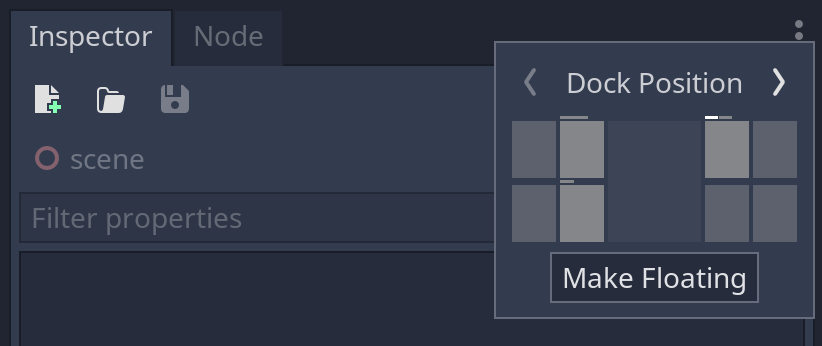
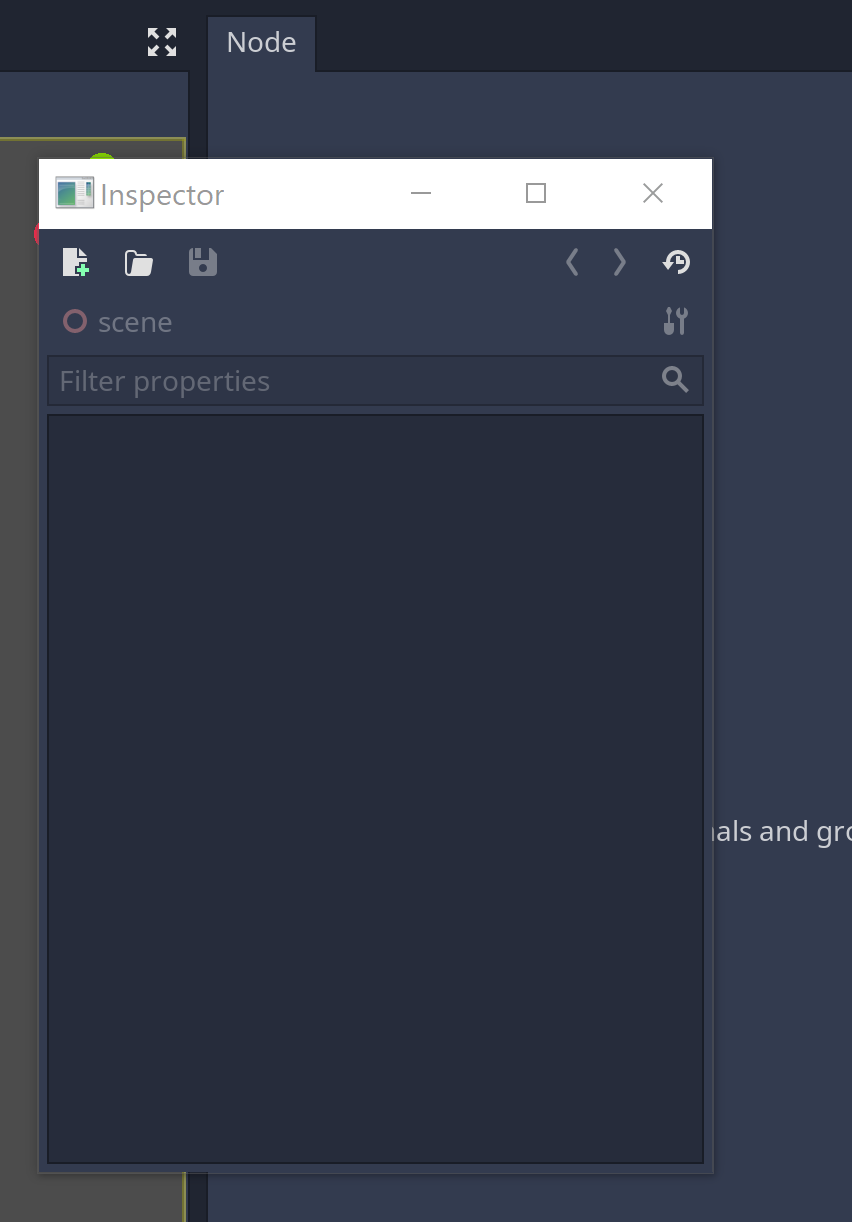
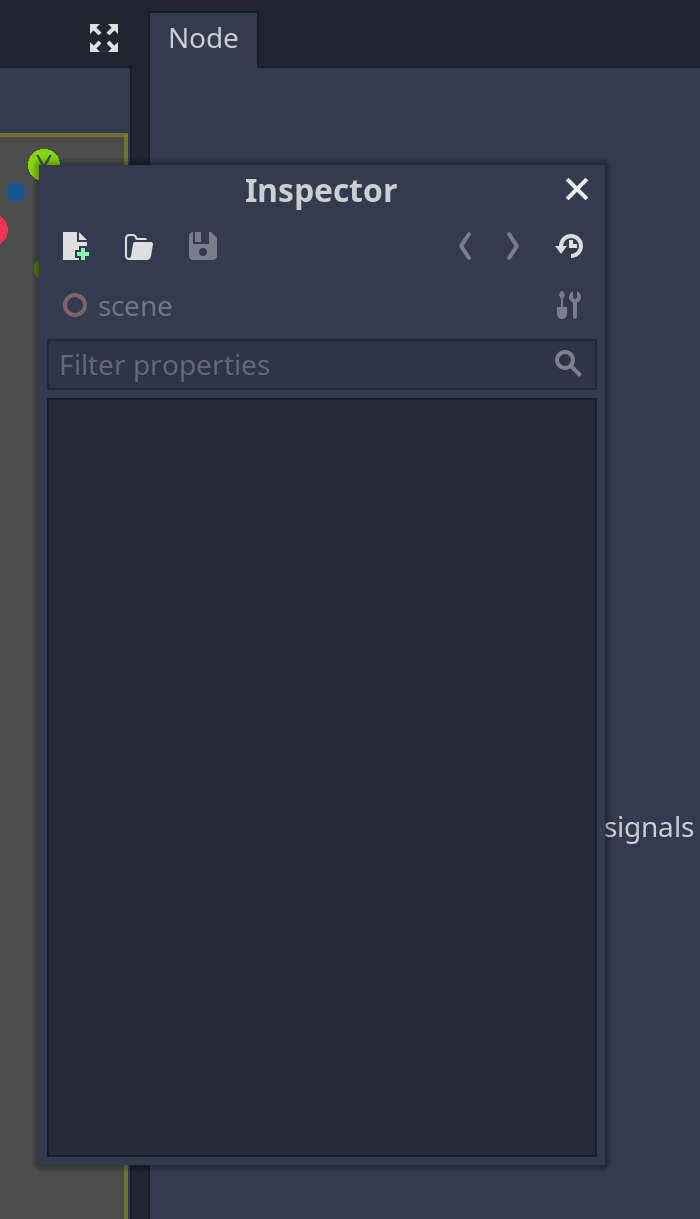
In lots of cases it's hard to see the visual difference, but one obvious thing you can check in the editor is when you click the dots icon in the corner of one of the dock panels (Inspector for example) you can select "Make Floating". When you're in multi-windows mode (by default) it will then appear as a whole separate window with a standard title bar from the OS, while in single window mode it will be a simple panel with a custom title bar.
Make Floating:
Multi-windows (Windows 10):
Single window:
pouleyKetchoupp
on 14 Sep 2020
@jak6jak Oh also because this is new for 4.0, --single-window makes no difference in 3.2 (it's always single window in that version).
If you want to test on a recent master build you can use @Calinou's nightly builds:
https://hugo.pro/projects/godot-builds/
pouleyKetchoupp
on 14 Sep 2020
When starting the editor with
--single-windowcommand line argument and loading a project, single window mode is not applied anymore. It works properly when loading a project directly from the command line.
That's not really a bug per se, flags are only valid for the instance they're passed to. It's the same for all flags like --fullscreen, --video-driver GLES2, etc., they will not be used by the edited project after starting it from the project manager.
This can be worked around like done for --verbose and --debug, but IMO we shouldn't add workarounds for every single command line option that we have. This needs a proper solution for all flags, and that wouldn't be a junior job. It probably requires a proposal to define how that should be done, possibly by putting all options in a struct and passing the struct contents to the new process somehow.
 akien-mga
on 14 Sep 2020
akien-mga
on 14 Sep 2020
@akien-mga That makes sense. I think --single-window needs a short term solution, because we're using it as a workaround in different configurations on master and it's not obvious for users to validate if it's enabled in the editor. So if it's ok with you, we can still go on with the workaround for now, and I'll write a proposal for a long-term solution to fix all the flags.
pouleyKetchoupp
on 14 Sep 2020
I added my first pull request! https://github.com/godotengine/godot/pull/42071
jak6jak
on 15 Sep 2020
Related issues
 n-pigeon
·
3Comments
n-pigeon
·
3Comments
 bojidar-bg
·
3Comments
bojidar-bg
·
3Comments
 ivanskodje
·
3Comments
ivanskodje
·
3Comments
 testman42
·
3Comments
testman42
·
3Comments
 gonzo191
·
3Comments
gonzo191
·
3Comments
Most helpful comment
That's not really a bug per se, flags are only valid for the instance they're passed to. It's the same for all flags like
--fullscreen,--video-driver GLES2, etc., they will not be used by the edited project after starting it from the project manager.This can be worked around like done for
--verboseand--debug, but IMO we shouldn't add workarounds for every single command line option that we have. This needs a proper solution for all flags, and that wouldn't be a junior job. It probably requires a proposal to define how that should be done, possibly by putting all options in a struct and passing the struct contents to the new process somehow.