Godot: Seamless OpenSimplex noise has less contrast than non-seamless noise
Godot version:
3.2.2-stable, Windows & Linux
OS/device including version:
Windows 10, Ubuntu 20.04.1 LTS
Issue description:
When switching between seamless and non-seamless versions of OpenSimplex noise, the contrast changes. Specifically, seamless noise never has a value of 0 or 1. I'm using the values in a shader to look up values in a gradient texture and never get the colours in the extremes to show when using a seamless noise texture.
Steps to reproduce:
- Create a Sprite
- Under Texture, add a New NoiseTexture
- Set the Noise to New OpenSimplexNoise
- On the Texture, turn the "seamless" checkbox on and off to see the difference. It's most apparent in the darkest colours of the texture; the seamless version just looks more washed out.
Minimal reproduction project:
N/A
 robbertzzz
All 5 comments
cc @JFonS
 Calinou
on 5 Sep 2020
Calinou
on 5 Sep 2020
seamless noise never has a value of 0 or 1
That's actually extremely rare with noise, or normalized random floats in general, but it can have bumps that tend towards the extremes.
In the case of OpenSimplex, the base algorithm actually happens to never go beyond 0.87 (computed this empirically with a large for loop).
Loss of contrast can happen when mixing several layers together and averaging them, because the probability of all layers tending to the same extreme is less likely.
Apparent loss of contrast is also happening if you take a slice of noise from a higher dimension, which appears to be how the seamless option is implemented. It's a bit unclear to me why this is the case, but it's a thing that just happens in higher dimensions, even with Simplex noise.
I can only suppose the same kind of reason: because a 4D sample needs to interpolate much more edges of the 4D lattice, the chance of getting a "bump" when looking at a slice is less likely, so when put back in 2D we get more "in-middle" values. But despite that, it doesn't mean values can't be min or max, it's just less likely.
We could fix this by quantifying how much "contrast loss" we have, and multiplying samples with a curve to introduce a positive bias, just so it "looks" better at the expense of being consistent?
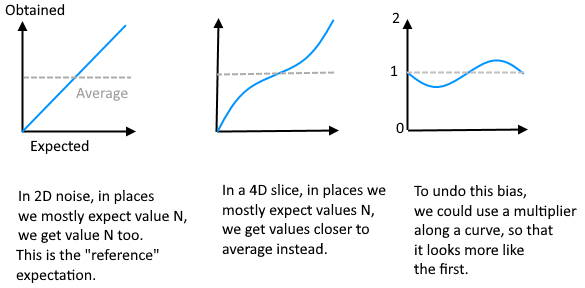
So that curve2[x] * curve3[x] -> curve1[x]
Another way would be to only multiply by a constant, but there would be a small chance for the result to clip beyond 0 and 1.
(just a though, maybe there is a better way to implement the algorithm in the first place)
 Zylann
on 6 Sep 2020
Zylann
on 6 Sep 2020
@Zylann Adding a multiplier is what I'm resorting to now, it does help make things look better. It's pretty interesting that technically the extremes should still exist, I haven't come across anything that looked like it and am using a LOT of different seeds in my current project.
A possible "solution" could be to add a flag for improving contrast, I can imagine that sometimes users wouldn't want that to happen as the maximum possible difference between two adjacent pixels changes by implementing a multiplier curve.
robbertzzz
on 11 Sep 2020
Is this something we should attempt to fix in 4.0, or should we leave it as-is?
A possible "solution" could be to add a flag for improving contrast
This can be done by the user using the Image class (or just taking the lower contrast into account in their shader).
Calinou
on 2 Nov 2020
Is this something we should attempt to fix in 4.0, or should we leave it as-is?
Given that the problem is broader than just image generation I'd like to see this fixed. I'm also using the noise function in another project than the one that made me open this issue to create smooth noisy animations, not knowing the actual min and max values makes that a lot harder to control.
robbertzzz
on 5 Nov 2020
Related issues
 nunodonato
·
3Comments
Zylann
·
3Comments
nunodonato
·
3Comments
Zylann
·
3Comments
 timoschwarzer
·
3Comments
timoschwarzer
·
3Comments
 bojidar-bg
·
3Comments
bojidar-bg
·
3Comments
 blurymind
·
3Comments
blurymind
·
3Comments
Most helpful comment
That's actually extremely rare with noise, or normalized random floats in general, but it can have bumps that tend towards the extremes.
In the case of OpenSimplex, the base algorithm actually happens to never go beyond
0.87(computed this empirically with a large for loop).Loss of contrast can happen when mixing several layers together and averaging them, because the probability of all layers tending to the same extreme is less likely.
Apparent loss of contrast is also happening if you take a slice of noise from a higher dimension, which appears to be how the
seamlessoption is implemented. It's a bit unclear to me why this is the case, but it's a thing that just happens in higher dimensions, even with Simplex noise.I can only suppose the same kind of reason: because a 4D sample needs to interpolate much more edges of the 4D lattice, the chance of getting a "bump" when looking at a slice is less likely, so when put back in 2D we get more "in-middle" values. But despite that, it doesn't mean values can't be
minormax, it's just less likely.We could fix this by quantifying how much "contrast loss" we have, and multiplying samples with a curve to introduce a positive bias, just so it "looks" better at the expense of being consistent?

So that
curve2[x] * curve3[x] -> curve1[x]Another way would be to only multiply by a constant, but there would be a small chance for the result to clip beyond 0 and 1.
(just a though, maybe there is a better way to implement the algorithm in the first place)