Godot: Inconsistent behavior of draw_line function
Godot version:
3.2.2, 4.0
OS/device including version:
Any
Issue description:
I wanted to fix #35384, but I ran into the fact that draw_line seems to behave incorrectly too.
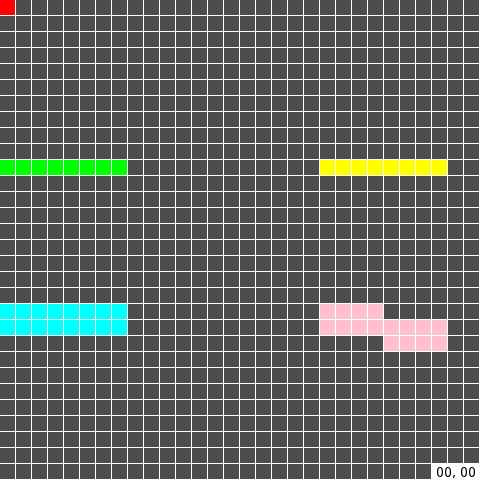
- If I draw 1 pixel, then it is important that the second vector does not coincide with the first.
- If I draw a horizontal (or vertical) line 1 pixel thick, it doesn't matter.
- If the thickness is greater than 1, then it is important.
- I have not tested the sloped lines.
Steps to reproduce:
func _draw():
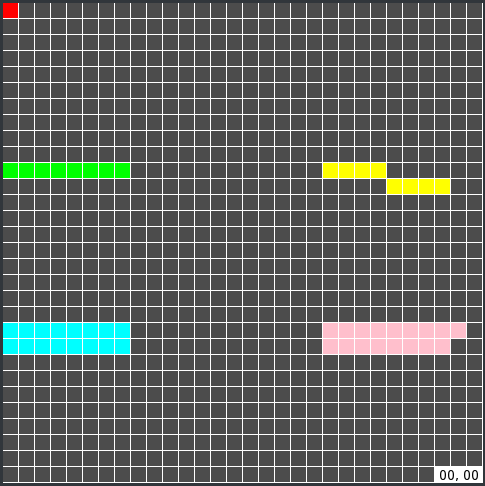
    draw_line(Vector2(00, 00), Vector2(00+1, 00+1), Color.red)
    draw_line(Vector2(20, 00), Vector2(20+0, 00+0), Color.blue)

    draw_line(Vector2(00, 10), Vector2(00+8, 10+0), Color.green)
    draw_line(Vector2(20, 10), Vector2(20+8, 10+1), Color.yellow)

    draw_line(Vector2(00, 20), Vector2(00+8, 20+0), Color.cyan, 2)
    draw_line(Vector2(20, 20), Vector2(20+8, 20+1), Color.pink, 2)
Minimal reproduction project:
draw_line_bug.zip
 dalexeev
All 10 comments
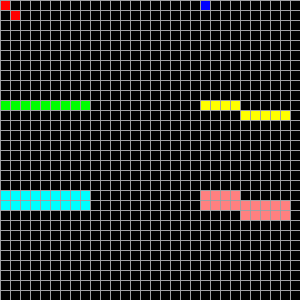
I tried to repeat these commands manually with given coordinates in KolourPaint. Here's what happened:

Of course, KolourPaint is not an absolute authority, but the overall result is more logical. (Why the result is not the same as in the following figure, I don't know.)
dalexeev
on 4 Aug 2020
Can you try it with pixel snap on? Also offsetting positions by 0.5 might help. E.g. try:
draw_line(Vector2(0.5, 0.5), Vector2(0.5+1, 0.5+1), Color.red)
Godot isnt a pixel art application. It uses the GPU to rasterize lines rather than drawing them pixel by pixel. So some differences are accepted and natural. Try the above tips and let me know how it goes.
 clayjohn
on 4 Aug 2020
clayjohn
on 4 Aug 2020
'Use Pixel Snap' has no effect on this behavior.
Also offsetting positions by 0.5 might help. E.g. try:
draw_line(Vector2(0.5, 0.5), Vector2(0.5+1, 0.5+1), Color.red)
No. You probably don't quite understand what I mean. :smiley:
It uses the GPU to rasterize lines rather than drawing them pixel by pixel.
It doesn't matter how Godot draws the line. The problem is a strange and ambiguous coordinate system.
So some differences are accepted and natural.
Why then does draw_rect(Rect2(x,y,w,h), Color.blue) always draw the rectangle exactly as expected?
dalexeev
on 4 Aug 2020
Why then does draw_rect(Rect2(x,y,w,h), Color.blue) always draw the rectangle exactly as expected?
Because GPUs handle lines and rects differently. For clarity, Godot doesn't handle drawing the line. It just passes the info off to the GPU to draw. So we need to work around how the GPU chooses to draw the line.
clayjohn
on 4 Aug 2020
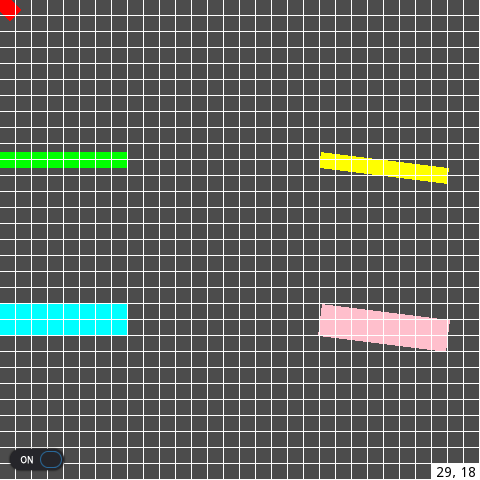
@dalexeev, that's how lines from your example would look before rasterization:
Here's your a little expanded project:
draw_line.zip
I don't see inconsistency in here.
 kleonc
on 5 Aug 2020
kleonc
on 5 Aug 2020
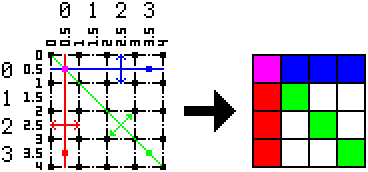
@kleonc Thank you, now I understand. The coordinates are the vertices of the grid, not the cells. @clayjohn was right.
This information should be documented. Also, we should probably create a similar function that works with pixel coordinates.
pixel       GPU
coords      coords
----------------------------
from to     from    to
----------------------------
(0,0-0,0 -> 0.0,0.5-1.0,0.5)
(0,0-0,0 -> 0.5,0.0-0.5,1.0)
 0,0-0,0 -> 0.0,0.0-1.0,1.0
 0,0-3,0 -> 0.0,0.5-4.0,0.5
 0,0-0,3 -> 0.5,0.0-0.5,4.0
 0,0-3,3 -> 0.0,0.0-4.0,4.0
dalexeev
on 5 Aug 2020
In HTML5 canvas, a trick I've seen for working in pixel coordinates is to add Vector2(0.5, 0.5) to all coordinates.
Not that this trick works in Godot..
I also tested some slight variations, such as subtracting (instead of adding) the same offset from the top-left point of the line, computing the offset based on the direction of the line, etc. They didn't quite work out, however.
 bojidar-bg
on 5 Aug 2020
bojidar-bg
on 5 Aug 2020
In HTML5 canvas, a trick I've seen for working in pixel coordinates is to add
Vector2(0.5, 0.5)to all coordinates.Not that this trick works in Godot..
@bojidar-bg I think the point is that you also need to take into account the direction (angle of inclination) of the line.
dalexeev
on 6 Aug 2020
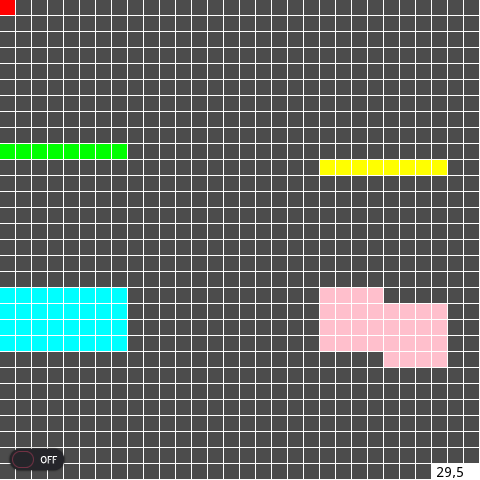
This difference in coordinates seems to be the cause of the bold lines in 4.0.
In 4.0, when width > 1, lines are drawn 2 times thicker than necessary, plus sometimes shifted up:
dalexeev
on 14 Aug 2020
The problem with thick lines can be solved simply, just add the missing coefficient 0.5 in line 472:
But I still don't understand why the green line is drawn 1 px higher.
dalexeev
on 14 Aug 2020
Related issues
 testman42
·
3Comments
testman42
·
3Comments
 ivanskodje
·
3Comments
ivanskodje
·
3Comments
 ndee85
·
3Comments
ndee85
·
3Comments
 SleepProgger
·
3Comments
SleepProgger
·
3Comments
 kirilledelman
·
3Comments
kirilledelman
·
3Comments