Godot: Vertex shader regression in 3.2.2
...or, possibly, my own incompetence? I've searched existing Issues for shader-related regressions and have found quite a bunch, but none of them sounded like what I'm seeing here.
Godot version:
3.2.2.rc1 and .rc2
OS/device including version:
Linux, GLES2
Issue description:
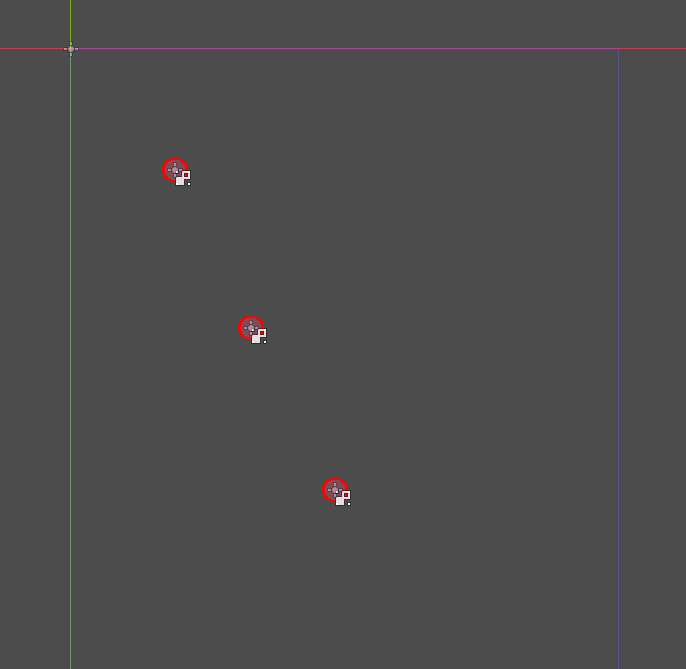
I've attached a simple project with a scene containing three objects. These objects are simple red circles animated with an equally simple vertex shader that "wobbles" them over time. In the editor, this looks like this:
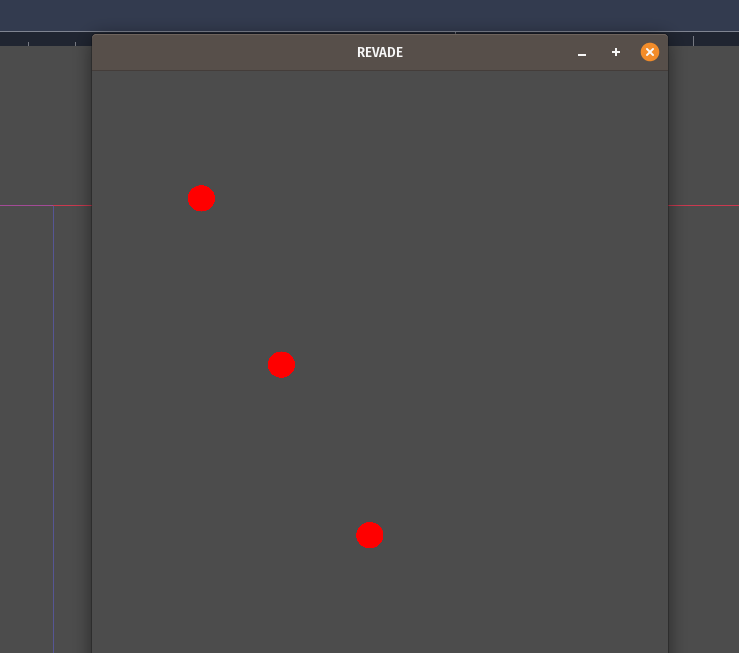
In 3.2.1, the game renders correctly, with the red blobs mostly keeping their shape, and only wobbling slightly:
In 3.2.2, the wobbling is all off, with the wobble effect scaling weirdly:
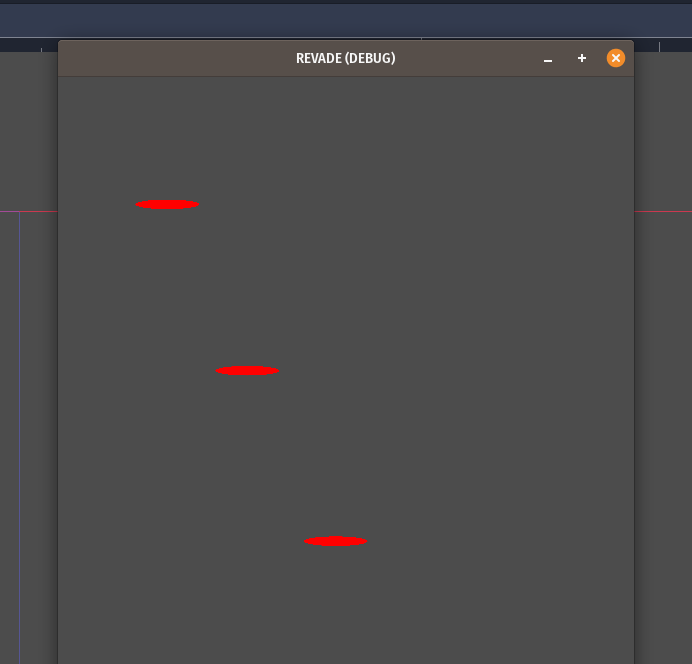
Also, in my main project (where these were extracted from), the objects move, and for the first second or so while they're moving, they're being rendered in the correct dimensions, and suddenly they scale up as displayed above.
Shader code:
For reference, here's the vertex shader code. It's not particularly clever, but it does the job. Well, in 3.2.1, it does. :b
shader_type canvas_item;

uniform float x_wobble = 50f;
uniform float y_wobble = 25f;

void vertex() {
    VERTEX.x += (UV.x - 0.5) * sin(TIME * 5f) * x_wobble;
    VERTEX.y += (UV.y - 0.5) * cos(TIME * 5f) * y_wobble;
}
Steps to reproduce:
- Download the attached project
- Run in 3.2.1, observe that everything looks fine
- Run in 3.2.2, observe that the shaded objects are scaled incorrectly
Minimal reproduction project:
shader-bug-example.zip
 hmans
hmans
All 8 comments
Can you run the project with batching turned off? You can set it in the project settings under rendering/batching/options/use_batching.
 clayjohn
on 18 Jun 2020
clayjohn
on 18 Jun 2020
@clayjohn With batching they stretch quite a bit. Without batching the transformations are much different and far less stretching.

 avencherus
on 18 Jun 2020
avencherus
on 18 Jun 2020
Looks like a missed case where batching should fail.
@lawnjelly
clayjohn
on 18 Jun 2020
Can you run the project with batching turned off? You can set it in the project settings under
rendering/batching/options/use_batching.
I can confirm that disabling batching fixes this on my system, yes.
Looks like a missed case where batching should fail.
@clayjohn, are you saying that this is an instance where batching should not be applied? If this is what you're saying, can I ask you to elaborate? I would have -- very naively -- assumed that this (same texture, same shader) would have been an obvious use case for batching.
hmans
on 18 Jun 2020
@hmans in order to batch objects together the position of each object is "baked" into the vertex position. However, that clearly can't be done here as you are changing vertex positions in the shader.
That being said, instead of breaking batches we may be able to fix it another way. Looking at your code again I see that this may just be a situation where UVs are broken as a result of the batch. So breaking batches may not be necessary.
clayjohn
on 19 Jun 2020
Yes I think this is a special case because it is both reading and writing in the same expression (+=). It should be easy enough for me to fix.
This is confirmed because it turns out you can (as a workaround) fix it in the shader by changing the expression to:
VERTEX = VERTEX + blah
 lawnjelly
on 19 Jun 2020
lawnjelly
on 19 Jun 2020
Fixed by #39669.
 akien-mga
on 19 Jun 2020
akien-mga
on 19 Jun 2020
Thanks!
hmans
on 19 Jun 2020
Related issues
 nunodonato
·
3Comments
nunodonato
·
3Comments
 testman42
·
3Comments
testman42
·
3Comments
 gonzo191
·
3Comments
gonzo191
·
3Comments
 RayKoopa
·
3Comments
RayKoopa
·
3Comments
 RebelliousX
·
3Comments
RebelliousX
·
3Comments
Most helpful comment
@hmans in order to batch objects together the position of each object is "baked" into the vertex position. However, that clearly can't be done here as you are changing vertex positions in the shader.
That being said, instead of breaking batches we may be able to fix it another way. Looking at your code again I see that this may just be a situation where UVs are broken as a result of the batch. So breaking batches may not be necessary.