Godot: White screen on editor startup
System setup:
Godot: 3.2.1 (both mono and standard version have the same problem)
OS: Windows 10 Pro Version 1909 (x64)
CPU: Intel Core i5-7300HQ @2.5GHz (x64)
GPU: Nvidia GTX 1050Ti (+ integrated Intel GPU, but it's not used here)
GPU driver: GeForce Game Ready Driver 446.14 or NVIDIA Studio Driver 442.92 (both have the same problem)
audio driver: Realtek High Definition Audio 30.10.2018
steps to reproduce: open godot without any existing projects on specified system, this problem occurs for me everytime I open godot, never got it to start properly
example project: none, this problem exists with a first time startup of godot but might also persist when opening an existing project
steps I tried to fix the problem that didn't help
- setting the GPU for godot to the NVIDIA one, so it doesn't accidentally use the integrated Intel one
- setting the GPU for OpenGL rendering to the NVIDIA one
- starting godot with administrator rights
- configuring the audio device so that it doesn't allow exclusive access
- updating the GPU driver (already using the most recent one)
- using
sfc /scannowto check for problems, no problems found - starting godot in compatibility mode
- doing a fresh windows 10 install
Whenever I start the godot, it opens up to a white screen:

The console shows no error, as seen in the image. I've left that screen open for about an hour, seems like nothing is happening. Task manager says godot is just quietly amassing small amounts of RAM, not even close to my limit of 16GB. CPU and GPU usage of the pc is in normal (low) range, but godot doesn't seem to use any CPU time.
Logs from the mono version are attached (see mono_logs.txt).
 nanella
All 21 comments
How many USB devices do you have connected? Try unconnecting all USB devices you can before starting Godot: #20566
To rule out the audio driver being an issue, pass the --audio-driver Dummy command line argument to the Godot executable (the value is case-sensitive, it must be "Dummy", not "dummy"). This will disable audio support in Godot.
 Calinou
on 30 May 2020
Calinou
on 30 May 2020
Thanks for the fast answer, I tried both your suggested solutions (separate and combined). Sadly it didn't make a difference, the white screen still persists.
Edit: Also disabled bluetooth for any devices connected there, no difference.
nanella
on 30 May 2020
Could you try to run Godot with the --verbose argument and paste the output here?
And do you get the same issue if you force it to run with the Intel IGP?
 akien-mga
on 30 May 2020
akien-mga
on 30 May 2020
Does your monitor have an USB hub? Those also caused same issues as those Calinou mentioned.
Also I am guessing your OS is set to German, any non ASCII characters in the path you installed Godot to (i.e. umlauts)?
 Zireael07
on 30 May 2020
Zireael07
on 30 May 2020
Verbose output:
Godot Engine v3.2.1.stable.mono.official - https://godotengine.org
Using GLES3 video driver
OpenGL ES 3.0 Renderer: GeForce GTX 1050 Ti/PCIe/SSE2

Mono: Initializing module...
Mono JIT compiler version 6.6.0 ((no/bef1e633581)
Mono: Logfile is: C:\Users\xxxxxx\AppData\Roaming/Godot/mono/mono_logs/2020_05_30 17.18.34 (13860).txt
Mono: Runtime initialized
Mono: Loading assembly mscorlib...
Mono: Assembly mscorlib loaded from path: C:\Users\xxxxxx\Dev\Godot_v3.2.1-stable_mono_win64/GodotSharp/Mono/lib/mono/4.5/mscorlib.dll
Mono: Loading scripts domain...
Mono: Creating domain 'GodotEngine.Domain.Scripts'...
Mono: INITIALIZED
Mono: Loading assembly GodotSharp...
Mono: Assembly GodotSharp loaded from path: C:\Users\xxxxxx\Dev\Godot_v3.2.1-stable_mono_win64/GodotSharp/Api/Debug/GodotSharp.dll
Mono: Loading assembly GodotSharpEditor...
Mono: Assembly GodotSharpEditor loaded from path: C:\Users\xxxxx\Dev\Godot_v3.2.1-stable_mono_win64/GodotSharp/Api/Debug/GodotSharpEditor.dll
Mono: Loading assembly GodotTools...
Mono: Assembly GodotTools loaded from path: C:\Users\xxxxxx\Dev\Godot_v3.2.1-stable_mono_win64/GodotSharp/Tools/GodotTools.dll
Mono: Loading assembly GodotTools.ProjectEditor...
Mono: Assembly GodotTools.ProjectEditor loaded from path: C:\Users\xxxxxx\Dev\Godot_v3.2.1-stable_mono_win64/GodotSharp/Tools/GodotTools.ProjectEditor.dll
Mono: Loading assembly UnnamedProject...
Mono: Failed to load project assembly
CORE API HASH: 12404198606810058654
EDITOR API HASH: 3089703643719645486
Loading resource: C:\Users/xxxxxx/AppData/Roaming/Godot/editor_settings-3.tres
EditorSettings: Load OK!
EditorSettings: Save OK!
Loaded builtin certs
Using the integrated GPU results in the same problem.
No USB hub used. Yes it is german, but no non ASCII characters exist in the path. I also tried putting godot directly under C:, that didn't help either.
nanella
on 30 May 2020
Paste verbose output from non-mono version too.
 Anutrix
on 30 May 2020
Anutrix
on 30 May 2020
Verbose output from standard version:
Godot Engine v3.2.1.stable.official - https://godotengine.org
Using GLES3 video driver
OpenGL ES 3.0 Renderer: GeForce GTX 1050 Ti/PCIe/SSE2

CORE API HASH: 10822102301860774635
EDITOR API HASH: 14982495073158502407
Loading resource: C:\Users/xxxxxx/AppData/Roaming/Godot/editor_settings-3.tres
EditorSettings: Load OK!
EditorSettings: Save OK!
Loaded builtin certs
After loading the certs, it just seems to get stuck in whatever should happen afterwards in both versions.
nanella
on 30 May 2020
The blank window on Windows sounds related to #13208, but apart from that I don't know if there's a clear link.
I'm not sure how to debug further, if you're familiar with compiling software and using a debugger, you could build Godot from source and load it in Visual Studio or another debugger to try to ascertain what step the engine is stuck on when showing this white screen.
The "Loaded builtin certs" is the last verbose print at the end of Main::start(), which is then followed by the main game loop. So it seems everything starts fine, but then it fails to display anything in the main loop.
akien-mga
on 31 May 2020
Just throwing this out: do you have a RDP connection to the machine open when you try to start Godot? I remember RDP causing issues with OpenGL applications.
Calinou
on 31 May 2020
No, I don't have any RDP connection open when starting Godot.
I fired up the Windows Process Explorer to maybe get a hint of where Godot is stuck:

The Godot process seems to be waiting for some mutex (the console host as well)...
I'll already tried closing absolutely everything except Godot (via task manager details to close hidden applications as well), but that doesn't help.
When I have the time later, I might give compiling and properly debugging Godot myself a shot.
nanella
on 31 May 2020
Somewhat related #35788?
 Xrayez
on 31 May 2020
Xrayez
on 31 May 2020
I haven't debugged it yet, but starting the current master version gives some interesting output. I started it both with Vulkan and OpenGL for comparison:
Vulkan:
PS C:\Users\xxxxxx\Dev\godot\bin> ./godot.windows.tools.64.exe --audio-driver Dummy
Godot Engine v4.0.dev.custom_build.a8787d1ae - https://godotengine.org
ERROR: Cant find layer: VK_LAYER_KHRONOS_validation
   at: _check_layers (drivers\vulkan\vulkan_context.cpp:157)
ERROR: Cant find layer: VK_LAYER_LUNARG_standard_validation
   at: _check_layers (drivers\vulkan\vulkan_context.cpp:157)
ERROR: Cant find layer: VK_LAYER_GOOGLE_threading
   at: _check_layers (drivers\vulkan\vulkan_context.cpp:157)
WARNING: GENERAL - Message Id Number: 0 | Message Id Name: Loader Message
        ReadDataFilesInRegistry: Registry lookup failed to get layer manifest files.
        Objects - 1
                Object[0] - VK_OBJECT_TYPE_INSTANCE, Handle 888516096
     at: _debug_messenger_callback (drivers\vulkan\vulkan_context.cpp:133)
// killing editor
ERROR: Some texture bindings were not properly freed (leaked canvasitems?
   at: ~RasterizerCanvasRD (servers\rendering\rasterizer_rd\rasterizer_canvas_rd.cpp:2500)
ERROR: Invalid Object id '23286776682', can't call method.
   at: (./core/callable_method_pointer.h:182)
OpenGL:
PS C:\Users\xxxxxx\Dev\godot\bin> ./godot.windows.tools.64.exe --audio-driver Dummy --video-driver GLES2
Godot Engine v4.0.dev.custom_build.a8787d1ae - https://godotengine.org
ERROR: Cant find layer: VK_LAYER_KHRONOS_validation
   at: _check_layers (drivers\vulkan\vulkan_context.cpp:157)
ERROR: Cant find layer: VK_LAYER_LUNARG_standard_validation
   at: _check_layers (drivers\vulkan\vulkan_context.cpp:157)
ERROR: Cant find layer: VK_LAYER_GOOGLE_threading
   at: _check_layers (drivers\vulkan\vulkan_context.cpp:157)
WARNING: GENERAL - Message Id Number: 0 | Message Id Name: Loader Message
        ReadDataFilesInRegistry: Registry lookup failed to get layer manifest files.
        Objects - 1
                Object[0] - VK_OBJECT_TYPE_INSTANCE, Handle 890503296
     at: _debug_messenger_callback (drivers\vulkan\vulkan_context.cpp:133)

ERROR: Condition "default_certs != nullptr" is true.
   at: load_default_certificates (modules\mbedtls\crypto_mbedtls.cpp:200)
// killing editor
ERROR: Some texture bindings were not properly freed (leaked canvasitems?
   at: ~RasterizerCanvasRD (servers\rendering\rasterizer_rd\rasterizer_canvas_rd.cpp:2500)
Both versions start properly, but does the error ERROR: Condition "default_certs != nullptr" is true maybe result in different behaviour on dev/production builds?
nanella
on 31 May 2020
@nanella: Master is Vulkan only, the GLES2 switch is non-functional yet.
Zireael07
on 31 May 2020
@Zireael07 Ah okay thx, didn't know that. Will try the old version then.
nanella
on 31 May 2020
So I debugged a little, and when reaching the marked line the debugger goes into assembly code for exception throwing and eventually stops:
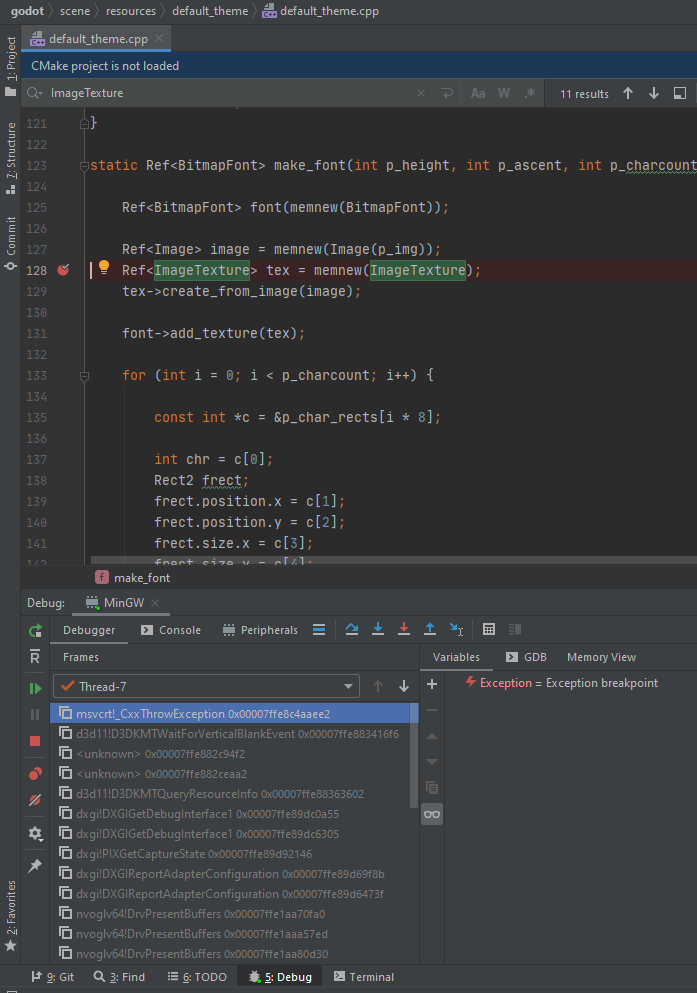
Since I'm not familiar with neither C++ nor assembly, I don't quite know how to proceed here. Does this help or how can I debug further?
nanella
on 31 May 2020
So I fixed the issue, it was problem with hardware / driver configuration, though not like I would've expected.
I've never had any issues until using Godot, so I thought the issue might be within Godot, but today my laptop started having problems starting some games with random Directx11 errors. Someone gave me the tip to use the laptops manufacturer's Intel GPU drivers, so I installed the manufacturer's driver for the integrated GPU - and that solved the problem.
So the issue seems to be Nvidia Optimus / switching between GPUs, where the integrated GPU is used as a go-between and needs a very specific driver.
nanella
on 1 Jun 2020
Then, should we consider this issue as solved?
Anutrix
on 1 Jun 2020
For my part, yes. Don't think there's anything Godot can do to make the issue with the driver obvious.
nanella
on 1 Jun 2020
Closing per @nanella's comment.
Calinou
on 1 Jun 2020
@nanella I have the same problem, where did you find the original intel driver at?
 GMihalkow
on 11 Nov 2020
GMihalkow
on 11 Nov 2020
You can let the intel site guess what driver you need here: https://www.intel.com/content/www/us/en/support/intel-driver-support-assistant.html
If that doesn't work, just search for your GPU on their site to find the right driver.
nanella
on 11 Nov 2020
Related issues
 reduz
·
111Comments
reduz
·
111Comments
 ghost
·
105Comments
ghost
·
117Comments
ghost
·
105Comments
ghost
·
117Comments
 nunodonato
·
143Comments
akien-mga
·
366Comments
nunodonato
·
143Comments
akien-mga
·
366Comments
Most helpful comment
No, I don't have any RDP connection open when starting Godot.

I fired up the Windows Process Explorer to maybe get a hint of where Godot is stuck:
The Godot process seems to be waiting for some mutex (the console host as well)...
I'll already tried closing absolutely everything except Godot (via task manager details to close hidden applications as well), but that doesn't help.
When I have the time later, I might give compiling and properly debugging Godot myself a shot.