Godot: Signal 'files_dropped' not emitting when engine is run as administrator
Godot version: 3.2.1.stable.official
OS/device including version: Windows 10 x64
Issue description: Engine doesn't react when a file or multiple files are dropped over game window. Sample project still works with 3.2 build.
Steps to reproduce: connect _SceneTree_ with _files_dropped_ signal.
Minimal reproduction project: FileDropTest.zip
 grotar00
All 5 comments
The project works for me correctly in 3.2.1.
 KoBeWi
on 26 Mar 2020
KoBeWi
on 26 Mar 2020
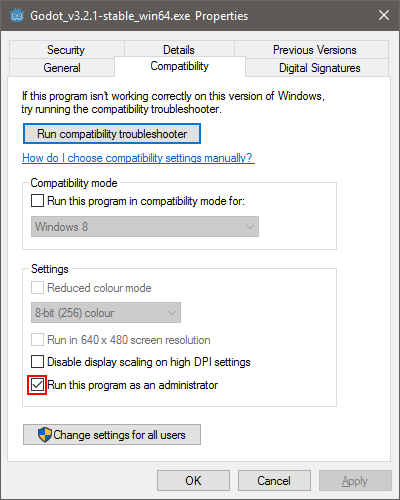
Solved by unchecking this box in executable properties. Launching engine as administrator from context menu yields same effect.
Problem appears in older versions as well up to Godot 2.1.4 so issue's title is misleading.
grotar00
on 26 Mar 2020
I ran the editor as administrator and tried to drop the test project into the manager and wondered why it doesn't work .-. So yeah, confirmed.
KoBeWi
on 26 Mar 2020
I guess that might be a security feature of Windows? But if so there should be some kind of error we can intercept and pass on to the user.
 akien-mga
on 27 Mar 2020
akien-mga
on 27 Mar 2020
One thing I found out is that this is Windows behaviour. Low integrity processes (explorer.exe runs with low integrity) are not allowed for drag n drop with higher integrity processes (Godot).
Unfortunately, there are only unstable undocumented ways to allow this. There is also no recent data about this either.
I did find https://social.msdn.microsoft.com/Forums/windowsdesktop/en-US/0ccf84fd-b78d-45b3-9b79-7366003cb19d/wmdropfiles-in-an-elevated-application-administrator?forum=windowsgeneraldevelopmentissues though.
 Anutrix
on 2 Apr 2020
Anutrix
on 2 Apr 2020
Related issues
 ndee85
·
3Comments
ndee85
·
3Comments
 mefihl
·
3Comments
mefihl
·
3Comments
 mooseyfaith
·
3Comments
mooseyfaith
·
3Comments
 gonzo191
·
3Comments
gonzo191
·
3Comments
 ivanskodje
·
3Comments
ivanskodje
·
3Comments
Most helpful comment
One thing I found out is that this is Windows behaviour. Low integrity processes (explorer.exe runs with low integrity) are not allowed for drag n drop with higher integrity processes (Godot).
Unfortunately, there are only unstable undocumented ways to allow this. There is also no recent data about this either.
I did find https://social.msdn.microsoft.com/Forums/windowsdesktop/en-US/0ccf84fd-b78d-45b3-9b79-7366003cb19d/wmdropfiles-in-an-elevated-application-administrator?forum=windowsgeneraldevelopmentissues though.