Godot: Are there errors in the NinePatchRect algorithm?
Godot version:3.2.1:
I have to talk about NinePatchRect again. I wonder if there is an error in the NinePatchRect algorithm in the control?
Below is an example of the NinePatchtexture plugin I wrote. You can see the obvious differences by comparing the effects.

OK, this is normal, then you look at the second picture, I have updated the demo, you can download a new demo to see a new demo example.
In Jiugong's standard algorithm:
1.The four corners should be kept (tiled) to their original size
- The four sides should keep one-way scaling
- The middle area should maintain two-way scaling
But I think NinePatchRect's current algorithm has lost its practical significance.

 qq715152910
All 9 comments
Aah sorry I got confused...
But it looks like the problem is more clear with the Editor in the bottom panel.
 swarnimarun
on 16 Mar 2020
swarnimarun
on 16 Mar 2020
Aah sorry I got confused...
But it looks like the problem is more clear with the Editor in the bottom panel.
Please download the new Demo again and observe its borders and corners.
NinePatchTexture-Demo
qq715152910
on 16 Mar 2020
Yep that looks like a problem.
So have you tried the master with the PR merged to see if it was fixed.
swarnimarun
on 16 Mar 2020
Yep that looks like a problem.
So have you tried the master with the PR merged to see if it was fixed.
I just heard that it was normal before a certain version was merged, but I cannot test it temporarily, please check this post.
->
#32170
qq715152910
on 16 Mar 2020
I ran into this issue too. These rectangles use the texture with the same margins, but you can see that the borders look different:

And here's a closer look, observe the bottom:

This should not happen.
Repro:
ReproductionProject.zip
 KoBeWi
on 3 Jul 2020
KoBeWi
on 3 Jul 2020
Totally agree. Documentation claims NinePatchRect is a "Scalable texture-based frame that tiles the texture's centers and sides, but keeps the corners' original size."
When resizing the NinePatchRect, the corners are scaled, preserving their original aspect ratio. This is incorrect. The corners should simply not be scaled. (If there is a hidpi scaling adjustment, then it should not be based on the size of the NinePatchRect).
The texture's centers and sides are scaled, not tiled, but that seems to be awaiting an implementation for
axis_stretch_horizontalandaxis_stretch_vertical.
 justinbowes
on 4 Jul 2020
justinbowes
on 4 Jul 2020
The issue occurs when sizing the NinePatchRect to a smaller size than the backing texture.
Workaround: make the center column & row extremely narrow, i.e. 1px. The corners scale down, but not up.
This is not a great workaround, because it limits the amount of detail you can put in the center columns, but the effect is less significant until center column tiling is implemented.
justinbowes
on 4 Jul 2020
When resizing the NinePatchRect, the corners are scaled, preserving their original aspect ratio.
I'm wondering if this is the only problem.
Here is another repoduction example: ProgressBar.zip + code on GitHub. This is an attempt to implement a custom progress bar. As you can see the bar degenerates to a fat blob when the center column is supposed to become zero size:

I have added some "debugging pixel" to the progress bar texture to show where the three columns are:
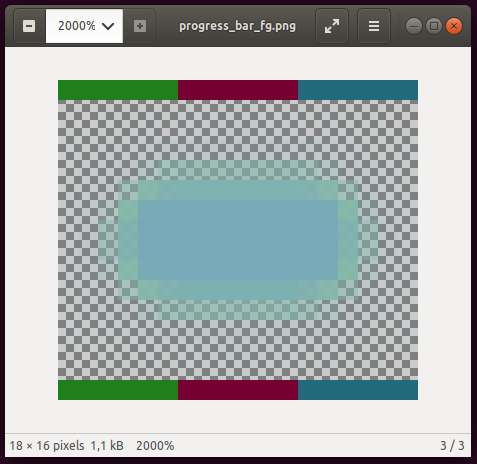
Basically the texture has a width of 18 pixels (6 + 6 + 6 pixels for the three columns), and a height of 16 pixel (8 + 0 + 8 pixels for the three rows). Accordingly, the left/right margins are set to 6 pixel, the top/bottom to 8 pixels.
I've set the minimum size to a width of 12 pixel, which should allow for the case of having only the left and the right column, but no center, resulting in a prefect circle (the 6 + 0 + 6 case). What happens instead is:
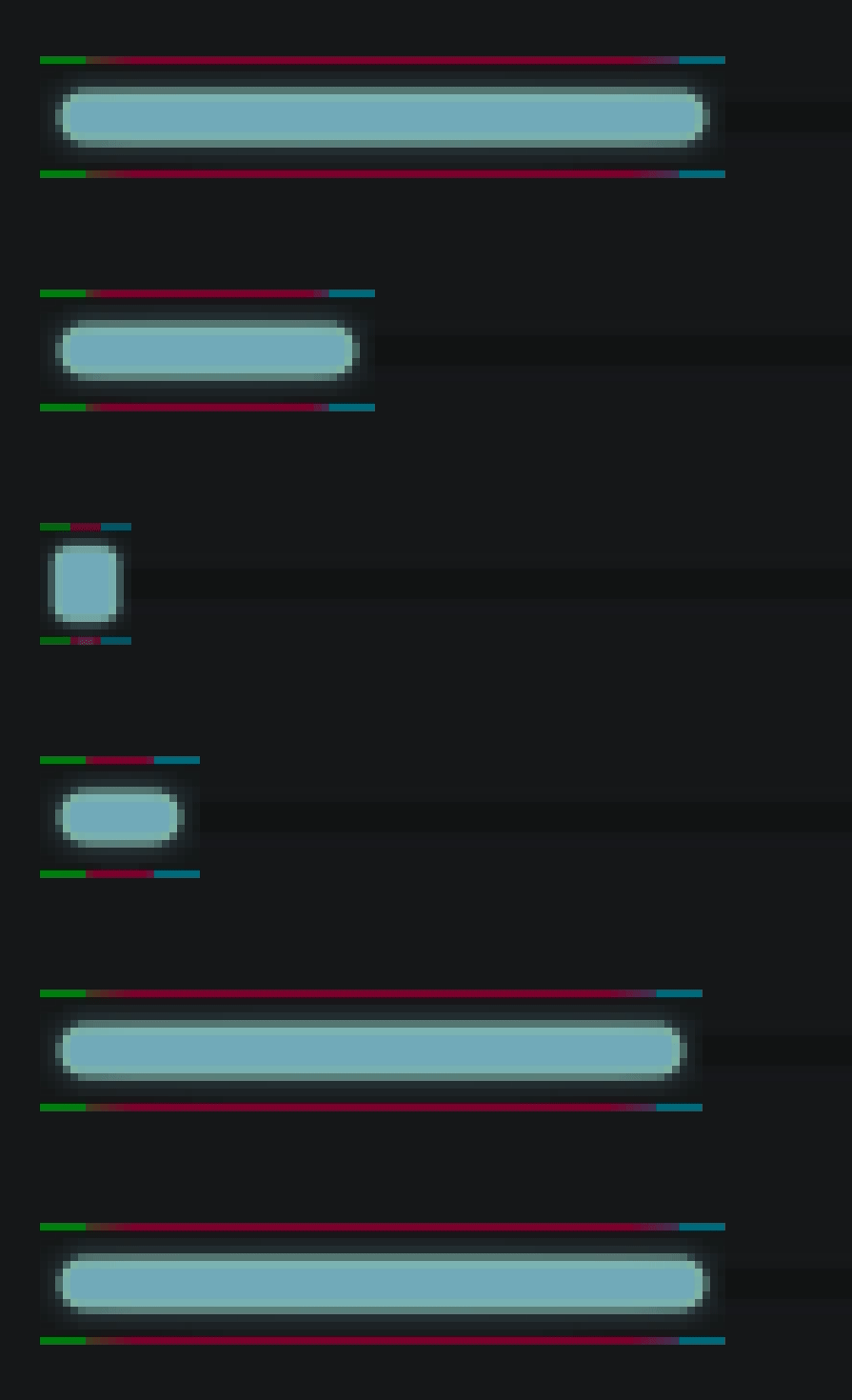
Note that it would be possible to "preserve the aspect ratio of the corners" just fine in this case: Their aspect ratio is 3x4 pixels, and that would fit into the 12x16 minimum size rect with the correct aspect ratio -- if the center would shrink down to zero.
Thus, I would say the bug is rather that the center fails to shrink below its original size. Instead the algorithm messes with the size of the corners, failing to satisfy what the documentation says _"... keeps the corners' original size"_ (and what would be much more intuitive).
Also it is a bit strange that the stretched area actually shows a color gradient. The debugging pixel jump from green to red at the boundary of the left to the center patch. The smooth transition from green to red is not what I would have expected:

Any ideas if this is intended behavior / should be tracked as a separate bug?
 bluenote10
on 18 Oct 2020
bluenote10
on 18 Oct 2020
Fixed by #42119.
(At least the OP, I don't know if @bluenote10's comment is handled, but if not it should be reported as a new issue.)
 akien-mga
on 21 Oct 2020
akien-mga
on 21 Oct 2020
Related issues
 reduz
·
111Comments
reduz
·
111Comments
 zatherz
·
121Comments
zatherz
·
121Comments
 crystalnoir
·
145Comments
crystalnoir
·
145Comments
 nunodonato
·
143Comments
nunodonato
·
143Comments
 NullNeska
·
191Comments
NullNeska
·
191Comments
Most helpful comment
I ran into this issue too. These rectangles use the texture with the same margins, but you can see that the borders look different:


And here's a closer look, observe the bottom:
This should not happen.
Repro:
ReproductionProject.zip