Godot: Export variable not shown in inspector when using external script editor
Godot version: 3.2.rc1.mono
OS/device including version: Linux 5.4.12-1-MANJARO
Issue description:
I wrote a GDscript, not C#.
When I save the exported variables aren't shown in the inspector.
I only can see them after I restart Godot.
Steps to reproduce:
- Open a project with the mono version of Godot and create a scene
- Create a node and a
GDscriptscript - Create a second
GDscriptwhere you put theexportvariable - Inherit the second script in the script attached to the node
- No exported variable is shown in inspector
- Build the project
- Restart Godot and the exported variable is shown
Minimal reproduction project:
Create any Node, add two GDscript / one attached to the node, make an export variable in the script without a node and inherit the script with the variable in the script attached to the node
 Rinma
Rinma
All 11 comments
I can't reproduce it here with 3.2.rc1.mono on Mageia 7.
I created a new project, created a scene (unsaved) with a Node2D root, added a GDScript with:
extends Node2D

export var toto = 1
 akien-mga
on 17 Jan 2020
akien-mga
on 17 Jan 2020
Okay I took a second look. I copied the content of the script, deleted it and recreated it and now it works like expected :-/
Okay.... and it stopped working again.
I also see that I forgot to mention that my scripts look something like this:
extends KinematicBody2D
class_name Car

export var speed: float = 20.0
And the script below is loaded in the scene
extends Car
I made a small project to show the problem: https://send.firefox.com/download/816e88b41a74c60c/#rmlFOPjZuF7j9ORFD2d3Lw
Rinma
on 17 Jan 2020
Actor is defined twice in that project, that might be the issue?
If I comment out one of the two class_name Actor, then adding an export var to the valid Actor.gd seems to work fine.
akien-mga
on 17 Jan 2020
I only have one actor class in my project, made the mistake only in the demo (copy paste error). But I found it. It happens if I use an external editor instead of the build in. I use VSCode and the Godot Tools addon in the beta version 1.0.0. If I use the build in editor it works correct.
Rinma
on 17 Jan 2020
This is an issue I can confirm this on 3.2
Add this line from Visual Studio Code into a script and go back to Godot Editor
export (NodePath) var path2
You will see the script update but the export option does not show up in the UI
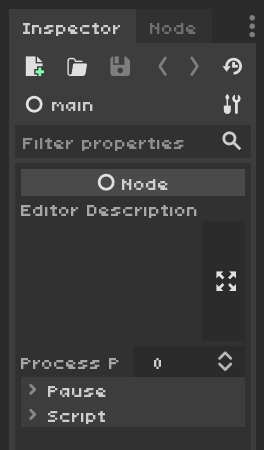
Open that script in the built in editor this time and save from the built in editor. All the sudden the export DOES show up.
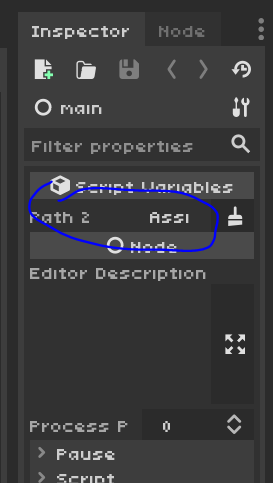
EDIT: I think the issue is that Script Variables don't get updated when you change the script externally.
 CarlGustavAlbertDwarfsteinYung
on 15 Feb 2020
CarlGustavAlbertDwarfsteinYung
on 15 Feb 2020
A test project here isn't going to show the issue. It updates when you open a new project, which fixes the problem. It will only update when you either
1.) Save from Godot's text editor, or
2.) Open a different project, then reopen your first project
 cajallen
on 15 Feb 2020
cajallen
on 15 Feb 2020
Can confirm this, only soft reloading the script from the built-in editor or reloading the entire project fixes it.
 mrzapp
on 2 Aug 2020
mrzapp
on 2 Aug 2020
Linking issues as they seem to be connected:
https://github.com/godotengine/godot-vscode-plugin/issues/136
 tekknovator
on 18 Sep 2020
tekknovator
on 18 Sep 2020
Looking for a workaround and so have been poking around in the Godot source. Unfortunately I am no CPP expert, but what I understood is this:
The the reload function is only called from the script editor drop down file menu if the the script is open in editor or via (hardcoded?) shortcut.
The shortcut and the filemenu entry are only available if the script is open in the internal editor. This makes it impossible to reload if the scripts are only opened in the external editor.
Question: Is it somehow possible to open scripts in external AND internal editor at the same time? Then one could simply hit cmd + shift + R after switching back to Godot window, as a workaround...
To fix this we need either
- a way to reload from external
- or make sure Godot reloads whenever the file is touched or changed.
- or a global reload shortcut.
I hope I got that right 😅.
@reduz which one would be the preferred fix?
tekknovator
on 18 Sep 2020
Hi,
I had this issue, but following the "Your first game" Tutorial I saw the comment below:
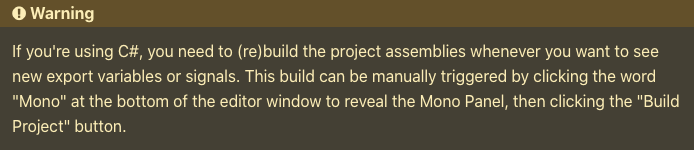
I did it and it works. re(Build) project to show the variables in the inspector.
 xeoplatinium
on 2 Oct 2020
xeoplatinium
on 2 Oct 2020
Related issues
 ducdetronquito
·
3Comments
ducdetronquito
·
3Comments
 Zylann
·
3Comments
Zylann
·
3Comments
 kirilledelman
·
3Comments
kirilledelman
·
3Comments
 RebelliousX
·
3Comments
RebelliousX
·
3Comments
 rgrams
·
3Comments
rgrams
·
3Comments
Most helpful comment
Can confirm this, only soft reloading the script from the built-in editor or reloading the entire project fixes it.