godot buttons can't be resized to 8×8
Godot version:
3.1.2
OS/device including version:
windows 10 64 bit
Issue description:
I can't shrink buttons below the size 8x16.848

Steps to reproduce:
- 1 make 24x24 pixel square for the button panel style
- 2 apply the style to all styles in the button except focus use empty style for that.
- 3 enable clip text and clip content
- 4 set the minimum size to 8x8
- 5 try to set the size to 8x8.
Minimal reproduction project:
PocketQuest.zip
please fix this every time I come back to godot ui I find this is still here.
content should always be resizeable unless the user themselves set a minimum size.
things that should also be looked at..
- anything that restricts the size of the control should be turned off by default
- allowing the user to resize the controls in containers
 Shadowblitz16
All 10 comments
This is an expected behavior, the buttons get their minimum size according to their defined style. If you need to resize a button to a very little value like 8x8, you should create a stylebox that have little to no margins.
Regarding your proposals at the end, you should open a detailed proposal in the godot-proposals repository. As I already told you it is unlikely to be accepted, but you can still try to see what the community thinks about it.
 groud
on 11 Jan 2020
groud
on 11 Jan 2020
It's strange that I can't reproduce the issue on macOS. The button in the reproduction project can be resized to 8x8 successfully in 3.1.2 stable.

 timothyqiu
on 11 Jan 2020
timothyqiu
on 11 Jan 2020
Hmm, that diserves more testing then. It not expected that the two behave differently.
groud
on 11 Jan 2020
@groud I am setting the style so your argument doesn't make sense.
empty styles shouldn't have a minimum size and setting the style should override the theme it uses.
obviously you don't make low res pixel art games or your would understand why this is a bug
Shadowblitz16
on 11 Jan 2020
@Shadowblitz16 I have to remind you that we have a Code of Conduct. Please stay constructive.
 Calinou
on 12 Jan 2020
Calinou
on 12 Jan 2020
FYI: I just tried on a Windows 10 64 bit machine, and I can't reproduce this either.
The button in the reproduction project can be resized to 8x8 successfully in 3.1.2 stable.

p.s. I also tried using the mono build, can't reproduce either.
timothyqiu
on 13 Jan 2020
try setting the font to [empty] and adding a icon to the button itself.
both seem to effect the minimum size of the button despite having clip text and clip content on
EDIT: just downloaded the project I linked I can't seem to reproduce the issue either at least not without changing anything. although setting the min size to 1x1 and trying to set the size to 1x1 doesn't work which probably is the same issue.
Shadowblitz16
on 13 Jan 2020
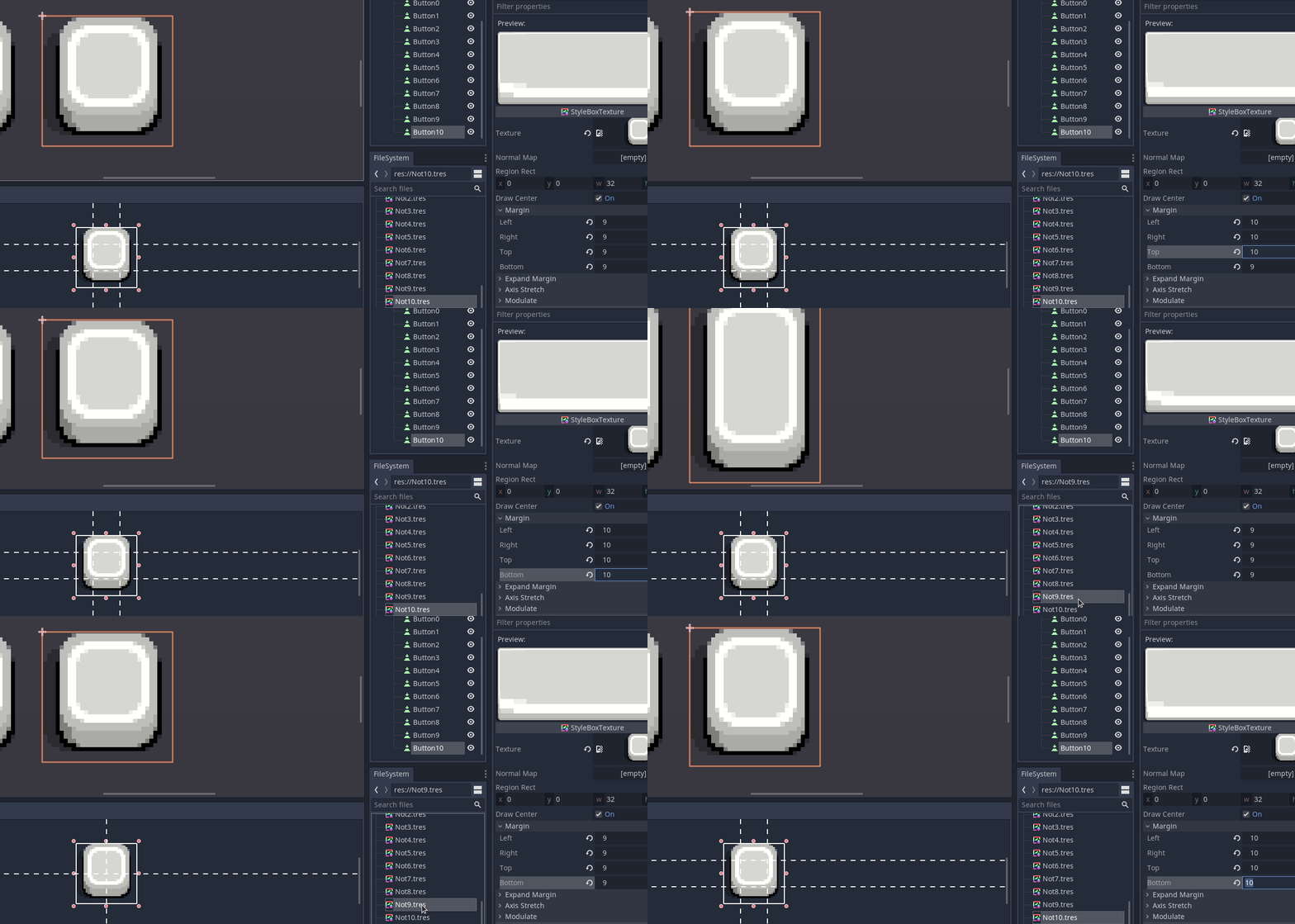
Here is another example of the same problem i think?


It is impossible to make a 32x32 button using these 32x32 textures with the margins setup correctly!? (need min 10 margin which makes the button bigger then 32x32!?
but ya i guess TextureButton works just a little extra work and does not stay in sync with edited theme
needed to make buttons with text look good but maybe there is some way to not expand buttons without text?
please & thanks
 rakkarage
on 18 May 2020
rakkarage
on 18 May 2020
@rakkarage I think you might need to adjust the font size.
The way Godot computes the minimum control size is somehow unique among the game engines / GUI toolkits.
The centeral stretchable area of the texture is only 12x12 if all the margins are 10. But since the default font size is 16, the 12x12 area can't hold any text using the font at that size, the button's minimum size grows, making it larger than the original 32x32 size.
If a smaller font size is used, which is reasonable for a pixel art style scenario, the minimum height will become smaller. In the screenshot below, the font size is set to 8, and the button's minimum size is 29x32:

The example project: PixelButton.zip
timothyqiu
on 19 May 2020
Thanks. That works great. i can just make a placeholder dynamic font and set size to 1 if i not want the button to stretch
rakkarage
on 19 May 2020
Related issues
 adolson
·
87Comments
adolson
·
87Comments
 crystalnoir
·
145Comments
Calinou
·
219Comments
crystalnoir
·
145Comments
Calinou
·
219Comments
 blurymind
·
192Comments
blurymind
·
192Comments
 nunodonato
·
143Comments
nunodonato
·
143Comments
Most helpful comment
@rakkarage I think you might need to adjust the font size.
The way Godot computes the minimum control size is somehow unique among the game engines / GUI toolkits.
The centeral stretchable area of the texture is only 12x12 if all the margins are 10. But since the default font size is 16, the 12x12 area can't hold any text using the font at that size, the button's minimum size grows, making it larger than the original 32x32 size.
If a smaller font size is used, which is reasonable for a pixel art style scenario, the minimum height will become smaller. In the screenshot below, the font size is set to 8, and the button's minimum size is 29x32:
The example project: PixelButton.zip