Godot: Dual GPU on Windows 10: High Usage of the Secondary GPU
Godot version: 3.1-3.2
OS/device including version: Windows 10 (64-bit), Acer Helios 300 (2019), RTX 2060, i7 9750H
Issue description: When I run the editor and especially launch the game from the editor, both of my GPUs becoming active and the activity % is more or less synced. The overall usage depends on the project itself, but Materials Tester Demo (from the official Godot package) is a great example, where % is always the same.
If I launch Godot with right-click and select Intel GPU only, then NVIDIA stays IDLE, but if I launch it with NVIDIA, then Intel GPU isn't IDLE at all: yes, it can be affected by the system and because it's connected to the laptop monitor, but not that much and not that synced. Load starts when I launch the game from the editor, and it ends, when I quit. No other apps do that so much: when I play games or launch other engines on NVIDIA, my Intel GPU stays below 15%.
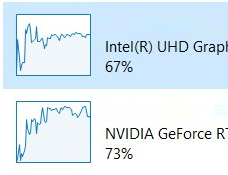
Just to make sure: It is not making my experience bad, the cooling in my laptop is great, it is just a bit odd in general since no other apps do that. The best guess so far: when the game is running on NVIDIA, the editor switches to Intel to optimize performance. Is this correct?
Steps to reproduce: Launch 3.1-3.2 on a Laptop with Dual Graphics and Windows 10. Use performance mode, so Godot will rely on NVIDIA graphics. Launch the project. Instead, both GPUs will be heavily loaded. If you have a very good GPU, then make sure to turn off VSync in the editor settings, because otherwise it will never be utilized enough on 60 FPS (or, in my case, on 144).
Minimal reproduction project: Materials Tester Demo (from the official Godot package)
 Rinocrosser
All 4 comments
The best guess so far: when the game is running on NVIDIA, the editor switches to Intel to optimize performance. Is this correct?
I think both the editor and running project are supposed to always run on the dedicated GPU. Also, neither of them have the ability to switch GPUs at run-time.
 Calinou
on 26 Dec 2019
Calinou
on 26 Dec 2019
I think both the editor and running project are supposed to always run on the dedicated GPU. Also, neither of them have the ability to switch GPUs at run-time.
Then it seems really odd and I have no more ideas)
Rinocrosser
on 26 Dec 2019
Something similar happened to me.
My problem is that I had the FPS (in the project settings) set to 0, so I set them to 60 and then I no longer consumed any CPU / GPU.
 Torguen
on 27 Dec 2019
Torguen
on 27 Dec 2019
My problem is that I had the FPS (in the project settings) set to 0, so I set them to 60 and then I no longer consumed any CPU / GPU.
I want to get as high FPS as possible. And other apps or games, even if they run with 400+ FPS, they don't affect Intel GPU that much.
PS You are correct, actually. If I make a game that will run in about 300-600 FPS in any other engine, my Intel GPU will get the same load, because it is in between NVIDIA and the screen. But usually, FPS was limited or games I've tried were too heavy to run at this FPS. So, make sense, seems, that it is not an issue of Godot anyway.
Rinocrosser
on 27 Dec 2019
Related issues
 nunodonato
·
3Comments
nunodonato
·
3Comments
 testman42
·
3Comments
testman42
·
3Comments
 RebelliousX
·
3Comments
RebelliousX
·
3Comments
 n-pigeon
·
3Comments
n-pigeon
·
3Comments
 EdwardAngeles
·
3Comments
EdwardAngeles
·
3Comments