Godot: Can't disable 2D grid when grid snapping is turned on in Godot 3.2
Godot version:
3.2 Beta 2 mono
OS/device including version:
MXLinux19 64bits
Issue description:
When grid snapping is enabled the grid can't be turned off, there's an option to always show the grid but not one to hide it.
Steps to reproduce:
Enable grid snapping.
 MightyPrinny
All 13 comments
Is this in 2D or 3D?
 aaronfranke
on 19 Dec 2019
aaronfranke
on 19 Dec 2019
2D, sorry I forgot to mention that.
MightyPrinny
on 20 Dec 2019
Well I think showing the grid when snapping is activated makes sense, as it avoids going into the visibility settings to tick an other box every time you want to work with a grid.
However I understand you might want it always visible (or always hidden).
What I suggest is changing the visibility settings to a 3 modes choice:
- Always show
- Show when snapping to grid
- Always hide
 groud
on 16 Jan 2020
groud
on 16 Jan 2020
@groud I'm thinking about implementing this, what UI nodes should I use for the options and what would the G key do?, I was thinking about adding a popup menu with radio buttons, but I'm not sure if that's the best choice, because then the G key behavior has to be implemented manually to make it switch between two options, or maybe I could just add more check boxes, keep the G key mapped to always show and disable the other check boxes when one is selected so it's clear that only one works at a time, or maybe show when snapping to grid doesn't get unchecked just disabled, but enabling always hide unchecks always show and vice versa,
MightyPrinny
on 25 Jan 2020
I think I have a better idea, we could only have 2 check boxes, "show grid" and "show grid when snapping to grid", when show grid is checked the grid is always visible, but when it's disabled it's always hidden unless show when snapping to grid is checked , that gives you the same functionality with only two check boxes.
MightyPrinny
on 25 Jan 2020
does this look good @groud https://github.com/MightyPrinny/godot/commit/2e9068ab0826ad86960fe8b44f3dfb2a8d2bd643 ? the guidelines say I have to talk with somebody about it so I'm going to wait for a response before opening the PR.
MightyPrinny
on 25 Jan 2020
No, having two checkbox, one "disabling" another is not a good idea UX-wise. With your solution if you activate "show grid" the second checkbox is useless, which is not good.
We should use radio buttons instead, so that you have only one of the 3 modes.
I think the G key should always change the state of the grid. Depending on the snapping state we choose the best mode out of the two remaining ones.
groud
on 25 Jan 2020
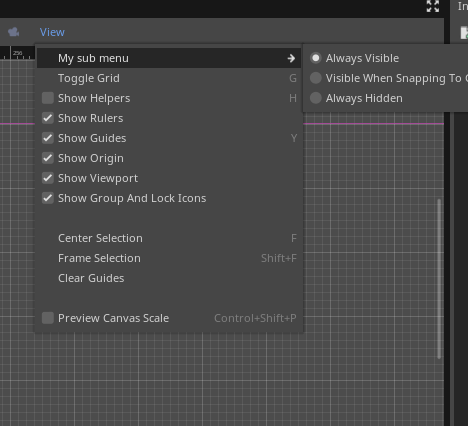
(I forgot to rename the menu)
@groud Like this ?
The default is Visible When Snapping To Grid.
MightyPrinny
on 25 Jan 2020
Should I rename the shortcut or we keep it as show grid?
MightyPrinny
on 25 Jan 2020
Yes exactly like this! Nice work!
The shortcut name is good. Provided it does that in any situation it's ok.
The only thing I would modify is the labels of the options. I would go for:
- Show
- Show when snapping to grid
- Hide
Also to make sure the toggle behavior is correct, I would go for such behavior. The thing after the arrow is the expected new mode:
- deactivating with snapping on -> hide
- deactivating with snapping of f -> show when snapping to grid
- activating with snapping on - > visible when snapping to grid
- activating with snapping off - > show
Basically we always choose the "show when snapping to grid", unless it does not toggle the grid visibility.
One last thing, I would move the toggle grid button inside the suvmenu :)
groud
on 25 Jan 2020
I didn't notice the names were redundant since the menu didn't have a name, I was thinking about naming the menu "Grid Visibility".
The toggle currently makes the grid invisible when the current option is Always Show or Show When Snapping To Grid, when the grid is invisible it goes back to the previous option so the user has control over that, I like this, but maybe making it depend on grid snapping is good too.
MightyPrinny
on 25 Jan 2020
Show when snapping to grid
Could be shortened to "Show when snapping". What else would you be snapping to that would appear in the settings for grid visibility?
One last thing, I would move the toggle grid button inside the suvmenu :)
Do we even need a dedicated UI button for this if we have the radio buttons? Is there a way to show the control hint of "G" on the menu item that opens to reveal the radio buttons?
aaronfranke
on 25 Jan 2020
Do we even need a dedicated UI button for this if we have the radio buttons? Is there a way to show the control hint of "G" on the menu item that opens to reveal the radio buttons?
I tried giving the sub menu a shortcut but the G showed up on top of the arrow.
MightyPrinny
on 25 Jan 2020
Related issues
 RyanBram
·
101Comments
RyanBram
·
101Comments
 nunodonato
·
143Comments
nunodonato
·
143Comments
 Calinou
·
219Comments
Calinou
·
219Comments
 NullNeska
·
191Comments
NullNeska
·
191Comments
 akien-mga
·
366Comments
akien-mga
·
366Comments
Most helpful comment
Well I think showing the grid when snapping is activated makes sense, as it avoids going into the visibility settings to tick an other box every time you want to work with a grid.
However I understand you might want it always visible (or always hidden).
What I suggest is changing the visibility settings to a 3 modes choice: