Godot: Ruler's text colour option does not exist in Editor Settings
Godot version:
_3.2 beta 1_
OS/device including version:
All
Issue description:
In the Editor Settings, there lacks an option to set the ruler's text colour.
Steps to reproduce:
Open the Editor Settings, look for an option to change the ruler's text colour.
 AtomaFajrovulpo
All 3 comments
Is this option really necessary? If you have difficulty seeing the numbers, you could increase the theme's contrast in Editor > Theme > Contrast.
 Calinou
on 10 Nov 2019
Calinou
on 10 Nov 2019
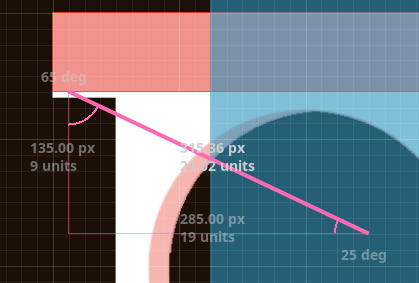
I also noticed that ruler texts might not be visible enough on bright backgrounds. Maybe some dark translucent background below their text would be a good idea.
EDIT:
Huh, the contrast option is useful. I didn't know it works like that.
EDIT2:
Doesn't really help in cases like this
 KoBeWi
on 10 Nov 2019
KoBeWi
on 10 Nov 2019
👍4
@Calinou Contrast seems not to affect the ruler text. ¯_(ツ)_/¯
AtomaFajrovulpo
on 10 Nov 2019
Was this page helpful?
0 / 5 - 0 ratings
Related issues
 SleepProgger
·
3Comments
SleepProgger
·
3Comments
 bojidar-bg
·
3Comments
bojidar-bg
·
3Comments
 RebelliousX
·
3Comments
RebelliousX
·
3Comments
 nunodonato
·
3Comments
nunodonato
·
3Comments
 gonzo191
·
3Comments
gonzo191
·
3Comments
Most helpful comment
I also noticed that ruler texts might not be visible enough on bright backgrounds. Maybe some dark translucent background below their text would be a good idea.
EDIT:
Huh, the contrast option is useful. I didn't know it works like that.
EDIT2:

Doesn't really help in cases like this