Godot: Full screen Godot projects cannot be captured by the "Print Screen" key.
This has been found with Godot RC2 on a Win7 64 bit machine with an Ivy Bridge i7 CPU, an ATI HD 7xxx series GPU, and 16 gigs of RAM.
I'm wondering if this is intentional or not, the issue is that when you set your Godot scene to run at full screen, and you take a screenshot of it using the 'print screen' key, it won't actually get a shot of the actual game in play (instead it gets whatever you would get once you exit out).
This occurs in all cases that start up full screen play, windowed mode works in all cases (even in full size).
If this is fixable, that would be great and would help present projects to the community.
Thanks.
 Ace-Dragon
All 43 comments
this is weird, will ask the windows people
On Tue, Dec 9, 2014 at 11:48 PM, Ace-Dragon [email protected]
wrote:
This has been found with Godot RC2 on a Win7 64 bit machine with an Ivy
Bridge i7 CPU, an ATI HD 7xxx series GPU, and 16 gigs of RAM.I'm wondering if this is intentional or not, the issue is that when you
set your Godot scene to run at full screen, and you take a screenshot of it
using the 'print screen' key, it won't actually get a shot of the actual
game in play (instead it gets whatever you would get once you exit out).This occurs in all cases that start up full screen play, windowed mode
works in all cases (even in full size).If this is fixable, that would be great and would help present projects to
the community.Thanks.
—
Reply to this email directly or view it on GitHub
https://github.com/okamstudio/godot/issues/953.
 reduz
on 10 Dec 2014
reduz
on 10 Dec 2014
Is this issue still valid in the current master branch? Is it also Windows-specific?
 akien-mga
on 5 Nov 2015
akien-mga
on 5 Nov 2015
I confirm that "Print Screen" works fine on Linux, at least under KDE4 with ksnapshot: it brings me back to the desktop and proposes to save somewhere the fullscreen snapshot that was just taken.
akien-mga
on 6 Nov 2015
Just tested a 2.0 alpha build from late October and I can confirm that the issue still exists on Win64 builds.
Ace-Dragon
on 6 Nov 2015
TBH, Print Screen in fullscreen games has always been a lottery in Windows AFAIK. But this actually happens and there must be a way to avoid it.
 vnen
on 7 Nov 2015
vnen
on 7 Nov 2015
Video capture confirmed not working in full screen on Windows 10.
note: Godot 2.1
 BlenderNPR
on 16 Aug 2016
BlenderNPR
on 16 Aug 2016
I also have an issue with Print Screen not working on windows 10. I also have the newest version 2.1
 ghost
on 20 Aug 2016
ghost
on 20 Aug 2016
Still an issue with Godot 3.0 alpha (recent build in the last week).
No description change is needed.
Ace-Dragon
on 29 Sep 2017
Any Windows dev up to investigate what could prevent screen capture in Godot windows?
akien-mga
on 9 May 2018
Works fine here. Alt+PrtSc works fine too.
Win10 - 64bit
Godot 3.0.2
 Crazy-P
on 20 May 2018
Crazy-P
on 20 May 2018
Recording full screen engine via OBS-Studio not working.
Screenshot made immediately after the window is enlarged (strange Windows 7 like top bar but I use unmodified version Windows 10)
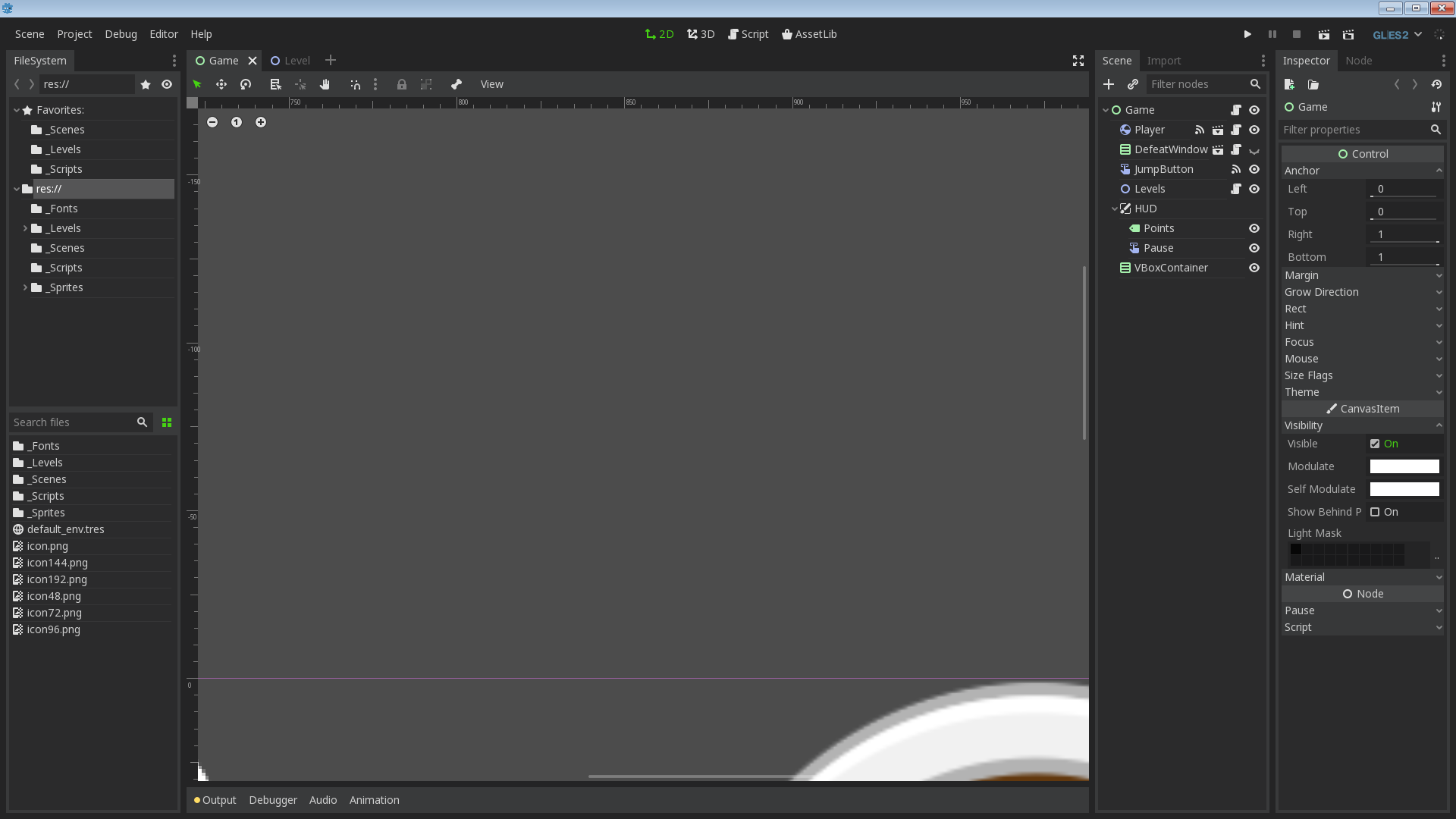
Screenshot made after some clicks in the Editor
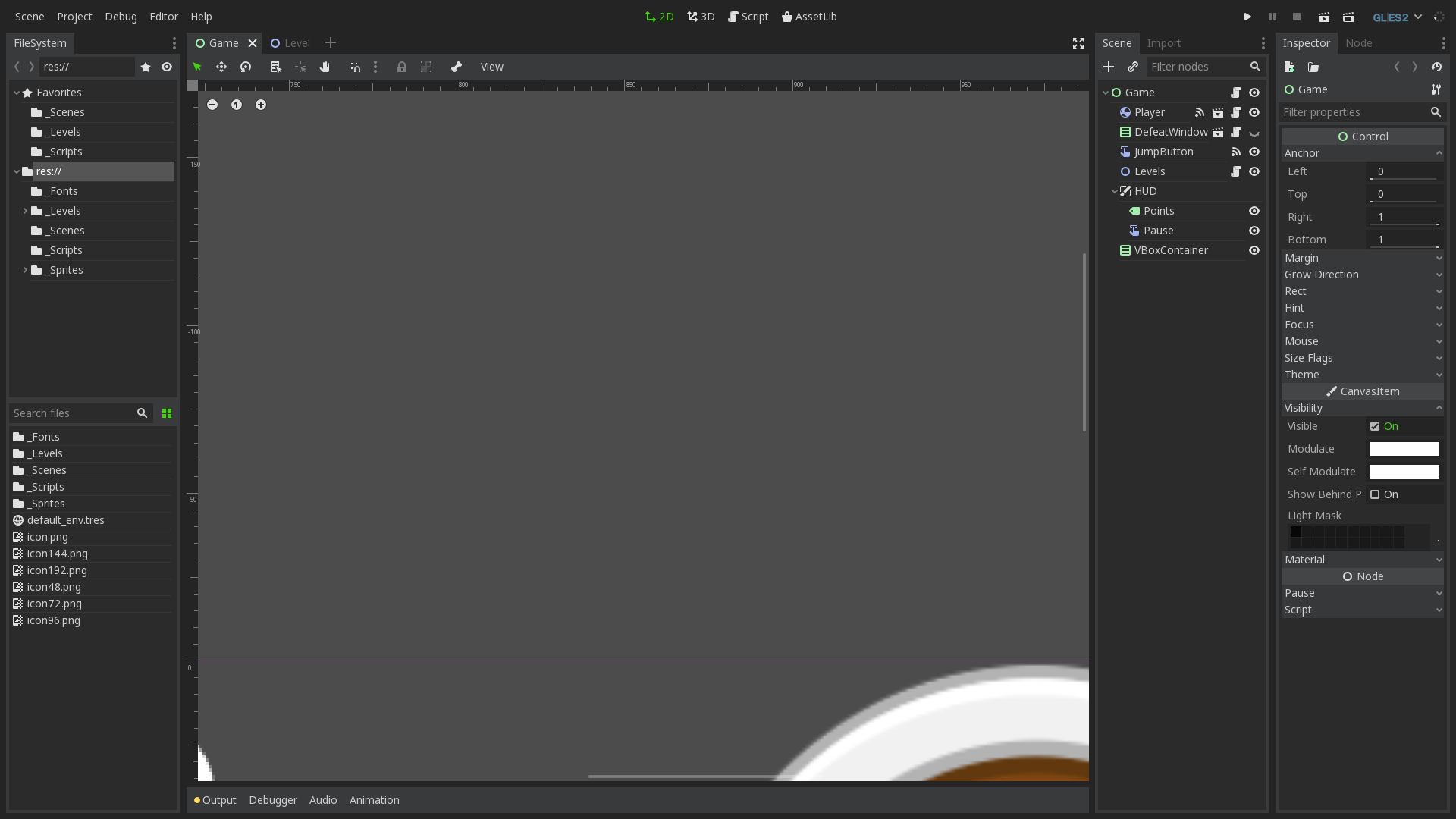
 qarmin
on 27 Aug 2018
qarmin
on 27 Aug 2018
Recording full screen engine via OBS-Studio not working.
As a workaround, you may be able to use a borderless window by enabling the Borderless property in the Project Settings.
 Calinou
on 27 Aug 2018
Calinou
on 27 Aug 2018
I wasn't able to replicate this on windows 7 with either master or 3.0.6. I was able to use obs and the screenshot button.
 RySchmitt
on 2 Nov 2018
RySchmitt
on 2 Nov 2018
What is the status on this issue? Can someone confirm on Windows 8/10?
 bojidar-bg
on 2 Mar 2019
bojidar-bg
on 2 Mar 2019
This is one of the oldest issues tagged bug. It's been over 4.5 years. Can someone at least confirm now?
 Anutrix
on 21 Jun 2019
Anutrix
on 21 Jun 2019
@Anutrix This was confirmed in #26327 recently (which is a duplicate of this issue).
Calinou
on 21 Jun 2019
win10 64bit LTSC
RX560
Ryzen 1800x
Asus B350 MB
Adrenalin 18.12.2
When I watch video in fullscreen and try to take a screenshot. it won't respond.
If I press winkey and bring start menu/taskbar then screenshot works but it is pointless when there is start menu/taskbar on top of video.
Also for games, if I run game first then try to record, sometimes it wont work. But If I record first and launch game then it works. I can stop and start in game as well. But it won't work if I don't run it first.
Sometimes I need to launch radeon settings (it is ok even if i just close without clicking anything)
It is as if it needs to awaken before doing anything .
Now will update to Adrenalin 19.6.3 and retry.
 SailorOnDaTea
on 5 Jul 2019
SailorOnDaTea
on 5 Jul 2019
Ok after installing 19.6.3 and restart
I just opened a new video went fullscreen and pressed hotkey.
It took a snapshot at first
but then it stopped again.
So it worked once.
This is weird.
I use Ctrl+F8 for that.
I would say fullscreen application probably locked some keys but other screenshot programs like MWSnap work just fine with any key combinations.
To be honest if it was just screenshots I wouldn't bother with ReLive but there is not manylight and decent recording software...
SailorOnDaTea
on 5 Jul 2019
Just found something. If you defocus and refocus the fullscreen window(press windows key twice) once and then take any screenshots, it repeated takes screenshot of the fullscreen window just before it defocused.
Anutrix
on 7 Sep 2019
While testing, I made OS.set_window_fullscreen(!OS.is_window_fullscreen()) execute whenever I press a random key X. After pressing X a few times and leaving the window in fullscreen, Windows+PrintScreen works perfectly.
Another thing: After it starts working, if I press Windows key to defocus, it stops working again.
Press X to regain the superpowers.
Oddly, this works only if the game starts in full screen mode. If I set fullscreen to False, in settings, it doesn't work no matter how many times I press X.
Putting that in ready function doesn't work either.
Anutrix
on 7 Sep 2019
See also #25427.
Calinou
on 7 Sep 2019
See also #25427.
That issue wasn't reproducible. Also, if we start the Example Project in that issue in full screen mode, after 2(3 actually because button says full screen off by default) toggles, Windows+PrintScreen works perfectly. Doesn't work if we set fullscreen to false in Project Settings and run the project.
Update:
Commenting this check https://github.com/godotengine/godot/blob/4ee8ecd3efee742be58c1ff191e78d0de09b57b6/platform/windows/os_windows.cpp#L1182 and toggling 4 times(5 actually because button says full screen off by default), we get Windows+PrintScreen perfectly working.
So the code inside that if is at least one requirement for the capture to work. But the bug doesn't end there though since we still need few toggles.
Update2:
Instead of commenting the check in Update1 above, insert GetWindowRect(hWnd, &pre_fs_rect); in first line of
https://github.com/godotengine/godot/blob/7bb2215ed0d7415179a8b59ad4766a3b573cf696/platform/windows/os_windows.cpp#L1898-L1900
Anutrix
on 7 Sep 2019
After over hundred tests and over 500(lol) screenshots, I have just come to the conclusion that "Window going from fullscreen to non-fullscreen" (OS.set_window_fullscreen(false)) effect is necessary at least once for the capture to work.
Anutrix
on 7 Sep 2019
The odd thing is toggling fullscreen mode in ready doesn't get the Windows+PrtScreen working but doing it using buttons/keys works for some reason. Still have no idea why. Does anyone have any idea?
Anutrix
on 9 Sep 2019
This might have been fixed by #37317, I can't reproduce this bug anymore. Needs more testing.
 aaronfranke
on 4 Apr 2020
aaronfranke
on 4 Apr 2020
Still the same on my side. I've tried all parameters for the fullscreen window (Always on top and borderless) nothing works... It just captures the state of the window before the focus.
(Windows 10)
 UPetit
on 12 May 2020
UPetit
on 12 May 2020
As a workaround, you can implement a script to save a PNG screenshot to a given location: https://github.com/Calinou/escape-space/blob/master/autoload/screenshot.gd
Calinou
on 12 May 2020
How did you guys test? Wasn't full screen broken on master?
Anutrix
on 12 May 2020
As a workaround, you can implement a script to save a PNG screenshot to a given location: https://github.com/Calinou/escape-space/blob/master/autoload/screenshot.gd
Yeah maybe for standard screen capture it could do the trick.
If I need to record a gif of a specific feature in my game, there is no such trick to do that...
How did you guys test? Wasn't full screen broken on master?
I ran my game, it launched a new fullscreen window of your main scene. Any screenshot taken while focusing the window will only capture you main scene in its state just after the start.
If I need to take a screenshot of a later scene (let's say I have a button to change my scene and I click on it). Any screenshot taken will still capture the first scene in its original state.
If I want to capture the current scene (the second one), I need to unfocus the game window and re-focus it so my screenshot will capture the game window in its current state etc.
It's like the screenshot can capture the screen in its live state...
UPetit
on 12 May 2020
@UPetit Are you testing 3.2 or master? The bug might have been fixed on master.
aaronfranke
on 12 May 2020
Windows 10 x64 , Godot Engine v3.2.2.beta.custom_build.dcfc876d3
tested - when you run game full screen and press PrintScreen the image will be in clipboard
 avril-gh
on 12 May 2020
avril-gh
on 12 May 2020
@aaronfranke I couldn't test this bug on master due to https://github.com/godotengine/godot/issues/37588.
Anutrix
on 12 May 2020
Still valid in 9e34ba4
 KoBeWi
on 18 Jul 2020
KoBeWi
on 18 Jul 2020
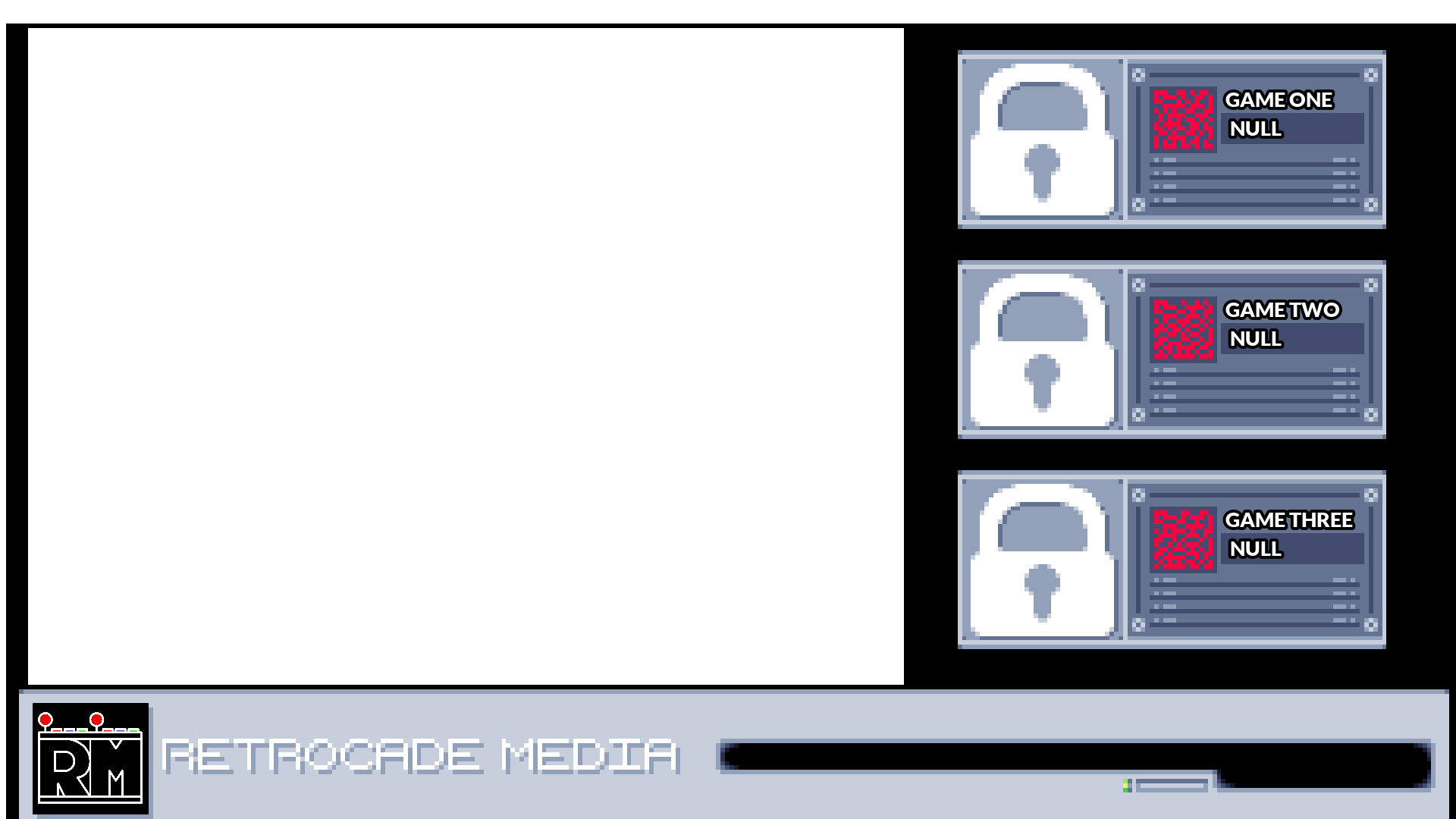
I'm on release 3.2.3, the issue persists. I personally get a couple different results:
This image includes weird black lines on the sides, and the whole screenshot has been moved downwards and shrunk. That bottom bar should run from the far left to the far right.
This image has a top bar reminiscent of Windows 7, despite being in fullscreen. You'll notice it also has been shrunk and has the black bars, it doesn't meet up with the window. On my monitor it looked like the final screenshot, but it came out like this.
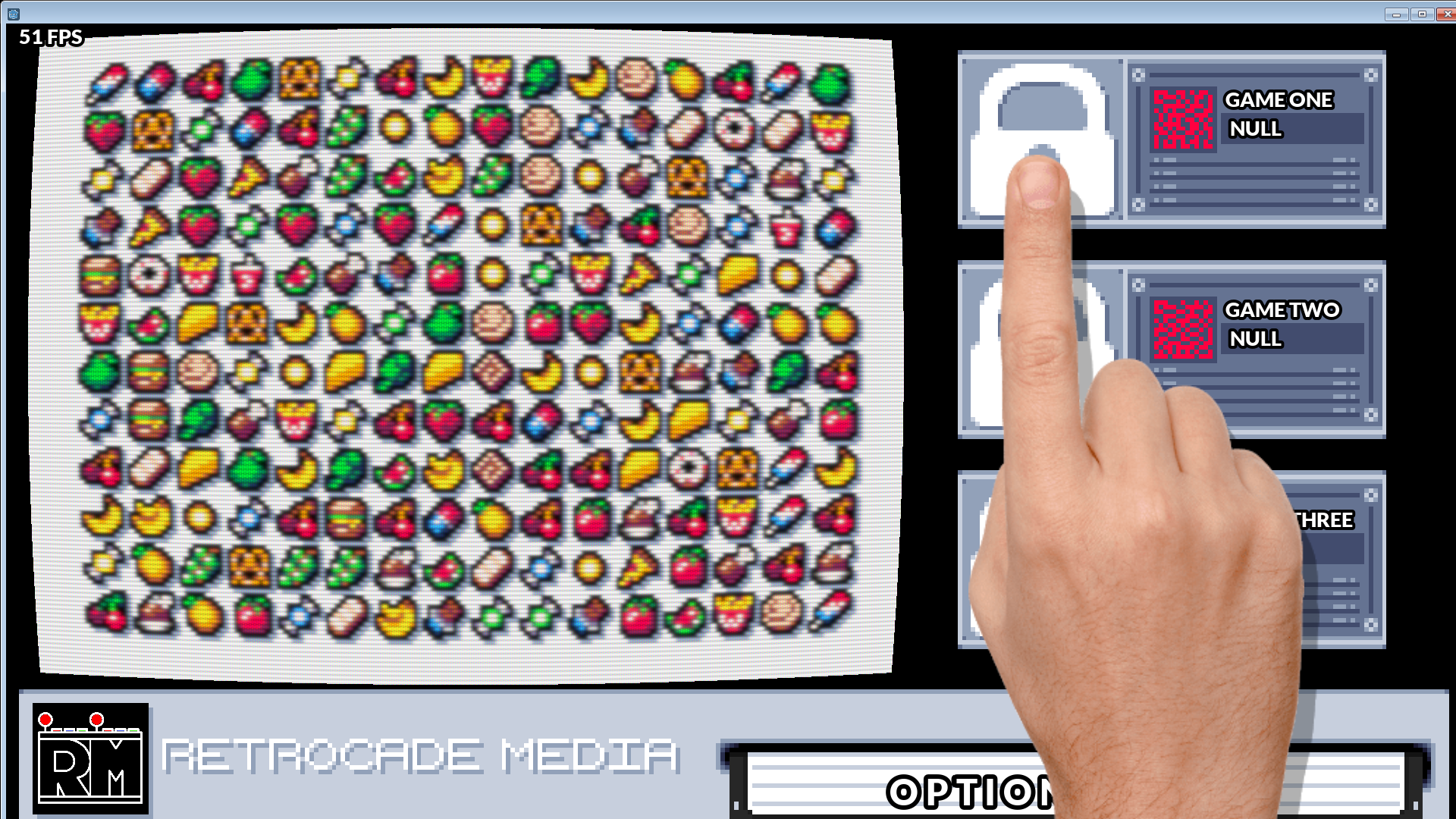
Here is a final, not messed up image for comparison.
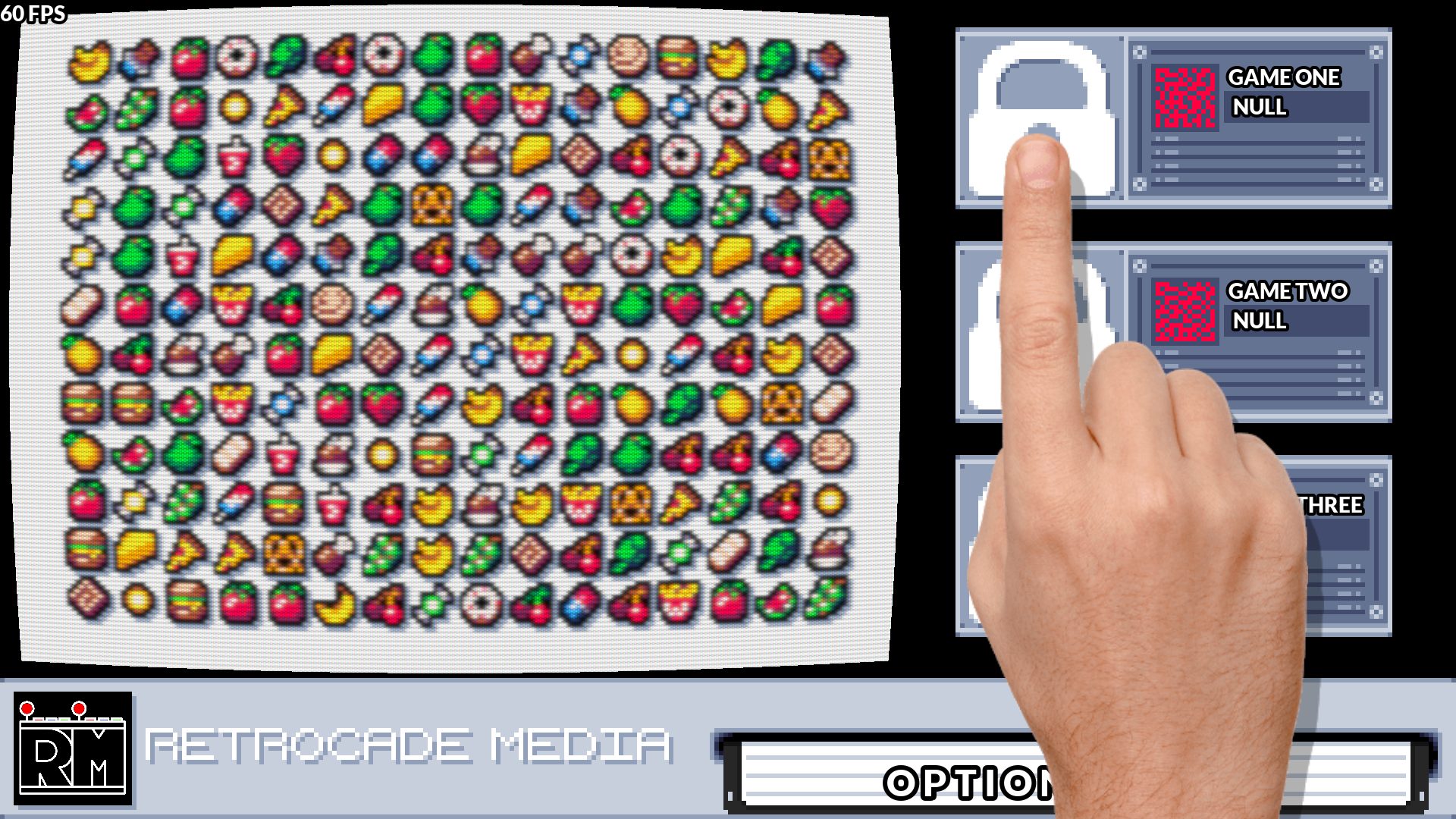
As a note, when using dual monitors, using Print Screen seems to work 99% of the time. It's a good start, if a little annoying to have to paste and save every screenshot.
I'm sure the Godot Dev's and contributors are well aware of the issue, but I thought I'd provide some image examples of each screenshot style. So far "shrunk with black bars" seems to happen more often than the Windows 7 bar for me.
 RetrocadeMedia
on 23 Sep 2020
RetrocadeMedia
on 23 Sep 2020
@RetrocadeMedia You can use a script to take a screenshot of the project and save it. See godot-editor-screenshooter for an example.
Calinou
on 23 Sep 2020
@Calinou I'm not too worried about taking editor screenshots. Thank you for the suggestion though.
RetrocadeMedia
on 23 Sep 2020
@RetrocadeMedia The script in question can be adapted to run inside a project :slightly_smiling_face:
The logic is exactly the same – capture the viewport, flip it vertically and save it to a PNG image. It's just a matter of where you run it.
Calinou
on 23 Sep 2020
Using 3.2.3 stable Standard Win64, issue persists. Tried every single configuration possible, including resizing and repositioning a borderless window instead of fullscreening it, and borderless fullscreen is still indistinguishable from regular fullscreen. Trying to capture with ShareX shows an outdated frame of the game, a common problem in a lot of games that run in non-borderless fullscreen.
For now I'll probably end up implementing an in-game screenshot function as posted above.
 730730
on 10 Nov 2020
730730
on 10 Nov 2020
@730730 Does it work if you keep the project in windowed mode and use Borderless Gaming to put it in fullscreen?
Calinou
on 10 Nov 2020
Wow, this bug is still around? This is one of the first reports I ever made for Godot.
I haven't tested with version 4 yet but I do ask, why does it seem so hard for Godot to properly support a feature that existed since the dawn of the personal computer?
Ace-Dragon
on 10 Nov 2020
- It's not a feature. It's a bug. If you are talking about ability to take screenshots, Godot supports that.
- The bug seems be not just in Godot but many other old games hinting it's an issue with the Windows API.
Everyone's been looking for a solution for a while now. I asked in DirectX server once and they too said it's might not be specific to Godot as some of them encountered it long ago but weren't sure how they fixed it.
Anutrix
on 10 Nov 2020
@730730 Does it work if you keep the project in windowed mode and use Borderless Gaming to put it in fullscreen?
That does work, yeah. Not much of a fix though as you can't just tell players to download some random software to be able to take screenshots. I do use BG myself on games where I have this exact same problem (or a similar problem where the screenshot looks just plain black/white), but I can't expect players to have the same knowledge.
As @Anutrix mentioned, it does seem this is a common problem in Windows games, and I'm assuming that even if there's a fix that could be applied, it hasn't been due to the multiplatform nature of Godot, as I imagine it could end up interfering with implementations in other platforms if the solution consists of a dirty hack.
I do find it misleading though to provide a "borderless" fullscreen option, which gamers have come to know as a solution to this specific problem, and have it provide no different functionality from regular fullscreen. I think a clarification in the docs on how this borderless mode works and what its limitations are in Windows would be helpful in lessening frustration when running into this issue.
730730
on 10 Nov 2020
@730730 Godot actually doesn't support exclusive fullscreen. It's supposed to use borderless fullscreen at all times: https://github.com/godotengine/godot/pull/41746
Therefore, I think enabling borderless when the window size is equal to the screen width and height is identical to enabling fullscreen on Windows.
Calinou
on 10 Nov 2020
Related issues
 SleepProgger
·
3Comments
SleepProgger
·
3Comments
 ndee85
·
3Comments
ndee85
·
3Comments
 Zylann
·
3Comments
Zylann
·
3Comments
 rgrams
·
3Comments
rgrams
·
3Comments
 ivanskodje
·
3Comments
ivanskodje
·
3Comments
Most helpful comment
Everyone's been looking for a solution for a while now. I asked in DirectX server once and they too said it's might not be specific to Godot as some of them encountered it long ago but weren't sure how they fixed it.