Godot: Resizing game window while breakpoint is active gives weird black edges
Godot version:
Custom build at a1fcac6
OS/device including version:
Windows 10 1903
Issue description:
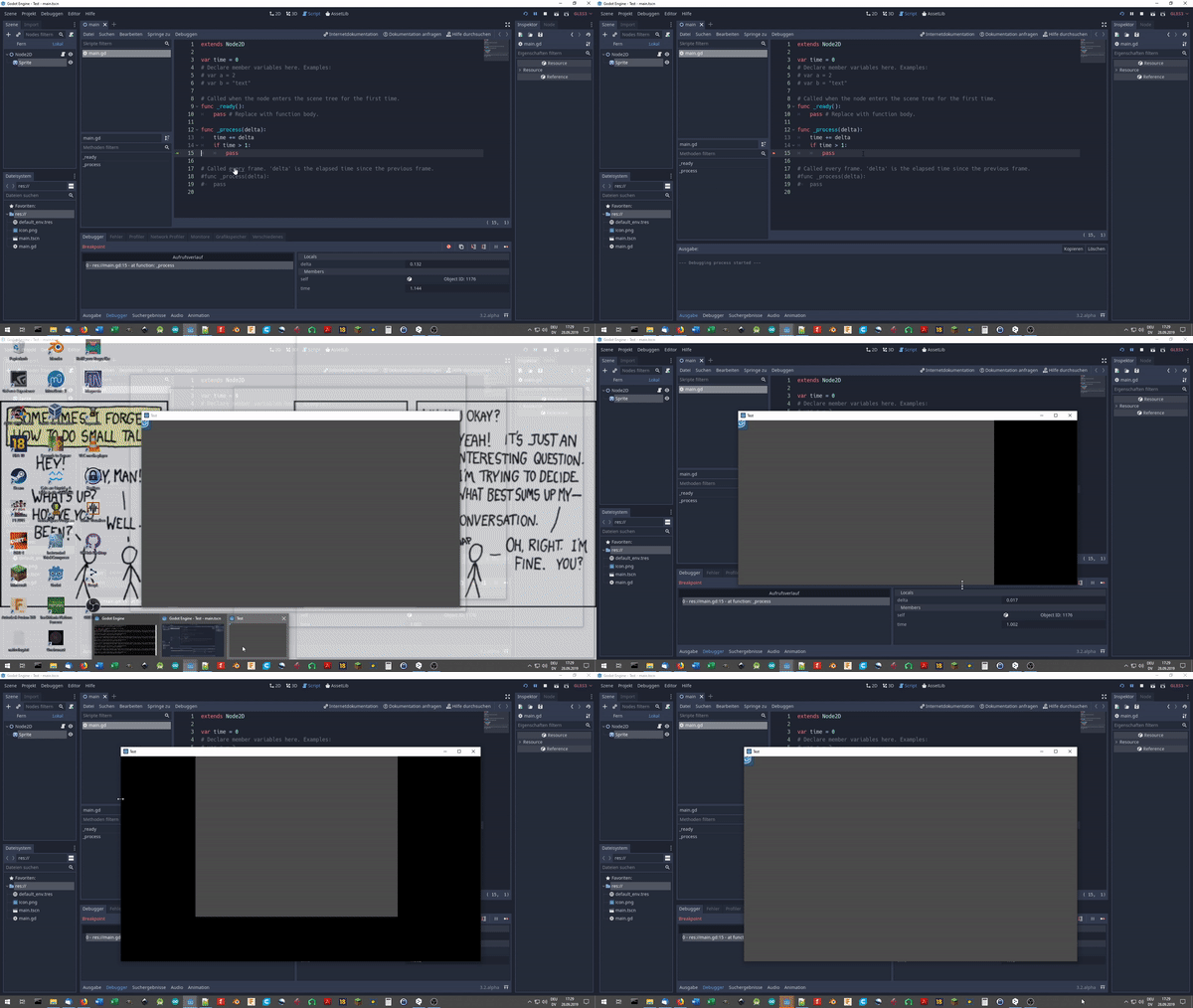
If you try to resize a game window while a breakpoint is active, the part you resized turns black. It works again after pressing "Continue" in the breakpoint window.
Steps to reproduce:
- Use any project you like.
- Add a breakpoint somewhere (using F9).
- When the breakpoint kicks in, resize the game window.
- You should see black edges.
Minimal reproduction project:
https://github.com/noname1477/breakpoint-resize-bug-test
 noname1477
All 2 comments
This doesn't sound like a bug to me. You have a breakpoint active, that means the game loop is really suspended. That includes rendering, so that's why you get black edges, they are not getting updated because the drawing code cannot run. If it were running, it would mess up the breakpoint you used in the first place.
If you want to pause the game and still be able to see things around, it would need a soft pausing instead, which would not involve a breakpoint (i.e stop calling _input, _process, _fixed_process, and stop physics), pretty much like what pausing does in Unity, but I don't think Godot's debugger has this ability yet.
 Zylann
on 28 Sep 2019
Zylann
on 28 Sep 2019
In light of Zylann's comment, I am closing this issue.
He proposed an interesting new feature, but since the implementation will be extremely complex, I suggest if anyone wants it, they make a proposal in the proposals repo.
 clayjohn
on 11 Jul 2020
clayjohn
on 11 Jul 2020
Related issues
 bojidar-bg
·
3Comments
bojidar-bg
·
3Comments
 SleepProgger
·
3Comments
SleepProgger
·
3Comments
 ducdetronquito
·
3Comments
ducdetronquito
·
3Comments
 mefihl
·
3Comments
mefihl
·
3Comments
 testman42
·
3Comments
testman42
·
3Comments
Most helpful comment
This doesn't sound like a bug to me. You have a breakpoint active, that means the game loop is really suspended. That includes rendering, so that's why you get black edges, they are not getting updated because the drawing code cannot run. If it were running, it would mess up the breakpoint you used in the first place.
If you want to pause the game and still be able to see things around, it would need a soft pausing instead, which would not involve a breakpoint (i.e stop calling
_input,_process,_fixed_process, and stop physics), pretty much like what pausing does in Unity, but I don't think Godot's debugger has this ability yet.