Godot: Code scrolling and Editor slow on huge files due to connection information
3.2 alpha 2e065d8ad
Windows 10
I hope this is the right place to ask questions about the beta and alpha build. If not please direct me to the right spot.
I have a game with 25k lines of code. Every time I open it in the alpha build, it takes 5 times as long to load and once loaded it will freeze a lot while scrolling through code or switching from one func to another another.
Are there any particular new settings in the editor that I can turn off to see if it will speed up?
 ondesic
All 23 comments
Are you using custom build or a nightly one? This might be the same case as #32195
If it's not, code minimap might be the culprit.
 KoBeWi
on 21 Sep 2019
KoBeWi
on 21 Sep 2019
Assuming it is a nightly from https://hugo.pro/projects/godot-builds/
I will check if minimap is the problem
ondesic
on 21 Sep 2019
After disabling code minimap, I still get the tremendous slow down. I notice also that if I hover over a function name in the "function names" window, godot will freeze for 5 seconds and then the hover text will appear. In v3.1, hovering over a function in the "function names" will almost instantly cause the hover text to pop up.
If I load a project that has 300 lines of code, everything is fast again.
ondesic
on 21 Sep 2019
here are 2 videos comparing the slow down. Same big project opened in 3.1 and latest nightly 3.2
The first video I hover over the function list in 3.1 and the hint dialog pops up almost immediately. The second video freezes completely and stalls for a long time before the hint dialog pops up.
Everything is painstakingly slower while editing as well as navigating menus. Every few letters of code typed and godot will freeze for a little bit. Every menu I access and godot will freeze a little while.
ondesic
on 27 Sep 2019
from the post and video I provided above, are there any ideas as to what else I could disable or what the major bog down could be? I just downloaded the latest alpha today and it has the same problem
update: I just went setting by setting from 3.1 to 3.2 alpha 1 and set everything the same. 3.2 a1 is crazy slow
ondesic
on 9 Oct 2019
Wild hunch, try changing values in Editor settings->Low Processors Mode Sleep Usec and Unfocused. I'm only saying that because it is new for 3.2 and could possibly be e.g. thinking it was unfocused incorrectly. Worth ruling out anyway.
Also we fixed something in the polling of gdscript language server just a couple of days ago (where it was polling far too frequently) in latest master, so it is possible that this may have been affecting things (especially if it was polling 25,000 lines of code too frequently). So do try latest nightly build again to compare.
If you can run task manager and let us know what percentage of CPU godot is using in both 3.1 and 3.2 that might be helpful info, and even better if you could would be to profile it but you may not be familiar with doing this.
 lawnjelly
on 14 Oct 2019
lawnjelly
on 14 Oct 2019
I will try the newest. Any suggestions on a number to set Low Processors Mode Sleep Usec and Unfocused to?
ondesic
on 14 Oct 2019
@ondesic I think most of the slowdown was coming from the LSP polling, so I'd try to leave it unchanged at first.
The Low Processor Mode Sleep Usec setting forces the editor to sleep at least this many microseconds before rendering another frame. The default value (6900) effectively caps the editor to 144 FPS (but note that V-Sync, which is enabled by default, will likely cap it below). Higher values will result in a lower FPS.
The Unfocused Low Processor Mode Sleep Usec setting does the same thing, but when the editor window isn't focused. The default value (50000) caps the editor rendering to 20 FPS in this case. This is designed to save CPU/GPU resources, especially on laptops.
 Calinou
on 14 Oct 2019
Calinou
on 14 Oct 2019
When I open the project in 3.1 the CPU usage is 3% almost always.
When I open the same project in the latest nightly, while loading, anytime I click on a menu, click on code, immediately type code, or hover over the fuction names, the CPU jumps to 24%
Also, I tried adjusting the 2 setting up and down. It doesn't seem to help.
ondesic
on 14 Oct 2019
And just to clarify, when you say 25k lines of code, is this gdscript?
lawnjelly
on 15 Oct 2019
Yes, all GDscript
ondesic
on 15 Oct 2019
So, I did a test and closed all scripts. The editor went back to normal speed. As soon as I reload the 20k line script, everything slows to a halt. In 3.2 there is definately something added that is working WAY too hard on the scripts as 3.1 is perfectly fine with the same script.
ondesic
on 17 Oct 2019
Any more ideas I can test?
ondesic
on 19 Oct 2019
I just procedurally created a gdscript file that was 20k lines long for a test. It was a little bit slower but still quite usable.
However when I turned on minimap it was quite a bit slower (I have that turned off as I don't use it). But 20k lines in one file might be worse case for the minimap.
There may be something that is going on in your particular project which is causing the slowdown.
If you really want to track it down, short of putting your 25K project available for download, you would probably need to compile Godot from source (or have a version with symbols inside for the profiler), then run it with a profiler to try and detect the bottlenecks.
I've used 'very sleepy' in the past (http://www.codersnotes.com/sleepy/) on windows but most any profiler should do. You would want to turn the profiler on just for the period where you were messing around in the files and getting these slowdowns. The profiler will tell you the exact functions and lines of code which are taking up the most time.
To clarify when I mentioned a change you should be using a build after, it is this commit:
32714
lawnjelly
on 20 Oct 2019
This is a profile of my build with a 100K line of code gdscript file, for reference. It may be something else that is bottlenecking your case.
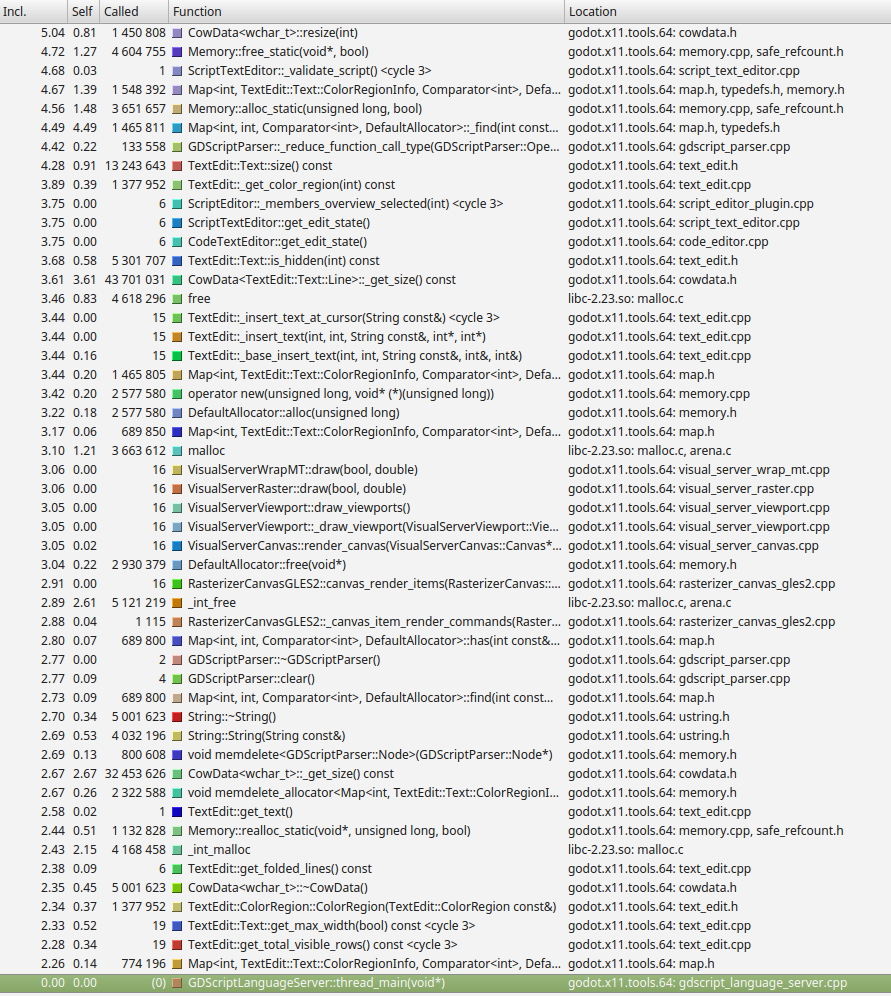
I know next to nothing about the gdscript parsing etc, so can only look for spikes on the profile. Nothing is jumping out at me as taking 'all the time', although there is probably room for lots of optimization for just moving around the file.
CowData resizing is happening a lot, called from String::resize.
Generally it seems to be doing an awful lot of allocating / deallocating for just moving around a file, whether that is the parser or the display code I don't know. Certainly the TextEdit itself may not be great with such big files. Each call to TextEdit::_insert_text seems to be taking a large amount of time.
Of course the other question is, is this 25K loc file actually game code? Or data? If it is data you may be better off loading it manually from a separate file. And could you separate this code into several files rather than trying to do it all in one?
Realistically rather than expecting Godot to be highly optimized for large .gd files, the easiest solution would be to split up your source code into multiple files. If a file in another tab isn't being edited, it presumably doesn't have to be repeatedly parsed (which is a lot of the time taken) and things like inserting text will be much quicker as there is less surrounding text to deal with.
On the other side of the coin, I'm not sure whether repeated parsing is really necessary, possibly it only really needs to be done when the user has typed something, and other results could be cached. But that may make the code unnecessarily more complex.
lawnjelly
on 20 Oct 2019
Perhaps I can dabble in building and profiling Godot.
In the meantime here is what I have found:
- I first thought it was the "minimap". However, 3.1 has the "minimap" and I have tested to. In 3.1 there is no difference with the speed.
- If I open my project in 3.2, it takes 5x as long to load compared to 3.1.
- Once loaded, the 3.2 editor is super slow until I close the 25k script. The speed for 3.2 goes back to normal when small scripts are opened.
- Most importantly, the speed slowdown seems to be completely isolated to 3.2. The 3.1 editor has no speed problems working with the 25k lines of code.
Is there an archive of the nightlies? Perhaps I can go back and test them through time and see when the slowdown first started?
ondesic
on 21 Oct 2019
Is there an archive of the nightlies?
Unfortunately, I don't have enough space to keep an archive of nightly builds, so you'll have to build commits manually to test them. Luckily, you can use git-bisect to efficiently test commits between a range (here, 3.1.1-stable..master). This means you won't have to build and test all commits, only a subset of them.
See Compiling for Windows for instructions on building Godot on Windows. You'll want to use Visual Studio here, as building with MinGW is significantly slower.
Calinou
on 21 Oct 2019
I first thought it was the "minimap". However, 3.1 has the "minimap" and I have tested to. In 3.1 there is no difference with the speed.
3.1 doesn't have the minimap, it was merged in August (#31302).
You can try to disable it, there's a setting for it.
 akien-mga
on 21 Oct 2019
akien-mga
on 21 Oct 2019
I have turned it off in 3.2 with no luck in solving the problem
ondesic
on 21 Oct 2019
Thank you so much for leading me in the right direction. I am now Git bisecting and am narrowing it down. I'll let you now what I find
ondesic
on 22 Oct 2019
Been testing all day and last night. Every build before commit a6562cd0048f1dadb3c1ab2f8583e21251634365 is super fast with my huge code. Here is where the problem started:
`commit a6562cd0048f1dadb3c1ab2f8583e21251634365
Date: Sat Apr 20 12:51:25 2019 +0100
Display connection information in the script editor
editor/code_editor.cpp | 1 +
editor/editor_settings.cpp | 1 +
editor/plugins/script_editor_plugin.cpp | 12 +++
editor/plugins/script_editor_plugin.h | 1 +
editor/plugins/script_text_editor.cpp | 165 +++++++++++++++++++++++++++++++-
editor/plugins/script_text_editor.h | 24 +++++
scene/gui/text_edit.cpp | 126 +++++++++++++++++++++---
scene/gui/text_edit.h | 21 ++++
8 files changed, 335 insertions(+), 16 deletions(-)`
ondesic
on 22 Oct 2019
@ondesic Thanks for taking the time to bisect the regression! This is going to be very helpful :heart:
Calinou
on 22 Oct 2019
GREAT JOB!!
So much faster!!!
ondesic
on 28 Oct 2019
Related issues
 kirilledelman
·
3Comments
kirilledelman
·
3Comments
 bojidar-bg
·
3Comments
bojidar-bg
·
3Comments
 mooseyfaith
·
3Comments
mooseyfaith
·
3Comments
 rgrams
·
3Comments
rgrams
·
3Comments
 timoschwarzer
·
3Comments
timoschwarzer
·
3Comments
Most helpful comment
Been testing all day and last night. Every build before commit a6562cd0048f1dadb3c1ab2f8583e21251634365 is super fast with my huge code. Here is where the problem started:
`commit a6562cd0048f1dadb3c1ab2f8583e21251634365
Date: Sat Apr 20 12:51:25 2019 +0100
editor/code_editor.cpp | 1 +
editor/editor_settings.cpp | 1 +
editor/plugins/script_editor_plugin.cpp | 12 +++
editor/plugins/script_editor_plugin.h | 1 +
editor/plugins/script_text_editor.cpp | 165 +++++++++++++++++++++++++++++++-
editor/plugins/script_text_editor.h | 24 +++++
scene/gui/text_edit.cpp | 126 +++++++++++++++++++++---
scene/gui/text_edit.h | 21 ++++
8 files changed, 335 insertions(+), 16 deletions(-)`