Godot: VCS selection menu dropdown uses dummy option as placeholder
Godot version:
3.2 alpha
Issue description:
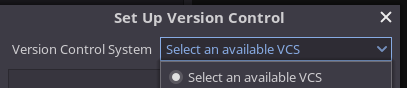
The dropdown default value/placeholder is an option itself. Should be shown as a placeholder or not at all.
Steps to reproduce:
- Select Project > Version Control > Set Up Version Control.
- Expand the dropdown container to see the default value listed in too.
Minimal reproduction project:
Fresh Godot Project
 IronicallySerious
All 3 comments
I introduced this bug originally :P
I am creating an issue so I remember to fix this as soon as I get free, or if anyone is willing, they can probably have a go at it.
Looks like a simple UI bug
IronicallySerious
on 14 Sep 2019
It would probably make sense to remove the placeholder option if at least one VCS is available. Just select the one that was first added to the list :slightly_smiling_face:
If no VCSes are found, an error dialog can be displayed instead.
 Calinou
on 14 Sep 2019
Calinou
on 14 Sep 2019
FWIW I think the "If no VCSes are found, an error dialog can be displayed instead." approach leads to a pretty unfriendly first experience--particularly with the current level of documentation as mentioned in https://github.com/godotengine/godot-docs/issues/2838.
My thinking is it would be nice if the "Set Up Version Control" displayed the error message (perhaps also stating "No VCS plugin available" in the disabled pop-up control) and then documented or linked to documentation on how to add an addon.
 follower
on 9 Oct 2019
follower
on 9 Oct 2019
Related issues
 kirilledelman
·
3Comments
kirilledelman
·
3Comments
 mefihl
·
3Comments
mefihl
·
3Comments
 rgrams
·
3Comments
rgrams
·
3Comments
 ducdetronquito
·
3Comments
ducdetronquito
·
3Comments
 testman42
·
3Comments
testman42
·
3Comments
Most helpful comment
It would probably make sense to remove the placeholder option if at least one VCS is available. Just select the one that was first added to the list :slightly_smiling_face:
If no VCSes are found, an error dialog can be displayed instead.