Godot: Version control window lists all global classes
Godot version:
3.2-alpha, 24e1039
OS/device including version:
Windows 10
Issue description:
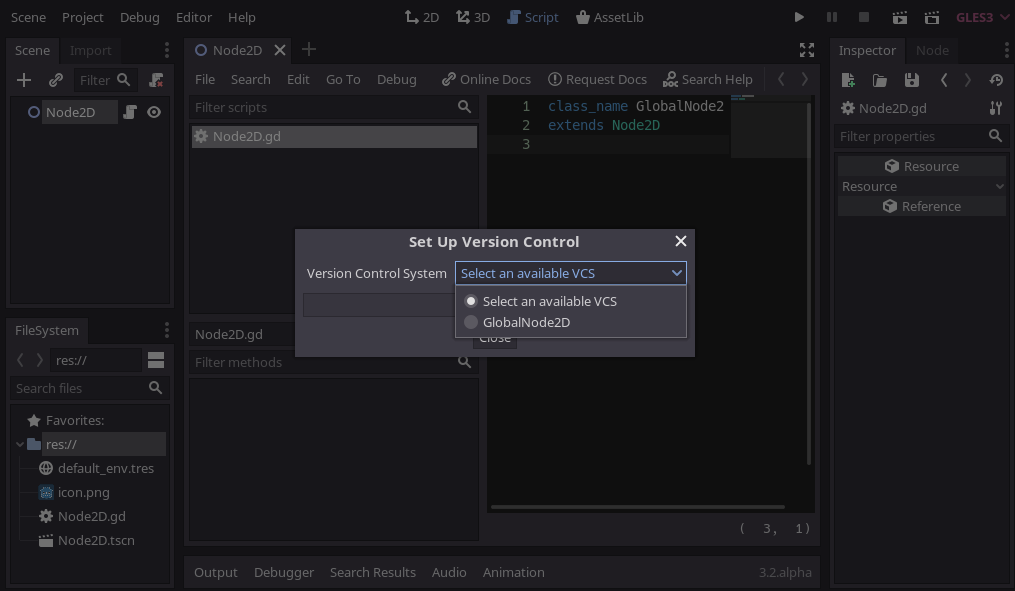
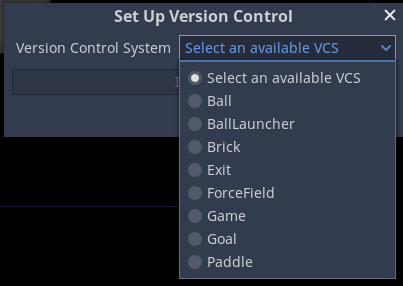
When attempting to select a VCS, all global classes exposed via class_name are listed regardless:
Steps to reproduce:
- Create global classes with
class_name - Go to
Project→Version Control→Set Up Version Control - See all classes listed in the project.
Minimal reproduction project:
vcs-global-classes.zip
 Xrayez
All 4 comments
I can confirm this on commit https://github.com/godotengine/godot/commit/24e1039eb6fe32115e8d1a62a84965e9be19a2ed.
 Calinou
on 13 Sep 2019
Calinou
on 13 Sep 2019
I wonder what kind of VCS Select an available VCS is
 Zylann
on 13 Sep 2019
Zylann
on 13 Sep 2019
Likely this Git plugin, so CC @IronicallySerious I guess.
Xrayez
on 13 Sep 2019
The "Select an available VCS" refers to a GDNative object placed in the project folder that extends EditorVCSInterface. @Zylann
To use the integration you will have to extract this .zip file in your project folder.
Right now it lists all global scripts available because since the VCS integration is new, I kept things as simple as possible. I would expect the dialogue box to raise an error in the output if you selected a script that is not the Git plugin so the VCS functionality stays hidden.
I would probably fix in this line here: https://github.com/godotengine/godot/blob/24e1039eb6fe32115e8d1a62a84965e9be19a2ed/editor/plugins/version_control_editor_plugin.cpp#L384
I can get this done after Monday because of my exams, but if someone is interested they can have a look. If we are able to detect what class a GDNative plugin extends then it is a simple if statement because all VCS plugins will extend EditorVCSInterface
EDIT: Sent a PR for this.
 IronicallySerious
on 13 Sep 2019
IronicallySerious
on 13 Sep 2019
Related issues
 timoschwarzer
·
3Comments
timoschwarzer
·
3Comments
 rgrams
·
3Comments
Zylann
·
3Comments
rgrams
·
3Comments
Zylann
·
3Comments
 ndee85
·
3Comments
ndee85
·
3Comments
 n-pigeon
·
3Comments
n-pigeon
·
3Comments
Most helpful comment
I wonder what kind of VCS
Select an available VCSis