Godot: Translation is set to en_US, however translations en_GB/en_AU
Edit:
Related Issue https://github.com/godotengine/godot/issues/26346
PR (Thanks Akien) https://github.com/godotengine/godot/pull/31198
Godot version:
3.1.1 Stable Mono
(Issue not related to Mono)
OS/device including version:
Windows 10 Pro Build 18362
Issue description:
In the project, en_AU is what the language appears to be.
However, adjusting window settings (Could be any setting) randomly changes the locale to en_GB.
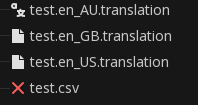
EDIT: This is what the project content icons appear to be:
Steps to reproduce:
No idea if this is reproducible on different computers.
Download the Test.zip project and mess with random settings
Minimal reproduction project:
Test.zip
 nathanfranke
All 10 comments
I can't reproduce. I loaded up the project, changed a bunch of settings. Stayed en_US the whole time for me. Any more tips on reproducing?
 clayjohn
on 8 Aug 2019
clayjohn
on 8 Aug 2019
I can't reproduce. I loaded up the project, changed a bunch of settings. Stayed en_US the whole time for me. Any more tips on reproducing?
I am working on debugging the engine to see exactly what is going wrong. I edited the original post to contain a screenshot of the translation icons. I think that since en is my fallback font and no other fonts are correctly loaded, the translations are converting to en_AU
Edit: I should note that I had the same problem with my main project, so it may be a problem with my computer (Or my Godot installation)
nathanfranke
on 8 Aug 2019
Likely a duplicate of #26346.
I confirm that it behaves weirdly, for the test project on Linux (with locale en_DK), I get "Great Britain" showing when running the project.
Yet
    print(OS.get_locale())
    print(TranslationServer.get_loaded_locales())
    print(TranslationServer.get_locale())
prints
en_DK
[en_US, en_GB, en_AU]
en_US
There must be something bogus with the CSV loader or the way the various sublocales are handled internally.
 akien-mga
on 8 Aug 2019
akien-mga
on 8 Aug 2019
The CSV is parsed properly it seems, as loading the .translation files manually shows the proper strings:
    print(OS.get_locale())
    print(TranslationServer.get_loaded_locales())
    print(TranslationServer.get_locale())

    print(tr("TEST"))
    print(TranslationServer.translate("TEST"))

    var tr_au = load("test.en_AU.translation")
    print(tr_au.get_message("TEST"))
    var tr_gb = load("test.en_GB.translation")
    print(tr_gb.get_message("TEST"))
    var tr_us = load("test.en_US.translation")
    print(tr_us.get_message("TEST"))
prints
en_DK
[en_US, en_GB, en_AU]
en_US
Great Britain
Great Britain
Australia
Great Britain
United States
As you can see, there's a mismatch between TranslationServer.get_locale() (which is correct) and what tr("TEST") resolves to.
akien-mga
on 8 Aug 2019
I think I found the bug, TranslationServer::translate() does some bogus locale matching logic.
akien-mga
on 8 Aug 2019
I think I found the bug,
TranslationServer::translate()does some bogus locale matching logic.
Exactly, I saw the same thing.
It looks like l != locale should be l == locale. I might PR in a sec
nathanfranke
on 8 Aug 2019
I'm already preparing a PR with added comments ;)
akien-mga
on 8 Aug 2019
I'm already preparing a PR with added comments ;)
Alright, go ahead :)
nathanfranke
on 8 Aug 2019
EDIT: This is what the project content icons appear to be:
BTW, it's a different issue but it's weird that only the first entry has a proper translation icon.
For me, none of them have it. Might be worth opening a new issue about it.
I also don't have the cross/invalid icon for the CSV locally, it appears with the "default" resource icon as the translations.
akien-mga
on 8 Aug 2019
After deleting .import, my icons are the same as you've described yours. Regardless, I could always inspect the files so it's definitely visual.
P.S: Should I choose close the Issue or wait until PR merged?
nathanfranke
on 8 Aug 2019
Related issues
 EdwardAngeles
·
3Comments
EdwardAngeles
·
3Comments
 blurymind
·
3Comments
blurymind
·
3Comments
 SleepProgger
·
3Comments
SleepProgger
·
3Comments
 mooseyfaith
·
3Comments
mooseyfaith
·
3Comments
 mefihl
·
3Comments
mefihl
·
3Comments