Godot version:
3.1.1 Mono version
OS/device including version:
Fedora Linux 30 x64
Mono 6.0.0 x64
Msbuild 16.0.0.0 for Mono
Issue description:
I run the project using a C# script and not build.
[leonardo@fedora-notebook Godot_v3.1.1-stable_mono_x11_64]$ DRI_PRIME=1 ./Godot_v3.1.1-stable_mono_x11.64
OpenGL ES 3.0 Renderer: Radeon 500 Series (POLARIS12, DRM 3.30.0, 5.1.20-300.fc30.x86_64, LLVM 8.0.0)
Mono: Logfile is: /home/leonardo/.local/share/godot/mono/mono_logs/2019_08_02 11.40.00 (25333).txt
Editing project: /home/leonardo/testec (::home::leonardo::testec)
OpenGL ES 3.0 Renderer: Radeon 500 Series (POLARIS12, DRM 3.30.0, 5.1.20-300.fc30.x86_64, LLVM 8.0.0)
Mono: Logfile is: /home/leonardo/.local/share/godot/mono/mono_logs/2019_08_02 11.40.03 (25355).txt
[leonardo@fedora-notebook Godot_v3.1.1-stable_mono_x11_64]$ Running: "/usr/bin/msbuild" "/home/leonardo/testec/testec.sln" /v:normal /t:Build "/p:Configuration=Tools" "/l:GodotSharpTools.Build.GodotBuildLogger,/home/leonardo/Programas/Godot_v3.1.1-stable_mono_x11_64/GodotSharp/Tools/GodotSharpTools.dll;/home/leonardo/.local/share/godot/mono/build_logs/2b9fc6edcc09ede0285a36ed243eea5f_Tools"
;1RMSBUILD : error MSB1025: Falha interna durante a execução do MSBuild.
System.IO.IOException: Invalid handle to path "/home/leonardo/testec/[Unknown]"
  at System.IO.FileStream.ReadData (System.Runtime.InteropServices.SafeHandle safeHandle, System.Byte[] buf, System.Int32 offset, System.Int32 count) [0x0002d] in <5994468181014a05b48ecbf866f95378>:0
  at System.IO.FileStream.ReadInternal (System.Byte[] dest, System.Int32 offset, System.Int32 count) [0x00026] in <5994468181014a05b48ecbf866f95378>:0
  at System.IO.FileStream.Read (System.Byte[] array, System.Int32 offset, System.Int32 count) [0x000a1] in <5994468181014a05b48ecbf866f95378>:0
  at System.IO.StreamReader.ReadBuffer () [0x000b3] in <5994468181014a05b48ecbf866f95378>:0
  at System.IO.StreamReader.Read () [0x00028] in <5994468181014a05b48ecbf866f95378>:0
  at System.TermInfoDriver.GetCursorPosition () [0x00048] in <5994468181014a05b48ecbf866f95378>:0
  at System.TermInfoDriver.Init () [0x002dc] in <5994468181014a05b48ecbf866f95378>:0
  at System.ConsoleDriver.Init () [0x00000] in <5994468181014a05b48ecbf866f95378>:0
  at System.Console.add_CancelKeyPress (System.ConsoleCancelEventHandler value) [0x00007] in <5994468181014a05b48ecbf866f95378>:0
  at Microsoft.Build.CommandLine.MSBuildApp.Execute (System.String commandLine) [0x00075] in <bfc1a6800805411fb2f459e7ffe3c4e3>:0

Unhandled Exception:
System.IO.IOException: Invalid handle to path "/home/leonardo/testec/[Unknown]"
  at System.IO.FileStream.ReadData (System.Runtime.InteropServices.SafeHandle safeHandle, System.Byte[] buf, System.Int32 offset, System.Int32 count) [0x0002d] in <5994468181014a05b48ecbf866f95378>:0
  at System.IO.FileStream.ReadInternal (System.Byte[] dest, System.Int32 offset, System.Int32 count) [0x00026] in <5994468181014a05b48ecbf866f95378>:0
  at System.IO.FileStream.Read (System.Byte[] array, System.Int32 offset, System.Int32 count) [0x000a1] in <5994468181014a05b48ecbf866f95378>:0
  at System.IO.StreamReader.ReadBuffer () [0x000b3] in <5994468181014a05b48ecbf866f95378>:0
  at System.IO.StreamReader.Read () [0x00028] in <5994468181014a05b48ecbf866f95378>:0
  at System.TermInfoDriver.GetCursorPosition () [0x00048] in <5994468181014a05b48ecbf866f95378>:0
  at System.TermInfoDriver.Init () [0x002dc] in <5994468181014a05b48ecbf866f95378>:0
  at System.ConsoleDriver.Init () [0x00000] in <5994468181014a05b48ecbf866f95378>:0
  at System.Console.add_CancelKeyPress (System.ConsoleCancelEventHandler value) [0x00007] in <5994468181014a05b48ecbf866f95378>:0
  at Microsoft.Build.CommandLine.MSBuildApp.Execute (System.String commandLine) [0x00418] in <bfc1a6800805411fb2f459e7ffe3c4e3>:0
  at Microsoft.Build.CommandLine.MSBuildApp.Main () [0x00028] in <bfc1a6800805411fb2f459e7ffe3c4e3>:0
[ERROR] FATAL UNHANDLED EXCEPTION: System.IO.IOException: Invalid handle to path "/home/leonardo/testec/[Unknown]"
  at System.IO.FileStream.ReadData (System.Runtime.InteropServices.SafeHandle safeHandle, System.Byte[] buf, System.Int32 offset, System.Int32 count) [0x0002d] in <5994468181014a05b48ecbf866f95378>:0
  at System.IO.FileStream.ReadInternal (System.Byte[] dest, System.Int32 offset, System.Int32 count) [0x00026] in <5994468181014a05b48ecbf866f95378>:0
  at System.IO.FileStream.Read (System.Byte[] array, System.Int32 offset, System.Int32 count) [0x000a1] in <5994468181014a05b48ecbf866f95378>:0
  at System.IO.StreamReader.ReadBuffer () [0x000b3] in <5994468181014a05b48ecbf866f95378>:0
  at System.IO.StreamReader.Read () [0x00028] in <5994468181014a05b48ecbf866f95378>:0
  at System.TermInfoDriver.GetCursorPosition () [0x00048] in <5994468181014a05b48ecbf866f95378>:0
  at System.TermInfoDriver.Init () [0x002dc] in <5994468181014a05b48ecbf866f95378>:0
  at System.ConsoleDriver.Init () [0x00000] in <5994468181014a05b48ecbf866f95378>:0
  at System.Console.add_CancelKeyPress (System.ConsoleCancelEventHandler value) [0x00007] in <5994468181014a05b48ecbf866f95378>:0
  at Microsoft.Build.CommandLine.MSBuildApp.Execute (System.String commandLine) [0x00418] in <bfc1a6800805411fb2f459e7ffe3c4e3>:0
  at Microsoft.Build.CommandLine.MSBuildApp.Main () [0x00028] in <bfc1a6800805411fb2f459e7ffe3c4e3>:0
ERROR: call_build: A Godot Engine build callback failed.
   At: editor/editor_node.cpp:4666.
WARNING: cleanup: ObjectDB Instances still exist!
   At: core/object.cpp:2095.
ERROR: cleanup: There are still MemoryPool allocs in use at exit!
   At: core/pool_vector.cpp:70.
Steps to reproduce:
You have to execute Godot by command line, and then run the C# project with the play button.
Minimal reproduction project:
testec.zip
 leotada
All 20 comments
I can run the project just fine. Seems like some OS or configuration issue.
 KoBeWi
on 2 Aug 2019
KoBeWi
on 2 Aug 2019
Apparently this error happens when Godot is executed by command line. I tested it now and it worked, starting by clicking, but by command line still not working.
leotada
on 5 Aug 2019
Works for me from command line too. I will just label it as "Needs Testing", maybe someone will run into the same problem :/
KoBeWi
on 5 Aug 2019
Works for me from command line too. I will just label it as "Needs Testing", maybe someone will run into the same problem :/
Which OS did you test?
leotada
on 5 Aug 2019
Ok, now I noticed this is Linux issue. I tried it on Windows.
KoBeWi
on 5 Aug 2019
Cannot reproduce
Ubuntu 18.04 bionic
Mono 6.0.0.319
MsBuild 16.0.0.0
Confirming- am I just supposed to run the project in the editor using the play button?
 nathanfranke
on 25 Aug 2019
nathanfranke
on 25 Aug 2019
Confirming- am I just supposed to run the project in the editor using the play button?
You have to execute Godot by command line, and then run with the play button.
leotada
on 30 Aug 2019
Has any progress been made on this? I'm encountering this issue whether I run Godot from the command line or from the GUI.
For reference, I'm running on Ubuntu 18.04 and I installed godot-mono using snap.
 JarredAllen
on 21 Oct 2019
JarredAllen
on 21 Oct 2019
Running the project as per the reproduction steps gives me a compiler error, but no MSBuild/Mono Native errors
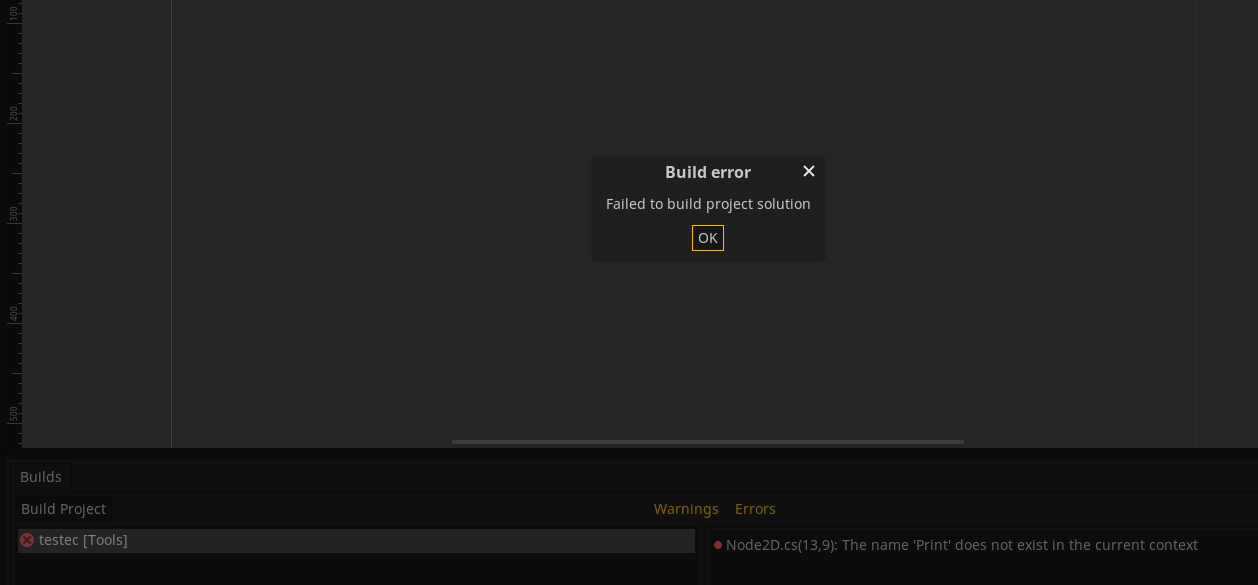
ERROR: call_build: An EditorPlugin build callback failed.
   At: editor/editor_node.cpp:5134.
Ubuntu 18.04.2 LTS
Kernal x86_64 Linux 4.18.0-17-generic
MS Build Engine 16.3.0-ci
Mono JIT compiler version 6.4.0.198 (tarball Tue Sep 24 01:21:28 UTC 2019
nathanfranke
on 21 Oct 2019
Not sure if my problem has to do with this.
This error appears to me just by adding a script but it seems to happen to me in a different way.
Use Win10 64.
In the forum I described how my problem happens.
https://godotforums.org/discussion/21482/problem-with-the-editor-in-c#latest
Any solution to this?
 Torguen
on 7 Nov 2019
Torguen
on 7 Nov 2019
I can confirm the same behavior as seen by @leotada
Invalid handle paths when executing Godot mono from shell, but works fine when launching from Nautilus.
Env
- Godot mono 3.1.1 (64-bit from https://godotengine.org/download/linux)
- Ubuntu 19.10
- Mono 6.4.0.198
- MsBuild 16.3.0
 hhedin
on 17 Nov 2019
hhedin
on 17 Nov 2019
Same problem here. Made me very confused for a while.
Linux MInt 19.3
Godot mono 3.2
 jabcross
on 11 Feb 2020
jabcross
on 11 Feb 2020
Same problem here.
Lubuntu 20.04
Godot mono 3.2.1
 qdwang
on 3 May 2020
qdwang
on 3 May 2020
Same problem here https://github.com/mono/mono/issues/19679
 Rombersoft
on 22 May 2020
Rombersoft
on 22 May 2020
Try to remove godot config folder. You find folder in /home/username/.config/godot. Press Ctrl + H to show hidden files.
 eugeneBecker
on 30 Jul 2020
eugeneBecker
on 30 Jul 2020
Same issue here on Arch Linux, here are my specs:
Mono 6.10.0
dotnet 3.1.402
Godot 3.2.2-stable_mono
It still does not work even after deleting the config folder
I tried building my own project (which is the Godot official tutorial project) and the project Pong CS which is publicly available.
I get the same error as the OP: System.IO.IOException: Invalid handle to path "/home/deregon/Godot/Projects/Dodge the Creeps!/[Unknown]"
 Deregon
on 15 Sep 2020
Deregon
on 15 Sep 2020
Same issue here on Arch Linux, here are my specs:
Mono 6.10.0
dotnet 3.1.402
Godot 3.2.2-stable_mono
It still does not work even after deleting the config folder
I tried building my own project (which is the Godot official tutorial project) and the project Pong CS which is publicly available.
I get the same error as the OP:System.IO.IOException: Invalid handle to path "/home/deregon/Godot/Projects/Dodge the Creeps!/[Unknown]"
Hi! So i don't have any issues on Arch Linux. Try to change Build Tool in Editor Settings from dotnetCLI to MSBuild (Mono). You can find Mono section at the bottom. Also i install these packages:
mono
mono-msbuild
dotnet-sdk
dotnet-runtime
dotnet-targeting-pack
eugeneBecker
on 15 Sep 2020
I tried to use both dotnetCLI and MSBuild but they both throw the same IOException.
I had all listed packages installed with the exception of mono-msbuild, which I installed but it still cannot build.
Deregon
on 15 Sep 2020
I tried to use both dotnetCLI and MSBuild but they both throw the same
IOException.
I had all listed packages installed with the exception of mono-msbuild, which I installed but it still cannot build.
Try to remove godot config folder.
You can use this command rm -r .config/godot/
And change to MSBuild (Mono) again
eugeneBecker
on 15 Sep 2020
Tried that and it finally worked!
Thanks for your support
Deregon
on 15 Sep 2020
Related issues
 zatherz
·
121Comments
zatherz
·
121Comments
 RyanBram
·
101Comments
RyanBram
·
101Comments
 adolson
·
87Comments
adolson
·
87Comments
 crystalnoir
·
145Comments
crystalnoir
·
145Comments
 ghost
·
105Comments
ghost
·
105Comments
Most helpful comment
I can confirm the same behavior as seen by @leotada
Invalid handle paths when executing Godot mono from shell, but works fine when launching from Nautilus.
Env