Godot version: v3.1.1 stable win64
OS/device including version: Windows 10 64 bit version 1809
What i did: I tried to play around with the new tilemap system, especially because of the new autotile feature. I expected the tiles to be placed and rendered correctly but instead the bottom ones almost always glitch out.
Steps to reproduce: Start with a blank node called whatever, i used "World".
Then add a Node2D TileMap and create a new tile map.
Add your tilemap image and select your 3x3 set of tiles, mask the center parts so the parts will connect correctly.
Edit your tilemap and see the errors occuring.
Errors:

What i expect:


Possible extra information:


Minimal reproduction project:
Platformer Setup Test.zip
 GreenMan36
All 7 comments
I don't know how this happened but your TileSet is corrupted. But you can fix it.
The bottom tiles have an invisible out of bounds sibling. To see them go to the Priority tab and click on one of the bottom tiles. Not only the tile you clicked on will be highlighted but also the one right below it although it is clearly out of bounds.
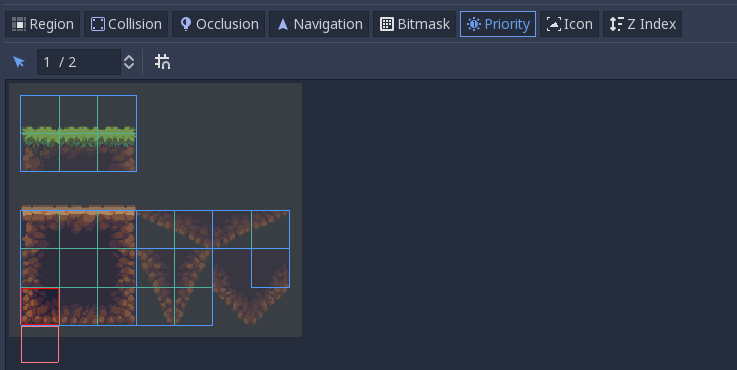
When you try to place the tiles Godot will choose a random tile with a fitting bitmask. As the oob tiles for some reasons have the same bitmask, there is a 50% chance you will place a corrupt bottom tile.
How to repair your tile set:
- Go to the Region tab and resize the region to also cover the bottom tiles out of bounds.
- Go to Bitmask tab and deselect any set bitmask of the tiles that are out of bounds.
- Resize the region again to only cover the relevant part.
Your TileSet should be fine now.
 DavidSichma
on 30 May 2019
DavidSichma
on 30 May 2019
Yes, I clearly scaled the tilesector after creating a bitmask. The once that are outside never got scaled back so when i moved it, they got outside of the texture.
I hope someone can adjust it so that bitmasks outside the set don't count.
GreenMan36
on 10 Jun 2019
Had the same problem, @DavidSichma 's fix worked!
 SaffronStreams
on 31 Dec 2019
SaffronStreams
on 31 Dec 2019
Just bad mask settings? Not a bug then...?
 agameraaron
on 11 Jan 2020
agameraaron
on 11 Jan 2020
It should just ignore tiles outside the bounds of the tileset tough.
Would have fixed this wierd scaling issue. It is most certainly a bug since scaling shouldn't preserve data which doesn't exist.
GreenMan36
on 14 Jan 2020
I don't know if my problem is related but I experienced the following:
System: Linux PopOs 20.0.4 LTS
Godot: 3.2.3
I had created a tilemap with a tileset resource. Within the tileset resource I added a png spritesheet that was 192x96, and created two autotiles on it. I then modified the png in Aseprite (the program I originally created it; I modified the aseprite file and then exported the modified png to overwrite the original which was being used by the tileset.) After overwriting the png file I went back into Godot and into that tileset resource and removed the second autotile. I added 3 more autotiles (a 1x3, a 3x1, and another 3x3), as well as a single tile, and a 2x2 atlas tile. The modified png is larger than the 192x96 (it is now 224x160.) I placed some of the tiles in my scene, and then played the scene. The only tiles that were rendered, were the ones covered by the original tileset (the two autotiles.) The tileset editor still showed my changes to the tilset configurations, so I deleted the autotiles, single tile, and atlas tiles, and remade them. This didn't work. I then removed the texture from the tileset and recreated all of the autotile, single tile, and atlas tiles. This also didn't resolve the issue. I closed the project (quit to project list) and then re-opened the project. My tileset now showed only the two original autotiles (as though I hadn't changed them.) Adding my further tileset changes didn't resolve the issue at this point, either. I cleared the tileset resource from the tilemap, and created a new one, with that png file, and created all of my autotiles, etc. This time the issue was resolved.
 voymasa
on 18 Sep 2020
voymasa
on 18 Sep 2020
This happens when the Subtile Size is changed after adding a bitmask.
 jeremyevans6
on 8 Oct 2020
jeremyevans6
on 8 Oct 2020
Related issues
 blurymind
·
3Comments
blurymind
·
3Comments
 SleepProgger
·
3Comments
SleepProgger
·
3Comments
 bojidar-bg
·
3Comments
bojidar-bg
·
3Comments
 RayKoopa
·
3Comments
RayKoopa
·
3Comments
 Spooner
·
3Comments
Spooner
·
3Comments
Most helpful comment
It should just ignore tiles outside the bounds of the tileset tough.
Would have fixed this wierd scaling issue. It is most certainly a bug since scaling shouldn't preserve data which doesn't exist.