Godot: TileSet with many tiles causes excessive memory usage due to TileSet editor, leading to OOM crash
Godot version:
3.1
OS/device including version:
Windows 10
temp2.zip
Description
I have a small bitmap made up of 8x8 pixel bitmaps. There are 319 of them in total. It is attached in the zip.
I have a scene file that creates all these tiles,also in the zip.
When I try to open the scene file the entire IDE crashes, the console is repeating the same error over and over 'Message queue out of memory. Try increasing...message_queue.cpp:56' followed by 'Failed Message: HBoxContainer::sort_children target ID: 56532'.
So, I increased the memory size from 1024 to 10240. One of three things happen at random:
- On double clicking the scene file it crashes again with the same error
- On double clicking it loads scene ok and I can see all 319 images when I click on the TileMap node. But when I click on the 'tileset' button it crashes again with the same error
- It works.
If I add another zero it works, but it is very laggy on loading, and very laggy on closing. Simply, I don't think the UI can scale with tiles. I think the only way to fix it, following analysis below is to lazily load the tile data, i.e. in the second screenshot load the main data to populate the dropdowns, but only load their inner windows when you actually select one.
 chucklepie
All 18 comments
It seems there's no way to "queue" messages after the queuer buffer is full and once it's full that entire queue frame is lost, because again, queueing messages is what the queuer does for a living, right? The problem there is that we bundled up too many messages in the same queuer frame. I think there's probably 1 message per tile for the enter_tree update, then number_of_tiles factorial messages for the editor sorting items, then number_of_tiles factorial messages for VBoxContainer:_sort_children and another number_of_tiles factorial messages for HBoxContainer:_sort_children
Each message costing 24 bytes or something it ought to use a lot of RAM pretty fast.
Unless I calculated this wrong.
Edit: Actually, it's just that it's adding several update and sort calls per tile and that's because we're trying to add humongous lot of controls to the editor to edit each of these tiles all at once, each tile here adds at least 45 controls, plus 17 or something labels and at least 17 or more layout controls, I estimate that each of these tile editing "blocks of interface" would require at least some 12kb or so of buffer to message the init/update calls, multiply that by 314 tiles and you'll need around 3Mb buffer just to queue the init. Now you said that with 10Mb buffer it did NOT work, which to what I see here is weird, would suggest that something is pushing excessive calls; I don't have the experience to fiddle with this and achieve an exact conclusion though.
 figloalds
on 28 May 2019
figloalds
on 28 May 2019
Thanks for the time. To think this is a tileset from a 48k zx spectrum game ;)
Do people not normally make this many tiles in a game and do you think it might get looked at?
Or is there a workaround?
chucklepie
on 28 May 2019
Further increase the buffer size to something like 102400 or 512000 and it should work.
I don't know exactly how much you need, I tried with 1gb buffer and it worked.
I still think this needs a proper fix, but doing this should enable you to continue your work
figloalds
on 28 May 2019
This works, but obviously something very wrong is happening if it creating so much data for so few tiles and crashes users IDE and project.
If this large data usage is not addressed might I suggest this 'queue size' value is changed to two values:
- start queue size
- maximum queue size
i.e. make the queue a dynamic thing so it increases when getting close to out of memory up to maximum size?
chucklepie
on 30 May 2019
I like the idea, it's not far fetched. May be annoying to implement because you need to keep track of linked allocation blocks, but it would be good specially because it's better that the editor allocates the ram it needs instead of entering an unrecoverable state
figloalds
on 30 May 2019
I see where the fault it now, with the hundreds of windows created in each dropdown for each tile when you click on Tileset that you mentioned.
Surely the better way would be to read all the data from the scene file but not create the controls, and instead lazily create the gui items when you click on the dropdown for each item? It's not going to be very often that you will want to revisit this section anyway...
Plus you get a massive lag spike when you open and close the tileset with a large number, when it created and deallocates the gui controls.
chucklepie
on 30 May 2019
I have done more trialing with this and simply increasing the queue size is of no use. I believe it's a fundamental problem with the tileset section of the tilemap editor.
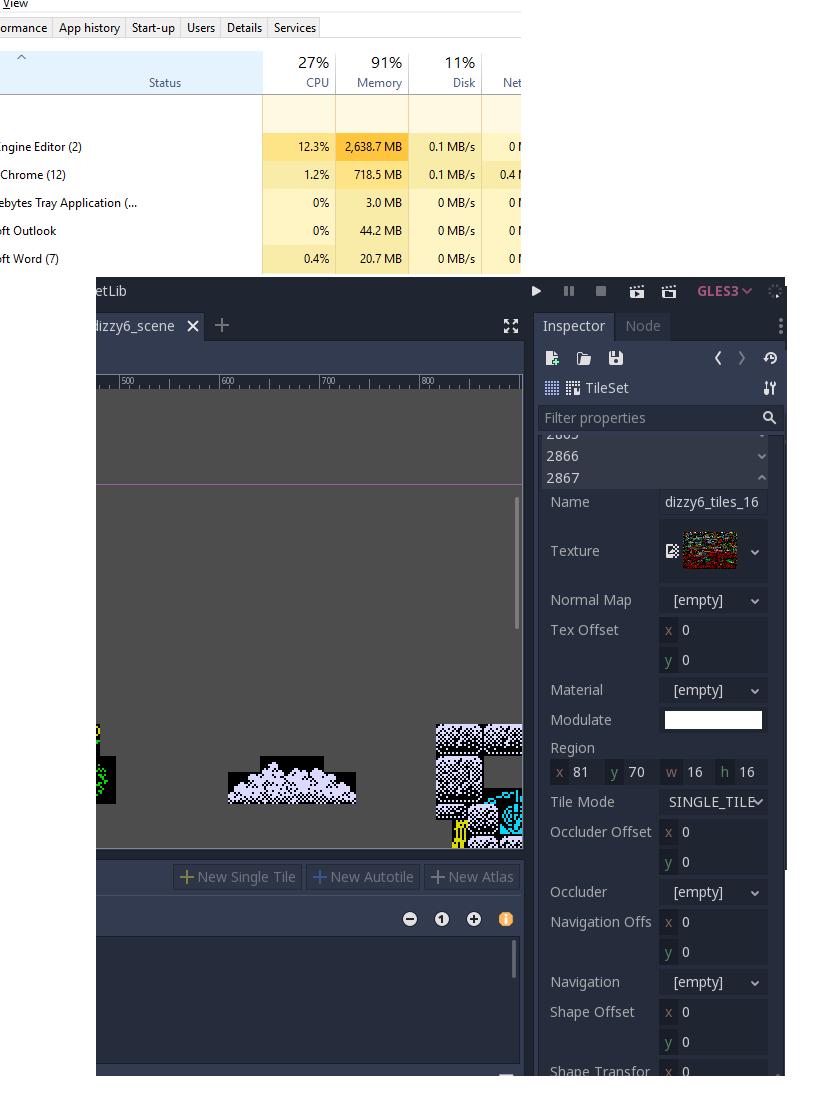
The problem is the more tiles you have, the more memory it uses, the IDE becomes very laggy as it loads and destroys tilesets (not the tilemap section display the tiles is fine, it is just the tileset editor that goes wrong). In the example below I had a few thousand tiles, selecting 'Tileset' took over a minute to be ready, over a minute to exit back and ate close on 3gb of RAM. i.e. the IDE simply cannot sustain a large number of tiles in the tileset view, as per picture. Yes, it could have been done differently, but it's a single atlas, nothing you wouldn't get in a decent sized game for a sub-section of a map.
The solutions I can think of are:
Allow multiple tilesets/tres per tilemap. Why is there a limit on one tileset per map? it means you cannot share tilesets across different maps within a game and instead have to rely on a giant monolithic tileset or manually select the tiles for each level that you want. If you could have multiple tilesets (or even make it virtual single tileset linking many tilesets together) then you would only be loading one resource at a time.
only read the data (or just the name if possible) and generate all the sub-windows beneath each tile dropdown when they are clicked, i.e. do it lazily - is there a need to generate so much Windowing data for dropdowns that will probably never be opened all together?
chucklepie
on 7 Jun 2019
As far as I understood, the problem is the inspector updating all of those things at once? So maybe there could be a way to optimize to not update closed categories?
 YeldhamDev
on 12 Jun 2019
YeldhamDev
on 12 Jun 2019
isn't it better to make it as (sub?) resource so not updating on inspector directly?
 volzhs
on 12 Jun 2019
volzhs
on 12 Jun 2019
isn't it better to make it as (sub?) resource so not updating on inspector directly?
I may be interpreting what you're saying wrong as I do not know the code, but as a sub resource, whenever you edit the master view of the tiles, e.g. to change collision flags, you have to go to that page that then creates the many thousands of window GUI elements for every tile, which then causes the problems. Is there really a need to generate all those window elements for every tile when the default view is to collapse the dropdown and only view the details after you open it? Think in terms of scaling the tilemap to very large maps with lots of graphics...
chucklepie
on 12 Jun 2019
I mean that no usability change for making tiles but making internal data for tilemap as sub-resouce not to expose it directly on inspector.
volzhs
on 12 Jun 2019
I mean that no usability change but making internal data for tilemap as sub-resouce not to expose it directly on inspector.
That's already a sub-resource: TileSet. The problem is that it has to appear in the inspector to trigger the tileset editor.
YeldhamDev
on 12 Jun 2019
@YeldhamDev oh... I got it.
I misunderstood about drawing tiles and editing the TileSet itself.
volzhs
on 12 Jun 2019
From the little poking I did, the best solution would be to batch the sorting calls (where the cause of the problem seems to be), instead of doing everything at once.
YeldhamDev
on 12 Jun 2019
From another issue I was trying to solve I created another message queue that only contains the deferred calls when a canvas item needs updating, so it doesn't fill the regular message queue. It saves only the object's instance id to make the call later so it uses less memory and it should also be faster. But I' m not convinced this is the right way to fix that. Anyway check the code here and compile if on windows
https://github.com/santouits/godot/commit/bf9d7a41d2bf98b4827e667a3190de24d313924d
or in linux you can get one build from here https://github.com/santouits/my_godot_compiler/releases/tag/20190612-bf9d7a4
 santouits
on 12 Jun 2019
santouits
on 12 Jun 2019
Tileset should have a page_like editor, like Arrays and Dictionaries
 MarianoGnu
on 13 Jun 2019
MarianoGnu
on 13 Jun 2019
I think the best solution for now is to make the TileSet resource not show the tiles to begin with. Being that the proper workflow is to select them in the tile editor.
YeldhamDev
on 8 Jan 2020
See #35653 for handling the max size of the Message Queue.
The proper fix for this issue is still to actually lower its memory requirements by preventing the instantiation of so many Controls in the Inspector, as discussed above. Either by pagination, or by simply not showing tiles in the inspector as suggested.
 akien-mga
on 28 Jan 2020
akien-mga
on 28 Jan 2020
Related issues
 SleepProgger
·
3Comments
SleepProgger
·
3Comments
 gonzo191
·
3Comments
gonzo191
·
3Comments
 ivanskodje
·
3Comments
ivanskodje
·
3Comments
 rgrams
·
3Comments
rgrams
·
3Comments
 timoschwarzer
·
3Comments
timoschwarzer
·
3Comments
Most helpful comment
I have done more trialing with this and simply increasing the queue size is of no use. I believe it's a fundamental problem with the tileset section of the tilemap editor.
The problem is the more tiles you have, the more memory it uses, the IDE becomes very laggy as it loads and destroys tilesets (not the tilemap section display the tiles is fine, it is just the tileset editor that goes wrong). In the example below I had a few thousand tiles, selecting 'Tileset' took over a minute to be ready, over a minute to exit back and ate close on 3gb of RAM. i.e. the IDE simply cannot sustain a large number of tiles in the tileset view, as per picture. Yes, it could have been done differently, but it's a single atlas, nothing you wouldn't get in a decent sized game for a sub-section of a map.
The solutions I can think of are:
Allow multiple tilesets/tres per tilemap. Why is there a limit on one tileset per map? it means you cannot share tilesets across different maps within a game and instead have to rely on a giant monolithic tileset or manually select the tiles for each level that you want. If you could have multiple tilesets (or even make it virtual single tileset linking many tilesets together) then you would only be loading one resource at a time.
only read the data (or just the name if possible) and generate all the sub-windows beneath each tile dropdown when they are clicked, i.e. do it lazily - is there a need to generate so much Windowing data for dropdowns that will probably never be opened all together?