Godot: Ability to include transparent objects in screen texture
Godot version: 3.1.1
OS/device including version: Windows 10
Issue description:
Currently it is not possible to create a material that performs refraction while maintaining visibility of transparent objects behind it.
I understand that it is more generally the case that screen-space shaders are not capable of reading color data written by transparent objects (as per https://github.com/godotengine/godot/issues/18332).
This is turning into a significant problem for the game I'm working on. In short, I'm making a marble platformer that will have a character inside the marble, appearing to push it around. However, I am fairly certain that I can only make said character look the best through the use of transparent materials, but this prevents me from using a refractive material on the marble, as doing so would prevent me from using transparent materials on the character (which is probably more important, from an artistic standpoint).
It would be optimal if I could use transparent materials on the character and a refractive material on the marble. I can't tell if this is actually technically impossible (as per https://github.com/godotengine/godot/issues/11523) or if it is just done for efficiency. If it is just done for efficiency, there should be some sort of way to control that, perhaps some options for what transparent materials write to (e.g. a "write to screen texture" and a "write depth" option).
Steps to reproduce:
Create an object with a transparent material and put it behind an object with a refractive material (i.e. one with "Refraction" enabled).
Minimal reproduction project:
TransparentRefractionTest.zip
 TheMonsterFromTheDeep
All 16 comments
This is a great proposal and it's something I have been thinking about a lot recently because it seems kind of arbitrary to not include transparent objects in the screen_texture. However, there is a very good reason why they are not included.
Transparent objects have to be rendered after opaque objects and they are sorted in order reverse depth order (objects further away are drawn first) so that proper alpha blending can be performed. Objects that use SCREEN_TEXTURE are treated as transparent objects so they are rendered during the transparent object pass for proper blending. The simplest solution to your problem would be to have the SCREEN_TEXTURE saved after the transparent pass, but then proper blending with transparent objects could not occur because transparent objects don't write to depth. For example, if you had a transparent object directly between the object using SCREEN_TEXTURE and the camera, the object using SCREEN_TEXTURE would draw on top of it always and appear in front of it (especially since the object would appear in the SCREEN_TEXTURE, even though it is in front of the object). It is preferable to render the SCREEN_TEXTURE objects in reverse depth order with the transparent objects.
Another issue here is that, when determining what to draw, Godot doesn't know what (or how many) objects will use SCREEN_TEXTURE. Its entirely possible that an object close to and another far from the camera both use it at the same time. Its impossible to have a correct texture for both. In such cases (and in your example above) SCREEN_TEXTURE ceases to be the correct tool for the job. Its not as simple as figuring out when to capture the SCREEN_TEXTURE during rendering because multiple objects may use it.
I think this illustrates that there isn't a good general purpose solution here. Some situations don't fall under the standard easy use case.
In such situations you need to use a Viewport and render your scene in multiple stages. First render everything you want to be visible in the screen_texture then render everything else, including the object that uses the screen_texture. It is unfortunately more complex than using SCREEN_TEXTURE but hey, sometimes complex effects require complex implementations.
I hope this explanation was helpful.
 clayjohn
on 4 May 2019
clayjohn
on 4 May 2019
@clayjohn Thank you for the response.
So a multiple-stage render will ensure everything is written to the screen texture? That wasn't made clear by the documentation, but if that is the case, I will definitely look into it.
But in terms of my proposal:
Your description of the rendering process essentially matches my conception of it, and to be honest I'm not entirely clear on what the exact problem is.
I'm essentially suggesting to keep the reverse-depth render pass, but make it possible for any given object within that pass to write to the screen texture (i.e. immediately after it is rendered). I'm guessing having every object write to the screen texture would be slow, but I imagine if you enabled it for a single object it would not be that problematic...?
Although I suppose the only real utility of such a feature would be in cases where it wouldn't be replaceable with multiple custom render passes. But I imagine such a situation might well crop up for somebody at somepoint...?
In any case, thanks for the help. I'll be sure to look into setting up multiple passes.
TheMonsterFromTheDeep
on 4 May 2019
I'm essentially suggesting to keep the reverse-depth render pass, but make it possible for any given object within that pass to write to the screen texture (i.e. immediately after it is rendered). I'm guessing having every object write to the screen texture would be slow, but I imagine if you enabled it for a single object it would not be that problematic...?
The SCREEN_TEXTURE is generated by copying the color component of the current render buffer. So it isn't as simple as object A goes on screen object B goes in screen texture etc. You are essentially taking a snapshot of the frame at a current point. And then using that for the rest of your rendering. So its not possible to pick and choose which objects go into it. It is done this way in order to be really fast.
However, if you wanted to have something similar to SCREEN_TEXTURE where you did pick and choose, you should just use a Viewport. It will be slower than using SCREEN_TEXTURE but more flexible.
Everything you describe above can be achieved using a Viewport. Again, SCREEN_TEXTURE is a general purpose utility that is provided for a very simple use case, it is not intended to capture complex use cases. That is why the Viewport node is provided. It can do everything you are looking for and more. It doesn't make sense to increase the complexity of the core render loop and decrease speed for everyone to enable a small feature that can be done with an already existing node.
clayjohn
on 4 May 2019
@clayjohn
Surely enabling a single extra buffer copy after a given object is rendered is not too inefficient...?
I do understand though if it's too niche a feature to dedicate time towards implementation. When I have some free time I'll probably look into it myself to see what I can do.
In any case, I have put together a scene using Viewports, where the refraction shaded-object is in a separate Viewport, but I'm afraid the same problem persists -- the refraction shader is completely ignoring the transparent materials.
Is there a specific Viewport structure that should do the trick?
Thank you for all your help.
TheMonsterFromTheDeep
on 4 May 2019
Surely enabling a single extra buffer copy after a given object is rendered is not too inefficient
It is, especially for all the users that don't need it. The standard render process should be kept as fast as possible otherwise render times will drop to a crawl for everyone.
You need to render all the objects you want in the refraction in the viewport then, when rendering your object that uses refraction, use the viewport texture from that viewport instead of using SCREEN_TEXTURE.
clayjohn
on 4 May 2019
@clayjohn
Ah, ok.
I am, however, going to likely compile my own version of Godot with this feature enabled, as there are additional complications with the Viewport method.
Is there any chance you could point me to the most relevant source files for the render loop? I've tried digging around but haven't found anything relevant.
Edit: And, on further thought, I get what you're saying, although I think I was confused by the wording "slow to a crawl." Doing some rough math, my estimation is that the slowdown would be no worse than 9.5% at 160 fps, while it would be no worse than 1.2% at 60 fps. However, I can see why those numbers are generally unacceptable.
TheMonsterFromTheDeep
on 4 May 2019
GLES3
Here is where the main framebuffer is copied:
https://github.com/godotengine/godot/blob/84401e8cdf4f41fc0e804bf5410622e75a08c0f5/drivers/gles3/rasterizer_scene_gles3.cpp#L4499-L4508
And here is where it is bound tobe used as a texture
https://github.com/godotengine/godot/blob/84401e8cdf4f41fc0e804bf5410622e75a08c0f5/drivers/gles3/rasterizer_scene_gles3.cpp#L4526-L4529
GLES2
Here is where it is copied:
https://github.com/godotengine/godot/blob/84401e8cdf4f41fc0e804bf5410622e75a08c0f5/drivers/gles2/rasterizer_scene_gles2.cpp#L2839-L2842
It is bound automatically when drawing happens, so you dont need to do change anything.
clayjohn
on 4 May 2019
@clayjohn
Cool, thanks. Looks like it shouldn't be too hard to implement what I want.
There is one significant problem with using Viewports: the color space is wrong. That is, reading the texture directly looks washed out. I believe the problem is that the Viewport texture is in sRGB and it needs to be in linear space, but I could have that backwards. In any case, pow(tex, 2.2) appears to almost do the trick, but is there a built in way to tell Godot to use the other color space for the texture (I tried hint_albedo, but that didn't work.)?
Edit: Oh also, am I correct that the only way to do this is for at least one of the Viewports to have its own world? If so, I have to duplicate all the lights in the scene, right? (As well as keep both cameras tracking to the same place, etc...)
Also, is there a way for the Viewport texture to generate the same blurred LODs that the SCREEN_TEXTURE normally has?
Thanks.
TheMonsterFromTheDeep
on 4 May 2019
is there a built in way to tell Godot to use the other color space for the texture (I tried hint_albedo, but that didn't work.)?
Its looking like hint_albedo is not working properly
For now use this:
albedo_tex.rgb = mix(pow((albedo_tex.rgb + vec3(0.055)) * (1.0 / (1.0 + 0.055)),vec3(2.4)), albedo_tex.rgb.rgb * (1.0 / 12.92), lessThan(albedo_tex.rgb,vec3(0.04045)));
Oh also, am I correct that the only way to do this is for at least one of the Viewports to have its own world? If so, I have to duplicate all the lights in the scene, right? (As well as keep both cameras tracking to the same place, etc...)
You don't need a separate world. Just a viewport with its own camera. Use the cull_mask property of the camera along with the cull layers property of the Meshinstance so that you dont render the object using the Viewport in the viewport.
Also, as we talk about this im thinking it would make a great topic for a tutorial. :)
Also, is there a way for the Viewport texture to generate the same blurred LODs that the SCREEN_TEXTURE normally has?
Yes. you just need to set the mipmap flag on the ViewportTexture. Although you have to do that from GDscript.
clayjohn
on 4 May 2019
Here are some images I made while testing it out.
Left is a sphere with transparency, right is a quad with SCREEN_TEXTURE
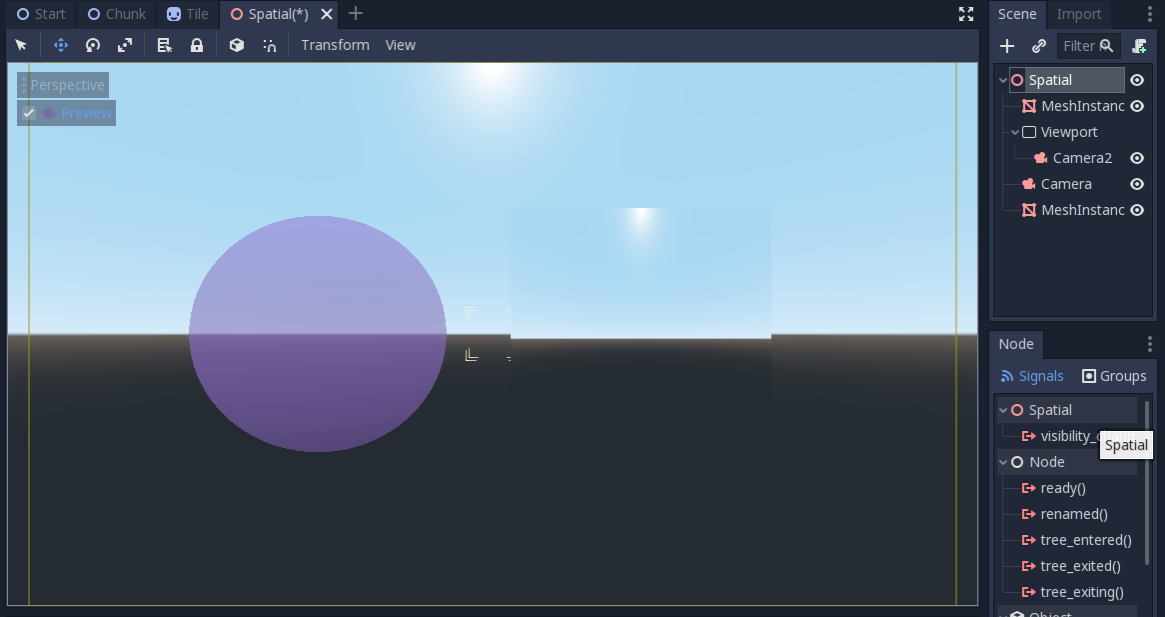
Using the viewports texture in the quad we get the below image
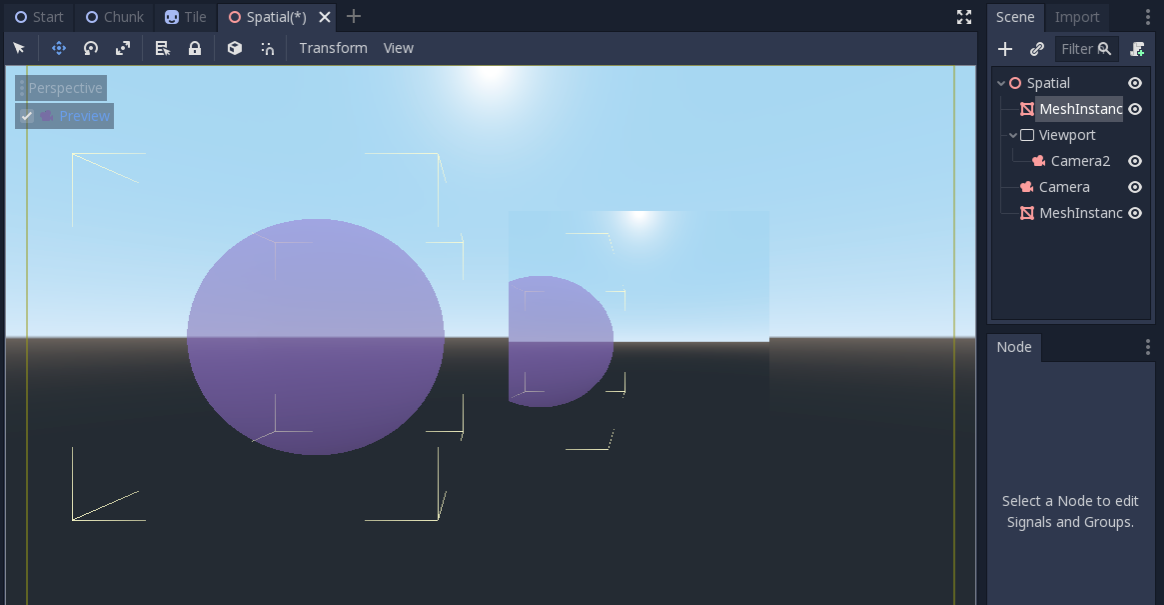
Note: you need to cull the quad itself in Camera2 otherwise you get an ugly white quad in the viewport's texture.
clayjohn
on 4 May 2019
You don't need a separate world. Just a viewport with its own camera. Use the cull_mask property of the camera along with the cull layers property of the Meshinstance so that you dont render the object using the Viewport in the viewport.
Oh, neat. That simplifies things a bit.
Also, is there a way for the Viewport texture to generate the same blurred LODs that the SCREEN_TEXTURE normally has?
Yes. you just need to set the mipmap flag on the ViewportTexture. Although you have to do that from GDscript.
Doesn't appear to work. Oh well, if I decide I need it I'm guessing I can put together a multi-stage post-process that includes the blur.
Anyways, my scene is looking a lot better now. And once I put together my marble model that has different amounts of refraction at different places I'm guessing it'll look even better. :grin:
TheMonsterFromTheDeep
on 4 May 2019
Still getting this bug. It also effects any meshes with "No depth test" enabled
EDIT: Just as a note, this is definitely an important feature to have. If it effects performance, add an option to Viewport and or Project Settings
 nathanfranke
on 13 Jan 2020
nathanfranke
on 13 Jan 2020
@nathanwfranke Please read my client above and the proposed workaround. https://github.com/godotengine/godot/issues/28628#issuecomment-489293649
This isn't a bug. It's an implementation limitation. There is no way to detect when to correctly capture the screen_texture automatically. You must do it yourself as the user using a Viewport and the method I explain above.
This is open as a documentation issue only.
clayjohn
on 13 Jan 2020
That comment is a wall of text, where's the workaround?
 Zireael07
on 13 Jan 2020
Zireael07
on 13 Jan 2020
@Zireael07 the last paragraph, and then expanded upon in further comments.
clayjohn
on 13 Jan 2020
Closing in favor of #18332, as this is a renderer limitation that should be better documented. (The "documentation" part is already covered in that issue.)
 Calinou
on 18 Jun 2020
Calinou
on 18 Jun 2020
Related issues
 NullNeska
·
191Comments
NullNeska
·
191Comments
 crystalnoir
·
145Comments
crystalnoir
·
145Comments
 nunodonato
·
143Comments
nunodonato
·
143Comments
 ghost
·
105Comments
ghost
·
105Comments
 zatherz
·
121Comments
zatherz
·
121Comments