Godot: TextureProgress when added a gradient texture will break the layout in the editor
Godot version:
3.1.stable.official
OS/device including version:
Mac OS High Sierra (latest)
Issue description:
A TextureProgress (bar) will break the layout in the editor and also in the runtime, when adding a gradient texture to it, as that texture will have a default width of 2048 pixels, which will then be the default width of the TextureProgress (bar).
Steps to reproduce:
Load the example project in the editor and see that the layout is broken. Then switch to the progress bars tab and see it in action. (There might be other issues here...)
Additional Notes:
One cannot even fix the layout as the TextureProgress (bar)'s width cannot be set to a value less than 2048, everything greater than 2048 is ok, though. (I tried also setting the width of the gradient texture to a value less than 2048, and while it works, the TextureProgress (bar)'s width can still not be reduced.)
Minimal Project:
simple-range-controls.zip
 silkentrance
All 5 comments
Your TextureProgress is inside a Container, so the container will fit its size to the texture. If you reduce the texture width _before_ making it visible, it will appear correctly.
As for the container, when it gets too big and then you reduce the internal size, it will auto-magically retract to minimal size when you touch one of the orange edit dots (whatever they are called). This is similar behavior to what was happening in #21803 and it's still valid in master (0b6b49a897b3).
 KoBeWi
on 6 Jul 2019
KoBeWi
on 6 Jul 2019
I ran into this yesterday in Godot v3.2.2.stable.official for Win64 while going through the design interfaces tutorial — I wasn't sure how to add a solid color fill for over, under, or progress, so I just picked GradientTexture and had this happen.
Here's a screenshot of my version information from Help -> About for confirmation:

Here's reproduction steps to explore this situation:
- Create a 2D Scene
Add a TextureGradient as a texture. In this case I added it to Under.
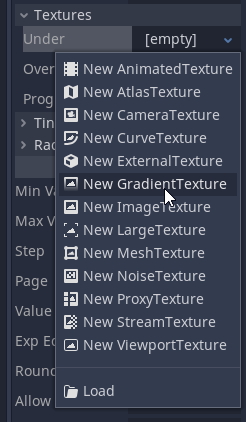
Okay, we're partway in. Let's examine the expected/actual behaviour at this stage.
Expected: The TextureGradient is still some reasonable size.
Actual: The TextureProgress has become ENORMOUS. Under Control -> Rect, the Size now has an X of 2048. It's not clear why, until we open the gradient to edit it and discover it has a width of 2048.

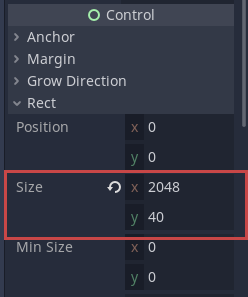
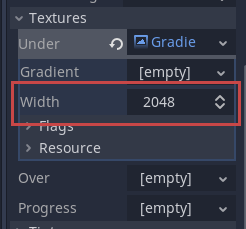
Right! Our gradient is enormous for some reason, but it's clear we can resize the TextureGradient to fix this, right?
- Type in "100" into Size X and hit enter.
Expected: Size changes.
Actual: It stays at 2048.
Hmm...
- Click the Revert button on Size X.
Expected: The X reduces to something like what it was before.
Actual: The X stays at 2048. The Y goes from 40 to 1.
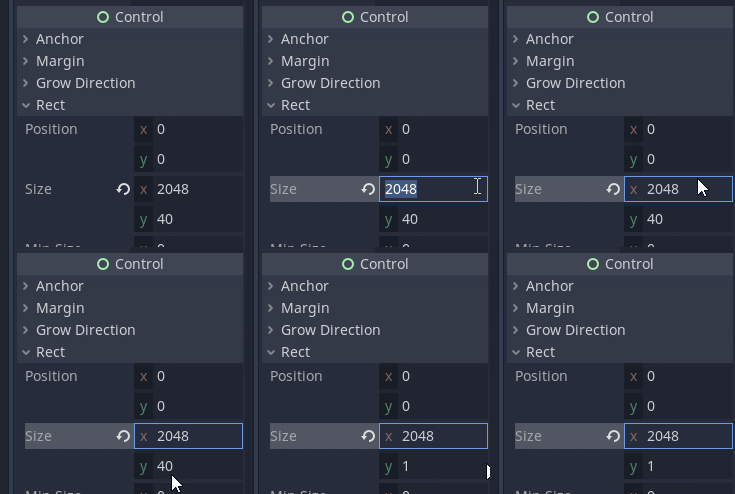
Ok, clearly it's inheriting the size from the gradient texture. I need to change the gradient size first!
- Scroll up to the gradient. Change Width to "100" and hit enter. Confirm that it sticks.
- Scroll down to Size again. Set X to "100" and hit enter.
Expected: The size is now 100 wide.
Actual: The size is still stuck at 2048.
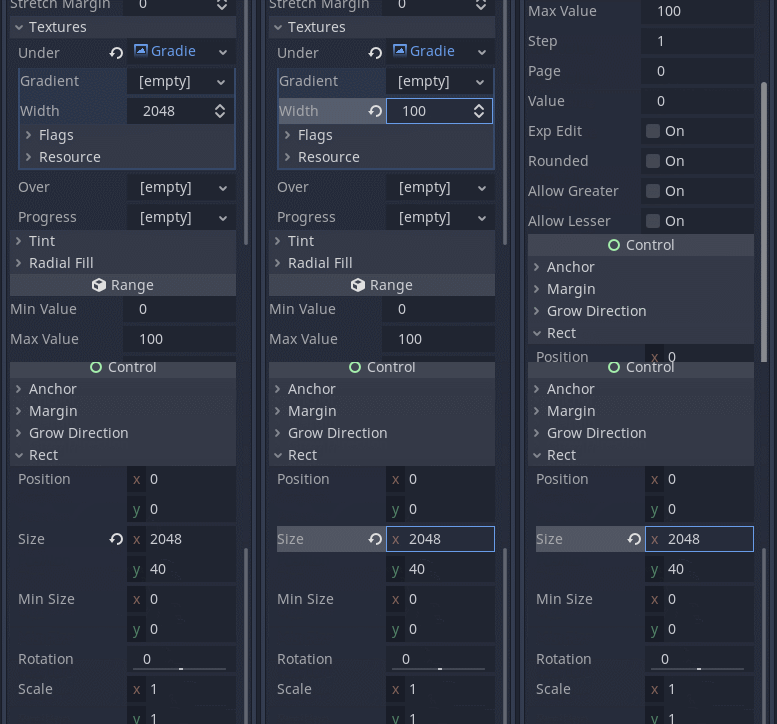
Maybe the changes to the Gradient don't get seen by the TextureProgress until I collapse the Gradient?
- Collapse the Gradient texture so I'm no longer seeing its details.
- Try to change the Width again. The above still happens.
At this stage I have no idea how I'm supposed to have a TextureProgres that has a gradient and less than 2048 width.
 spacemonaut
on 8 Jul 2020
spacemonaut
on 8 Jul 2020
At this stage I have no idea how I'm supposed to have a TextureProgres that has a gradient and less than 2048 width.
After making the texture smaller, save the scene and reload it.
KoBeWi
on 8 Jul 2020
@KoBeWi I confirm that works. Thank you.
spacemonaut
on 8 Jul 2020
We should probably decrease the default GradientTexture width in 4.0 to make this less problematic. (Something like 256 should be a saner value, while also being faster to generate.)
 Calinou
on 8 Jul 2020
Calinou
on 8 Jul 2020
Related issues
 SleepProgger
·
3Comments
SleepProgger
·
3Comments
 Spooner
·
3Comments
Spooner
·
3Comments
 nunodonato
·
3Comments
nunodonato
·
3Comments
 RebelliousX
·
3Comments
RebelliousX
·
3Comments
 RayKoopa
·
3Comments
RayKoopa
·
3Comments
Most helpful comment
We should probably decrease the default GradientTexture width in 4.0 to make this less problematic. (Something like 256 should be a saner value, while also being faster to generate.)