Godot: GLES2 cull mode inverted (wheel)
Godot version:
master
OS/device including version:
Antergos (Arch Linux)
Issue description:
In GLES2 the wheel disappears if I set the cull mode to back. The wheels are rendered correctly when using GLES3. In the editor it looks correct with GLES2 and GLES3.
Steps to reproduce:
See minimal reproduction project.
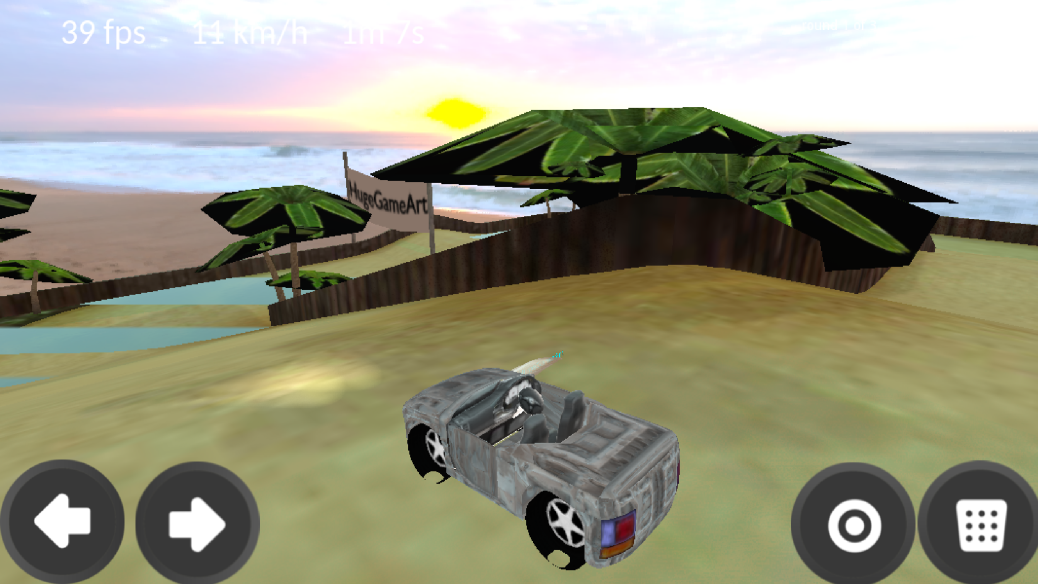
Minimal reproduction project:
By @OBKF
https://github.com/godotengine/godot/files/3219931/gles2_vehicle_wheel_bug.zip
 LinuxUserGD
All 9 comments
Strange that this happens only on wheels. even for my project and @BastiaanOlij tutorial demo.
I think it has something to do with transformation matrix in the physics.
 OBKF
on 13 Apr 2019
OBKF
on 13 Apr 2019
I have the exact same issue.
Godot 3.1 stable x64
Windows 10 x64
 SmartySmart702
on 16 Apr 2019
SmartySmart702
on 16 Apr 2019
Can anyone here post steps to reproduce or an MRP? Without either one of those, no one is going to work on this bug. A video/packaged game is not an MRP. Here is a description of an MRP from stackoverflow https://stackoverflow.com/help/minimal-reproducible-example
 clayjohn
on 24 May 2019
clayjohn
on 24 May 2019
@clayjohn
Here I made a small demo project, it's just importing things from Blender.
It looks fine in the editor but inverted in the game.
gles2_vehicle_wheel_bug.zip
OBKF
on 26 May 2019
@OBKF
Thanks, I updated the description
LinuxUserGD
on 26 May 2019
Okay, wow. Looking into this has exposed a whole mess in both the vehicle code and the rendering code.
- In Vehicle_wheel sets the scale to a negative value for some reason. This inverts the geometry. And causes some other weird stuff https://github.com/godotengine/godot/issues/26627
- GLES3 forces the scale to be positive so the objects render normally (kind of, normals still have issues: https://github.com/godotengine/godot/issues/26710, https://github.com/godotengine/godot/issues/25696)
To fix this particular issue, we either need to fix why wheels are using a negative scale. Or we need to make it so that negative scales are okay and will not screw up the geometry.
What we really need to do is both.
Regarding the negative scales @Timofffee can you take a look at that? Do wheels absolutely have to use negative scales?
clayjohn
on 26 May 2019
Nice one @clayjohn , a lot of the vehicle code was copied from an old version of bullet and altered to work with Godot, I'm guessing they did that to make something work without noticing the consequences :)
 BastiaanOlij
on 27 May 2019
BastiaanOlij
on 27 May 2019
The vehicle code is actually too bad and does not behave as good as in Bullet (at least the Blender version), so I gave up on it (I am making my own based on a unity opensourced project Tork, bit arcady but seems good).
I think @AndreaCatania mentioned that he will bind the vehicle code from bullet at some point but I am not sure.
OBKF
on 28 May 2019
A bit off-topic: reduz mentioned that the vehicle code won't be part of the engine in coming versions of Godot and instead implemented as a module (asset library).
LinuxUserGD
on 28 May 2019
Related issues
 RebelliousX
·
3Comments
RebelliousX
·
3Comments
 rgrams
·
3Comments
rgrams
·
3Comments
 ndee85
·
3Comments
ndee85
·
3Comments
 bojidar-bg
·
3Comments
bojidar-bg
·
3Comments
 kirilledelman
·
3Comments
kirilledelman
·
3Comments
Most helpful comment
Okay, wow. Looking into this has exposed a whole mess in both the vehicle code and the rendering code.
To fix this particular issue, we either need to fix why wheels are using a negative scale. Or we need to make it so that negative scales are okay and will not screw up the geometry.
What we really need to do is both.
Regarding the negative scales @Timofffee can you take a look at that? Do wheels absolutely have to use negative scales?