Godot: [Regression] Imported rigged mesh (from .escn) deforms badly
Godot version:
master / 4326fd5a7
OS/device including version:
Manjaro Linux 18.0.4
Issue description:
I wanted to see if there is any last minute regression before 3.1 stable gets released, so I updated from 8b231b9, and now my rigged character that is imported from .escn asset looks like this:
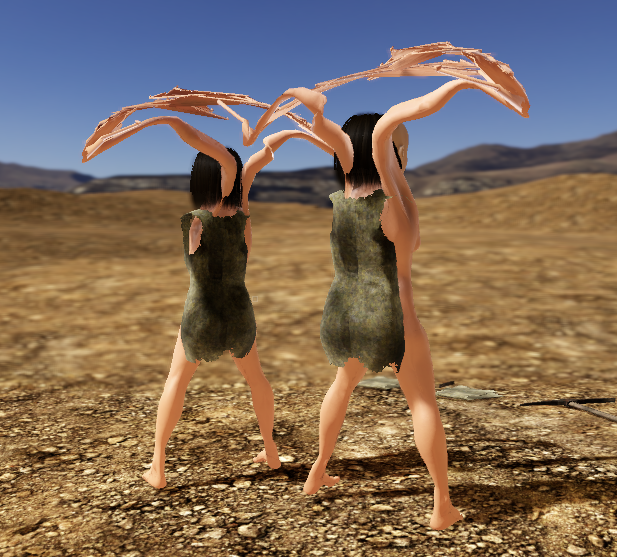
I tried to delete the generated .mesh and reimported it, but the problem persists.
When the mesh also looks deformed in editor after the reimport:
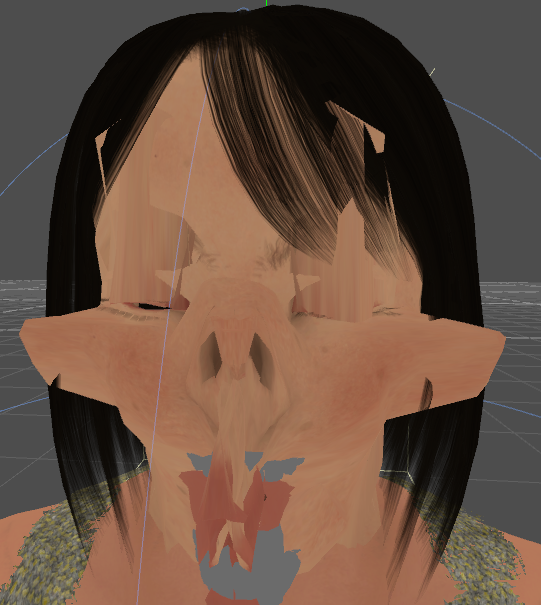
 mysticfall
All 17 comments
And when I tried to export the model again and reimport it in Godot, it became this:
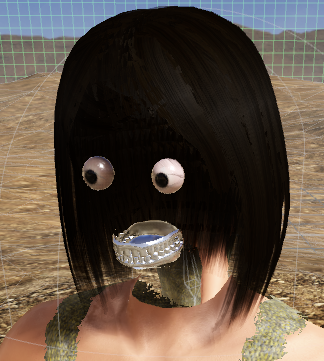
On a side note, I have a problem with Godot Blender exporter which produces a similar looking output with the last screenshot in the issue description:
https://github.com/godotengine/godot-blender-exporter/issues/172
But before the update, it never actually affected the exported .escn file so it looked ok in the editor and I was able to run the game without a problem.
mysticfall
on 13 Mar 2019
I have uploaded the .escn asset in question, along with the import settings here:
mysticfall
on 13 Mar 2019
The Blender .escn exporter is still experimental and may have issues compared to the _Better Collada Exporter_ (which is why it's not on the download page on the official site).
Last I checked, it does have a couple of bugs with bone deformation (which includes issues with bone rotation), but that bug applied to the 3.1 beta builds as well.
Right now, the Better Collada exporter should be used for production files while the .escn exporter gets used for simpler assets and for the purpose of reporting issues.
 Ace-Dragon
on 13 Mar 2019
Ace-Dragon
on 13 Mar 2019
My personal experience regarding the two exporters has been quite the opposite, however. Before the engine update, I didn't have any serious issues with using the Blender exporter but the Better Collada wasn't a viable option for my project.
There is an unresolved issue with the Better Collada that prevents it from exporting a model with many blend shapes, and it also doesn't support Blender 2.8. And the project hasn't been actively maintained for quite a while, so we can't expect to see these issues get resolved any time soon.
I also had some problems with the glTF exporter before, but it was a while ago so there's a chance that it has become usable by now.
But AFAIK, the Blender exporter is currently the only viable option if you have a complex model with many blend shapes, or want to use Blender 2.8.
By the way, I'm almost done bisecting this issue. I'll share the result as soon as I finish it.
mysticfall
on 13 Mar 2019
Bisect reports that this was the first bad commit :
(2f32a75d2e2afc22e7e170c2506455010d063ce8) Skeletons can now choose between using local or world coords for processing, fixes #26468
mysticfall
on 13 Mar 2019
@mysticfall it sounds like a missing feature in the exporter if that's the first bad commit then I guess? The exporter perhaps doesn't set local or world transforms correctly?
 hpvb
on 14 Mar 2019
hpvb
on 14 Mar 2019
@hpvb I suspect it could be the case. I'll try to get the attention of the devs of the exporter to this issue then.
mysticfall
on 14 Mar 2019
@mysticfall
The first two screenshots could be just the .import cache become invalidate and causing weird deformation.
Maybe give a try with the AABB fix? based on the third screenshots, it is very similar issue.
Besides, I checked your Character.escn on OSX, it works fine. It reminds me of an issue related float rounding in 3.1 which cause quaternion reported as non-normalized and it happens more on Linux platform. It is also possible rounding affect bone transforms. So if there are some error log in importing the .escn, they may need some attention
 Jason0214
on 14 Mar 2019
Jason0214
on 14 Mar 2019
Unfortunately, it seems that this issue isn't affected by the AABB fix (#27038) as I mentioned in a comment I left at the PR.
I attached a log file that I took during my test which consists of deleting existing meshes, reimporting the source .escn, changing material names (as they gets deleted), assigning them to respective mesh instances (they sometimes get cached if I don't do that), and finally run the project to see the result.
I'm not too sure if the logged messages are relevant to this issue because I believe I at least had some of them even when it worked as expected.
mysticfall
on 14 Mar 2019
Did you try toggling the boolean?
p_skeleton->set_use_bones_in_world_transform(true);
[Edited]
In the escn import?
 fire
on 14 Mar 2019
fire
on 14 Mar 2019
@fire Yes, setting the property indeed fixed the problem for me. Thanks much!
So, I assume that the exporter needs to set that property when it creates .escn file?
mysticfall
on 14 Mar 2019
@mysticfall Great to know. I will take a look at the this property afterwards to see if it can be handled in escn.
Jason0214
on 14 Mar 2019
@Jason0214 Thanks much, as always :)
mysticfall
on 15 Mar 2019
I can confirm that toggling this property can fix things:
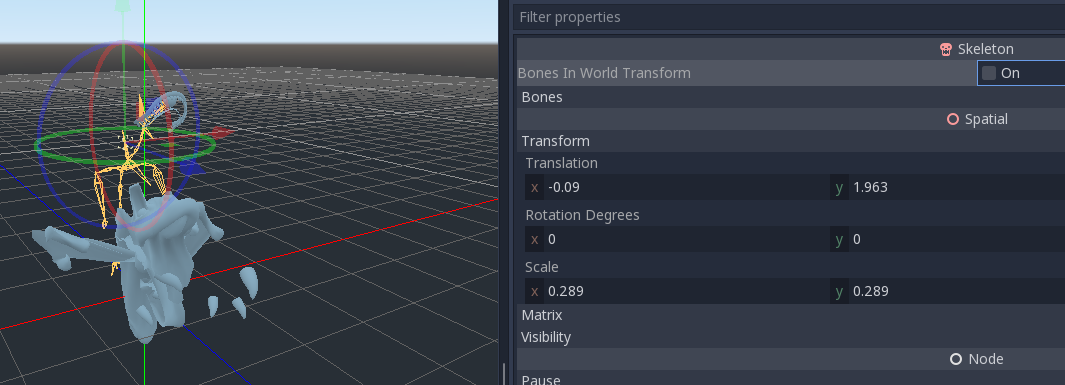
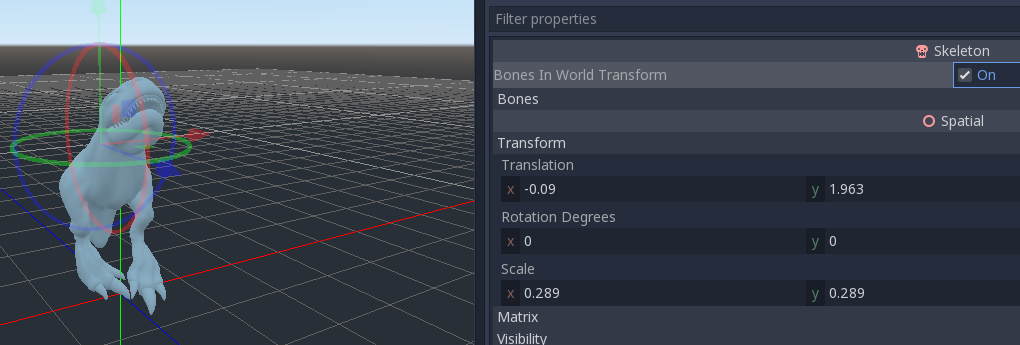
There is 82 escns in our project... Uh-oh, there will be a lot of monkey-work then...
 Antokolos
on 15 Mar 2019
Antokolos
on 15 Mar 2019
It looks like the exporter was fixed.
https://github.com/godotengine/godot-blender-exporter/commit/22d2f396d9b6c3384e9d4dcfd913d53ea61203c3
If you already updated some assets to get the problem, just re-import them.
Ace-Dragon
on 15 Mar 2019
Wow, great, thanks!
@Jason0214 , thank you for your work, as always! :)
Antokolos
on 15 Mar 2019
Maybe we can close this issue now, as it turned out a problem with the exporter and it's confirmed to be fixed?
mysticfall
on 24 Mar 2019
Related issues
 Calinou
·
219Comments
Calinou
·
219Comments
 nunodonato
·
143Comments
nunodonato
·
143Comments
 crystalnoir
·
145Comments
crystalnoir
·
145Comments
 karroffel
·
144Comments
karroffel
·
144Comments
 akien-mga
·
366Comments
akien-mga
·
366Comments
Most helpful comment
Did you try toggling the boolean?
p_skeleton->set_use_bones_in_world_transform(true);
[Edited]
In the escn import?