Godot: Can't run Godot with OpenGL 2.1 on Linux with Intel 915GM
Godot version:
3.1 RC2
OS/device including version:
root@slax
OS: Debian GNU/Linux 9 (stretch) i686
Model: 1872V79 ThinkPad T43
Kernel: 4.9.0-8-686
Shell: bash 4.4.12
Resolution: 1024x768
WM: Fluxbox
CPU: Intel Pentium M 2.13GHz (1) @ 2.1GHz
GPU: Intel Integrated Graphics
Memory: 372MB / 2010MB
Issue description:
When trying to run Godot 3.1 RC2 there is just a blank background. I can run Godot 2.1.5 though.
My OpenGL version:
# glxinfo | grep "OpenGL"
OpenGL vendor string: Intel Open Source Technology Center
OpenGL renderer string: Mesa DRI Intel(R) 915GM x86/MMX/SSE2
OpenGL version string: 2.1 Mesa 13.0.6
OpenGL shading language version string: 1.20
OpenGL ES profile version string: OpenGL ES 2.0 Mesa 13.0.6
OpenGL ES profile shading language version string: OpenGL ES GLSL ES 1.0.16
The output after running Godot in terminal:
# ./Godot_v3.1-rc2_x11.32
X Error of failed request:  GLXBadFBConfig
  Major opcode of failed request:  154 (GLX)
  Minor opcode of failed request:  34 ()
  Serial number of failed request:  24
  Current serial number in output stream:  22
X Error of failed request:  GLXBadFBConfig
  Major opcode of failed request:  154 (GLX)
  Minor opcode of failed request:  34 ()
  Serial number of failed request:  24
  Current serial number in output stream:  22
ERROR: initialize: Condition ' ctxErrorOccurred || !p->glx_context ' is true. returned: ERR_UNCONFIGURED
   At: platform/x11/context_gl_x11.cpp:188.
OpenGL ES 2.0 Renderer: Mesa DRI Intel(R) 915GM x86/MMX/SSE2
ERROR: initialize: Directional shadow framebuffer status invalid
   At: drivers/gles2/rasterizer_scene_gles2.cpp:3355.
ALSA lib pcm.c:8306:(snd_pcm_recover) underrun occurred
 DegradedMind
All 28 comments
Why you use 2 years old graphics driver?
Try to update mesa to 18.x version.
 qarmin
on 11 Mar 2019
qarmin
on 11 Mar 2019
Why you use 2 years old graphics driver?
Try to update mesa to 18.x version.
13.0.6 is the version Debian 9 ships with. 2 years old is actually pretty recent for a Debian Stable.
 akien-mga
on 11 Mar 2019
akien-mga
on 11 Mar 2019
Does it run if you remove the default_env.tres ?
akien-mga
on 11 Mar 2019
Uh, what's that? I'm new to Godot. I have only the Godot executable file. Is this related to projects? I am not trying to open any projects, but the Godot itself.
DegradedMind
on 11 Mar 2019
Yeah that's a file generated when you start a project, but if it crashes while opening the project manager, then it's a different issue.
akien-mga
on 11 Mar 2019
Can you try with ./Godot_v3.1-rc2_x11.32 --video-driver GLES2 --verbose?
akien-mga
on 11 Mar 2019
# ./Godot_v3.1-rc2_x11.32 --video-driver GLES2 --verbose

XInput: Refreshing devices.
XInput: No touch devices found.
Detecting GPUs, set DRI_PRIME in the environment to override GPU detection logic.
X Error of failed request:  GLXBadFBConfig
  Major opcode of failed request:  154 (GLX)
  Minor opcode of failed request:  34 ()
  Serial number of failed request:  24
  Current serial number in output stream:  22
X Error of failed request:  GLXBadFBConfig
  Major opcode of failed request:  154 (GLX)
  Minor opcode of failed request:  34 ()
  Serial number of failed request:  24
  Current serial number in output stream:  22
Only one GPU found, using default.
XcursorGetTheme could not get cursor theme
Failed loading custom cursor: X_cursor
Using GLES2 video driver
OpenGL ES 2.0 Renderer: Mesa DRI Intel(R) 915GM x86/MMX/SSE2

ERROR: _gl_debug_print: GL ERROR: Source: OpenGL        Type: Error     ID: 4   Severity: High  Message: GL_INVALID_ENUM in glEnable(GL_TEXTURE_CUBE_MAP_SEAMLESS)
   At: drivers/gles2/rasterizer_gles2.cpp:134.
ERROR: _gl_debug_print: GL ERROR: Source: OpenGL        Type: Error     ID: 4   Severity: High  Message: GL_INVALID_OPERATION in glTexImage2D(bad target for texture)
   At: drivers/gles2/rasterizer_gles2.cpp:134.
ERROR: _gl_debug_print: GL ERROR: Source: OpenGL        Type: Error     ID: 4   Severity: High  Message: GL_INVALID_OPERATION in glTexImage2D(bad target for texture)
   At: drivers/gles2/rasterizer_gles2.cpp:134.
ERROR: _gl_debug_print: GL ERROR: Source: OpenGL        Type: Error     ID: 4   Severity: High  Message: GL_INVALID_OPERATION in glTexImage2D(bad target for texture)
   At: drivers/gles2/rasterizer_gles2.cpp:134.
ERROR: _gl_debug_print: GL ERROR: Source: OpenGL        Type: Error     ID: 4   Severity: High  Message: GL_INVALID_OPERATION in glTexImage2D(bad target for texture)
   At: drivers/gles2/rasterizer_gles2.cpp:134.
ERROR: _gl_debug_print: GL ERROR: Source: OpenGL        Type: Error     ID: 4   Severity: High  Message: GL_INVALID_VALUE in glTexImage2D(invalid width or height or depth)
   At: drivers/gles2/rasterizer_gles2.cpp:134.
ERROR: initialize: Directional shadow framebuffer status invalid
   At: drivers/gles2/rasterizer_scene_gles2.cpp:3355.

Audio buffer frames: 940 calculated latency: 21ms
CORE API HASH: 4041032142084178815
EDITOR API HASH: 3460433989868662541
Loading resource: /root/.config/godot/editor_settings-3.tres
EditorSettings: Load OK!
EditorSettings: Save OK!
Loaded builtin certs
EditorSettings: Save OK!
can you upload all your glxinfo output to pastebin or something and paste the link here?
 santouits
on 11 Mar 2019
santouits
on 11 Mar 2019
glxinfo output: https://pastebin.com/jsbB0LAL
DegradedMind
on 11 Mar 2019
it seems your driver doesn't support ARB_seamless_cube_map extension
https://github.com/godotengine/godot/blob/8598641b15e5a18c07acff5bb496e74956bb1c74/drivers/gles2/rasterizer_storage_gles2.cpp#L5472
I guess we should check with config.extensions.has("GL_ARB_seamless_cube_map")
Also don't know if we should check here too: https://github.com/godotengine/godot/blob/8598641b15e5a18c07acff5bb496e74956bb1c74/drivers/gles2/rasterizer_storage_gles2.cpp#L5323
@reduz
santouits
on 11 Mar 2019
Should be fixed by d9235be5. Can you confirm @DegradedMind? (To compile for X11: http://docs.godotengine.org/en/latest/development/compiling/compiling_for_x11.html)
akien-mga
on 11 Mar 2019
It didn't run. Maybe I compiled it wrong or my hardware is just extremely old. There is probably no point in resolving this issue since it won't be that common. I can stick with Godot 2.1.5.
~$ ./godot.x11.tools.32

X Error of failed request:  GLXBadFBConfig
  Major opcode of failed request:  154 (GLX)
  Minor opcode of failed request:  34 ()
  Serial number of failed request:  24
  Current serial number in output stream:  22
X Error of failed request:  GLXBadFBConfig
  Major opcode of failed request:  154 (GLX)
  Minor opcode of failed request:  34 ()
  Serial number of failed request:  24
  Current serial number in output stream:  22
ERROR: initialize: Condition ' ctxErrorOccurred || !p->glx_context ' is true. returned: ERR_UNCONFIGURED
   At: platform/x11/context_gl_x11.cpp:188.

** (zenity:17558): WARNING **: Error retrieving accessibility bus address: org.freedesktop.DBus.Error.ServiceUnknown: The name org.a11y.Bus was not provided by any .service files
Gtk-Message: GtkDialog mapped without a transient parent. This is discouraged.
Seems it compiled fine, don't worry. Now please run it with '--video-driver GLES2 --verbose' like before, so we can see more things.
santouits
on 12 Mar 2019
Almost nothing seems to have changed pretty much.
~$ ./godot.x11.tools.32 --video-driver GLES2 --verbose
XInput: Refreshing devices.
XInput: No touch devices found.
Detecting GPUs, set DRI_PRIME in the environment to override GPU detection logic.
X Error of failed request:  GLXBadFBConfig
  Major opcode of failed request:  154 (GLX)
  Minor opcode of failed request:  34 ()
  Serial number of failed request:  24
  Current serial number in output stream:  22
X Error of failed request:  GLXBadFBConfig
  Major opcode of failed request:  154 (GLX)
  Minor opcode of failed request:  34 ()
  Serial number of failed request:  24
  Current serial number in output stream:  22
Only one GPU found, using default.

** (zenity:18004): WARNING **: Error retrieving accessibility bus address: org.freedesktop.DBus.Error.ServiceUnknown: The name org.a11y.Bus was not provided by any .service files
Gtk-Message: GtkDialog mapped without a transient parent. This is discouraged.
Yep. I wonder if it is indeed a compilation problem. Can you try with the new release candidate and --verbose again: https://downloads.tuxfamily.org/godotengine/3.1/rc3/
EDIT: The warning at the end should leave if you install a package according to google:
sudo apt-get install at-spi2-core
santouits
on 12 Mar 2019
After installing at-spit-core the warning at the end disappeared. but even trying to run RC3 leaves the same terminal output as with the executable that I compiled.
# ./Godot_v3.1-rc3_x11.32 --video-driver GLES2 --verbose
XInput: Refreshing devices.
XInput: No touch devices found.
Detecting GPUs, set DRI_PRIME in the environment to override GPU detection logic.
X Error of failed request:  GLXBadFBConfig
  Major opcode of failed request:  154 (GLX)
  Minor opcode of failed request:  34 ()
  Serial number of failed request:  24
  Current serial number in output stream:  22
X Error of failed request:  GLXBadFBConfig
  Major opcode of failed request:  154 (GLX)
  Minor opcode of failed request:  34 ()
  Serial number of failed request:  24
  Current serial number in output stream:  22
Only one GPU found, using default.
Gtk-Message: GtkDialog mapped without a transient parent. This is discouraged.
It's surprising that there is nothing printed after "Only one GPU found, using default." (which comes from Godot).
No window is shown, and no crash?
akien-mga
on 12 Mar 2019
@akien-mga, actually, there is the pop-up that says:
"
Unable to initialize Video driver
Your video card driver does not support any of the supported OpenGL versions.
Please update your drivers or if you have a very old or integrated GPU upgrade it.
"
and a window without any contents, but that's it.
DegradedMind
on 12 Mar 2019
I have updated the mesa driver to 17.2.8 and the issue is still present.
DegradedMind
on 26 Mar 2019
I have noticed that even if the window is blank, the gui components like text boxes and buttons seems to be working.
DegradedMind
on 26 Mar 2019
It may me unrelated, but
https://www.phoronix.com/scan.php?page=news_item&px=OpenGL-1.4-i915-Now-Default
I have an i3 U380 with i915 (using modeset driver on Ubuntu Bionic LTS with the latest hwe updates. Godot editor launches fine, but running the project gives that error message.
I've tested this with master (with default build options, built on Debian Stretch in Docker on another machine) - issue still present.
 dark-penguin
on 8 Aug 2019
dark-penguin
on 8 Aug 2019
It may me unrelated, but
https://www.phoronix.com/scan.php?page=news_item&px=OpenGL-1.4-i915-Now-Default
Indeed, it seems like recent Mesa (17.1+) would have moved this chipset from OpenGL 2.1 to OpenGL 1.4, confirming that its 2.1 support was incomplete. So this chipset is simply too old to run Godot, we won't be able to fix that (as we won't go below OpenGL 2.1 as min requirement), so closing.
I have an i3 U380 with i915 (using modeset driver on Ubuntu Bionic LTS with the latest hwe updates. Godot editor launches fine, but running the project gives that error message.
That's because the editor falls back to GLES2 by default, but your project is configured for GLES3, which your IGP doesn't support. If you set the project to GLES2 in the project settings it should run fine.
akien-mga
on 12 Aug 2019
Nope. My project is certainly GLES2. I just tried creating a new GLES2 project again, and the result is the same. That's the weird thing - Godot editor runs fine, so in theory "other" Godot projects should run too.
I don't know if this is worth trying to fix considering it's old hardware and not powerful enough to be useful. Maybe even specific to the model, but what if there are other devices with a similar problem?..
dark-penguin
on 12 Aug 2019
@dark-penguin Not sure why this happens then. Maybe try to set framebuffer allocation to 2D or 2D without Sampling?
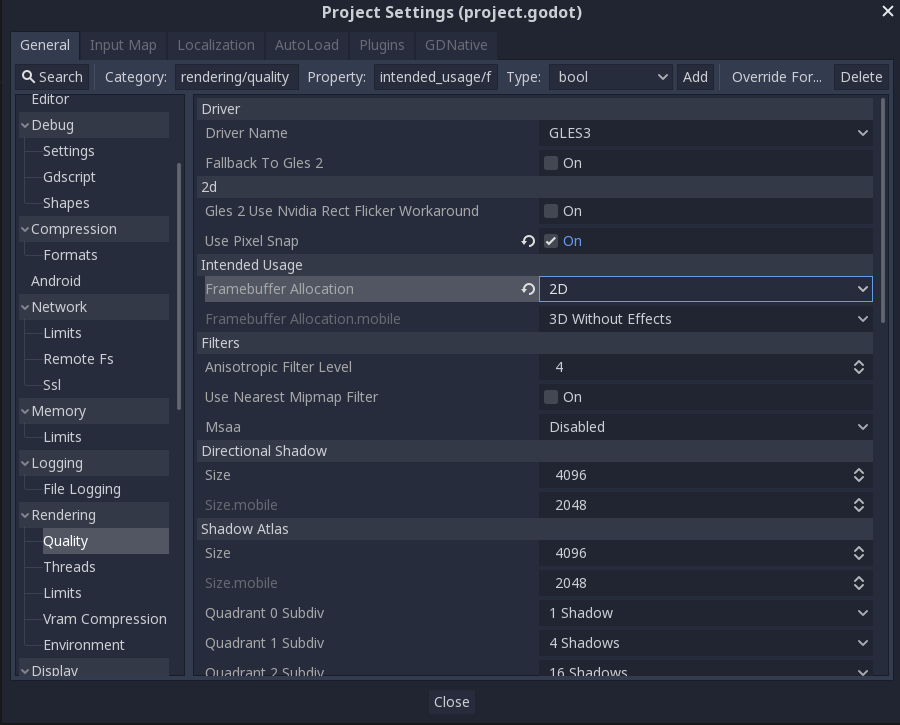
Or try to reduce other quality settings to see if any allows the game to run.
akien-mga
on 12 Aug 2019
Ohhh. I just realized that switching "GLES3" to "GLES2" in the corner does not change the renderer for the project. I thought, I see that it says "GLES2", so my project is GLES2 ! After switching the project to GLES2, it works right away!
And when I created a new project to test this, I expected the "GLES2" option to be on the left, because 3 is greater than 2. Apparently I did not even read what it says, and just chose the option on the left, and it said "GLES2" in the corner, so I was sure it's GLES2. %)
dark-penguin
on 12 Aug 2019
Wait, if your editor renderer is GLES2, the project is still in GLES3? That's _majorly_ weird as far as UX is concerned....
 Zireael07
on 12 Aug 2019
Zireael07
on 12 Aug 2019
It is not intuitive, that's for certain. However, I don't think it's a bad thing to be able to run your editor in GLES2 while developing a GLES3 project. It may come in handy in some situations.
Still, I think any sane person would assume that if you see a "GLES2" label on your screen while working on a project, that means your project is in GLES2 mode. But converting your project back and forth every time you change the editor mode or open your project on GLES2 hardware... it would be even worse. Maybe add a caption near that button that clarifies that this is editor mode, not project mode?.. No, that's waste of screen space, you only need to learn this once. I can't come up with a better way to do this. This is the very first setting in the "Rendering" group, so I guess it can't be even more obvious.
dark-penguin
on 12 Aug 2019
@dark-penguin As far as I know, the renderer selection dropdown is supposed to modify the project settings, but it doesn't seem to always work. A separate issue should be created for this.
 Calinou
on 12 Aug 2019
Calinou
on 12 Aug 2019
Related issues
 RebelliousX
·
3Comments
RebelliousX
·
3Comments
 blurymind
·
3Comments
blurymind
·
3Comments
 rgrams
·
3Comments
rgrams
·
3Comments
 RayKoopa
·
3Comments
RayKoopa
·
3Comments
 n-pigeon
·
3Comments
n-pigeon
·
3Comments
Most helpful comment
It is not intuitive, that's for certain. However, I don't think it's a bad thing to be able to run your editor in GLES2 while developing a GLES3 project. It may come in handy in some situations.
Still, I think any sane person would assume that if you see a "GLES2" label on your screen while working on a project, that means your project is in GLES2 mode. But converting your project back and forth every time you change the editor mode or open your project on GLES2 hardware... it would be even worse. Maybe add a caption near that button that clarifies that this is editor mode, not project mode?.. No, that's waste of screen space, you only need to learn this once. I can't come up with a better way to do this. This is the very first setting in the "Rendering" group, so I guess it can't be even more obvious.