Godot: Light2D does not work across or inside CanvasLayers.
Godot version:
b63c506
OS/device including version:
Win10 64-bit GeForce 9600 GT
Issue description:
When putting a Light2D or Node2D into another CanvasLayer, there is no longer a way to use Light2D nodes. They only operate on the default canvas layer, no matter where they're located.
This currently makes these features impossible to use together.
Here depicts a sprite getting both lights, and the other getting neither. Though the lights are contained in their respective canvases.
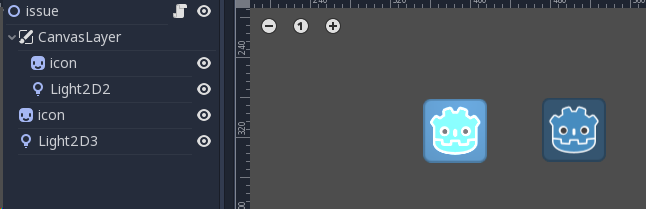
The problem exists in GLES2 and GLES3, in game and in editor.
Steps to reproduce:
Add a CanvasLayer and try out combinations of nodes and lights. You will notice the lights disregard the CanvasLayer that is their parent.
Minimal reproduction project:
3.1 Light2D CanvasLayer.zip
 avencherus
All 2 comments
You need to set the Light2D Min Layer and Max Layer ranges correctly.
 mrcdk
on 6 Mar 2019
mrcdk
on 6 Mar 2019
Thanks, my mistake. Misunderstood these, didn't realize they were canvas layers.
avencherus
on 6 Mar 2019
Related issues
 kirilledelman
·
3Comments
kirilledelman
·
3Comments
 timoschwarzer
·
3Comments
timoschwarzer
·
3Comments
 nunodonato
·
3Comments
nunodonato
·
3Comments
 RayKoopa
·
3Comments
RayKoopa
·
3Comments
 Zylann
·
3Comments
Zylann
·
3Comments
Most helpful comment
You need to set the
Light2DMin LayerandMax Layerranges correctly.