Godot: Strange artifacts in pixel art when in fullscreen
Godot version:
Godot 3.1 beta 9
OS/device including version:
Windows 8.1, Toshiba Satellite
Issue description:
Low-res pixel art periodically shows strange artifacts when scaled up in fullscreen. For example, this 16x16 sprite mainly scales up fine, except that sometimes there are stray pixels where they shouldn't be.
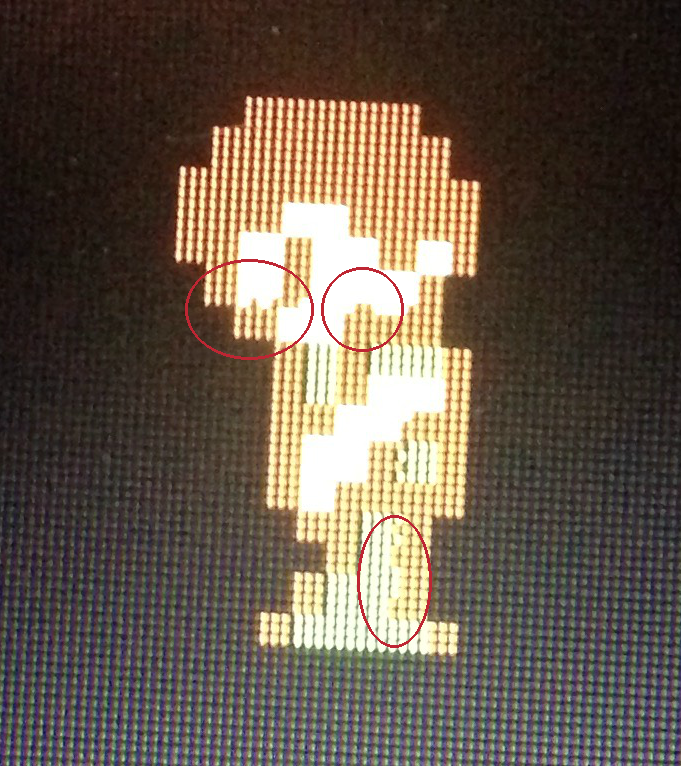
(I had to take this photo with my phone, since Windows screencap doesn't work when Godot is fullscreen.)
In the above image, the sprite is standing still. If I move the player a little, the artifacts either go away, or change to new positions.
The sprite should look like this:
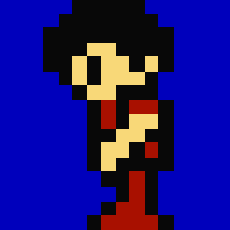
The native resolution of the project is 200x200, the sprite size is 16x16, use_pixel_snap = true, display/window/stretch /mode = "2d", and display/window/stretch/aspect = "keep". The sprite's texture was imported with lossless compression and does not use filter. There is no camera in the project.
I notice the artifacts more frequently when my sprite is facing left (during which the spite has flip_h = true), but I also notice them periodically when moving right.
Steps to reproduce:
- Create a low-resolution player node with horizontal movement.
- Flip the sprite depending on the orientation of the player.
- Set your project's window to a low-resolution.
- Set your project's stretch parameter to keep the aspect ratio.
- Set the project's window to fullscreen.
- Enable use_pixel_snap.
- Play the scene and tap left until you notice strange artifacts appearing on the sprite.
Minimal reproduction project:
TestProject.zip
 sicienss
All 10 comments
After testing with your project, and using it in fullscreen, this is the result that I got:
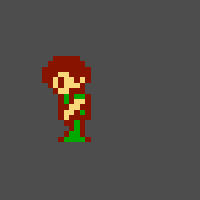
This picture was taken while running the project in fullscreen. Isn't this what was supposed to happen? This was tested on an RX 480 in Linux, with the latest version on git at the time of writing.
 veryprofessionaldodo
on 2 Mar 2019
veryprofessionaldodo
on 2 Mar 2019
Can confirm, Linux 4.19.23-1-MANJARO x86_64 18.0.3 Illyria, Nvidia 800M
OpenGL ES 3.0 Renderer: Mesa DRI Intel(R) Haswell
(Image scaled up 6x for visibility)
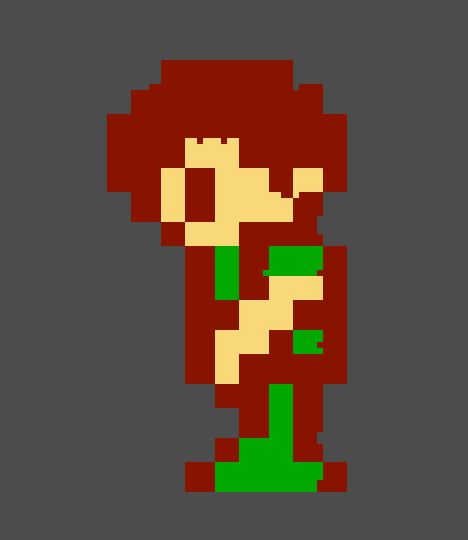
Edit:
It happens in the editor too. GLES2 is also affected. Artifacts present even in windowed mode.

I think I've seen this sometimes in earlier versions, but I've never seen it so severe it affects non-moving sprite, until now.
 Naryosha
on 2 Mar 2019
Naryosha
on 2 Mar 2019
@Naryosha Did you use the project that @sicienss provided for that image? If so, that's quite strange. I tested this on Linux 4.20.11-1 Manjaro.
veryprofessionaldodo
on 2 Mar 2019
@veryprofessionaldodo Yes, I used the provided project. Using Godot b84b015.
Naryosha
on 2 Mar 2019
This can be fixed with the following shader:
shader_type canvas_item;

void fragment() {
    COLOR = textureLod(TEXTURE, UV+SCREEN_PIXEL_SIZE*0.5, 0.0);
}
The issue is that OpenGL samples texels at the center so you need to offset your texture lookups as discussed here. Something should be implemented in the renderer to fix this, but for now this shader should work.
 clayjohn
on 2 Mar 2019
clayjohn
on 2 Mar 2019
@sicienss If you make your project pixel perfect, you most likely want to use stretch mode viewport instead of 2D, by the way. It will have les surprises like this.
@clayjohn I am not so sure that is a good idea, because of the actual fact you mentioned yourself that pixel sampling (and writing) happens from the center.. this is a common fix in DirectX but should not be needed in OpenGL. Maybe it's related to pixel snap actually so a hack like the one you mentioned could be used together with it (or used for pixel snapping).
 reduz
on 3 Mar 2019
reduz
on 3 Mar 2019
@reduz It appears in canvas.glsl we offset vertices by half a pixel when using pixel snap.
Maybe we could do the same for UV when pixel snap is on
For example, in the fragment shader:
#ifdef USE_PIXEL_SNAP
    uv += screen_pixel_size * 0.5;
#endif
We do it in the fragment shader so that we can use screen_pixel_size. We could also add screen_pixel_size into the vertex shader and then the calculation can be done there.
clayjohn
on 3 Mar 2019
@clayjohn I can't reproduce the issue, so if you want to give it a try and see if it works, go ahead
reduz
on 3 Mar 2019
FWIW, the shader workaround provided by @clayjohn does solve the issue for me. The artifacts disappear under the presence of the shader. But it would be nice if one didn't have to do this.
sicienss
on 3 Mar 2019
So I spent some time with this. While my above solution mostly works, it is indeed a hack as reduz pointed out. It works great when you are rendering directly to screen. But if you are rendering to a small viewport then upscaling it results in a full pixel offset in the texture lookup which becomes very obvious, especially if your texture doesnt have a 1 px buffer.
I have yet to find an acceptable solution.
clayjohn
on 4 Mar 2019
Related issues
 Zylann
·
3Comments
Zylann
·
3Comments
 bojidar-bg
·
3Comments
bojidar-bg
·
3Comments
 rgrams
·
3Comments
rgrams
·
3Comments
 ducdetronquito
·
3Comments
ducdetronquito
·
3Comments
 timoschwarzer
·
3Comments
timoschwarzer
·
3Comments
Most helpful comment
This can be fixed with the following shader:
The issue is that OpenGL samples texels at the center so you need to offset your texture lookups as discussed here. Something should be implemented in the renderer to fix this, but for now this shader should work.