Godot: GLES2 crash with errors 502/506 on iOS [iPhone 5s, 6 and iPad Pro]
Godot version:
3.1 (tested beta 7 through beta 9)
OS/device including version:
iPhone 5s - iOS 11.4
Issue description:
Simple 2D projects crash instantly right after the launch image is shown. Screen turns dark grey. Does not occur when exporting as a GLES3 project.
XCode output:
2019-03-01 18:15:27.556089+0100 GLES2_TEST[295:13172] [DYMTLInitPlatform] platform initialization successful
*********** main.m
running app main
after init super 0x102bd0450
******** screen size 640, 1136
after init gles 0x102bd0450
******** adding observer for sound routing changes
******** adding observer for keyboard show/hide
glview is 0x102bd0450
Path: /var/containers/Bundle/Application/7DF1E009-FFCA-4227-B882-763032EF57A2/GLES2_TEST.app
godot_iphone /var/containers/Bundle/Application/7DF1E009-FFCA-4227-B882-763032EF57A2/GLES2_TEST.app/GLES2_TEST
cwd /private/var/containers/Bundle/Application/7DF1E009-FFCA-4227-B882-763032EF57A2/GLES2_TEST.app
os created
setting data dir to /var/mobile/Containers/Data/Application/CF445435-3FD3-4F46-89FC-A286B2707960/Documents from /var/mobile/Containers/Data/Application/CF445435-3FD3-4F46-89FC-A286B2707960/Documents
setup 0
cadisaplylink: 1start animation!
******** screen size 640, 1136
2019-03-01 18:15:28.211989+0100 GLES2_TEST[295:12957] [App] UIWindow->__registeredPreCommitHandler was abandoned !!!! this would have caused a cascade of blown fences - proactively clearing but a bug exists here somewhere between UIKit and CoreAnimation
2019-03-01 18:15:28.212285+0100 GLES2_TEST[295:12957] +[CATransaction synchronize] called within transaction
2019-03-01 18:15:28.218528+0100 GLES2_TEST[295:12957] +[CATransaction synchronize] called within transaction
2019-03-01 18:15:28.263400+0100 GLES2_TEST[295:12957] +[CATransaction synchronize] called within transaction
2019-03-01 18:15:28.322041+0100 GLES2_TEST[295:12957] OpenGL ES 2.0 Renderer: Apple A7 GPU
OpenGL ES 2.0 Renderer: Apple A7 GPU
2019-03-01 18:15:28.370377+0100 GLES2_TEST[295:12957] **ERROR**: Directional shadow framebuffer status invalid
2019-03-01 18:15:28.370805+0100 GLES2_TEST[295:12957]    At: drivers/gles2/rasterizer_scene_gles2.cpp:3330:initialize() - Directional shadow framebuffer status invalid
**ERROR**: Directional shadow framebuffer status invalid
   At: drivers/gles2/rasterizer_scene_gles2.cpp:3330:initialize() - Directional shadow framebuffer status invalid
2019-03-01 18:15:28.539121+0100 GLES2_TEST[295:12957] [MC] System group container for systemgroup.com.apple.configurationprofiles path is /private/var/containers/Shared/SystemGroup/systemgroup.com.apple.configurationprofiles
2019-03-01 18:15:28.539908+0100 GLES2_TEST[295:12957] [MC] Reading from public effective user settings.
2019-03-01 18:15:29.165566+0100 GLES2_TEST[295:12957] 502 error
2019-03-01 18:15:29.203475+0100 GLES2_TEST[295:12957] **WARNING**: Could not create framebuffer!!
2019-03-01 18:15:29.203574+0100 GLES2_TEST[295:12957]    At: drivers/gles2/rasterizer_storage_gles2.cpp:4333:_render_target_allocate() - Could not create framebuffer!!
**WARNING**: Could not create framebuffer!!
   At: drivers/gles2/rasterizer_storage_gles2.cpp:4333:_render_target_allocate() - Could not create framebuffer!!
2019-03-01 18:15:29.231660+0100 GLES2_TEST[295:12957] 502 error
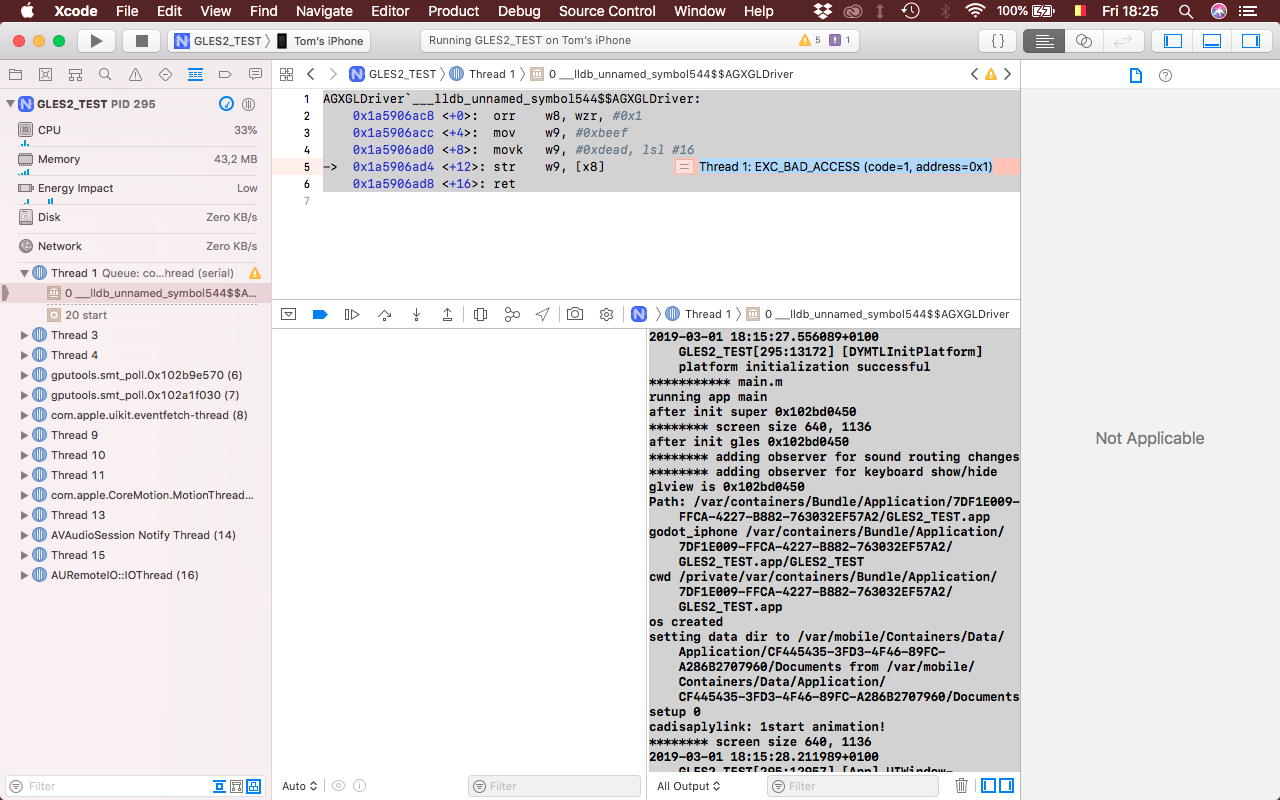
AGXGLDriver`___lldb_unnamed_symbol544$$AGXGLDriver:
    0x1a5906ac8 <+0>:  orr    w8, wzr, #0x1
    0x1a5906acc <+4>:  mov    w9, #0xbeef
    0x1a5906ad0 <+8>:  movk   w9, #0xdead, lsl #16
->  0x1a5906ad4 <+12>: str    w9, [x8]
    0x1a5906ad8 <+16>: ret
The second one is marked 'Thread 1: EXC_BAD_ACCESS (code=1, address=0x1)' where the arrow is (see screenshot).
Steps to reproduce:
Make a new GLES2 project -> add Node2D -> export for iOS -> run on device
Minimal reproduction project:
GLES2_TEST.zip
(Included basic Images.xcassets with valid images to replace the xcassets Godot generates)
XCode screenshot:
 tomnahooy
All 56 comments
Don't know if it is relevant, but XCode version used is 10.0
tomnahooy
on 1 Mar 2019
This might have been fixed today by 8799f69, it will be available in 3.1 beta 10.
 akien-mga
on 1 Mar 2019
akien-mga
on 1 Mar 2019
Ok cool, I'll try again when beta 10 is released and I'll let you know! Thanks!
tomnahooy
on 1 Mar 2019
It seems the issue persists in 3.1 beta 10, albeit with slightly different output in Xcode:
2019-03-03 12:26:04.113744+0100 GLES2_TEST[284:10057] [DYMTLInitPlatform] platform initialization successful
*********** main.m
running app main
after init super 0x102f6dff0
******** screen size 640, 1136
after init gles 0x102f6dff0
******** adding observer for sound routing changes
******** adding observer for keyboard show/hide
glview is 0x102f6dff0
Path: /var/containers/Bundle/Application/59DB892E-6DD7-458E-856C-AF2B3DBDB258/GLES2_TEST.app
godot_iphone /var/containers/Bundle/Application/59DB892E-6DD7-458E-856C-AF2B3DBDB258/GLES2_TEST.app/GLES2_TEST
cwd /private/var/containers/Bundle/Application/59DB892E-6DD7-458E-856C-AF2B3DBDB258/GLES2_TEST.app
os created
setting data dir to /var/mobile/Containers/Data/Application/AB43CFC3-E465-43F2-BB0F-F3CAC0F7E47B/Documents from /var/mobile/Containers/Data/Application/AB43CFC3-E465-43F2-BB0F-F3CAC0F7E47B/Documents
setup 0
cadisaplylink: 1start animation!
******** screen size 640, 1136
2019-03-03 12:26:04.669331+0100 GLES2_TEST[284:9922] [App] UIWindow->__registeredPreCommitHandler was abandoned !!!! this would have caused a cascade of blown fences - proactively clearing but a bug exists here somewhere between UIKit and CoreAnimation
2019-03-03 12:26:04.669605+0100 GLES2_TEST[284:9922] +[CATransaction synchronize] called within transaction
2019-03-03 12:26:04.679553+0100 GLES2_TEST[284:9922] +[CATransaction synchronize] called within transaction
2019-03-03 12:26:04.739634+0100 GLES2_TEST[284:9922] +[CATransaction synchronize] called within transaction
2019-03-03 12:26:04.780987+0100 GLES2_TEST[284:9922] OpenGL ES 2.0 Renderer: Apple A7 GPU
OpenGL ES 2.0 Renderer: Apple A7 GPU
2019-03-03 12:26:04.971276+0100 GLES2_TEST[284:9922] [MC] System group container for systemgroup.com.apple.configurationprofiles path is /private/var/containers/Shared/SystemGroup/systemgroup.com.apple.configurationprofiles
2019-03-03 12:26:04.974813+0100 GLES2_TEST[284:9922] [MC] Reading from public effective user settings.
2019-03-03 12:26:05.590438+0100 GLES2_TEST[284:9922] 506 error
2019-03-03 12:26:05.739829+0100 GLES2_TEST[284:9922] 502 error
(lldb)
AGXGLDriver`___lldb_unnamed_symbol544$$AGXGLDriver:
0x1a2a3eac8 <+0>: orr w8, wzr, #0x1
0x1a2a3eacc <+4>: mov w9, #0xbeef
0x1a2a3ead0 <+8>: movk w9, #0xdead, lsl #16
-> 0x1a2a3ead4 <+12>: str w9, [x8]
0x1a2a3ead8 <+16>: ret

tomnahooy
on 3 Mar 2019
well... I feel sorry for milestones is set to 3.2 for this...
 volzhs
on 5 Mar 2019
volzhs
on 5 Mar 2019
Could you try some earlier beta builds to see if it used to work? There were changes to GLES2 in all beta versions, so it could be that a change around beta 7 broke things for your device (it seems to be the case for some Windows setups and Android phones at least).
akien-mga
on 5 Mar 2019
I went through all available beta builds and encountered the same issue in all of them. The Xcode builds failed for a different reason in beta 3 and 4, so these two I couldn't actually test. The 506 error only occurs in beta 10 and 11.
tomnahooy
on 6 Mar 2019
This may be fixed by 7141c73, by the way.
 reduz
on 7 Mar 2019
reduz
on 7 Mar 2019
Cool. I'll test it as soon as it is available. Will it be in the next beta?
tomnahooy
on 7 Mar 2019
Just tested in RC1: the issue remains (errors 506 & 502).
*********** main.m
running app main
after init super 0x102ac72a0
******** screen size 640, 1136
after init gles 0x102ac72a0
******** adding observer for sound routing changes
******** adding observer for keyboard show/hide
glview is 0x102ac72a0
Path: /var/containers/Bundle/Application/0E8F04BE-EF60-4A6C-B18B-9B24A73634D2/GLES2_TEST.app
godot_iphone /var/containers/Bundle/Application/0E8F04BE-EF60-4A6C-B18B-9B24A73634D2/GLES2_TEST.app/GLES2_TEST
cwd /private/var/containers/Bundle/Application/0E8F04BE-EF60-4A6C-B18B-9B24A73634D2/GLES2_TEST.app
os created
setting data dir to /var/mobile/Containers/Data/Application/BE895C65-3919-4565-8439-B2FD7C3395FC/Documents from /var/mobile/Containers/Data/Application/BE895C65-3919-4565-8439-B2FD7C3395FC/Documents
setup 0
cadisaplylink: 1start animation!
******** screen size 640, 1136
2019-03-09 09:49:52.587215+0100 GLES2_TEST[284:11214] OpenGL ES 2.0 Renderer: Apple A7 GPU
OpenGL ES 2.0 Renderer: Apple A7 GPU
2019-03-09 09:49:52.725335+0100 GLES2_TEST[284:11214] [MC] System group container for systemgroup.com.apple.configurationprofiles path is /private/var/containers/Shared/SystemGroup/systemgroup.com.apple.configurationprofiles
2019-03-09 09:49:52.726258+0100 GLES2_TEST[284:11214] [MC] Reading from public effective user settings.
2019-03-09 09:49:53.136873+0100 GLES2_TEST[284:11214] 506 error
2019-03-09 09:49:53.476599+0100 GLES2_TEST[284:11214] 502 error
(lldb)
AGXGLDriver`___lldb_unnamed_symbol544$$AGXGLDriver:
0x1a46baac8 <+0>: orr w8, wzr, #0x1
0x1a46baacc <+4>:  mov    w9, #0xbeef
0x1a46baad0 <+8>:  movk   w9, #0xdead, lsl #16
-> 0x1a46baad4 <+12>: str w9, [x8]
0x1a46baad8 <+16>: ret
libdyld.dylib`start:
    0x183b05fbc <+0>: nop
    0x183b05fc0 <+4>: bl     0x183b4e244               ; exit
    0x183b05fc4 <+8>: brk    #0x3

tomnahooy
on 9 Mar 2019
Does it work if you remove the default_env.tres from your project?
akien-mga
on 9 Mar 2019
No, it doesn't make any difference if I remove it from the project.
tomnahooy
on 9 Mar 2019
I just noticed the following error when I ran the project in the editor on macOS:
E 0:00:00:0094   Directional shadow framebuffer status invalid
  <C Source>     drivers/gles2/rasterizer_scene_gles2.cpp:3355 @ initialize()
I downloaded RC1 on my Linux machine as well and opened the same project: the error doesn't show up there. Also, it only shows up on the mac if the project is GLES2, GLES3 seems fine.
To be clear: it does run in the editor on macOS in GLES2, but it shows the error too.
tomnahooy
on 9 Mar 2019
I get the same error on an iPhone 6 and iPad Pro using GLES2, I was trying to get better frame rates than GLES3 where I am getting around 40fps in a test scene consisting of a plane and sphere with 1 directional light. This is using 3.1rc
 ViktorEvil
on 10 Mar 2019
ViktorEvil
on 10 Mar 2019
Do we have other iPhone / iPad users affected by this, and if so what are your phone/tablet models?
(If you're not affected by this on iPhone/iPad, please state so too.)
akien-mga
on 10 Mar 2019
@BastiaanOlij @samgreen Are you able to reproduce it/debug further? @reduz doesn't have access to any relevant hardware right now.
akien-mga
on 11 Mar 2019
@akien-mga I just created a new RC2 project with GLES2, added a sprite node (like the original example), exported to iOS, and was able to run it on a 2017 iPad Pro 10.5" with Xcode 10.1.
Along the way, I saw this error in the editor:

I had to manually delete the icons in Images.xcassets because the partial population of the Godot icons caused Xcode to complain about an icon for a stickers pack. After that, this is what showed in the logs when I ran the test:
2019-03-10 21:43:57.321117-0400 test[3293:1833648] [DYMTLInitPlatform] platform initialization successful
*********** main.m
running app main
2019-03-10 21:43:57.377609-0400 test[3293:1833601] [ApplicationLifecycle] Windows were created before application initialzation completed. This may result in incorrect visual appearance.
after init super 0x105606d20
2019-03-10 21:43:57.428944-0400 test[3293:1833601] Metal GPU Frame Capture Enabled
2019-03-10 21:43:57.429709-0400 test[3293:1833601] Metal API Validation Enabled
******** screen size 1536, 2048
after init gles 0x105606d20
******** adding observer for sound routing changes
******** adding observer for keyboard show/hide
glview is 0x105606d20
Path: /var/containers/Bundle/Application/C7B1193D-4E87-484A-8752-052AA282FAC2/test.app
godot_iphone /var/containers/Bundle/Application/C7B1193D-4E87-484A-8752-052AA282FAC2/test.app/test
cwd /private/var/containers/Bundle/Application/C7B1193D-4E87-484A-8752-052AA282FAC2/test.app
os created
setting data dir to /var/mobile/Containers/Data/Application/D636C196-C253-4B96-A301-5B98C2E47C22/Documents from /var/mobile/Containers/Data/Application/D636C196-C253-4B96-A301-5B98C2E47C22/Documents
setup 0
cadisaplylink: 1start animation!
******** screen size 1536, 2048
2019-03-10 21:43:57.497090-0400 test[3293:1833601] OpenGL ES 2.0 Renderer: Apple A10X GPU
OpenGL ES 2.0 Renderer: Apple A10X GPU
2019-03-10 21:43:57.713133-0400 test[3293:1833601] [MC] System group container for systemgroup.com.apple.configurationprofiles path is /private/var/containers/Shared/SystemGroup/systemgroup.com.apple.configurationprofiles
2019-03-10 21:43:57.713404-0400 test[3293:1833601] [MC] Reading from public effective user settings.
2019-03-10 21:43:58.071560-0400 test[3293:1833601] 506 error
2019-03-10 21:43:58.293274-0400 test[3293:1833601] 502 error
2019-03-10 21:43:58.646357-0400 test[3293:1833601] [Error] setCurrentGameFromInternal: ignoring -- nil bundleIdentifier :(null)
2019-03-10 21:43:58.675000-0400 test[3293:1833601] [Error] _authenticateUsingAlert:Faied to authenticate player with existing credentials.Error: Error Domain=GKErrorDomain Code=15 "The requested operation could not be completed because this application is not recognized by Game Center." UserInfo={GKServerStatusCode=5019, NSLocalizedDescription=The requested operation could not be completed because this application is not recognized by Game Center., NSUnderlyingError=0x282fccb70 {Error Domain=GKServerErrorDomain Code=5019 "status = 5019, no game matching descriptor: ios:com.claymytest.testing:1.0:1.0+-1" UserInfo={GKServerStatusCode=5019, NSLocalizedFailureReason=status = 5019, no game matching descriptor: ios:com.claymytest.testing:1.0:1.0+-1}}}
2019-03-10 21:43:58.682893-0400 test[3293:1833601] [Error] startAuthenticationForExistingPrimaryPlayer:Failed to Authenticate player.Error: Error Domain=GKErrorDomain Code=15 "The requested operation could not be completed because this application is not recognized by Game Center." UserInfo={NSLocalizedDescription=The requested operation could not be completed because this application is not recognized by Game Center.}
There were 1847 build warnings about building for iOS 10 when linked to iOS 9, but it didn't throw any errors germane to that.
Hope that helps.
 clayheaton
on 11 Mar 2019
clayheaton
on 11 Mar 2019
I'll take a look. Is it curious to anyone else that the driver crash says dead beef?
0x1a46baacc <+4>:  mov    w9, #0xbeef
0x1a46baad0 <+8>:  movk   w9, #0xdead, lsl #16
 samgreen
on 11 Mar 2019
samgreen
on 11 Mar 2019
@samgreen I am actually having a good old laugh at a lot of the messages Apple put in the logs when we're using code thats deemed old :)
@clayheaton I'll have to double check but its very important that the SDK we set as minimum when building the binaries matches the SDK set in our xcode project files, maybe those are mismatched. A lot of the warnings can be ignored as it's unlikely you're running on anything older then iOS 11 anyway.
@akien-mga I can have a play around with GLES2 tomorrow after work if someone else hasn't solve this, it's a little late today.
 BastiaanOlij
on 11 Mar 2019
BastiaanOlij
on 11 Mar 2019
There were 1847 build warnings about building for iOS 10 when linked to iOS 9, but it didn't throw any errors germane to that.
I believe we did _actually_ bump the minimum to iOS 10.
samgreen
on 11 Mar 2019
Adding more details here. If the crash is restricted to the A10X GPU those devices are:
- iPad Pro 10.5" (2017)
- iPad Pro 12.9" 2nd Gen (2017)
- Apple TV 4K or "5th Gen" (2017)
If the crash is instead iPhone 5s and iPhone 6 as the ticket title indicates, that would be the old school PowerVR GPUs.
- iPhone 5s (PowerVR G6430)
- iPhone 6 (PowerVR GX6450)
samgreen
on 11 Mar 2019
Starting testing now...
No issues with GLES 2 on iPhone XS Max.
samgreen
on 11 Mar 2019
Confirming same crash log on iPhone 6 non S
2019-03-11 12:45:18.125382-0700 GLES2Export[261:5505] [DYMTLInitPlatform] platform initialization successful
*********** main.m
running app main
after init super 0x102d0e610
******** screen size 640, 960
after init gles 0x102d0e610
******** adding observer for sound routing changes
******** adding observer for keyboard show/hide
glview is 0x102d0e610
Path: /var/containers/Bundle/Application/CA630A22-F2FB-4268-8B1A-774F7F5E7C37/GLES2Export.app
godot_iphone /var/containers/Bundle/Application/CA630A22-F2FB-4268-8B1A-774F7F5E7C37/GLES2Export.app/GLES2Export
cwd /private/var/containers/Bundle/Application/CA630A22-F2FB-4268-8B1A-774F7F5E7C37/GLES2Export.app
os created
setting data dir to /var/mobile/Containers/Data/Application/92DFA546-6749-412F-A827-F15E5F4CA9DE/Documents from /var/mobile/Containers/Data/Application/92DFA546-6749-412F-A827-F15E5F4CA9DE/Documents
setup 0
cadisaplylink: 1start animation!
******** screen size 640, 960
2019-03-11 12:45:18.721896-0700 GLES2Export[261:5243] OpenGL ES 2.0 Renderer: Apple A8 GPU
OpenGL ES 2.0 Renderer: Apple A8 GPU
2019-03-11 12:45:19.213566-0700 GLES2Export[261:5243] [MC] System group container for systemgroup.com.apple.configurationprofiles path is /private/var/containers/Shared/SystemGroup/systemgroup.com.apple.configurationprofiles
2019-03-11 12:45:19.214178-0700 GLES2Export[261:5243] [MC] Reading from public effective user settings.
2019-03-11 12:45:19.826932-0700 GLES2Export[261:5243] 506 error
******** stop animation!
start animation!
2019-03-11 12:45:20.242208-0700 GLES2Export[261:5243] 502 error
I believe the 502 is GL_INVALID_OPERATION and the I think the 506 is GL_INVALID_FRAMEBUFFER_OPERATION. So possible bad configuration when setting up FBO in GLES 2. I'll try and dig in a bit more in rasterizer_scene_gles2.cpp but this is a release blocking issue IMO.
@akien-mga
samgreen
on 11 Mar 2019
There were 1847 build warnings about building for iOS 10 when linked to iOS 9, but it didn't throw any errors germane to that.
I believe we did _actually_ bump the minimum to iOS 10.
I pretty sure I had to select iOS 10 manually as it defaults to iOS 9 when I built yesterday
ViktorEvil
on 11 Mar 2019
I'll try and dig in a bit more in rasterizer_scene_gles2.cpp but this is a release blocking issue IMO.
I fully agree, which is why it's one of the last few issues in the 3.1 milestone and also labelled high priority. But @reduz doesn't have the hardware to reproduce it, so your digging into this code is our best hope to get it fixed before the 3.1 (FYI, we hope to release it within 2-3 days).
Worst case we will end up releasing with this bug, and do our best to fix it quickly for 3.1.1.
akien-mga
on 11 Mar 2019
Can I recommend reaching out to these folks?
This would resolve the hardware access issue. As it gives you remote access and shell to real hardware. I’m sure they’d toss an invite your way.
I’ll keep this thread updated with findings.
samgreen
on 11 Mar 2019
Another possibility would be to run it through Firebase Test Lab on the devices that seem to be afflicted. The instructions are pretty simple. I can look into it in about 24 hrs (unfortunately, I'm busy until then) if there's still a need.
clayheaton
on 11 Mar 2019
Compiled the release templates from master for arm64 to continue testing on the crashing iPhone 6. Getting some actionable output from the shader compiler. Might be a quick fix. Relevant snippet here:
**ERROR**: CanvasShaderGLES2: Vertex shader compilation failed:
ERROR: 0:19: '' : syntax error: #extension must always be before any non-preprocessor tokens
2019-03-11 14:35:54.039851-0700 GLES2Export[328:16429]    At: drivers/gles2/shader_gles2.cpp:129:_display_error_with_code() - CanvasShaderGLES2: Vertex shader compilation failed:
ERROR: 0:19: '' : syntax error: #extension must always be before any non-preprocessor tokens
**ERROR**: CanvasShaderGLES2: Vertex shader compilation failed:
ERROR: 0:19: '' : syntax error: #extension must always be before any non-preprocessor tokens

   At: drivers/gles2/shader_gles2.cpp:129:_display_error_with_code() - CanvasShaderGLES2: Vertex shader compilation failed:
ERROR: 0:19: '' : syntax error: #extension must always be before any non-preprocessor tokens

2019-03-11 14:35:54.040403-0700 GLES2Export[328:16429] **ERROR**: Method/Function Failed, returning: __null
2019-03-11 14:35:54.040447-0700 GLES2Export[328:16429]    At: drivers/gles2/shader_gles2.cpp:288:get_current_version() - Method/Function Failed, returning: __null
**ERROR**: Method/Function Failed, returning: __null
   At: drivers/gles2/shader_gles2.cpp:288:get_current_version() - Method/Function Failed, returning: __null
2019-03-11 14:35:54.040487-0700 GLES2Export[328:16429] **ERROR**: Condition ' !version ' is true. returned: false
2019-03-11 14:35:54.040508-0700 GLES2Export[328:16429]    At: drivers/gles2/shader_gles2.cpp:88:bind() - Condition ' !version ' is true. returned: false
**ERROR**: Condition ' !version ' is true. returned: false
   At: drivers/gles2/shader_gles2.cpp:88:bind() - Condition ' !version ' is true. returned: false
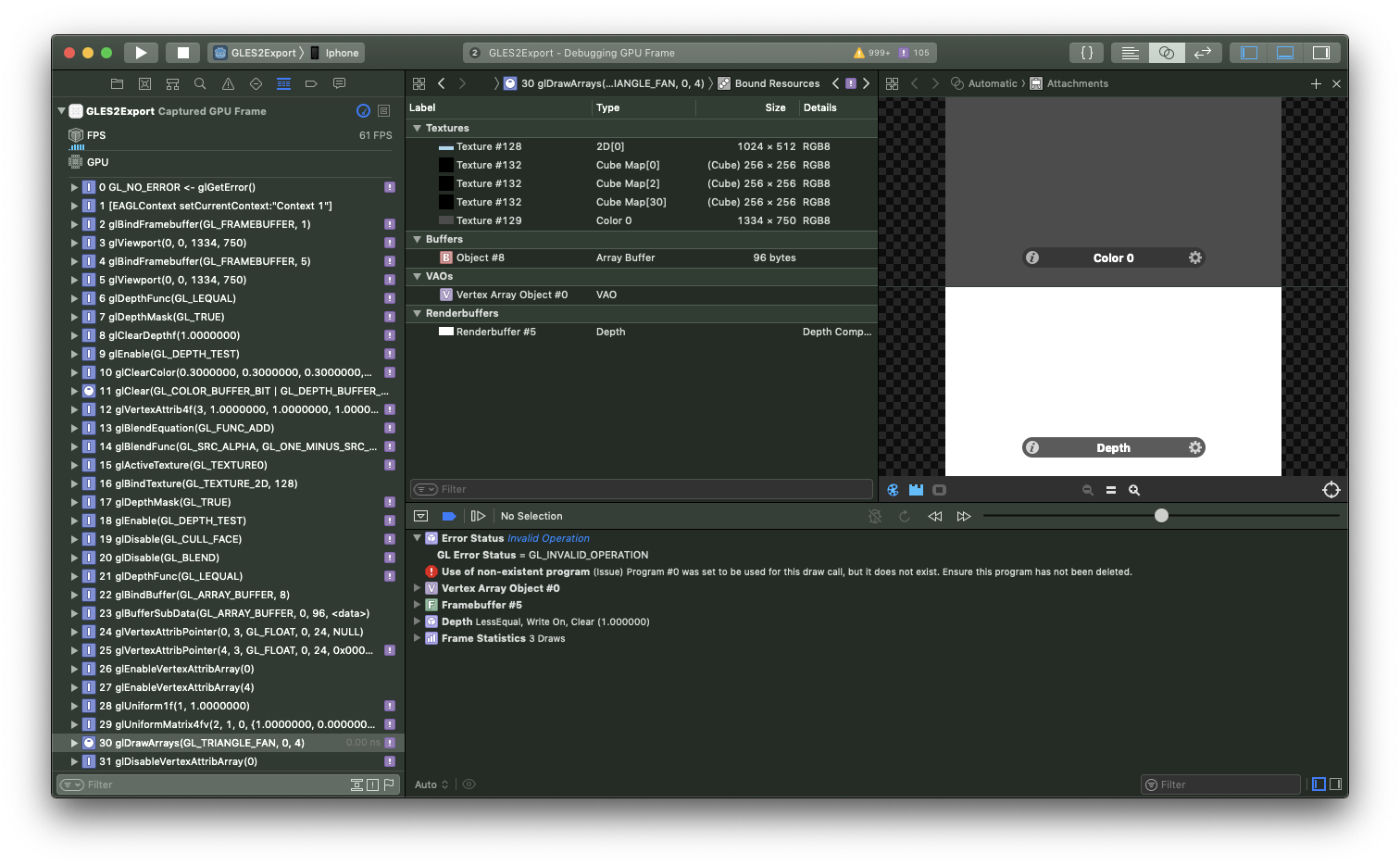
So it looks like the GL_INVALID_OPERATION might be coming from the shaders failing to compile. The console is repeatedly logging this error as well as the shader errors above.
samgreen
on 11 Mar 2019
You synced with master at the wrong time, this error was a regression from #26928 and is fixed in #26932.
akien-mga
on 11 Mar 2019
Confirming that it's simply a shader compilation issue.
samgreen
on 11 Mar 2019
Ah just saw your comment @akien-mga. I'll pull and confirm it's resolved for old iOS GPUs.
samgreen
on 11 Mar 2019
Progress with the new pull. but still failing shader compilation on older GPUs. Details:
2019-03-11 14:59:28.386041-0700 GLES2Export[355:19894] **ERROR**: CanvasShaderGLES2: Vertex shader compilation failed:
ERROR: 0:72: Invalid call of undeclared identifier 'texture2DLodEXT'
2019-03-11 14:59:28.386073-0700 GLES2Export[355:19894]    At: drivers/gles2/shader_gles2.cpp:129:_display_error_with_code() - CanvasShaderGLES2: Vertex shader compilation failed:
ERROR: 0:72: Invalid call of undeclared identifier 'texture2DLodEXT'
**ERROR**: CanvasShaderGLES2: Vertex shader compilation failed:
ERROR: 0:72: Invalid call of undeclared identifier 'texture2DLodEXT'
To clarify, #26928 was not meant to fix this issue. It would be great if it did fix this error, but I doubt it :)
Edit: Though the error you're getting is related.
2019-03-11 14:59:28.386041-0700 GLES2Export[355:19894] ERROR: CanvasShaderGLES2: Vertex shader compilation failed:
ERROR: 0:72: Invalid call of undeclared identifier 'texture2DLodEXT'
akien-mga
on 11 Mar 2019
Ahhh, thanks for clarifying.
samgreen
on 11 Mar 2019
Can you try d9235be54b6965e9700b6be2ca201d347d1c6d93 to see if this texture2DLodEXT error you get is still a regression from my PRs?
akien-mga
on 11 Mar 2019
Reading the spec again, I did mess up with those PRs, I'll sent a revert.
akien-mga
on 11 Mar 2019
I’m thinking it’s actually this extension. Unrelated to cube map.
http://www.khronos.org/registry/gles/extensions/EXT/EXT_shader_texture_lod.txt
samgreen
on 11 Mar 2019
I just meant that you should test commit d9235be as it's the one before my changes.
Again, #26928 and #26932 were made today and introduced bugs that are affecting your tests. They're unrelated to the issue discussed here.
akien-mga
on 11 Mar 2019
26936 should fix that temporary regression and let you dig further again.
akien-mga
on 11 Mar 2019
As an aside, I’m curious about the original intent from the poster. All the devices listed in the ticket support GL ES 3 and Apple devices have supported it for almost 7 years now.
We’d have to go so far back as iPhone 4S and the original iPad to find a lack of GL3 support. Curious what the context is @tomnahooy
samgreen
on 11 Mar 2019
As an aside, I’m curious about the original intent from the poster. All the devices listed in the ticket support GL ES 3 and Apple devices have supported it for almost 7 years now.
We’d have to go so far back as iPhone 4S and the original iPad to find a lack of GL3 support. Curious what the context is @tomnahooy
I tried GLES2 because I was having performance issues in a very simple 3D scene and it was suggested that I try GLES2 on the discord server to see if it rectified my low FPS
ViktorEvil
on 11 Mar 2019
@ViktorEvil Thanks for the context. That's useful information.
samgreen
on 11 Mar 2019
@akien-mga pulled master again (man we move fast around here 😄 ) and rebuilt and redeployed. More progress, but I think something funky is happening where the shaders get compiled. The error is similar but in a different spot.
2019-03-11 15:57:54.971122-0700 GLES2Export[370:24887] **ERROR**: SceneShaderGLES2: Vertex shader compilation failed:
ERROR: 0:723: '' : syntax error: #extension must always be before any non-preprocessor tokens
ERROR: 0:1068: 'FRAGMENT_SHADER_GLOBALS' : syntax error: syntax error
2019-03-11 15:57:54.971153-0700 GLES2Export[370:24887]    At: drivers/gles2/shader_gles2.cpp:129:_display_error_with_code() - SceneShaderGLES2: Vertex shader compilation failed:
ERROR: 0:723: '' : syntax error: #extension must always be before any non-preprocessor tokens
ERROR: 0:1068: 'FRAGMENT_SHADER_GLOBALS' : syntax error: syntax error
**ERROR**: SceneShaderGLES2: Vertex shader compilation failed:
ERROR: 0:723: '' : syntax error: #extension must always be before any non-preprocessor tokens
ERROR: 0:1068: 'FRAGMENT_SHADER_GLOBALS' : syntax error: syntax error

   At: drivers/gles2/shader_gles2.cpp:129:_display_error_with_code() - SceneShaderGLES2: Vertex shader compilation failed:
ERROR: 0:723: '' : syntax error: #extension must always be before any non-preprocessor tokens
ERROR: 0:1068: 'FRAGMENT_SHADER_GLOBALS' : syntax error: syntax error

2019-03-11 15:57:54.972353-0700 GLES2Export[370:24887] **ERROR**: Method/Function Failed, returning: __null
2019-03-11 15:57:54.972402-0700 GLES2Export[370:24887]    At: drivers/gles2/shader_gles2.cpp:288:get_current_version() - Method/Function Failed, returning: __null
**ERROR**: Method/Function Failed, returning: __null
   At: drivers/gles2/shader_gles2.cpp:288:get_current_version() - Method/Function Failed, returning: __null
2019-03-11 15:57:54.972442-0700 GLES2Export[370:24887] **ERROR**: Condition ' !version ' is true. returned: false
The FRAGMENT_SHADER_GLOBALS is new.
Relevant shader output from log:
720: #ifndef USE_GLES_OVER_GL
721: #ifdef GL_EXT_shader_texture_lod
722: #extension GL_EXT_shader_texture_lod : enable
723: #define texture2DLod(img, coord, lod) texture2DLodEXT(img, coord, lod)
724: #define textureCubeLod(img, coord, lod) textureCubeLodEXT(img, coord, lod)
725: #endif
726: #endif // !USE_GLES_OVER_GL
If our goal is to get the #extension towards the beginning of the file, why is it appearing on line 722?
samgreen
on 12 Mar 2019
@samgreen I had some issues with an iOS project using gles3 (using 3.0.6), where there was a strange warping of 3D meshes. I couldn't test it any farther myself because none of my testers or users seem to have the issue, but Apple review had it frequently and rejected my builds for it. I ended up doing the project over in gles2 using 2.1.x and never had the issue again. Also, since there are many issues with gles3 on android as well, it seems safer to me to use gles2 on mobile all together :)
tomnahooy
on 12 Mar 2019
@samgreen Sorry, that was still a fallout of my wrong PRs from today... It should now be fixed with 3ebde6fa, at least for me GLES2 works well and the cumulated diff is basically nil...
Now it should work properly, i.e. as it did before a few hours ago.
akien-mga
on 12 Mar 2019
Latest crash

samgreen
on 12 Mar 2019
I don't know if this helps but I've tested GLES2 (specifically the project supplied) on different devices.
- iPad (2018) no crash
- iPhone X no crash
- iPhone 6 plus crashed
 Xancett
on 12 Mar 2019
Xancett
on 12 Mar 2019
Helpful context, thanks @Xancett
samgreen
on 12 Mar 2019
Some additional info. Tested the sample project with RC3, GLES2 on an iPhone 6S. Doesn't crash.
 alcroito
on 12 Mar 2019
alcroito
on 12 Mar 2019
To summarize:
Device | GPU | OpenGL FBO Error?
-- | -- | --
iPhone 5s | PowerVR G6430 | YES
iPhone 6 & 6 Plus | PowerVR GX6450 | YES
2015 iPad Pro 9.7" | PowerVR Series 7XT | YES
iPhone 6s & 6s Plus | PowerVR GT7600 | NO
iPhone 7 & 7 Plus | Apple A10 | NO
iPad (2018) | Apple A10 | NO
2017 iPad Pro 10.5" | Apple A10X | NO
iPhone X | Apple A11 | NO
iPhone XS Max | Apple A12 | NO
The problem _might_ be restricted to older PowerVR gpus, except @ViktorEvil has reported the same issue with an iPad pro (can you confirm the generation?), which is one of the newest Apple chips.
I'll continue digging today.
edit: I just realized we have conflicting crash reports from @ViktorEvil and @clayheaton on iPad pro.
samgreen
on 12 Mar 2019
Sorry should have stated that my iPad Pro is 9.7” with A9X chip
ViktorEvil
on 12 Mar 2019
This is working fine on my iPhone 7. Can't seem to test on my iPad, XCode won't recognise it but its very very very very very very old ;)
BastiaanOlij
on 13 Mar 2019
@BastiaanOlij Thanks for the update, further evidence for the table above.
samgreen
on 13 Mar 2019
I have finally resolved this issue. After all this debugging it turns out that the export template was incorrectly coded and was always creating OpenGL ES 3 contexts on devices that supported it. That explains the weirdness that we saw in the table above. The export template will function correctly on devices that _only support_ OpenGL ES 2 and not 3.
Fix coming soon. Should be very small, hopefully we can make the release @akien-mga
samgreen
on 14 Mar 2019
Related issues
 ducdetronquito
·
3Comments
ducdetronquito
·
3Comments
 ndee85
·
3Comments
ndee85
·
3Comments
 kirilledelman
·
3Comments
kirilledelman
·
3Comments
 testman42
·
3Comments
testman42
·
3Comments
 Zylann
·
3Comments
Zylann
·
3Comments
Most helpful comment
I'll take a look. Is it curious to anyone else that the driver crash says
deadbeef?