Godot: [Regression from d116705, beta 5] TPS Demo is pixelated with depth prepass and MSAA 2x
Godot version:
3.1 beta 7
OS/device including version:
Mac OS
AMD Radeon R9 M370X
Issue description:
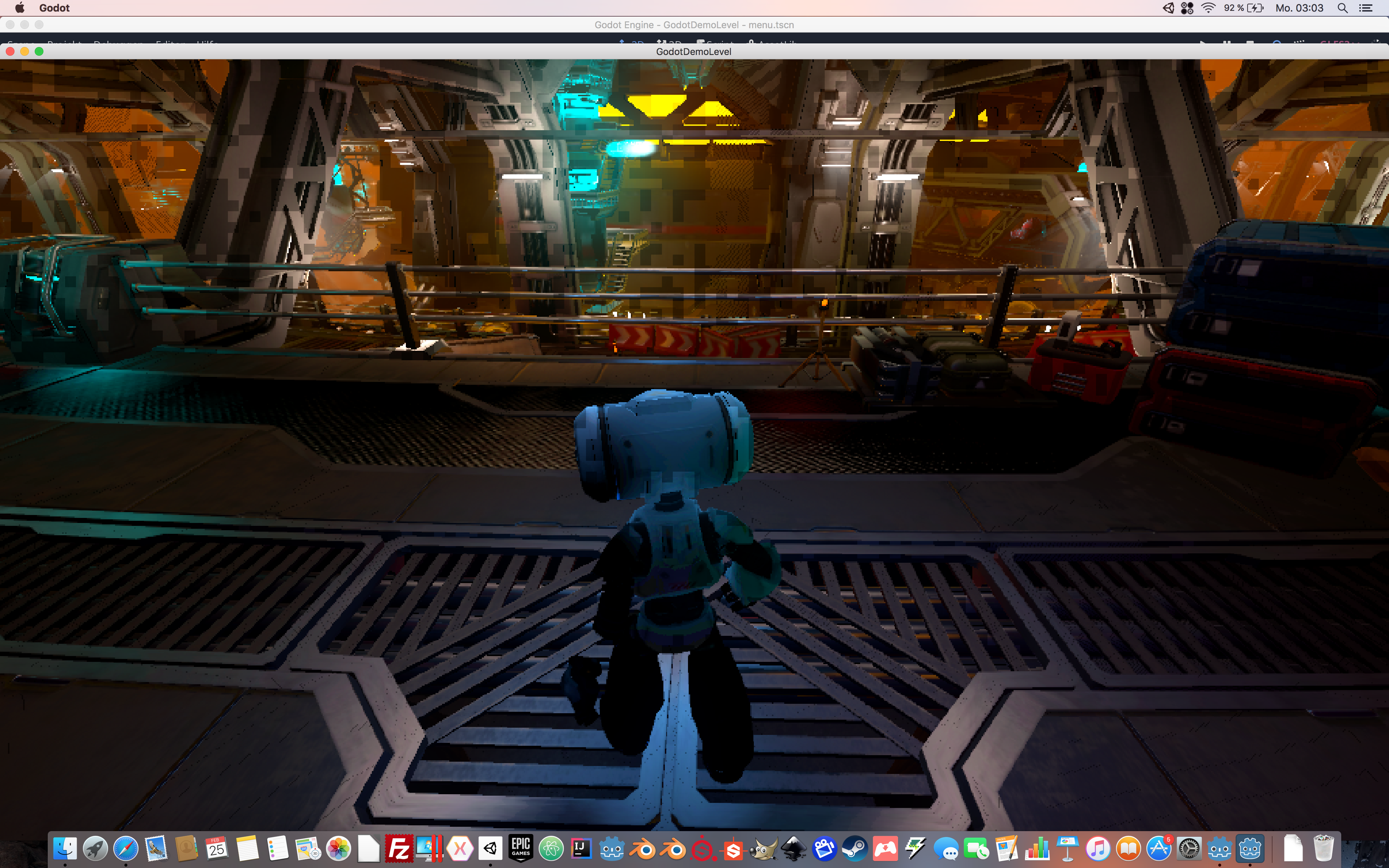
The TPS Demo from Godot is pixelated after start. (Not Main Menu)
Testing the same Project with Godot 3.1 beta 3 and everything works fine.
So something must be wrong with Godot 3.1. beta 7
Steps to reproduce:
Just open and run the TPS Project.
Issue appears with beta 7, with beta 3 it's all fine
 TheNeoGameFactory
All 34 comments
Tried on Linux (Mageia 7) with Nvidia GTX 670MX, I can't reproduce it there with either 3.1 beta 7 or b520846c68.
 akien-mga
on 25 Feb 2019
akien-mga
on 25 Feb 2019
This could be hiDPI-related, try going to the Project Settings and enable Display → Window → Dpi → Allow Hidpi. Note that it means it's going to run in 4K resolution, which is going to be very slow on a laptop. A better fix for laptops/low-end hardware would be to use a downscaled viewport with linear filtering (as nearest-neighbor filtering doesn't fit the art style of the TPS demo).
 Calinou
on 25 Feb 2019
Calinou
on 25 Feb 2019
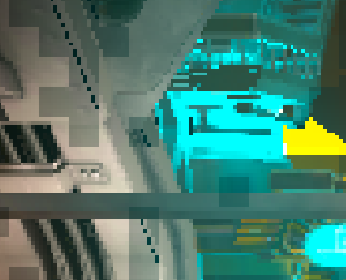
It's not only pixelated, it also has larger artifacts:
 Zylann
on 25 Feb 2019
Zylann
on 25 Feb 2019
This could be hiDPI-related, try going to the Project Settings and enable Display → Window → Dpi → Allow Hidpi. Note that it means it's going to run in 4K resolution, which is going to be very slow on a laptop. A better fix for laptops/low-end hardware would be to use a downscaled viewport with linear filtering (as nearest-neighbor filtering doesn't fit the art style of the TPS demo).
No, has nothing to do with this option.
But to be sure, i have tested it and as expected there was no change.
I mean in Beta 3 it works great but with beta 7 not, so there must be some problem with this version.
I will test it on my other PC with windows as soon as possible.
TheNeoGameFactory
on 26 Feb 2019
For a faster test i used my Parallels Windows on Mac and there are no pixels or artifacts.
Some black textures, but this is because the windows sandbox on mac.
I will test it later on a real windows pc.
Maybe it is a MacOS only Problem.
EDIT:
Beta 6 is even crashing if i try to run the demo. (Mac)
TheNeoGameFactory
on 26 Feb 2019
Any luck with beta 8? And which version of macOS?
 Sslaxx
on 27 Feb 2019
Sslaxx
on 27 Feb 2019
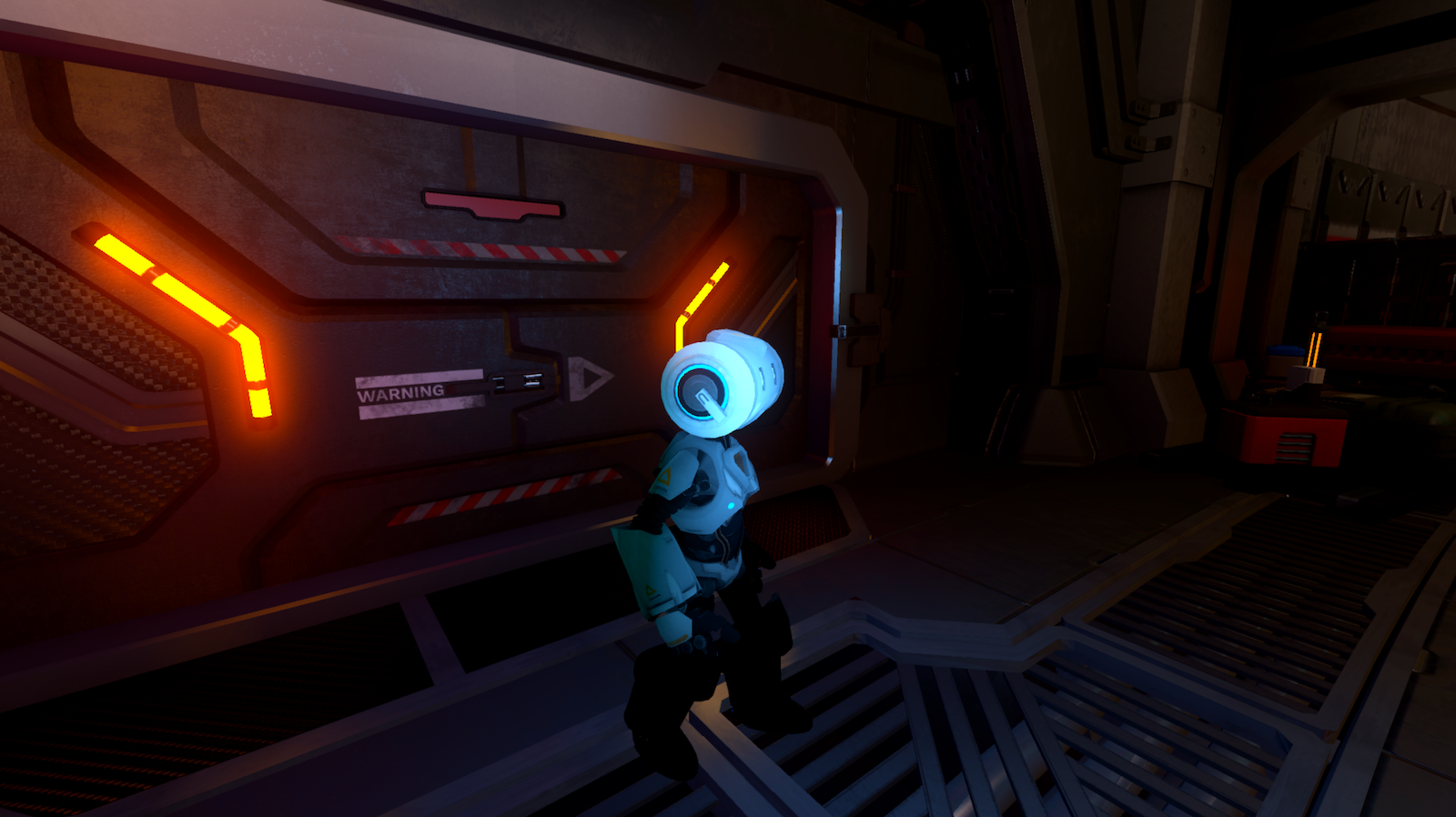
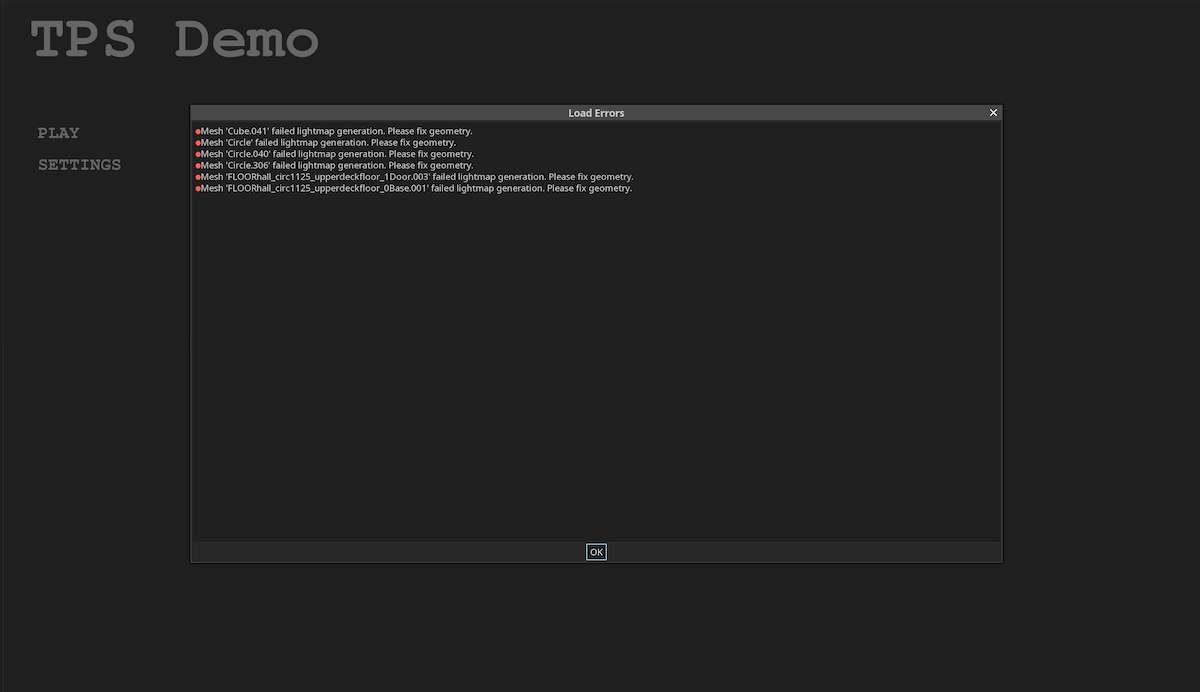
Mac user here (iMac with latest Mojave, Radeon Pro 570 4Go, 16 Go ram). When importing the tps demo after git clone (Godot beta 8), multiple errors are appearing during (re)import. One of these is a problem with the level geometry resulting in light mapping to failed (Godot is asking to fix the geometry), and maybe causing these artifacts during runtime.
When running the demo, if the camera is in front of the robot, all is fine (except the left arm is missing..):
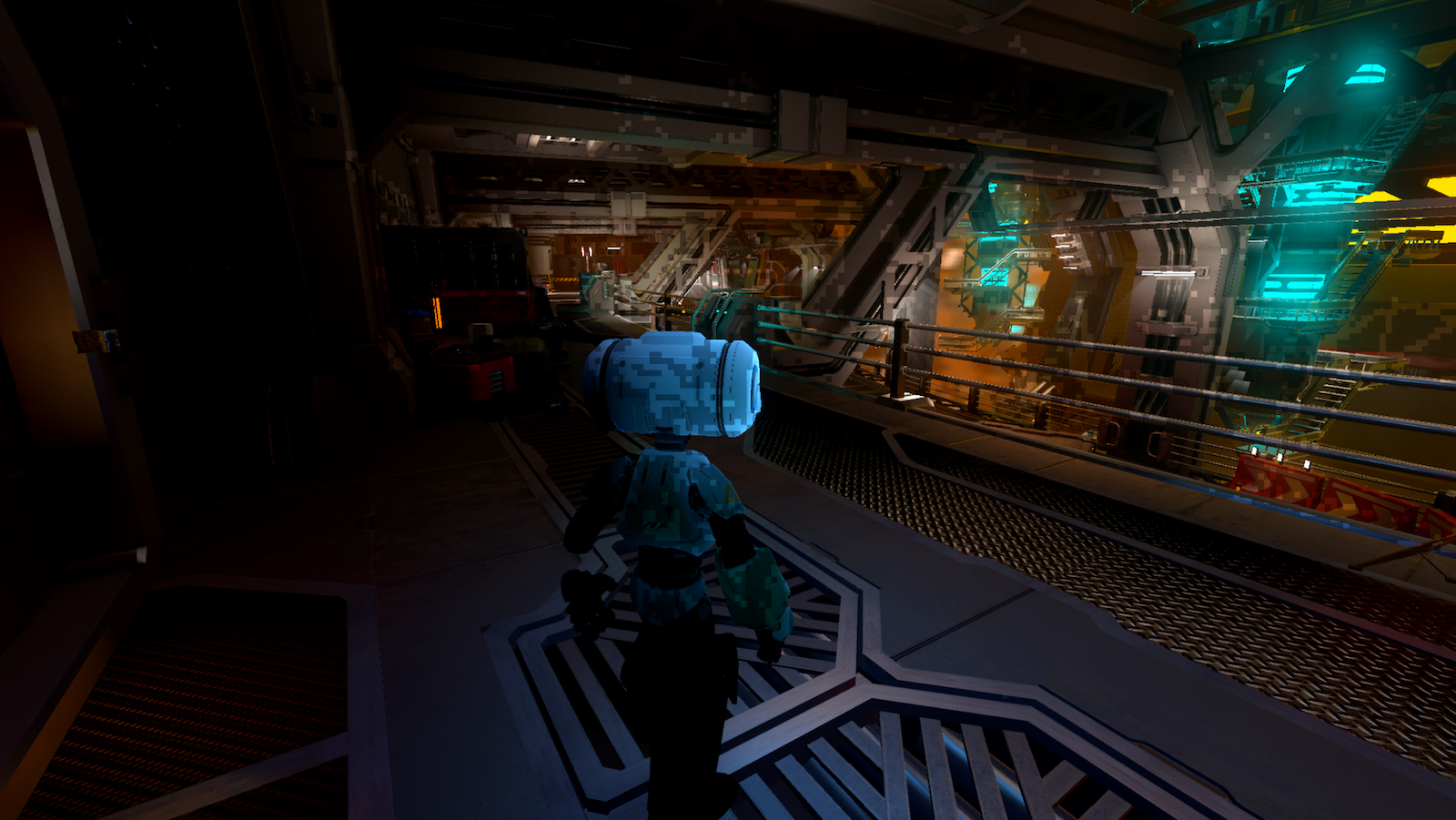
When rotating the camera, artifacts are all over the place:
 Atypic-prod
on 27 Feb 2019
Atypic-prod
on 27 Feb 2019
Can you show your settings screen for the demo?
 reduz
on 28 Feb 2019
reduz
on 28 Feb 2019
Settings used:
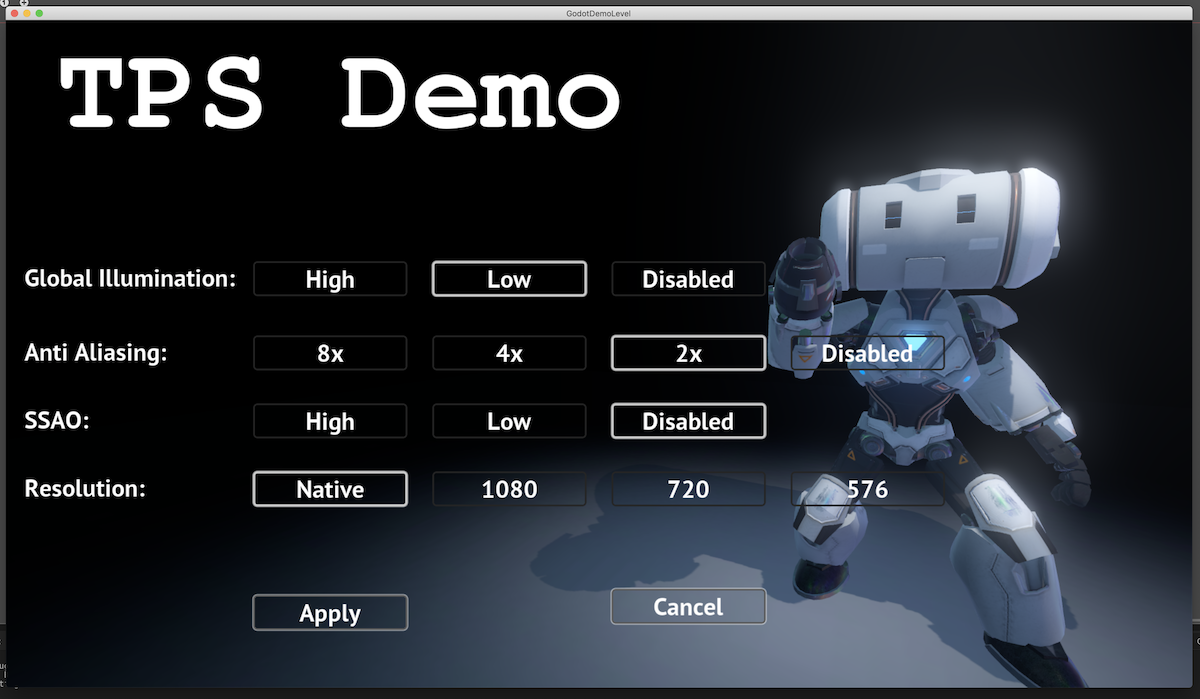
And errors with geometry showed during import (or re-import levelDemo.dae):
Atypic-prod
on 28 Feb 2019
I unfortunately don't have any Radeon hardware to test this and won't do until April. At home some weeks ago on a 450 it worked fine, though.
reduz
on 1 Mar 2019
On native Windows with Radeon HD8970M it runs without artifacts.
Also it is not because the settings. Settings are saved in project.godot and if i open my project in beta 3 or beta 7 there are the same settings!
So there is in later betas a problem but it seems to be only a mac problem.
I will test it on mac with beta 9 today. Maybe it is gone.
TheNeoGameFactory
on 1 Mar 2019
Still there in Beta 9, but i have no errors like laurentP.
TheNeoGameFactory
on 1 Mar 2019
Just tested on beta 10, With Nvidia 970GTX, Driver 419.17, Windows 10. I got the same result with
@laurentP , the robot left arm is missing. It will appear when you rotate the camera at certain angle but continue to be missing after that angle.
I dont think this is radeon or amd problem ?
 takhimi
on 2 Mar 2019
takhimi
on 2 Mar 2019
@takhimi the missing robot arm is not the problem I wanted to draw your attention to.
@reduz
i found the settings what caused the problem.
Projectsettings -> Depth Prepass
Disable this setting and it works, enable this option and the artifacts will appears.
So there is a problem with the depth prepass on mac.
TheNeoGameFactory
on 2 Mar 2019
Fixed also the missing arm and some body parts.
Open Player.tscn
Body Parts
Select node -> 00Robot_Body008
GeometryInstance -> Extra Cull Margin = 360
Arm
Select node -> Robot_Arms001
GeometryInstance -> Extra Cull Margin = 360
After this settings the parts don't disappear.
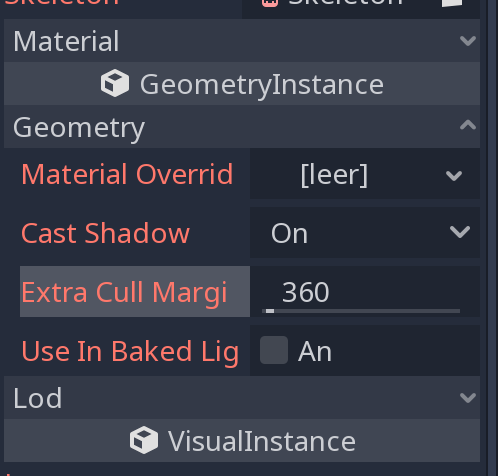
@reduz
Is this the correct way to use it?
TheNeoGameFactory
on 2 Mar 2019
Ok this is it! And for the robot arm that's disappearing, I need to change the Extra Cull Margin for the Robot_Arms part too.
Atypic-prod
on 3 Mar 2019
Robot missing arm is fixed now, so no workarounds required for that any longer.
reduz
on 3 Mar 2019
So we have two macOS users with the regression, which apparently happened between a851033 (beta 3) and e30ce69cb (beta 7). Would one of you be able to do a git bisect to identify the problematic commit? I would start by testing intermediate beta builds (b4 is 17809ca9, b5 is c54330c6b and b6 is 30a4723d).
Can other macOS users reproduce the issue? @bruvzg maybe?
akien-mga
on 5 Mar 2019
Can you guys try again? I think I may have fixed this recently
reduz
on 5 Mar 2019
I am confident that this is fixed. Please reopen if not the case..
reduz
on 5 Mar 2019
I think I may have fixed this recently
Rendering bugs are fixed in 80618700c, AMD FirePro D300, macOS 10.14.3
Robot missing arm is fixed now
Missing arm is not fully fixed, still happens when running and aiming.
 bruvzg
on 5 Mar 2019
bruvzg
on 5 Mar 2019
Rendering bugs are not fixed for me (Radeon Pro 570, macOs 10.14.3), I have to disable the Depth prepass. For the robot's arm, it's ok.
Tested with a freshly compiled Godot from the repo.
Atypic-prod
on 5 Mar 2019
it's not fixed in RC 1.. so whats wrong with you? why did you close issues so fast!
TheNeoGameFactory
on 9 Mar 2019
Reopening.
it's not fixed in RC 1.. so whats wrong with you? why did you close issues so fast!
Because it's better to close issues when we think they're fixed, and reopen if they're not, than to let issues sit around endlessly and forget about them. Without closing issues, we can't prioritize our work.
akien-mga
on 9 Mar 2019
I will let you know if it is fixed :) i promise
TheNeoGameFactory
on 9 Mar 2019
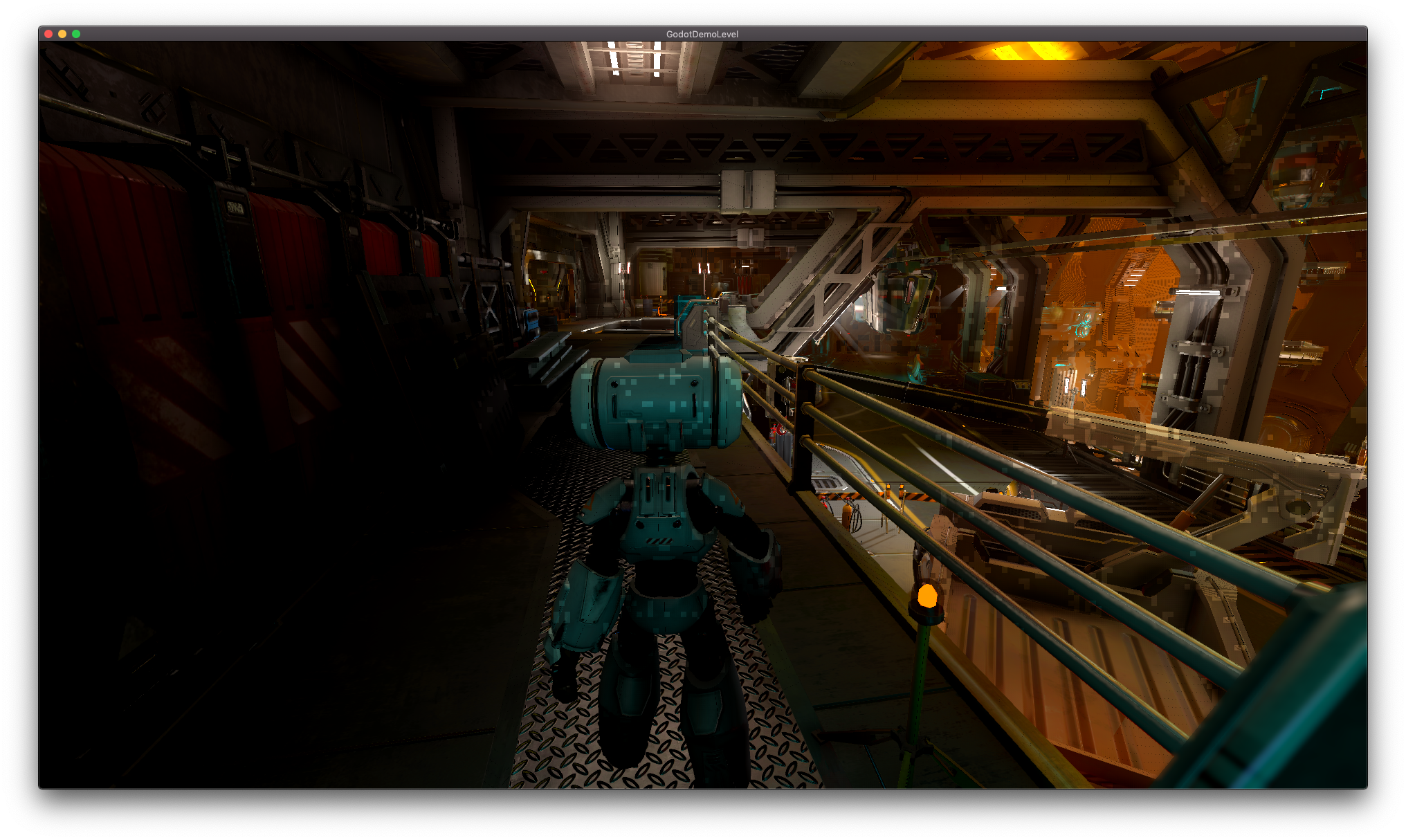
Done some extra testing, for me it's still pixelated if AA is set to 2x, with any other AA level it's fine.
bruvzg
on 9 Mar 2019
Broken between beta 4 and beta 5, bisected to commit d116705538fe0c625e0b40d56f3d6ecfe3bbb4aa (Allow usage of depth texture when contact shadows are disabled).
bruvzg
on 10 Mar 2019
A bit more info:
- Was broken before beta 3.
- Fixed in the commit cab45f2f2653afe4bcfd3217c903a2241bf24acb (Fix errors on iOS)
- Fix reverted in the commit cce679584bfffa16c4a088836079cc4cfee035f7 (Revert "Fix errors on iOS")
- Fixed again in the commit 677d4400de9ae73713be9f33600f59a10a079c19 (Ensure contact shadows are only used when lights use them)
- Reintroduced in the commit d116705538fe0c625e0b40d56f3d6ecfe3bbb4aa (Allow usage of depth texture when contact shadows are disabled)
bruvzg
on 10 Mar 2019
@bruvzg
So you mean it is depth prepass with AA
I give it a try.
TheNeoGameFactory
on 10 Mar 2019
Testing with depth prepass enabled (project settings) and AA disabled (in game settings) with RC1 and no glitches. Enabling AA and the glitches are back.
(Radeon Pro 570, macOs 10.14.3)
Atypic-prod
on 10 Mar 2019
Tested following:
Test 1:
Depth Prepass enabled (Project Settings)
AA 8x (InGame)
-> Works, no pixels/artifacts
Test 2:
Depth Prepass enabled (Project Settings)
AA 4x (InGame)
-> Works, no pixels/artifacts
Test 3:
Depth Prepass enabled (Project Settings)
AA 2x (InGame)
-> pixels/artifacts appearing all over the screen
Test 4:
Depth Prepass enabled (Project Settings)
AA disabled (InGame)
-> Works, no pixels/artifacts
Test 5:
Depth Prepass disabled (Project Settings)
AA 2x (InGame)
-> Works, no pixels/artifacts
So it is the AA 2x with Depth Prepass, what causing this problem.
TheNeoGameFactory
on 10 Mar 2019
@bruvzg I can't reproduce it, but can you change the line:
if (state.used_contact_shadows || state.used_depth_texture) {
for
if (state.used_contact_shadows) {
and let me know if this is fixed? I think that PR should be reverted (the last one that causes it) since it's incorrect anyway
reduz
on 11 Mar 2019
Wouldn't the issue still happen when enabling contact shadows?
akien-mga
on 11 Mar 2019
but can you change the line
Yes changing this line fixes the issue.
bruvzg
on 11 Mar 2019
Related issues
 n-pigeon
·
3Comments
n-pigeon
·
3Comments
 EdwardAngeles
·
3Comments
EdwardAngeles
·
3Comments
 SleepProgger
·
3Comments
SleepProgger
·
3Comments
 mooseyfaith
·
3Comments
mooseyfaith
·
3Comments
 RayKoopa
·
3Comments
RayKoopa
·
3Comments
Most helpful comment
Reopening.
Because it's better to close issues when we think they're fixed, and reopen if they're not, than to let issues sit around endlessly and forget about them. Without closing issues, we can't prioritize our work.