Godot: Error: Failed to get modified time on assets used in a scene
Godot version:
5b5db08a51a2240dfc8452309284152af1425185
OS/device including version:
Windows 10, 64-bit
Issue description:
When exporting the game, some assets when loaded in a scene, will cause this error:
ERROR: Failed to get modified time for: Icons/4701338.jpg
   At: drivers\windows\file_access_windows.cpp:306
This happens for .ogg files, jpg, and png. I think for any type of resource
These errors are only generated when the asset is used in a scene
These errors do not get generated when previewing the scene in the Editor
Steps to reproduce:
- Add a Sprite node, set its texture to any png file
- Export game with debug enabled
- You will see errors flood the console (dependent on how many)
Minimal reproduction project:
New Game Project55.zip
 girng
girng
All 21 comments
https://docs.microsoft.com/en-us/cpp/c-runtime-library/reference/stat-functions?view=vs-2017
Each of these functions returns 0 if the file-status information is obtained. A return value of -1 indicates an error, in which case errno is set to ENOENT, indicating that the filename or path could not be found. A return value of EINVAL indicates an invalid parameter; errno is also set to EINVAL in this case.
Could be helpful
girng
on 25 Jan 2019
This is breaking my tile-maps in my game in the 3.1 beta 3. Any word on if this will get fixed before actual release of 3.1?
 JoshuaCoffman
on 29 Jan 2019
JoshuaCoffman
on 29 Jan 2019
Is this still reproducible in the current master branch / latest beta builds?
I've tried the MRP on Linux, exporting it to Windows and running the binary through WINE, and did not reproduce any issue.
 akien-mga
on 25 Feb 2019
akien-mga
on 25 Feb 2019
Same problem here in Win7 ultimate and Godot v3.1 and Dodge the creek example.
It worked well first times then for some reason that I ignore (maybe browsing the directories) text is disappeared from the labels and the button.
E 0:00:02:0549 Failed to get modified time for: D:/workspace/Godot3_dodge-master/fonts/Xolonium-Regular.ttf
 virtualfish
on 21 Mar 2019
virtualfish
on 21 Mar 2019
Hi,
I'm getting this error as well.
However, I'm really not sure what is causing it - only a few .png files are having this trouble:
ERROR: Failed to get modified time for: .../project/objects/gui/life.png
   At: drivers/windows/file_access_windows.cpp:338
ERROR: Failed to get modified time for: .../project/objects/gui/background_screen.png
   At: drivers/windows/file_access_windows.cpp:338
This is breaking my Windows build, I think...
ERROR: No loader found for resource: res://objects/gui/life.png
   At: core/io/resource_loader.cpp:285
ERROR: Can't load dependency: res://objects/gui/life.png
   At: core/io/resource_format_binary.cpp:659
ERROR: load: Condition ' err != OK ' is true. returned: RES()
   At: core/io/resource_loader.cpp:208
ERROR: Failed loading resource: res://objects/gui/score/ScoreGUI.tscn.converted.res
   At: core/io/resource_loader.cpp:285
ERROR: Can't load dependency: res://objects/gui/score/ScoreGUI.tscn
   At: core/io/resource_format_binary.cpp:659
ERROR: load: Condition ' err != OK ' is true. returned: RES()
   At: core/io/resource_loader.cpp:208
ERROR: Failed loading resource: res://objects/gui/MainGUI.tscn.converted.res
   At: core/io/resource_loader.cpp:285
ERROR: Can't load dependency: res://objects/gui/MainGUI.tscn
   At: core/io/resource_format_binary.cpp:659
ERROR: load: Condition ' err != OK ' is true. returned: RES()
   At: core/io/resource_loader.cpp:208
ERROR: Failed loading resource: res://scenes/MainGame.tscn.converted.res
   At: core/io/resource_loader.cpp:285
Any ideas? I've even tried deleting the file and saving another copy, and the file works just fine when I run the game from the editor...
Thanks,
-Devin
 DevinPentecost
on 10 May 2019
DevinPentecost
on 10 May 2019
I was able to remove the errors (both from editor warnings and Windows build crash) by locating all of the usages of the resources in the scenes (not scripts) and removing the reference, building, then adding the reference back and building again.
Still doesn't explain why this was happening, or why this fixes it, but it looks like it holds onto some bad version of the file. It's possible that the file was moved and the editor is holding onto an old reference maybe?
Thanks,
-Devin
DevinPentecost
on 10 May 2019
I just encountered this problem too and @DevinPentecost 's fix works.
 KoBeWi
on 25 Aug 2019
KoBeWi
on 25 Aug 2019
Is this still reproducible in the current master branch / latest beta builds?
I must have skipped my notifications for this issue, my bad!!
I just tested this issue on godot-3.2-alpha1, and it's still reproducible.
I have far too many scene files to edit, I don't believe I can do @DevinPentecost's solution (unfortunately)
girng
on 10 Oct 2019
is returning -1? However, the docs for _wstat, says:
A return value of -1 indicates an error, in which case errno is set to ENOENT, indicating that the filename or path could not be found
Which seems weird, because all the resources when running the game with debug enabled are working fine. I hope someone with more advanced with C++ / programming can take a deeper look into this
girng
on 10 Oct 2019
Aww. I'm getting closer to finding the root cause I think
checks the virtual directory ( res://) dependent on the ACCESS_ TYPE.
The error:
ERROR: Failed to get modified time for: Textures/UI/Flags/uswest.png.
That's the path from the project's working directory, not the virtual path res://Textures/UI/Flags/uswest.png inside data.pck. So of course rv is going to return -1.
Now, I don't know if this is an issue in fix_path, or if _get_modified_time is receiving the wrong path on exported games with debug enabled. I'm pretty sure it's the latter. Although, I really have no idea lol
girng
on 10 Oct 2019
I have the same error, but it may not be the same issue.
When I copied a font tres file that was in the root of the project to a different project in the res:///ui folder with it's font source.
Later I moved the font source to an 'assets' folder within the Godot editor as res://ui/assets.
In the actual .tres file opened in a text editor Godot had added assets to the file path but it was res://assets/somefont in the .tres file.
Godot did not properly change the file path in the editor.
This is a subtle error.
Edit: using Godot 3.1.1, Linux.
 jbwyatt4
on 9 Nov 2019
jbwyatt4
on 9 Nov 2019
The same thing happens when you load a .tscn from a .pck with a different root folder as to the main project folder, Godot fails to get modified time from a poorly concatenated path that seems to come out of nowhere.
 IlyaStuurFedorov
on 13 Nov 2019
IlyaStuurFedorov
on 13 Nov 2019
for me it behaves like this:
- project is build using godot 3.2.beta1 and works just fine on development machine
- on different machines the
- importing checked out project from git produces the error when compiling/executing the project
- and executable (build on other machine and which is working fine there) is causing the same issues on other computer
 trifox
on 4 Dec 2019
trifox
on 4 Dec 2019
I just encountered this problem.
I had a folder with caps in the folder name but git cloned it with all lowercase letters for some reason. I just renamed the folder to add the capitals back in and the error went away.
 MMMaellon
on 31 Dec 2019
MMMaellon
on 31 Dec 2019
for me it behaves like this:
- project is build using godot 3.2.beta1 and works just fine on development machine
on different machines the
- importing checked out project from git produces the error when compiling/executing the project
- and executable (build on other machine and which is working fine there) is causing the same issues on other computer
REPORT: my situation was, with invalid filenames, printing out the error, so might be a wrong error
for not found resources
(c#)
newTexture = (Texture)ResourceLoader.Load(filename);
trifox
on 2 Jan 2020
Hi. I'm currently facing this issue when exporting from 3.2.stable. I'm compiling in Win10 and deploying to X11 (Raspbian)
Though in my case the error reads:
ERROR: _get_modified_time: Failed to get modified time for: res://assets/textures/static/map.png.
   At: drivers/unix/file_access_unix.cpp:321.
From that I noticed that the "png" part on each one of the thrown errors is ending with a period (.), however my original files are not; they are properly named without any extra punctuation (I always use underscore).
Perhaps it is part of the error message only, or a simply formatting error for the console, but if it's not I think it's worth investigating the possibility that the file parser is mistakingly splitting the string after the second period separator and before the import extension on the file format map.png.import
Now onto the other part of my findings, since I'm using PCK/ZIP export to create zip files after some research I also noticed that every single file, including the .import and .stexfiles themselves, get their metadata stripped so no creation time, no accesed time, and as such no modified time (among other attributes) are present in the resulting zip file.
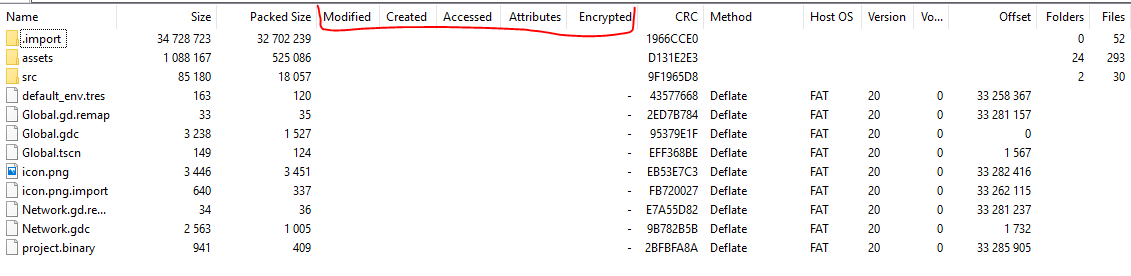
Of course I tried to repackage the resulting zip so i'd get the time metadata automatically on each element but even after doing that the build kept throwing the same errors under linux, however in my specific case, the resources are inexplicably present while executing the application and I don't get a crash (yet) 🤔
Also while probably unrelated, when I attempt to unzip the .import folder inside Raspbian the .import folder is the only folder that isn't properly read and can't be unpacked, but this may be due to the missing metadata or perhaps something else i'm missing.
I'd suggest updating the title of this issue as well as the platform labels as other comments hint they have problems under linux and even macOS
 Jose-Moreno
on 21 Jul 2020
Jose-Moreno
on 21 Jul 2020
I encountered the same bug, it turned out that the images mentioned in the console were missing from there respective directories. it worked fine after I put the images into their folders
 oritZeFitret
on 28 Aug 2020
oritZeFitret
on 28 Aug 2020
We are running into this issue with exported pcks as well on both Mac OS Catalina and Mojave with a completely fresh project.

 slasktotten
on 8 Sep 2020
slasktotten
on 8 Sep 2020
The same here, the sound plays fine but the error appears.
3.2.3 RC6 mono
EDIT
Ok, it was fixed.
Actually in the sounds folder there were only the ".import" files, there were no ".wav" files.
Then I put the ".wav" files back in the folder and the error disappeared.
 Torguen
on 14 Sep 2020
Torguen
on 14 Sep 2020
Same for me in Godot Engine v3.2.3.stable.official
 smks
on 4 Oct 2020
smks
on 4 Oct 2020
I am getting this error too.
it seems to happen to me whenever I use tool scripts
 Shadowblitz16
on 29 Oct 2020
Shadowblitz16
on 29 Oct 2020
Related issues
 RebelliousX
·
3Comments
RebelliousX
·
3Comments
 kirilledelman
·
3Comments
kirilledelman
·
3Comments
 mefihl
·
3Comments
mefihl
·
3Comments
 RayKoopa
·
3Comments
RayKoopa
·
3Comments
 Zylann
·
3Comments
Zylann
·
3Comments