Godot: UDP Broadcasting not received on all Android devices
Godot version:
Master branch
Pulled 15th December 2018
OS/device including version:
Issue description:
Using PacketPeerUDP to broadcast on 255.255.255.255 to other clients who are listening with:
func _process():
   while udp.get_available_packet_count() > 0:
      var pkt = udp.get_var()
       if str(pkt) == "whatever":
         server_ip = udp.get_packet_ip()
This works well on some Android devices, but it does not work on others. Some devices do not receive any packets at all. One device seems to work on one WiFi router but not on others. The problem is a bit random. I have the following permissions set on Android export:
INTERNET
ACCESS_NETWORK_STATE
CHANGE_WIFI_MULTICAST_STATE
Looking around on the web, it is a common problem and it could be the same issue as this post:
https://pzoleeblogen.wordpress.com/2014/03/04/android-udp-broadcast-message-is-not-received/
i.e. Maybe Godot needs a way of adding a "MulticastLock"?
Steps to reproduce:
Minimal reproduction project:
 wombatwingdings
All 19 comments
I've had the same problem. As a workaround, I broadcast to all local broadcast addresses:
var udp_peer = PacketPeerUDP.new()
for address in IP.get_local_addresses():
var parts = address.split('.')
if (parts.size() == 4):
parts[3] = '255'
udp_peer.set_dest_address(parts.join('.'), DISCOVERY_PORT)
udp_peer.put_var({ game_id = self.game_id })
udp_peer.close()
 timoschwarzer
on 30 Dec 2018
timoschwarzer
on 30 Dec 2018
Thanks for the suggestion. Unfortunately, the workaround doesn't work for me. The clients still don't pick it up. I have tested that it is executed in the debugger. I had previously tried hardcoding 192.168.0.255 just to see if it worked, but there was no difference.
wombatwingdings
on 31 Dec 2018
Hmm, that's weird. Can you confirm that the router actually forwards the packets to all devices?
timoschwarzer
on 31 Dec 2018
I've been through the settings and there should be nothing stopping it. It works the other way round. i.e. I broadcast from the Android device unable to receive. I have android and windows device that pick it up no problem.
wombatwingdings
on 31 Dec 2018
I have a horrible workaround for this issue (for which I am not proud). Since Android devices are not guaranteed to listen to packets not explicitly destined for that device (source: https://developer.android.com/reference/android/net/wifi/WifiManager.MulticastLock), I have put in code that blasts every device on the local network. It also does a sleep for a second after doing so before repeating just to be nice to the network. Here's the code if anyone else is interested:
const BE_NICE = 1 # Seconds
const NUM_PINGS = 5 # Pings per frame. Musn't lock up _process for too long
var dev = 2
var baseIp = "192.168.0."
var sleep = false
var timer = 0
var udp = PacketPeerUDP.new()
func GetIPAddr():
for address in IP.get_local_addresses():
var parts = address.split(".")
if parts.size() == 4:
if parts[0] == "192" && parts[1] == "168":
baseIp = "192.168." + parts[2] + "."
print("Base IP Addr = " + baseIp)
return
func _ready():
GetIpAddr()
func _process(delta):
if sleep==true:
timer += delta
if timer > BE_NICE:
timer = 0
sleep = false
else:
var i = 0
var msg = "whatever"
while i < NUM_PINGS && sleep == false:
var addr = baseIp + str(dev)
udp.set_dest_address(addr, PORT)
udp.put_var(msg)
dev += 1
if dev >= 255:
dev = 2
sleep = true
i += 1
@wombatwingdings This doesn't work in all networks, though, since they can have different IP ranges or netmasks.
timoschwarzer
on 4 Jan 2019
@timoschwarzer True. It will only work on "Class C" private networks (192.168.x.x) and only with devices in the same subnet. But I think that would account for most home networks. It's not ideal but it is the best that I can think of without a proper fix for this issue.
wombatwingdings
on 4 Jan 2019
Sadly, I've been unable to reproduce on any my devices, so I don't really know how to debug it.
For the little I could find on the internet, it seems something device-dependent, and more common on old phones.
It might also be related to battery saving modes and vendor's specific battery saving apps.
But then again, I've been unable to reproduce, so couldn't confirm any of that.
 Faless
on 1 Mar 2019
Faless
on 1 Mar 2019
@Faless Is it possible to add a MulticastLock as the android documentation states is required for this to work? (https://developer.android.com/reference/android/net/wifi/WifiManager.MulticastLock). I would be able to test some code without it being in the main repo if that would help. Sadly, I haven't done anything with Android SDK myself.
wombatwingdings
on 1 Mar 2019
@wombatwingdings well, technically broadcast is not multicast.
The documentation says nothing about broadcast.
Broadcast seems to work just fine on many devices (thus, there seem to be no special requirements of sort)/
It could be tried of course, maybe just adding it to java/src/org/godotengine/godot/Godot.java onCreate, and see what happens.
But again, it's pretty pointless without being able to reproduce.
Btw, what is your phone model/OS version? How is your network? E.g. is computer connected via WiFi or cable, (I assume your phone is connected via WiFi ofc), what is your router model, what is your router model?
Faless
on 2 Mar 2019
@wombatwingdings Can you try this APK: BCastTest.zip (had to zip it or GH was complaining).
Changed code from current master:
diff --git a/platform/android/java/src/org/godotengine/godot/Godot.java b/platform/android/java/src/org/godotengine/godot/Godot.java
index a10d7876f..d3eba66bd 100644
--- a/platform/android/java/src/org/godotengine/godot/Godot.java
+++ b/platform/android/java/src/org/godotengine/godot/Godot.java
@@ -51,6 +51,7 @@ import android.hardware.Sensor;
 import android.hardware.SensorEvent;
 import android.hardware.SensorEventListener;
 import android.hardware.SensorManager;
+import android.net.wifi.WifiManager;
 import android.os.Build;
 import android.os.Bundle;
 import android.os.Environment;
@@ -107,6 +108,7 @@ public class Godot extends Activity implements SensorEventListener, IDownloaderC
        private TextView mTimeRemaining;
        private ProgressBar mPB;
        private ClipboardManager mClipboard;
+       private WifiManager.MulticastLock mLock;

        private View mDashboard;
        private View mCellMessage;
@@ -434,6 +436,11 @@ public class Godot extends Activity implements SensorEventListener, IDownloaderC
        protected void onCreate(Bundle icicle) {

                super.onCreate(icicle);
+
+               WifiManager wifi = (WifiManager) getSystemService(Context.WIFI_SERVICE);
+               mLock = wifi.createMulticastLock("lock");
+               mLock.acquire();
+
                Window window = getWindow();
                //window.addFlags(WindowManager.LayoutParams.FLAG_TURN_SCREEN_ON | WindowManager.LayoutParams.FLAG_KEEP_SCREEN_ON);
                window.addFlags(WindowManager.LayoutParams.FLAG_TURN_SCREEN_ON);
@@ -580,6 +587,7 @@ public class Godot extends Activity implements SensorEventListener, IDownloaderC
                for (int i = 0; i < singleton_count; i++) {
                        singletons[i].onMainDestroy();
                }
+               mLock.release();
                super.onDestroy();
        }
Oh, almost forgot, this is the project source, so you can also run it on the desktop.
BCastTestProj.zip
Faless
on 2 Mar 2019
@Faless This looks promising! I will definitely try it but unfortunately it won't be for at least a week as I've got a pressing deadline coming this week.
wombatwingdings
on 2 Mar 2019
I got the broadcasting working. Turns out there is a setting that we can toggle on/off in developer options in Android. But technically that isn't a solution since we can't tell users to go to developer options and toggle it on.
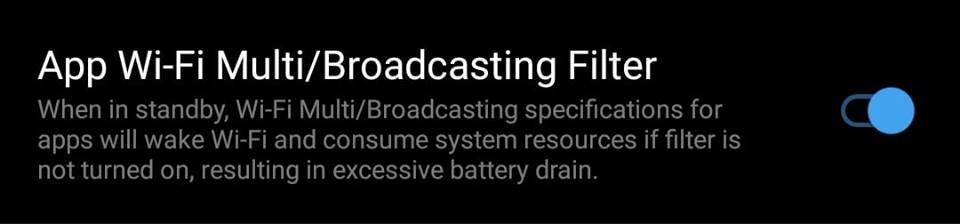
 ramizbalayil
on 4 Mar 2019
ramizbalayil
on 4 Mar 2019
@ramizbalayil what android version? Device model? I don't have that option in my developer options.
Faless
on 4 Mar 2019
@Faless I use a OnePlus 3 Android Version 8.0
I also tested it on a OnePlus 5 Android Version 9.0
As I'm typing this, I'm realizing I should also test on a phone that's not a OnePlus. :)
ramizbalayil
on 4 Mar 2019
@Faless Apologies for the delay in getting the test results back to you. It's not something I can reproduce from home, but happens on other people's WiFi. I've tested your BCastTest.zip and confirmed that the issue is fixed. I can receive on all devices tested. I also tried patching my source with your fix and also confirm it works in my game/build too. Good work, well done!
The only issue I see it that unless I specify CHANGE_WIFI_MULTICAST_STATE permission in Godot Android Export Preferences, I get a crash on startup. I realise you probably know about this and the fix would need to check if this permission is set before creating the MultiCastLock, but thought I should mention it anyway. Sorry if it sounds like I'm trying to teach grandma to suck eggs.
Thanks so much for your help on this issue.
wombatwingdings
on 31 Mar 2019
@wombatwingdings no worries, and thank you for trying this out!
I'm glad we found a solution, I'll start working on a proper fix soon.
I would like to only take the lock when actually needed.
Faless
on 31 Mar 2019
Will this be fixed in Godot 3.2?
 fractilegames
on 24 Nov 2019
fractilegames
on 24 Nov 2019
Related issues
 gonzo191
·
3Comments
gonzo191
·
3Comments
 ivanskodje
·
3Comments
ivanskodje
·
3Comments
 ducdetronquito
·
3Comments
timoschwarzer
·
3Comments
ducdetronquito
·
3Comments
timoschwarzer
·
3Comments
 Spooner
·
3Comments
Spooner
·
3Comments
Most helpful comment
@wombatwingdings Can you try this APK: BCastTest.zip (had to zip it or GH was complaining).
Changed code from current master: