Godot: Gray out nodes without scripts in the Connect Signal window
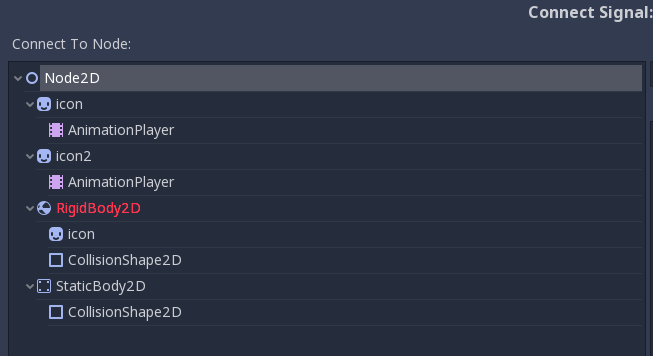
It would be a nice QOL improvement, particularly for beginners if all the nodes in Connect Signal dialog window were grayed out, so as to more clearly see which nodes make any sense to select. Currently, if the user selects a node that doesn't possess a script, then an error window appears to say that this was a poor choice. Instead, those nodes shouldn't be selectable in the Connect Signal dialog.
 Oranjoose
All 3 comments
You can connect to functions that are part of the node and not part of the script, so a node doesn't need to have a script for connecting signals to it. In 3.1 alpha 3 (I don't know if it's in the stable version too), the menu will hide the "Make Function" button when you select a node without a script. So at least it's clear that you can't create a new function on the node. But maybe there could be some autocomplete or something so you know what functions are available in the node.
 CowThing
on 18 Dec 2018
CowThing
on 18 Dec 2018
See also #15339 and #24316.
 akien-mga
on 18 Dec 2018
akien-mga
on 18 Dec 2018
Added in 3.2
 KoBeWi
on 25 Apr 2020
KoBeWi
on 25 Apr 2020
Related issues
 bojidar-bg
·
3Comments
bojidar-bg
·
3Comments
 rgrams
·
3Comments
rgrams
·
3Comments
 gonzo191
·
3Comments
gonzo191
·
3Comments
 nunodonato
·
3Comments
nunodonato
·
3Comments
 Spooner
·
3Comments
Spooner
·
3Comments
Most helpful comment
You can connect to functions that are part of the node and not part of the script, so a node doesn't need to have a script for connecting signals to it. In 3.1 alpha 3 (I don't know if it's in the stable version too), the menu will hide the "Make Function" button when you select a node without a script. So at least it's clear that you can't create a new function on the node. But maybe there could be some autocomplete or something so you know what functions are available in the node.