Godot: Mono version can't run scene in the editor + UI bugs in output panel
Godot version:
version 3.1.2 alpha
OS/device including version:
geforce 9800 gt---8gbram-----core2quadq8200-----windows 7 64 bits---mono version 5.12.0.226
Issue description:
c # godot does not play main scene.
c# godot no reproduce escena principal.
https://youtu.be/PADz6mRT66g
Steps to reproduce:
Watch the video
miren el video
https://youtu.be/PADz6mRT66g
Minimal reproduction project:
Problem reproduction:
https://youtu.be/-RELbyNAEXQ
project:
https://github.com/kone9/Gaucho_noel_c-_in_godot
image:
 kone9
kone9
All 20 comments
Minimal reproduction project:
Can you provide the project? If not, can you make a new simple project that reproduces the issue?
What is your installed Mono version?
 akien-mga
on 11 Dec 2018
akien-mga
on 11 Dec 2018
I have to upload the project ???
It's simple ... Create the project I give it play and it does not work ... It does not have much back ... Watch the video.
kone9
on 11 Dec 2018
mono version 5.12.0.226
Problem reproduction:
https://youtu.be/-RELbyNAEXQ
kone9
on 11 Dec 2018
Thanks, copying the error message from the video here:
modules/mono/editor/csharp_project.cpp:142 - Method/Function Failed: returning FAILED
modules/mono/editor/godotsharp_builds.cpp:484 - Condition ' metadata_err != OK ' is true. returned: false
editor/editor_node.cpp:4421 - A Godot Engine build callback failed.
Is there any more detail in the terminal (cmd.exe) when this error happens? Or just the same error message?
akien-mga
on 11 Dec 2018
Seems related to #23562 and #23497.
akien-mga
on 11 Dec 2018
Estoy subiendo el proyecto,ahora te lo paso
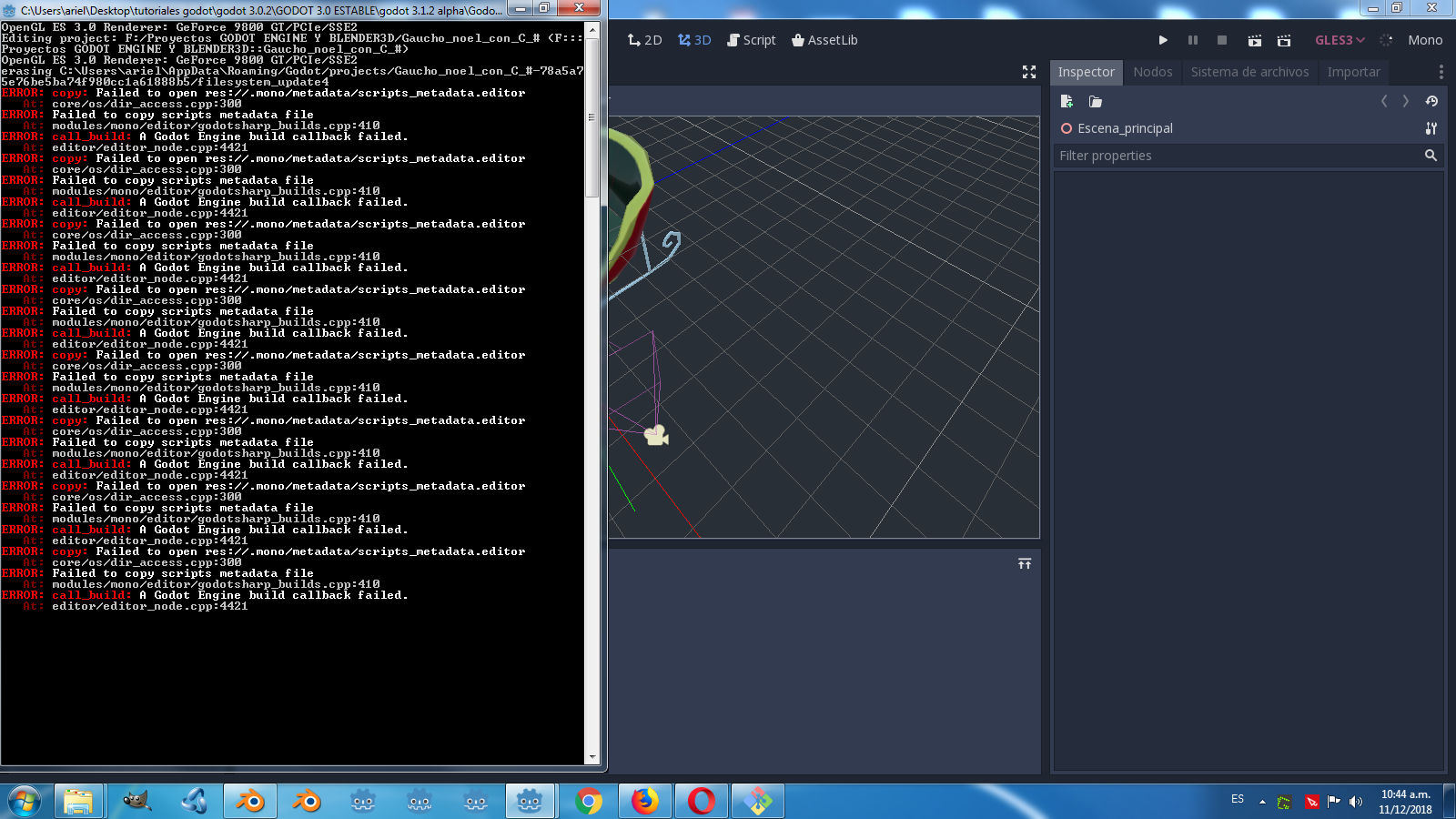
Esta es la imagen de la consola.
I'm uploading the project, now I'll give it to you
This is the image of the console.

kone9
on 11 Dec 2018
Godot Engine v3.1.alpha.mono.official (c) 2007-2018 Juan Linietsky, Ariel Manzur & Godot Contributors.
Cambiar pestaña de escena
core/os/dir_access.cpp:300 - Failed to open res://.mono/metadata/scripts_metadata.editor
Failed to copy scripts metadata file
editor/editor_node.cpp:4421 - A Godot Engine build callback failed.
core/os/dir_access.cpp:300 - Failed to open res://.mono/metadata/scripts_metadata.editor
Failed to copy scripts metadata file
editor/editor_node.cpp:4421 - A Godot Engine build callback failed.
core/os/dir_access.cpp:300 - Failed to open res://.mono/metadata/scripts_metadata.editor
Failed to copy scripts metadata file
editor/editor_node.cpp:4421 - A Godot Engine build callback failed.
core/os/dir_access.cpp:300 - Failed to open res://.mono/metadata/scripts_metadata.editor
Failed to copy scripts metadata file
editor/editor_node.cpp:4421 - A Godot Engine build callback failed.
core/os/dir_access.cpp:300 - Failed to open res://.mono/metadata/scripts_metadata.editor
Failed to copy scripts metadata file
editor/editor_node.cpp:4421 - A Godot Engine build callback failed.
core/os/dir_access.cpp:300 - Failed to open res://.mono/metadata/scripts_metadata.editor
Failed to copy scripts metadata file
editor/editor_node.cpp:4421 - A Godot Engine build callback failed.
core/os/dir_access.cpp:300 - Failed to open res://.mono/metadata/scripts_metadata.editor
Failed to copy scripts metadata file
editor/editor_node.cpp:4421 - A Godot Engine build callback failed.
core/os/dir_access.cpp:300 - Failed to open res://.mono/metadata/scripts_metadata.editor
Failed to copy scripts metadata file
editor/editor_node.cpp:4421 - A Godot Engine build callback faile
kone9
on 11 Dec 2018
kone9
on 11 Dec 2018
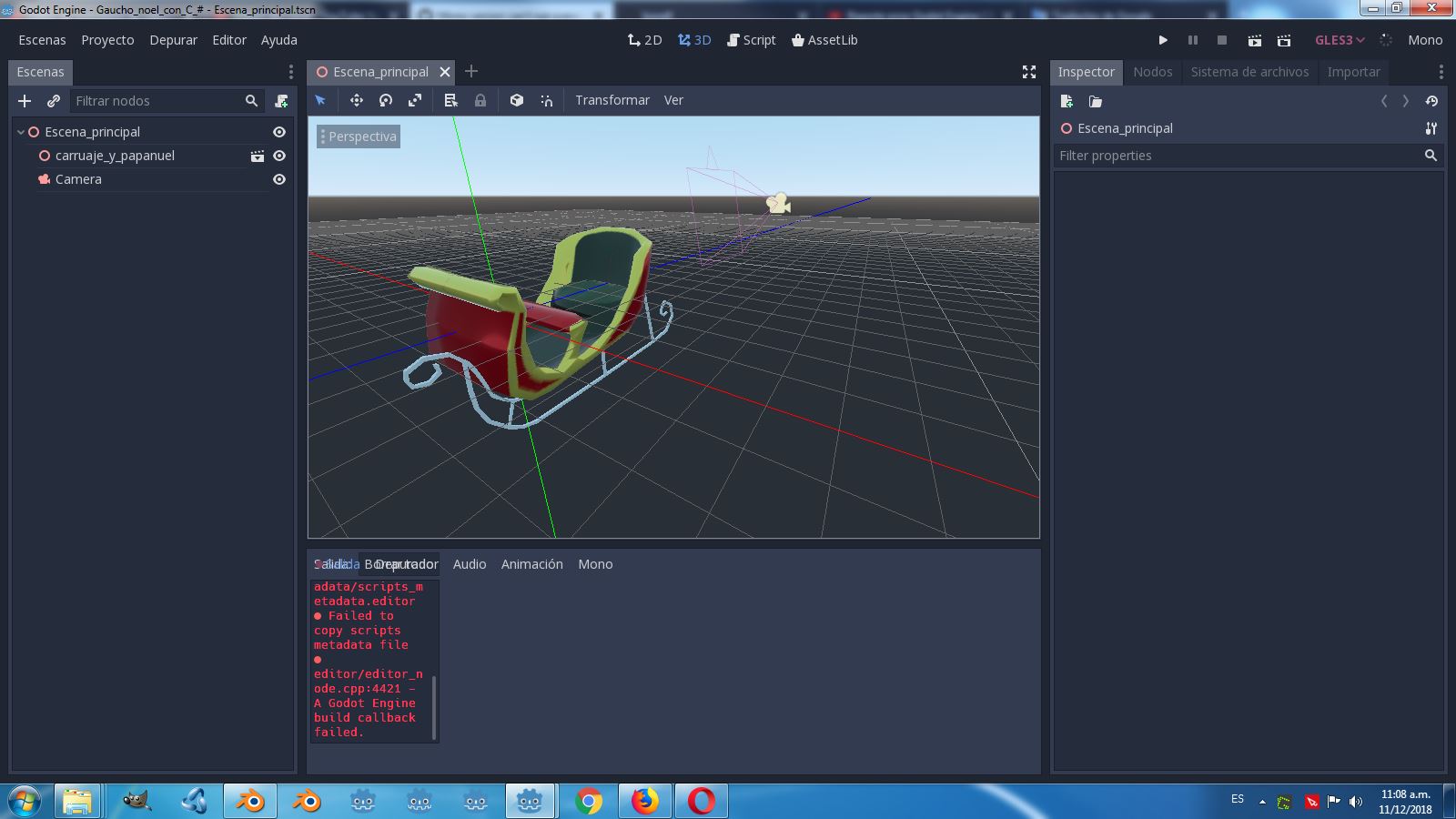
I have a godot shortcut placed in the bottom bar, when I run it from the shortcut the menus are not visible. UI bugs in output panel
kone9
on 11 Dec 2018
I also got these UI bugs in the output/debugger panel and build problems when trying to run my C# projects with alpha5. Just some thoughts:
You need to have Nuget and MSbuild installed. However, alpha 5 no longer relies on a specific Mono SDK version. (source: https://godotengine.org/article/dev-snapshot-godot-3-1-alpha-5)
I'm on Windows 10 here. MSbuild can only be installed with Visual Studio (to be exact: Build Tools for Visual Studio). Nuget Package Manager is also included but as stated on the nuget site:
Note: nuget.exe itself is not included with any version of Visual Studio. (source: https://www.nuget.org/downloads)
Which one is needed? And is Godot looking into the path variables for nuget and msbuild like it is stated in #24636?
In #23562 there were also two additional steps suggested:
- Delete all folders inside %user%\AppData\Roaming\Godot\mono
- In the Editor Settings: switch the Build Tool in "Builds" to MSBuild (VS Build Tools)
Hope I got every relevant aspect here. I'll do a clean install now (newest VS, nuget, msbuild, mono) and see what changes.
 pwab
on 8 Jan 2019
pwab
on 8 Jan 2019
After updating Visual Studio to the newest version and deleting the content of the %appdata%\Godot\mono folder it now works as before. MSBuild (VS Build Tools) was set as the Build Tool anyway.
pwab
on 8 Jan 2019
I have this issue on Linux. The UI bugs (transparent alpha quality warning, tiny box for output log) disappeared around Godot 3.1 beta2.
However, now the FileSystem panel now stays empty. No errors relating to this are logged to the console.
mono -V prints
Mono JIT compiler version 5.18.0.225 (tarball Fri Jan 18 22:44:53 CET 2019)
Copyright (C) 2002-2014 Novell, Inc, Xamarin Inc and Contributors. www.mono-project.com
        TLS:           __thread
        SIGSEGV:       altstack
        Notifications: epoll
        Architecture:  amd64
        Disabled:      none
        Misc:          softdebug
        Interpreter:   yes
        LLVM:          supported, not enabled.
        Suspend:       preemptive
        GC:            sgen (concurrent by default)
msbuild /version prints
Microsoft (R) Build Engine version 15.3.0.0 for .NET Framework
Copyright (C) Microsoft Corporation. All rights reserved.
nuget | grep -i version prints
NuGet Version: 2.8.7.0
Attempting to run the project prints:
ERROR: end_task: Condition ' !tasks.has(p_task) ' is true.
   At: editor/progress_dialog.cpp:229.
ERROR: call_build: A Godot Engine build callback failed.
   At: editor/editor_node.cpp:4511.
Tested with GitHub commit c2f59de212546e2005e4cbdde9515599cdaa3b78 (Jan 26th)
 Cygon
on 26 Jan 2019
Cygon
on 26 Jan 2019
Is this reproducible with 3.1 beta 6?
 neikeq
on 23 Feb 2019
neikeq
on 23 Feb 2019
The UI no longer shows bugs.
Using the official build of Godot 3.1 beta6, opening a Mono test project prints to the console:
ERROR: initialize: The loaded Core API assembly is out of sync
   At: modules/mono/mono_gd/gd_mono.cpp:356.
Mono: Proceeding to unload scripts domain because of invalid API assemblies.
And displays a message box saying "Failed to build GodotSharp solution".
Hitting run in the editor prints this to the console:
ERROR: call_build: A Godot Engine build callback failed.
   At: editor/editor_node.cpp:4528.
If I do the same with a build from git, the result is the same, except that no error is printed to the console when I open my Mono test project.
(It would be really, genuinely useful if Godot's mono module offered even the tiniest sliver of information about what went wrong. Any part out of "What was the Mono module attempting to do?" or "Which Mono call failed?" or "What is the error code?" would help immensely)
Here's the ~/.local/share/godot/mono/mono_logs/*.txt file produced:
1551004971.txt
Cygon
on 24 Feb 2019
I agree that it would be useful if the Mono errors (out of sync, can't build solution, etc. etc) were shown as a pop-up box (like the one for no GLES 3 support) instead of being stowed away in the console.
 Zireael07
on 24 Feb 2019
Zireael07
on 24 Feb 2019
@Zireael07 Ha, I'd pay money to even have a "hello, I'm here" stowed away in the console. The mono module (and export process, too) just don't talk. At all :)
I looked for the GodotSharp solution that it apparently tries to compile and located it in ~/.local/share/godot/mono/solutions/<number>/.
Running msbuild on the GodotSharp project compiles it successfully with 879 warnings, 0 errors
Running msbuild on the GodotSharpEdit project compiles it successfully, 1 warning, 0 errors
There was no build prior to me attempting one, so Godot likely did not even get as far as invoking msbuild on my system.
Clicking "View log" in the editor's "Build Project" tab shows "Unable to run the command specified. The file or folder /home/cygon/.local/share/godot/mono/build_logs/<number>_Release/msbuild_log.txt does not exist. I could find no msbuild_log.txt anywhere, so this may be a further indication that it doesn't get to the point of actually invoking msbuild.
Cygon
on 24 Feb 2019
You can try running Godot with the environment variable GODOT_DEBUG_MSBUILD=1 and see if there is anything in the terminal when building.
neikeq
on 24 Feb 2019
Just to clarify. Out of sync errors are normal if you upgraded from a previous Godot version (I have to modify the error message to include this info). Most of the time it means the Godot API assemblies in the project are from a different version and cannot be loaded. After building the project, it should be fine.
If you cannot open the build log file, then it was an early error or exception, which the logger doesn't capture. I will probably have to make it save the process std output for such cases. For now, running Godot with the GODOT_DEBUG_MSBUILD=1 should redirect MSBuild's output to Godot's, so you should be able to see what went wrong in the terminal.
neikeq
on 4 Mar 2019
@Cygon's issue doesn't look the same as OP's, so it should be in a new issue.
Since there are no comments on this actual issue, I will assume it has been fixed. If @kone9 can still reproduce it, we will re-open.
neikeq
on 4 Mar 2019
Okay, I created a separate issue for my troubles: #26686
Cygon
on 6 Mar 2019
Related issues
 testman42
·
3Comments
testman42
·
3Comments
 mefihl
·
3Comments
mefihl
·
3Comments
 timoschwarzer
·
3Comments
timoschwarzer
·
3Comments
 n-pigeon
·
3Comments
n-pigeon
·
3Comments
 blurymind
·
3Comments
blurymind
·
3Comments
Most helpful comment
Seems related to #23562 and #23497.