Godot: No InputEventJoypadMotion events for L and R triggers on the Gamecube controller on Windows
Godot version:
v3.1.alpha.official
OS/device including version:
Windows OS 10 Home.
Issue description:
There is no corresponding event if you press down the L and R button. If you press them down until they click then you get a InputEventJoypadButton event. But anything between not-pressed and pressed all the way triggers 0 events.
Steps to reproduce:
- Get a mayflash adapter
- Plug in a gamecube control.
- Press L about halfway.

func _input(event):
        if event is InputEventJoypadButton:
        print("joypad button %s" % event.button_index)
    else:
        print('event %s' % event)
You'll see that the else case is never triggered and the InputEventJoypadButton is triggered on click. Ideally what I would like to see is InputEventJoypadButton triggered throughout the press with various values under pressure. I don't have a deep opinion when the button should be considered pressed or not.
 telaviv
All 12 comments
That's an expected behavior.
If your are using the analog behavior of the button, you have to check for InputEventJoypadMotion changes, not for InputEventJoypadButton ones.
As you can see on your right screen, you are basically checking for the button value (the flashing button n°5) instead of the "x rotation axis". This depends on your device but Godot has no way to know that this axis corresponds to a button or the other way around.
 groud
on 23 Oct 2018
groud
on 23 Oct 2018
Neither http://docs.godotengine.org/en/3.0/classes/class_inputeventjoypadmotion.html or https://docs.godotengine.org/en/3.0/classes/class_inputeventjoypadbutton.html?highlight=InputEventJoypadButton make this clear. This is, really, a documentation issue.
 Sslaxx
on 23 Oct 2018
Sslaxx
on 23 Oct 2018
I don't personally think it's a documentation issue -- to my knowledge, the GameCube controller is special in that it's the only one with L and R buttons that have both analog (pressing in only partway) and digital (pressing in all the way, until you get that *click*) behavior. I don't see why we need a disclaimer for one controller.
 LikeLakers2
on 23 Oct 2018
LikeLakers2
on 23 Oct 2018
@LikeLakers2 Is it any different than the PS L2/R2 triggers? I recall seeing them have analog input as well some time ago, and taking a rather far press to trigger the button press events.
 avencherus
on 24 Oct 2018
avencherus
on 24 Oct 2018
@avencherus I'm not sure, I haven't used Playstation controllers. That said, I imagine it works the same on PlayStation controllers? Analog to measure how far down it's pressed, then digital if it's pressed down all the way?
LikeLakers2
on 24 Oct 2018
@groud and others, I think you are all misreading the title, the code, and the gif.
I am not complaining that I'm not seeing InputEventJoypadButton events. I'm complaining that I'm not getting ANY events. This includes InputEventJoypadMotion. See the else clause of my code.
telaviv
on 24 Oct 2018
@LikeLakers2 I double checked this, and yeah, I have the InputEventJoypadButton firing on the L2/R2 press at about 60%+ pressure. It also reports an InputEventJoypadMotion event with the pressure. (The pressure values in the InputEventJoypadButton are 0.0). I think this is how it would work on an XBox controller's bumpers too. I think this OPs issue is the GameCube controller is not giving an InputEventJoypadMotion at all, when it should, since it provide pressure information.
@groud Probably a missing InputEventJoypadMotion event for a GameCube controller.
@telaviv Ok, I think I understand your problem now that I've revisited some joypad events. I believe the thing you're asking for is that you are not getting an InputEventJoypadMotion event. If that is so, I think it would be better framed that way in the issue. Have you also checked the event.pressure on the button event. Not sure if it might have something other than 0.
I will also add that I haven't seen much work being done on the joypad inputs. I still have an issue that I reported last year regarding how the joypad IDs can leak on Windows if unplugged/replugged in a certain order. So I don't know if there is anyone actively handling this area anymore. :(
func _input(event):

    if event is InputEventJoypadButton:
        printt(event.button_index, event.pressure, event.pressed)

    elif(event is InputEventJoypadMotion): # I think this is what you're expecting?
        printt(event.axis, event.axis_value)
Have you also checked the event.pressure on the button event. Not sure if it might have something other than 0.
Oh, I did not know the API supported analog buttons. So yeah, this event.pressure should solves your problem.
Edit:but if I understand correctly, more button events should be triggered when the pressure change
groud
on 24 Oct 2018
@groud Yeah, it works at least for a PS4 controller. Will some day down the road acquire an XBox joypad, and maybe others to do more testing. When running the above code and pulling the L2 trigger this is the output, it seems to report pressed after 50%
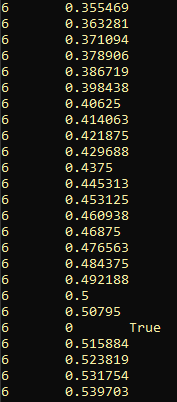
In 2.1 I had once resorted to this in a small game to get a more sensitive press event by triggering at 10-20%.
I can't be entirely sure what the API intentions were, but there was that pressure/motion addition I recall seeing some time ago. The intention may of been aimed at the analog sticks specifically.
Now it seems there is a "pressure" member to the button? Maybe it would've been intended to have information for these too? No ideas though, I haven't used those recent changes yet, I still prefer to do my own fine tuning, mappings, and algorithms with the raw input values.
avencherus
on 25 Oct 2018
Alright I just tested this using master on linux. v3.1.alpha.custom_build.bf957a4. I indeed see the InputEventJoypadMotion event there. So either a windows bug (probably) or something that was fixed on master.
telaviv
on 25 Oct 2018
Can someone re-test on Godot 3.1.1+? We have Input.get_action_strength() now.
@LikeLakers2 For the record, the Steam controller also does this, triggers are both analog and digital.
 aaronfranke
on 8 Jun 2019
aaronfranke
on 8 Jun 2019
The last comment didn't get a reply, so closing for inactivity.
Please comment if you can still reproduce in Godot 3.2.3 rc3 or newer.
 KoBeWi
on 7 Aug 2020
KoBeWi
on 7 Aug 2020
Related issues
 Zylann
·
3Comments
Zylann
·
3Comments
 gonzo191
·
3Comments
gonzo191
·
3Comments
 timoschwarzer
·
3Comments
timoschwarzer
·
3Comments
 SleepProgger
·
3Comments
SleepProgger
·
3Comments
 Spooner
·
3Comments
Spooner
·
3Comments
Most helpful comment
I don't personally think it's a documentation issue -- to my knowledge, the GameCube controller is special in that it's the only one with L and R buttons that have both analog (pressing in only partway) and digital (pressing in all the way, until you get that *click*) behavior. I don't see why we need a disclaimer for one controller.