Godot: Odd triangle holes will appear in CSG subtraction
Similiar Issues:
https://github.com/godotengine/godot/issues/18476
Godot version:
43c2868
OS/device including version:
Nvidia GTX 1080 on Windows 10
Issue description:

Steps to reproduce:
Create CSG nodes consisting of a plane of sufficient size and then use a cylinder to subtract. Odd triangle holes will appear.
Minimal reproduction project:
 fire
fire
All 13 comments
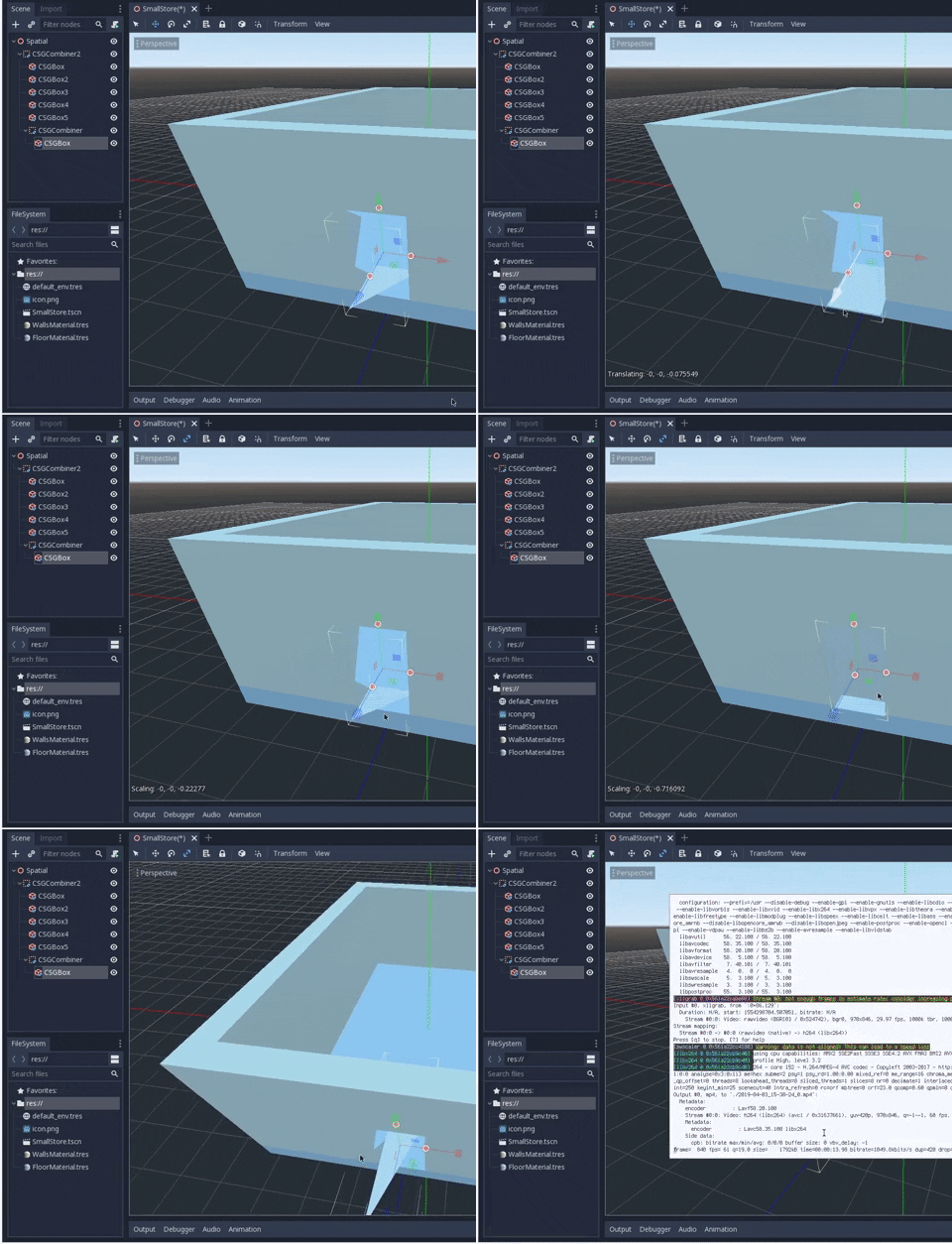
I have a very similar issue but with cubes.

As you can see from the gif, I used 3 cubes:
- external walls
- internal walls (subtracts)
- entrance (subtracts)
Depending on the position of the door it shows or not the artifacts.
Does it have to do with the snap property value?
Possibly related to #21125?
 Toshiwoz
on 18 Oct 2018
Toshiwoz
on 18 Oct 2018
I get a lot of artifacts when I try to subtract one aggregate union from another in this project:


Edit: Oops. Messed up archiving the project. Recreated one with similar problems.
sandbox.zip
(Using 89f8b84)
 dbenoy
on 5 Dec 2018
dbenoy
on 5 Dec 2018
same here, running 3.1-stable on linux x86_64 on a r9 270x with the amdgpu drivers
happens on both the es2 and es3 renderers
 Francesco149
on 3 Apr 2019
Francesco149
on 3 Apr 2019
Here are the results of a debugging session using the sandbox project 😅
In the sandbox project I see 3 holes and get exactly 3 failed polygon triangulations.
One example:
0.000000000,0.000000000
0.549831629,0.725973845
0.588947773,0.687405705
0.549831629,0.725973845
0.000000000,0.000000000
0.549831629,0.725973845
0.000000000,0.000000000
0.633987665,0.642996907
1.40420127,1.42415524
1.07861471,1.42415524
0.549831629,0.725973845
0.549831629,0.725973845
0.000000000,0.000000000
0.633987665,0.642996907
0.549831629,0.725973845
which looks like

When putting the values into some online delaunay triangulation demo, I get a working triangulation.
Just use javascript console and put in the following:
demo.addAt(0.000000000*100,0.000000000*100);
demo.addAt(0.549831629*100,0.725973845*100);
demo.addAt(0.588947773*100,0.687405705*100);
demo.addAt(0.549831629*100,0.725973845*100);
demo.addAt(0.000000000*100,0.000000000*100);
demo.addAt(0.549831629*100,0.725973845*100);
demo.addAt(0.000000000*100,0.000000000*100);
demo.addAt(0.633987665*100,0.642996907*100);
demo.addAt(1.40420127*100,1.42415524*100);
demo.addAt(1.07861471*100,1.42415524*100);
demo.addAt(0.549831629*100,0.725973845*100);
demo.addAt(0.549831629*100,0.725973845*100);
demo.addAt(0.000000000*100,0.000000000*100);
demo.addAt(0.633987665*100,0.642996907*100);
demo.addAt(0.549831629*100,0.725973845*100);
which should result in the following:

So my current assumption is that either our triangulation is faulty or not tolerant enough since other implementation seem to be able to triangulate the polygon just fine?
 ShyRed
on 3 Apr 2019
ShyRed
on 3 Apr 2019
After some more debugging and tinkering with the source code: The failed polygons do not seem to be the ones belonging to the holes / missing triangles :( I added delaunay triangulation to CSG in case polygon triangulation fails and the resulting triangles seem to belong to the shape(s) that are being subtracted with:

So I suspect it really is the CSG algorithm itself that is having trouble finding and closing all holes. Polygon triangulation seems fine and the invalid polygons should indeed not be triangulated.
ShyRed
on 5 Apr 2019
Just a wild guess, but.. could it be that some vertices/edges/faces are assigned wrongly, thus creating the bad polygons and holes at once?
 bojidar-bg
on 5 Apr 2019
bojidar-bg
on 5 Apr 2019
I'm seeing a similar issue, but with CSG union.

Edit: Moving the ramp very slightly away from the box so that their edges don't intersect at the same point (e.g. x=0.001) fixes the issue. Towards the box works also, just as long as they don't meet exactly.
 nonoesimposible
on 5 May 2019
nonoesimposible
on 5 May 2019
Encountered this with 3.1.1.stable.official. Similar to what @nonoesimposible said, fudging values by ±0.1 seems to fix things.

 duckinator
on 9 Jun 2019
duckinator
on 9 Jun 2019
I found a way to fix the holes in the example by @fire. Please retest your csg shapes. If you can please upload small example projects. Screenshots are pretty hard to debug.
 ptrojahn
on 15 Aug 2019
ptrojahn
on 15 Aug 2019
@ptrojahn There's a new approximate equal function that scales epsilon. It may be useful.
fire
on 16 Aug 2019
fire
on 16 Aug 2019
I found a way to fix the holes in the example by @fire. Please retest your csg shapes. If you can please upload small example projects. Screenshots are pretty hard to debug.
The issue opener seems to have done that:
https://github.com/godotengine/godot/issues/22988#issue-369814700
If you want more I can provide mine.
Toshiwoz
on 16 Aug 2019
My original test case is solved. Please open a new issue if you have other test cases.
fire
on 5 Sep 2019
Related issues
 gonzo191
·
3Comments
bojidar-bg
·
3Comments
gonzo191
·
3Comments
bojidar-bg
·
3Comments
 SleepProgger
·
3Comments
SleepProgger
·
3Comments
 mooseyfaith
·
3Comments
mooseyfaith
·
3Comments
 EdwardAngeles
·
3Comments
EdwardAngeles
·
3Comments
Most helpful comment
Here are the results of a debugging session using the sandbox project 😅
In the sandbox project I see 3 holes and get exactly 3 failed polygon triangulations.
One example:
which looks like

When putting the values into some online delaunay triangulation demo, I get a working triangulation.
Just use javascript console and put in the following:
which should result in the following:
So my current assumption is that either our triangulation is faulty or not tolerant enough since other implementation seem to be able to triangulate the polygon just fine?