Godot: ColorPicker: alpha can still be set in hex value if "edit alpha" is off
Godot version:
3.06 stable
OS/device including version:
Antergos Linux
Issue description:
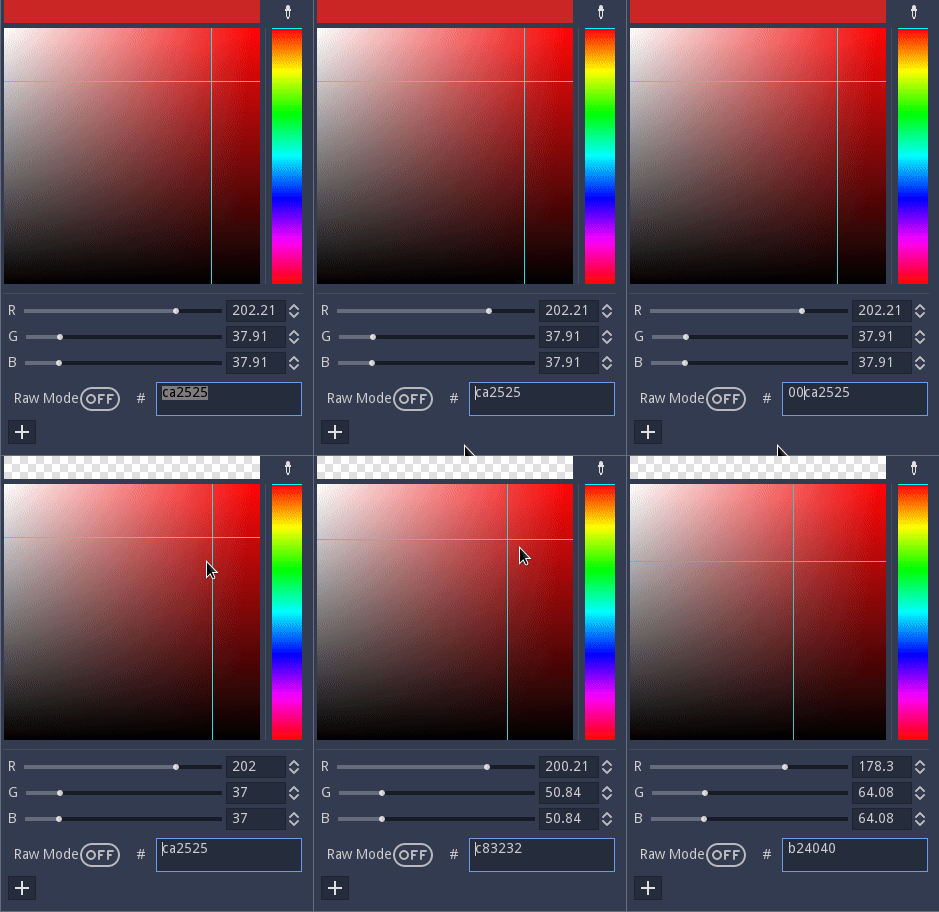
In a ColorPicker node, after setting "edit alpha" to false, the colour's alpha value can still be set through the hex value. Not sure if this is intentional.
Steps to reproduce:
Add Colorpicker node. Set "edit alpha" to false. In the running project, add 00 in front of the hex value.
 DeleteSystem32
All 4 comments
The color picker does not check if alpha is enabled or not when entering html.
Is this expected behaviour or shall I try to fix it?
 bugfi5h
on 4 Oct 2018
bugfi5h
on 4 Oct 2018
I think it should be fixed. In the editor it's not a big issue, but ColorPicker can also be used in games and there, if the developer decided to disable alpha edit, players should not be allowed to work it around.
 akien-mga
on 4 Oct 2018
akien-mga
on 4 Oct 2018
So I looked into it and got two solutions that work.
1:
Saving the previous alpha and reset it after the input is done in ColorPicker::_html_entered:
  float last_alpha = color.a;
  color = Color::html(p_html);
  if (!is_editing_alpha())
    color.a = last_alpha;
- Changing Color::html to have a second parameter (not optimal I guess)
in Color.h:
static Color html(const String &p_color, bool p_use_alpha=true);
in Color.cpp:
//in Color::html
  int a = 255;
  if (alpha && p_use_alpha) {
    a = _parse_col(color, 0);
    if (a < 0) {
      ERR_EXPLAIN("Invalid Color Code: " + p_color);
      ERR_FAIL_V(Color());
    }
  }
and finally in Colorpicker.cpp:
color = Color::html(p_html, is_editing_alpha());
Solution (1) seems good to me.
akien-mga
on 5 Oct 2018
Related issues
 SleepProgger
·
3Comments
SleepProgger
·
3Comments
 blurymind
·
3Comments
blurymind
·
3Comments
 RayKoopa
·
3Comments
RayKoopa
·
3Comments
 EdwardAngeles
·
3Comments
EdwardAngeles
·
3Comments
 nunodonato
·
3Comments
nunodonato
·
3Comments
Most helpful comment
I think it should be fixed. In the editor it's not a big issue, but
ColorPickercan also be used in games and there, if the developer decided to disable alpha edit, players should not be allowed to work it around.