Godot: Godot fails to load config and creates a new one every time.
The the 3.1 alpha f1e5b7c build, it seems like the editor is no longer able to make good use of the editor settings file. I've wiped it out, and it doesn't even like the new one it creates when I reopen to the project screen.

 avencherus
All 7 comments
I can confirm this on commit https://github.com/godotengine/godot/commit/4b6846a59d785af3bef6a29958387ed0ee0f6575.
 Calinou
on 7 Sep 2018
Calinou
on 7 Sep 2018
Did a build of the commit right before my version, 74359a1d1, and that appears to work fine, unless I did something wrong. So is it really f1e5b7c causing it?
avencherus
on 8 Sep 2018
The bug is caused by the EditorSettings class being registered with the API_EDITOR api, but being instanced before the editor is ready. I was able to fix the error by modifying line 3085 of editor/editor_node.cpp as such:
ClassDB::set_current_api(ClassDB::API_CORE);
ClassDB::register_virtual_class<EditorSettings>();
ClassDB::set_current_api(ClassDB::API_EDITOR);
This registers the class as API_CORE instead of API_EDITOR. However, I don't think this is a valid or permanent solution, unless EditorSettings was initially supposed to be registered with the API_CORE api.
 turtlewit
on 8 Sep 2018
turtlewit
on 8 Sep 2018
I renamed this thread for better search..
 Chaosus
on 10 Sep 2018
Chaosus
on 10 Sep 2018
Apologies I'm still having this same issue. I'm trying godot --export "blah" ..\bin\ from the command line and it pukes out the following:
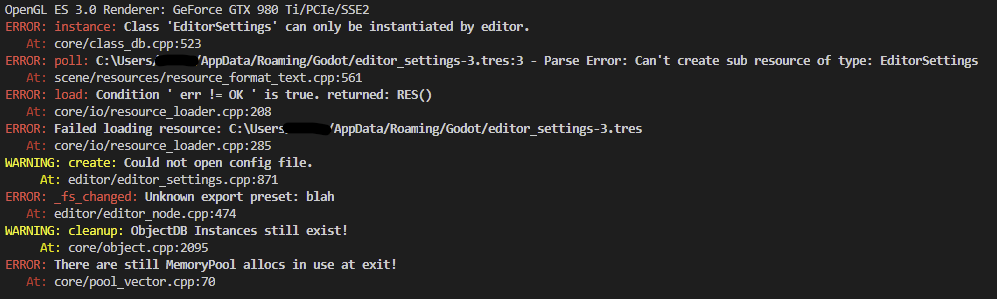
I know blah is not a valid export but according to the docs:
[...] try exporting to a non-recognized platform and the full listing of platforms your configuration supports will be shown [...]
In addition I don't think it matters what export I put this error seems to happen regardless.
 roa-nyx
on 28 Jul 2019
roa-nyx
on 28 Jul 2019
@roa-nyx I found a workaround with Godot v3.1.1.stable.official on macOS High Sierra (v10.13.6).
I had the same issue when attempting to export, but only if I used the --path option, or if I omitted the project.godot argument. So I managed to fix it by doing this in my build script:
cd ./my-project-directory
godot project.godot --export <preset-name> <target-name>
cd -   # return to previous directory
Now, when I re-open the Godot project list after running this, it still remembers my projects and I don't have to re-scan them all.
 cur33
on 23 Aug 2019
cur33
on 23 Aug 2019
@nathanwfranke and I can reproduce this in 3.1.1, we're for the most part using this build script. Replacing --path . with project.godot fixes the problem. I don't know why I had --path . in the first place, but at least now we have narrowed down what the problem is.
 aaronfranke
on 9 Sep 2019
aaronfranke
on 9 Sep 2019
Related issues
 nunodonato
·
143Comments
nunodonato
·
143Comments
 ghost
·
161Comments
ghost
·
161Comments
 alelepd
·
187Comments
alelepd
·
187Comments
 RyanBram
·
101Comments
Calinou
·
219Comments
RyanBram
·
101Comments
Calinou
·
219Comments
Most helpful comment
@roa-nyx I found a workaround with Godot v3.1.1.stable.official on macOS High Sierra (v10.13.6).
I had the same issue when attempting to export, but only if I used the --path option, or if I omitted the project.godot argument. So I managed to fix it by doing this in my build script:
Now, when I re-open the Godot project list after running this, it still remembers my projects and I don't have to re-scan them all.