Godot: ScrollContainer's max scroll_vertical is larger than expected
Godot version:
3.0.6
OS/device including version:
Windows 8.1
Issue description:
I noticed that no matter what I do, the maximum value of a ScrollContainer's scroll_vertical is always 12 px more than expected.
With three Buttons each 20 px tall, inside a VBoxContainer with separation = 0, you'd expect a ScrollContainer 60 px tall to have no VScrollBar. But it does, and you can scroll down 12 px (that is, scroll_vertical can be increased to 12).
The result of this is that there is an ugly gap at the bottom of the VScrollBar, corresponding to the 12 extra pixels.
Steps to reproduce:
- Create a ScrollContainer 60 px tall with scroll_vertical_enabled = true.
- Add a VBoxContainer with separation = 0.
- Add 3 buttons to the VBoxContainer, each 20 px tall.
- Observe the extra 12 px at the bottom of the VScrollBar.
Minimal reproduction project:
ScrollContainerIssue.zip
Thoughts:
Maybe these 12 extra pixels correspond to the height of an HScrollBar that isn't visible but is somehow figuring into the mix.
 sicienss
All 11 comments
I can confirm this behavior with the test project on the master branch. It isn't dependent on the amount of items in the container, it's just always adding 12px of empty space to the bottom of ScrollContainer. You can literally just make an empty ScrollContainer and it does this - steps 2 and 3 are not necessary.
Maybe these 12 extra pixels correspond to the height of an HScrollBar that isn't visible but is somehow figuring into the mix.
Sounds likely. Perhaps instead of disabled it's just hidden.
 aaronfranke
on 28 Aug 2018
aaronfranke
on 28 Aug 2018
This is not a bug and you are under a false assumption:
- ScrollContainer has a stylebox which contains a margin, if you want it gone then override it in the inspector or from code.
- VBox and HBox also have some separation distance between elements in pixels. If you want it gone override it in the inspector or from code
 reduz
on 8 Sep 2018
reduz
on 8 Sep 2018
I need to dig it to understand.
beside, I think it's unintuitive if I have to.
 volzhs
on 12 Sep 2018
volzhs
on 12 Sep 2018
@reduz ScrollContainer has only Bg style.
This custom style seems not related this issue.
What should I take a look?

volzhs
on 12 Sep 2018
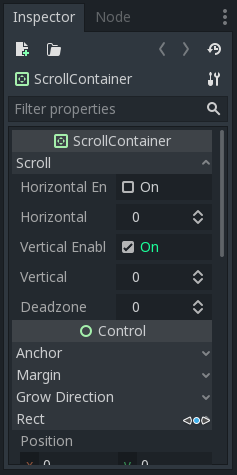
Here is what top of the inspector look.
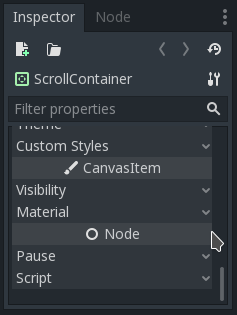
And this is what inspector looks with current branch
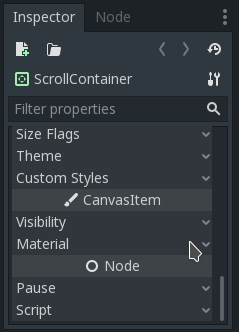
And this is what #21534 PR provided.
This shows ScrollContainer shows more than it should.
volzhs
on 12 Sep 2018
@volzhs I think this is related to clip being the same size as the canvas item rect, while items are offseted by the stylebox. I never really thought of this as a problem, but maybe some can see it as it. Probably the way to fix it is to give a custom rectangle to the clip function..
reduz
on 12 Sep 2018
@reduz What I found caused this issue is here.
these lines set scrollbar page size with considering the other scrollbar also shown, even it's hidden.
there's no considering the other scrollbar is hidden.
volzhs
on 13 Sep 2018
@reduz What I found caused this issue is here.
godot/scene/gui/scroll_container.cpp
Line 385 in 9c0cc0d
v_scroll->set_page(size.height - hmin.height);
godot/scene/gui/scroll_container.cppLine 398 in 9c0cc0d
h_scroll->set_page(size.width - vmin.width);
these lines set scrollbar page size with considering the other scrollbar also shown, even it's hidden.
there's no considering the other scrollbar is hidden.
Interestingly I think I found another angle (in addition to the above) where the 12px is coming from:
To replicate: Make a new project, add a panel container, add a scroll container (remove size flags, disable horizontal and vertical scrolling) and add just a basic color rectangle with a min size (I used 32x32)
When you run the project, inspect the nodes with the "Remote" view on the Scene tree you will find two (invisible) scrollbars _h_scroll and _v_scroll.. which have a size of 12px vertically and horizontally (respectively).
Despite being invisible the ScrollContainer sizes up to make room for this hidden Controls.
I think updating the ScrollContainer to _not_ create these when the respective scroll is disabled would resolve this bug, and if each respective option is enabled or disabled, then to add a new one to the control, or delete, as needed.
 WeRideForCoffee
on 1 Dec 2018
WeRideForCoffee
on 1 Dec 2018
Is this still reproducible in the current master branch?
 akien-mga
on 23 Jan 2019
akien-mga
on 23 Jan 2019
yes.
volzhs
on 23 Jan 2019
I think what @WeRideForCoffee found is same with mine.
the invisible scroller size affects the other.
and I still think #21534 is right fix for this issue.
volzhs
on 7 Mar 2019
Related issues
 EdwardAngeles
·
3Comments
EdwardAngeles
·
3Comments
 Spooner
·
3Comments
Spooner
·
3Comments
 rgrams
·
3Comments
rgrams
·
3Comments
 ndee85
·
3Comments
ndee85
·
3Comments
 ducdetronquito
·
3Comments
ducdetronquito
·
3Comments
Most helpful comment
@reduz What I found caused this issue is here.
https://github.com/godotengine/godot/blob/9c0cc0db63f61cd71a2a735519dc7816973e5b7e/scene/gui/scroll_container.cpp#L385
https://github.com/godotengine/godot/blob/9c0cc0db63f61cd71a2a735519dc7816973e5b7e/scene/gui/scroll_container.cpp#L398
these lines set scrollbar page size with considering the other scrollbar also shown, even it's hidden.
there's no considering the other scrollbar is hidden.