Godot: DirectionalLight's shadows doesn't work with orthogonal cameras
Godot version:
db55d8a
Issue description:
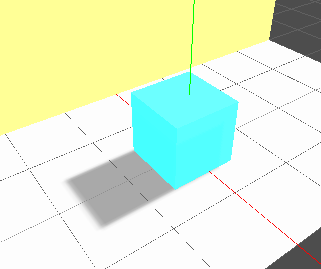
Perspective mode:
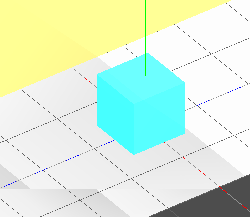
Orthogonal mode:
 YeldhamDev
All 7 comments
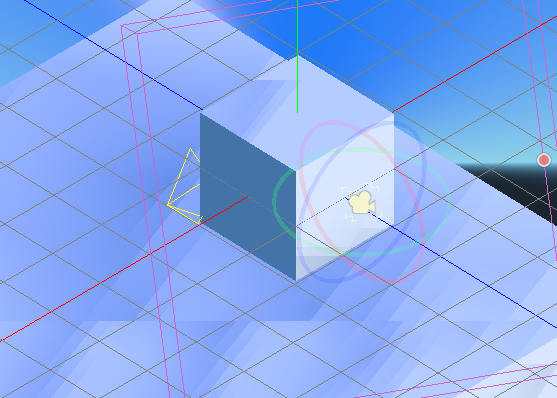
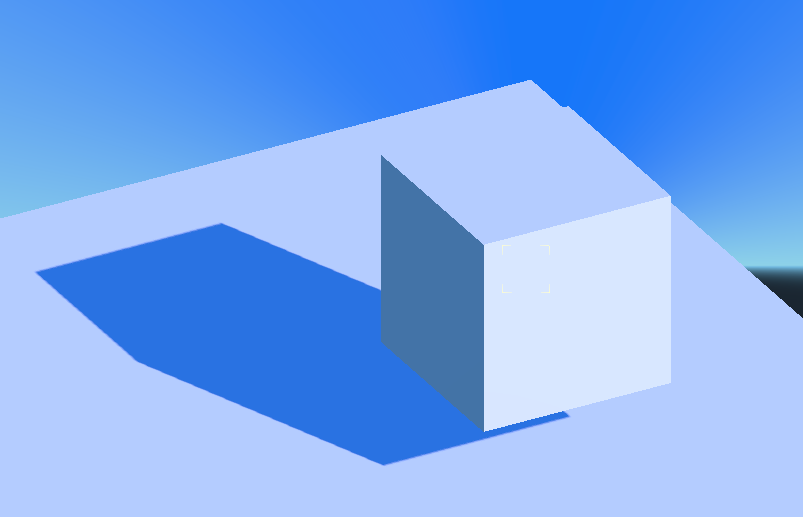
For me it only breaks in the editor when you press 5 on the numpad to switch to orthographic mode. If you place a orthographic camera and then click the "preview" button on the camera it does seem to work.
E.g. here's an orthographic shadow after pressing 5:
And here's after previewing an orthographic camera:
 Bauxitedev
on 27 Aug 2018
Bauxitedev
on 27 Aug 2018
This is not really bug, but more like the fact that PSSM (2 and 4 splits) are pointless in orthographic view.
Try using ortographic shadow instead.
 reduz
on 8 Sep 2018
reduz
on 8 Sep 2018
I wish usability of this could be improved, maybe shadow should be forced to ortographic?
reduz
on 8 Sep 2018
@reduz Orthogonal shadow does nothing.
YeldhamDev
on 8 Sep 2018
Also affects SpotLight, see example project from #28878: https://github.com/godotengine/godot/files/3176735/FF.zip
 akien-mga
on 8 Jan 2020
akien-mga
on 8 Jan 2020
Testing with MRP: 21462.zip
Can reproduce in 3.1.alpha2, 3.1.1, 3.1.2, 3.2, 3.2.1 (stables)
Can't reproduce in 3.2.2.stable.
Appears to be resolved.
 tom-jk
on 22 Jul 2020
tom-jk
on 22 Jul 2020
Thanks, closing.
akien-mga
on 22 Jul 2020
Related issues
 kirilledelman
·
3Comments
kirilledelman
·
3Comments
 mooseyfaith
·
3Comments
mooseyfaith
·
3Comments
 RebelliousX
·
3Comments
RebelliousX
·
3Comments
 Spooner
·
3Comments
Spooner
·
3Comments
 bojidar-bg
·
3Comments
bojidar-bg
·
3Comments
Most helpful comment
For me it only breaks in the editor when you press 5 on the numpad to switch to orthographic mode. If you place a orthographic camera and then click the "preview" button on the camera it does seem to work.
E.g. here's an orthographic shadow after pressing 5:

And here's after previewing an orthographic camera:
