Godot: rect_size of Control node with tool script is (0, 0) in _ready
Godot version:
3.0.6
Issue description:
The value of rect_size of a Control node is (0, 0) in _ready when it is called in a tool script.
 Piet-G
All 8 comments
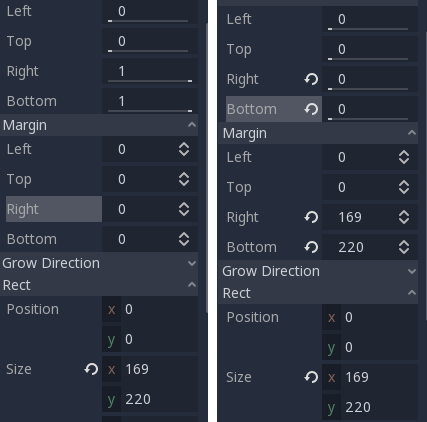
I'm getting this issues with all controls. It seems that when the anchors are not equal, rect_size is improperly computed in _ready (but not afterwards in process!)...
In ready, rect_size is (0, 0) on the left and (169, 220) on the right:
 isaacremnant
on 31 Aug 2018
isaacremnant
on 31 Aug 2018
Just an update because I think I understand where this is coming from. Looking at control.cpp, rect_size needs to be computed based on the parent's rect_size. Since children get initialized before their parents, calling get_parent().rect_size will always return (0,0) in _ready().
This means that in _ready(), rect_size can only be reported as Vector2(margin_right-margin_left, margin_bottom-margin_top). This is not actually a problem when all four anchors are 0.
I don't think this is actually a bug, but a limitation of the initialization order. It's still pretty annoying though, so I'd at least like an actual error when accessing rect_size in _ready. Maybe rect_size could be NULL until it's properly initialized? Workaround is something like (thanks vnen, didn't know that trick!)
func _ready():
    yield(get_tree(), "idle_frame")
    do something with now properly initialized rect_size
You don't need to create another function, you can use yield(get_tree(), "idle_frame") too.
I don't see this is a bug, it's just how controls work. It might need to be better documented.
 vnen
on 12 Sep 2018
vnen
on 12 Sep 2018
I would agree it probably needs to be documented that these aren't updated immediately. Also worth noting that they don't update when the control is not visible, and only after the frame when they're first made visible again.
 avencherus
on 20 Nov 2018
avencherus
on 20 Nov 2018
when using the idle_frame trick to re-adjust the label / control, there is a slight artifact/flicker. which is infinitesimally small, but noticeable. especially if you have a style attached to the label. it should be updated internally in the renderer. i mean you are literally calling rect_size to update the size, it should work smoothly, just like how it does when the rect_size is changed based on text lol
 girng
on 1 Jan 2019
girng
on 1 Jan 2019
artifact/flicker
It's exactly one frame because you're drawing as soon as the control is ready. Just hide() it in _ready then show() it after the update.
isaacremnant
on 1 Jan 2019
It's exactly one frame because you're drawing as soon as the control is ready. Just hide() it in _ready then show() it after the update.
oh, i mean after _ready, when adjusting a label's size. sorry got this issue confused with my issue
girng
on 1 Jan 2019
Would it be possible to somehow block (or warn about) access to rect_size only in _ready()?
 aaronfranke
on 1 Oct 2019
aaronfranke
on 1 Oct 2019
Related issues
 kirilledelman
·
3Comments
kirilledelman
·
3Comments
 nunodonato
·
3Comments
nunodonato
·
3Comments
 ivanskodje
·
3Comments
ivanskodje
·
3Comments
 RayKoopa
·
3Comments
RayKoopa
·
3Comments
 Spooner
·
3Comments
Spooner
·
3Comments