Godot: Scene tabs should have a right-click menu: Close, Close All, Close Others
Godot version:
3.0.2 stable
OS/device including version:
MacBook Air (13-inch, Early 2014) (1,4 GHz Intel Core i5)
MacOS High Sierra 10.13.3
Issue description:
When right-clicking the scene tabs (scenes opened in the editor), currently nothing happens. It should show a right-click menu with the usual tab-related options:
- Close Others
- Close Tab
- Close All
Steps to reproduce:
- Have many tabs opened
- Try to close all the other tabs except the one that is selected
CURRENT: It's needed to click on the tab + click on the close button for every opened tab
EXPECTED: Right-click the current tab an click Close Others
 jahd2602
All 4 comments
Not sure how relevant it would be...
You can use Middle mouse button to quickly close any tab without selecting it first. There's also an option in the editor settings to always display the close button in all tabs.
 nunodonato
on 15 Jul 2018
nunodonato
on 15 Jul 2018
@nunodonato Thanks! I didn't know that and it will surely improve my workflow. However, the menu still needs to be implemented. (Specially because of the Close Others option)
jahd2602
on 16 Jul 2018
Just wanted to create the issue too, but it's already there!
Both Qt Creator and Notepad++, which I use, have this.
 starry-abyss
on 10 Aug 2018
starry-abyss
on 10 Aug 2018
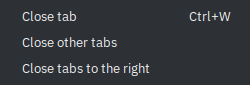
Similarly to Web browsers, we can offer two more buttons: one that will close all other tabs, and one that will only close tabs to the right of the tab that was right-clicked. This way, one can close several scenes at one in a more selective manner.
 Calinou
on 28 Mar 2019
Calinou
on 28 Mar 2019
Related issues
 akien-mga
·
366Comments
akien-mga
·
366Comments
 nicklunt
·
107Comments
nicklunt
·
107Comments
 reduz
·
111Comments
reduz
·
111Comments
 diiiiiiiii
·
87Comments
diiiiiiiii
·
87Comments
 karroffel
·
144Comments
karroffel
·
144Comments
Most helpful comment
Just wanted to create the issue too, but it's already there!
Both Qt Creator and Notepad++, which I use, have this.