Godot: WebSocket fragmentation makes connection unusable
Godot version:
Godot built from master @ commit acd9646e (Jun 10th)
OS/device including version:
MacOS High Sierra v 10.13.5
Issue description:
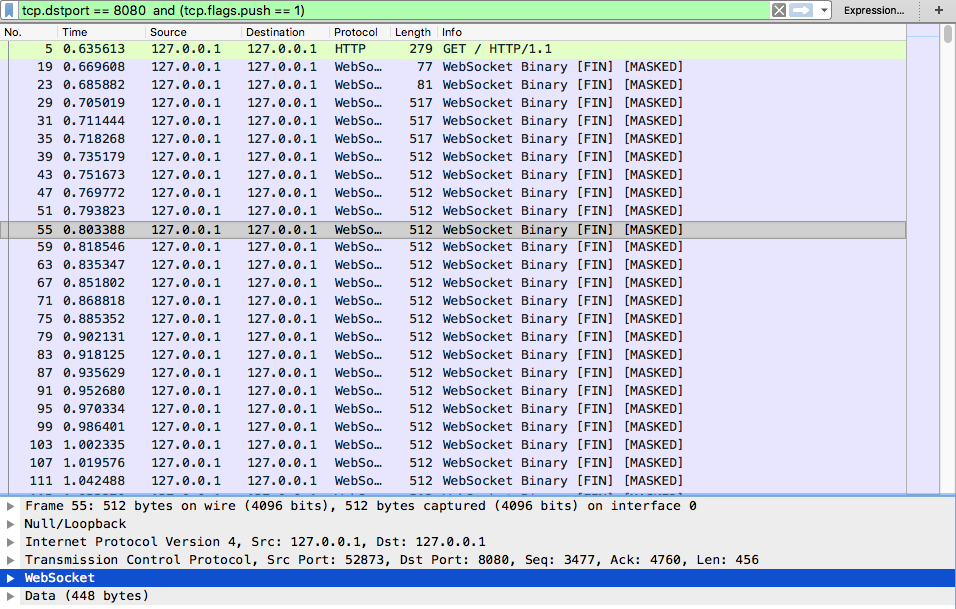
I played around with the WebSocket feature implemented by @Faless. I've setup a simple server and a client on localhost. The server will send an rpc message to the client every physics frame (60FPS) and vice versa. A single message has around 450 bytes of data in it, coming to around 512 when all headers are added, so that's just around 30 KBps sent every second by both sides.
Server always sends the data to the client just fine during my tests. However, the client will randomly decide if the tcp packets should be fragmented or not. If the packets aren't fragmented, the connection works fine. If they do get fragmented, the server will accumulate more and more network delay and the connection becomes too lagged to be useful.
The issue also happens if I disable sending an rpc message from server to the client, so now it's only client sending rpcs. The issue happens for around 50% of connections during my tests.
Correct connection:
Bad connection:
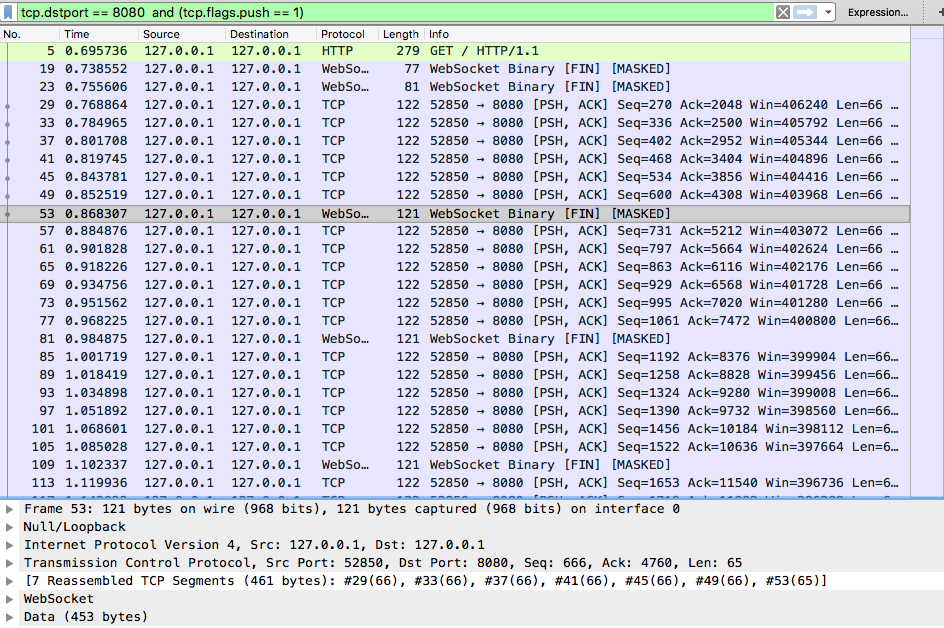
Notice the dots next to the selected packet. The dots indicate which packets were used to reassemble the full tcp packet. Each packet has 66 bytes of payload, but I've seen it go as low as 20 bytes on my other project, so it's not constant.
Steps to reproduce:
- Make sure you're using godot compiled with websocket support
- Download reproduction project and cd into it from command line
- Start the server using "\
- In another terminal, start the client using "\
- Look at the output from the server. If after 5 seconds you only see messages like "OK - network delay is 0 seconds", do a Ctrl+C on the client and start it again. Repeat until you get an error.
- On around 50% of tries, the server will accumulate more and more delay, as indicated by messages like "ERROR - observed large network delay of 5 seconds". Observe that the delay gets bigger as time progresses.
- In another terminal, start the client using "\
Minimal reproduction project:
Attaching a reproduction project. The zip also contains the full wireshark captures screenshotted above.
 pawilon
All 6 comments
I also just confirmed that the issue also happens on my Ubuntu 18.04 VM, so it's not MacOS specific.
pawilon
on 15 Jun 2018
Confirmed, I found the problem and I'm working on a fix, thank you so much for spotting this! :+1:
 Faless
on 16 Jun 2018
Faless
on 16 Jun 2018
Hey @Faless, can you share what do you think the problem is and if there are maybe any possible workarounds in the meantime?
pawilon
on 23 Jun 2018
Sure, try out this branch:
https://github.com/Faless/godot/tree/lws_fix_lite
This fixes an allocation problem that caused the transfer rate control information of libwebsocket to be random bytes from memory (causing, as you said, random fragmentation).
Please note that your speed is still limited by your network step, and to achieve high transfer rate (I personally tested 10MiB/s) you will need threading, with much smaller network step (100/200 microseconds delay).
Let me know if the patch works for you.
Faless
on 24 Jun 2018
Gave it a try and now I can see the reproduction project consistently throws the high delay error, however I didn't add any threads as you've suggested, so maybe that's the reason. Before I do, one doubt I have is if it's enough to just add this thread on the server, or will it need to happen on both the client and the server? Because according to http://docs.godotengine.org/en/3.0/getting_started/workflow/export/exporting_for_web.html threads aren't available when exporting for the web, so it won't work on the client. And I guess the web export is the main usecase for websockets :)
EDIT: Actually now I see consistent errors even before applying the patch, so it's probably something on my side. I'll investigate when I have slightly more time. The thread question still stands, though.
pawilon
on 24 Jun 2018
Alright, turns out I made some changes to the reproduction project locally which I forgot about :) After reapplying the patch and retesting now I'm getting consistently good results!
pawilon
on 25 Jun 2018
Related issues
 blurymind
·
3Comments
blurymind
·
3Comments
 EdwardAngeles
·
3Comments
EdwardAngeles
·
3Comments
 RebelliousX
·
3Comments
RebelliousX
·
3Comments
 ducdetronquito
·
3Comments
ducdetronquito
·
3Comments
 kirilledelman
·
3Comments
kirilledelman
·
3Comments
Most helpful comment
Confirmed, I found the problem and I'm working on a fix, thank you so much for spotting this! :+1: